

Building a Document Q&A Application with Python, FastAPI, Google Cloud, and RAG
Introduction:
PresalesAI is a conversational document assistant for presales teams. It allows users to upload PDF and Excel documents, ask questions in natural language, and receive answers grounded in the available document evidence.
This article introduces the solution architecture and explains how to set up the application locally. Later articles will cover document ingestion, vector retrieval, the question-answering API, and Cloud Run deployment.
Solution Architecture
The application separates the user interface, API, document processing, storage, retrieval, and answer-generation responsibilities.
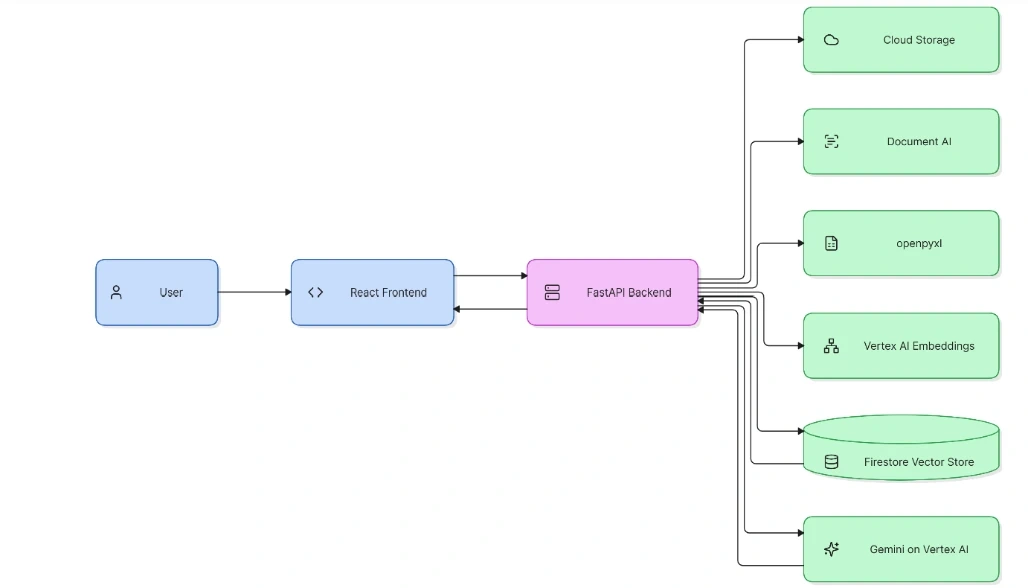
The frontend does not access Google Cloud directly. All cloud operations are handled by the FastAPI backend, which keeps configuration, validation, credentials, and retrieval logic in one controlled layer.
Project Structure
PresalesAISln/
|-- backend/
| |-- app/
| | |-- config.py
| | |-- document_ai.py
| | |-- main.py
| | |-- rag.py
| | |-- storage.py
| |-- tests/
| |-- .env
| |-- .env.example
| |-- requirements.txt
| |-- pyproject.toml
|
|-- frontend/
| |-- src/
| | |-- api.ts
| | |-- App.tsx
| | |-- App.css
| |-- package.json
| |-- .env.example
|
|-- .gitignore
Backend Responsibilities
· config.py loads local and Google Cloud configuration.
· storage.py uploads original PDF and XLSX files to Cloud Storage.
· document_ai.py calls the configured Document AI processor and preserves page and table information.
· rag.py extracts content, creates chunks, generates embeddings, performs vector retrieval, and calls Gemini.
· main.py exposes the health, upload, Document AI, and chat endpoints.
Frontend Responsibilities
· Provides the document upload control and question composer.
· Shows uploaded files, user questions, answers, and citations.
· Displays backend connection status.
· Searches across all indexed documents rather than limiting a question to the latest attachment.
· Requests consent before an answer can be generated from general knowledge when document evidence is unavailable.
Google Cloud Services
Cloud Storage
Cloud Storage preserves the original uploaded file. A generated object path prevents collisions between files with the same filename.
gs://your-bucket/documents/<unique-id>/<filename>
Document AI
Document AI processes PDF files. PresalesAI prefers OCR for reliable text extraction and supports Form Parser and Layout Parser processors for structured documents and layouts.
· PDF text and pages
· Tables where available
· Layout information
· Form fields and entities where supported
Firestore
Firestore stores document chunks, citations, and vector embeddings in the document_chunks collection. A vector index allows semantic search across all indexed documents and conversations.
Vertex AI
Vertex AI provides two model capabilities: text embeddings for documents and questions, and Gemini for grounded answer generation. Gemini receives retrieved context instead of the entire document repository.
Environment Configuration
The backend uses a local .env file. Real credentials and service-account keys are not committed to the repository.
APP_ENV=local
CORS_ORIGINS=http://localhost:5173,http://127.0.0.1:5173
GCP_PROJECT_ID=your-project-id
GCP_LOCATION=us-central1
GCS_BUCKET=your-storage-bucket
DOCUMENT_AI_LOCATION=us
DOCUMENT_AI_OCR_PROCESSOR_ID=your-ocr-processor-id
DOCUMENT_AI_FORM_PARSER_PROCESSOR_ID=your-form-parser-processor-id
DOCUMENT_AI_LAYOUT_PROCESSOR_ID=your-layout-parser-processor-id
FIRESTORE_DATABASE=(default)
GEMINI_MODEL=gemini-2.5-flash
EMBEDDING_MODEL=text-embedding-005
RAG_DISTANCE_THRESHOLD=0.45
For local authentication, use Application Default Credentials:
gcloud auth application-default login
Backend Health Check
The first endpoint is intentionally simple. It confirms that FastAPI is running before cloud integrations are tested.
cd D:\Freelancing\PresalesAISln\backend
.\.venv\Scripts\Activate.ps1
uvicorn app.main:app --reload --port 8000
Test the endpoint:
Invoke-RestMethod http://127.0.0.1:8000/health
The expected response is:
{
"status": "ok",
"service": "PresalesAI API",
"version": "0.1.0",
"environment": "local"
}
Running the Frontend
cd D:\Freelancing\PresalesAISln\frontend
npm install
npm run dev
Open http://127.0.0.1:5173/ in a browser. The frontend uses VITE_API_BASE_URL to locate the FastAPI backend:
VITE_API_BASE_URL=http://localhost:8000
Initial Request Flow
Upload PDF or XLSX
-> Validate file type and size
-> Store original in Cloud Storage
-> Extract PDF or Excel content
-> Create citation-aware chunks
-> Generate embeddings
-> Store chunks in Firestore
-> Embed the user's question
-> Search all indexed documents
-> Send relevant context to Gemini
-> Return answer and citations
The current indexing path is synchronous. This is appropriate for the local foundation and small demonstration files. Background processing, retries, and Cloud Run deployment will be addressed in later parts of the series.
Design Principles
· Store original files separately from extracted content so documents can be reprocessed.
· Keep page, sheet, and row citations with every chunk.
· Search across the complete indexed document collection.
· Do not present unsupported information as a document-grounded answer.
· Ask for permission before using general knowledge when retrieval finds no relevant evidence.
· Keep secrets out of source control and use Google Cloud authentication mechanisms.
Conclusion
Part 1 establishes the PresalesAI foundation: a React frontend, a FastAPI backend, Google Cloud configuration, Cloud Storage, Document AI, Excel extraction, Firestore vector retrieval, and Gemini-based answer generation.
The next article will focus on document ingestion, chunking, embeddings, citations, and vector search.
Join the conversation! Your thoughts help the community grow.