

Instruction
In the new SharePoint App model, web parts are replaced with app parts. The problem is they don't have an equivalent to Web Part Connections. So how can you pass parameters from one part to another?
To answer this you have to consider several things:
- App parts are basically small applications that are presented in your SharePoint site through iframes.
- Each app is running in a separate domain and so are their app parts. Because of this any direct manipulation through some javascript code is out of the question because it would mean cross-domain scripting and all you would get is an "access denied" message.
This post explains about how to create an user defined custom property for a Client Web Part in SharePoint 2013 Provider Hosted App and its relationship with the query string and the standard tokens. The option for getting the data from Client Web Part's custom property is bit different from Farm based or Sandboxed Web Parts. In Provider Hosted App, the value of the property has to be accessed via query string.
Steps:
- Add Client web part to app part.
- Open element.xml and add one Property right click on Client web part, then Custom properties.
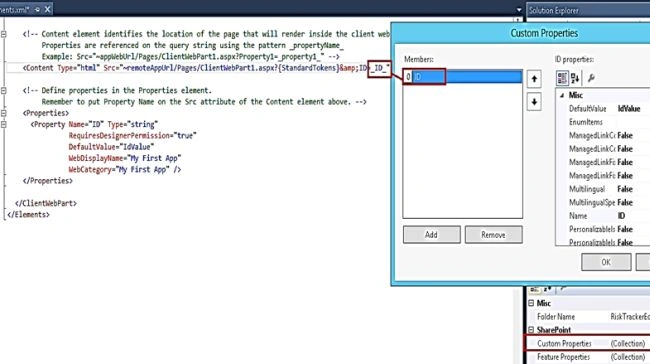
- Go to host web where you are having query string.
- Add App part.
- Add one script editor web part. It should be below to App.

- Now in the App landing page load read the Query string value in .Cs file.
- protected void Page_Load(object sender, EventArgs e)
- {
- string _ID = Request.QueryString["ID"];
- }
Priyaranjan K SPosted Oct 6, 2015, 6:28 AM
Good one
Santhakumar MunuswamyPosted Sep 5, 2015, 4:09 AM
Thanks for nice share
Sumit JoshiPosted Sep 4, 2015, 12:18 PM
Thanks for sharing.
Ankit BansalPosted Sep 4, 2015, 5:05 AM
thanks for sharing...
Vinodh NarayananPosted Sep 3, 2015, 1:01 PM
Nice one
Mohammed IbrahimPosted Sep 3, 2015, 11:38 AM
nice
Kaviya BalasubramanianPosted Sep 3, 2015, 8:06 AM
Thanks for the useful article
Pankaj Kumar ChoudharyPosted Sep 3, 2015, 8:00 AM
Nice Share.......
Karthikeyan KPosted Sep 3, 2015, 7:34 AM
Good one...
Karthikeyan KPosted Sep 3, 2015, 7:34 AM
Thanks for sharing