

We can say it is a type of rules governed to manage the services with clients. It provides high end in scalability, durability and effective transaction management.
Question Arises: What is Per-Session Based Instance Management?
The Sessions are well managed between client and service, when the client creates a new proxy pointing towards a particular service instance the independent service is allocated for the client.
So, let's try to implement this concept so that we can get much better idea on this:
So, firstly we will create simple method in IService1, Where the Complete Code of IService1.cs looks like this:
using System.ServiceModel;
namespace SimpleInstanceManagement
{
// NOTE: You can use the "Rename" command on the "Refactor" menu to change the interface name "IService1" in both code and config file together.
[ServiceContract(SessionMode = SessionMode.Required)]
public interface IService1
{
[OperationContract]
int SimpleMethod(int a);
}
}
The Complete Code of Service1.svc looks like this:
using System;
using System.ServiceModel;
namespace SimpleInstanceManagement
{
// NOTE: You can use the "Rename" command on the "Refactor" menu to change the class name "Service1" in code, svc and config file together.
[ServiceBehavior(InstanceContextMode = InstanceContextMode.PerSession)]
public class Service1 : IService1, IDisposable
{
public int Heighter = 0;
public int SimpleMethod(int a)
{
a = (Heighter = Heighter + 1);
return a;
}
public void Dispose()
{
Heighter = Heighter " 1;
}
}
}
The Complete Code of Web.Config looks like this:
<?xml version="1.0"?>
<configuration>
<system.web>
<compilation debug="true" targetFramework="4.0" />"
</system.web>
<system.serviceModel>
<behaviors>
<serviceBehaviors>
<behavior name="Application">
<!" To avoid disclosing metadata information, set the value below to false and remove the metadata endpoint above before deployment ">
<serviceMetadata httpGetEnabled="true"/>
<!" To receive exception details in faults for debugging purposes, set the value below to true. Set to false before deployment to avoid disclosing exception
information ">
<serviceDebug includeExceptionDetailInFaults="false"/>
</behavior>
</serviceBehaviors>
</behaviors>
<serviceHostingEnvironment multipleSiteBindingsEnabled="true" />
<services>
<service name="SimpleInstanceManagement.Service1"" behaviorConfiguration="Application">
<endpoint address="/SimpleAddress" binding="wsHttpBinding" contract="SimpleInstanceManagement.IService1">"</endpoint>
<endpoint address="mex" binding="mexHttpBinding" contract="IMetadataExchange">
</endpoint>
<host>
<baseAddresses>
<add baseAddress="http://localhost:49257/Service1.svc"/>
</baseAddresses>
</host>
</service>
</services>
</system.serviceModel>
<system.webServer>
<modules runAllManagedModulesForAllRequests="true"/>
</system.webServer>
</configuration>
I have created New Web Application where I have added it to existing solution files. I have specified service reference with a link as given below:
http://localhost:49257/Service1.svc
The Complete Code of WebForm1.aspx looks like this:
<%@ Page Language="C#" AutoEventWireup="true" CodeBehind="WebForm1.aspx.cs" Inherits="Instance.WebForm1"" %>
<!DOCTYPE html PUBLIC "-//W3C//DTD XHTML 1.0 Transitional//EN" "http://www.w3.org/TR/xhtml1/DTD/xhtml1-transitional.dtd">
<html xmlns="http://www.w3.org/1999/xhtml">
<head id="Head1" runat="server">
<title></title>
</head>
<body>
<form id="form1"" runat="server">
<div>
<center>
<table>
<tr>
<td>
<asp:Label ID="Label1"" runat="server" Text="Please Enter Some Value" ForeColor="Brown"
Font-Bold=" true" Font-Italic="true"></asp:Label>
</td>
<td>
<asp:TextBox ID="TextBox1"" runat="server"></asp:TextBox>
</td>
</tr>
<tr>
<td>
</td>
<td>
<asp:Button ID="Button1"" runat="server" Text="Click Here" OnClick="Button1Click"
Style="margin-left: 0px" Width="118px" />
</td>
</tr>
</table>
</center>
</div>
</form>
</body>
</html>
The Complete Code of WebForm1.aspx.cs looks like this:
using System;
using Instance.ServiceReference1;
namespace Instance
{
public partial class WebForm1 : System.Web.UI.Page
{
protected void PageLoad(object sender, EventArgs e)
{
}
protected void Button1Click(object sender, EventArgs e)
{
if (TextBox1.Text != null)
if ((TextBox1.Text)=="1")
{
var ab = new Service1Client();
Response.Write("<center>The Value is: <b>" + ab.SimpleMethod((Convert.ToInt32(TextBox1.Text))) +
"</br></b></center>");
Response.Write("<center>The Value is: <b>" + ab.SimpleMethod((Convert.ToInt32(TextBox1.Text))) +
"</br></b></center>");
Response.Write("<center>The Value is: <b>" + ab.SimpleMethod((Convert.ToInt32(TextBox1.Text))) +
"</br></b></center>");
Response.Write("<center><i>Second Instance Created for Service</i></center>");
var bc = new Service1Client();
Response.Write("<center>The Value is: <b>" + bc.SimpleMethod(Convert.ToInt32(TextBox1.Text)) +
"</br></b></center>");
Response.Write("<center>The Value is: <b>" + bc.SimpleMethod(Convert.ToInt32(TextBox1.Text)) +
"</br></b></center>");
Response.Write("<center>The Value is: <b>" + bc.SimpleMethod((Convert.ToInt32(TextBox1.Text))) +
"</br></b></center>");
Response.Write("<center>The Value is: <b>" + bc.SimpleMethod((Convert.ToInt32(TextBox1.Text))) +
"</br></b></center>");
}
else
{
Response.Write("<center><b><i>Please Enter Some Values or Enter Correct Values</i></b></center>");
}
}
}
}
}
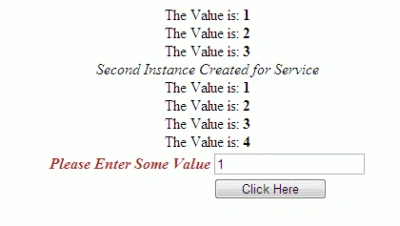
The Output of the Application looks like this:
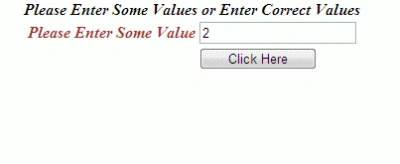
The Output of the Application for incorrect results looks like this:
I hope this article is useful for you. I look forward for your comments and feedback.
Stephen JohnsonPosted Dec 20, 2011, 12:22 AM
Hi Vijay. Good Article.
Arjun PanwarPosted Dec 19, 2011, 11:53 PM
Very good explanation.
Sonakshi SinghPosted Dec 19, 2011, 11:51 PM
Nice article.
Blocked AccounteditedPosted Dec 19, 2011, 2:06 AMEdited Dec 19, 2011, 2:06 AM
Good Work