

Objective
To develop a Windows application for playing audio and video files using c#.net.
Design
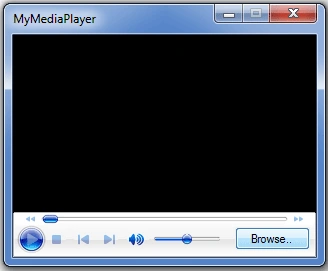
Design a form as above with an OpenFileDialog control, one Button, and the 'Windows Media Player' control (COM component).
Note that OpenFileDialog control appears below the form (not on the form), which is used in our application for browsing audio/video files.
Steps for adding 'Windows Media Player' control (COM component) into Toolbox:
By default, the 'Windows Media Player' control is not provided in the Toolbox, we have to add it into the toolbox if required.
In order to add the 'Windows Media Player' control into the toolbox.
Right-click on the 'General' tab (or any other tab) in the toolbox ->select 'Choose Items...' ->select 'COM Components' tab ->select 'Windows Media Player' ->click on the 'OK' button.
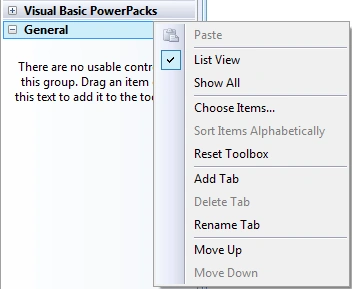
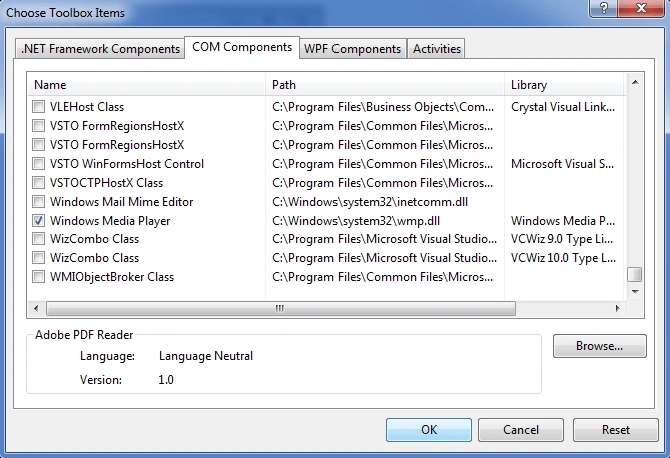
'Windows Media Player' control will appear in the toolbox.

Now, drag the 'Windows Media Player' control onto the form and place a button on it with text as 'Browse..' as shown in the design.
Code
using System;
using System.Windows.Forms;
namespace mymediaplayer
{
    public partial class Form1 : Form
    {
        public Form1()
        {
            InitializeComponent();
        }

        private void btnBrowse_Click(object sender, EventArgs e)
        {
            openFileDialog1.Filter = "(mp3,wav,mp4,mov,wmv,mpg)|*.mp3;*.wav;*.mp4;*.mov;*.wmv;*.mpg|all files|*.*";
            if (openFileDialog1.ShowDialog() == DialogResult.OK)
                axWindowsMediaPlayer1.URL = openFileDialog1.FileName;
        }
    }
}
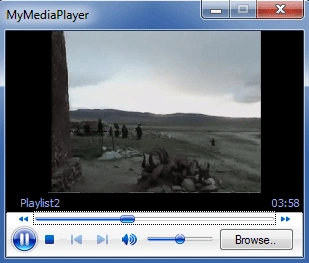
Output
XiaoXi ChenPosted Apr 13, 2022, 6:45 AM
Thank you so much for sharing your knowledge to us, Sir...
gaurav patilPosted Nov 21, 2018, 1:21 AM
How to update version of windows media player 12 in com component visual studio
gaurav patilPosted Nov 21, 2018, 1:20 AM
Windows media player version 1 not play encode mp4 video file..
John McDougallPosted Mar 28, 2018, 9:32 AM
Thanks !! Fine simply concise writing.
nasar aliPosted Sep 6, 2017, 12:32 PM
Thanks mr Prashanth Chindam
Kumar SundaramPosted Jul 11, 2015, 9:29 AM
Sir i added the windows media player into toolbox but i could not drag them into my form what should i do..Tell me...
waqar chaudharyPosted Dec 12, 2013, 2:27 AM
just initiate the path statically from where the media player get the video file .
Sarika Nikam NikamPosted Jun 14, 2013, 2:18 AM
Thanks But i want add video file without use browse button plz give me reply
manivel pPosted Dec 3, 2012, 4:45 AM
Hi All, I am playing videos using axWindowsMediaPlayer in forms. My problem is after playing the video or while playing video we can not enter any text in Textbox. Please let me know how to resolve this issue. Thanks Mani
jitendraPosted Oct 20, 2012, 5:53 AM
this is very usefull for me and other learner thanks for posting article
lokesh jPosted Mar 27, 2012, 1:57 AM
this code suits only for files with .wmv,.avi extensions.i cant play the files with .mp3,.mp4 extensions.give some information about that.. thanks in advance
A K DasPosted Mar 26, 2012, 12:25 AM
Hi Prashanth Chindam, Thanks for this post, please specify that it will work on web application or not, Thanks.............
igor splyndePosted Mar 5, 2012, 11:50 AM
hello want to know how can I play a video from a streamreader, and he's normal http bloquiado with basic authentication. part of the code: "String result; HttpWebRequest request = (HttpWebRequest) WebRequest.Create ("http://urldosite/meuvideo.mp4"); request.Credentials = new NetworkCredential ("User", "senha000"); request.PreAuthenticate = true; / / Get response HttpWebResponse response = (HttpWebResponse) request.GetResponse (); StreamReader sr = new StreamReader (response.GetResponseStream ()); result = sr.ReadToEnd (); sr.Close (); " I want to know how to put windows media player to view the video which will result in the variable? example: axwindowsmediaplayer = result;
Ken HPosted Feb 28, 2012, 10:59 AM
hi Prashanth Chindam, this is a nice article. thank you.
John felixPosted Nov 24, 2011, 8:21 AM
How store and retrive video files in Asp.net using C#
John felixPosted Nov 24, 2011, 8:21 AM
How store and retrive video files in Asp.net using C#
Einar EinarssonPosted Aug 20, 2011, 9:37 AM
This helped alot! u rock m8te! ;)
Antony nadanPosted Dec 5, 2010, 2:07 AM
Thanks a lot for the code.. its really helpful
Sudhakar TillapudiPosted Nov 9, 2010, 5:05 AM
Hi Prashanth its a nice Article.... Ur Explanation is Very Nice..... keep posting Such Articles ........
Felice MassaroPosted Nov 7, 2010, 4:12 AM
This works very well. Such a simle code. Thanks you!
vineet sharmaPosted Nov 5, 2010, 4:26 PM
thanks dear it helps so much....
saravanan viPosted Nov 3, 2010, 3:53 AM
how to create folder in ou application to upload song
saravanan viPosted Nov 3, 2010, 2:36 AM
pls add songs book to play song by category save in sub folder