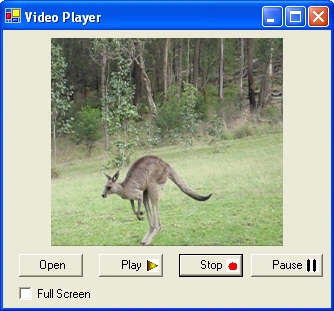
Figure 1 - Kangaroo Hopping Movie
Introduction
Just got back from a three week trip to Australia and all I can say is, "Give me a home among the gum trees." (Australian programmers will get what I'm saying here.). Most people know what a kangaroo looks like, but most haven't seen one up close. Needless to say, they are strange creatures if you are coming from the New York City. Unfortunately, the AVI kangaroo video taken by the digital camera was too large to upload to the site due to the size of the file. In any case, some of you are probably asking yourselves, "Kangaroos or not, how exactly do I play an AVI file in .NET?". This article will show you how by demonstrating the implementation of a WinForm Video Player.
The Player
The Video Player takes advantage of the DirectX AudioVideoPlayback library. This library mindlessly allows you to play videos inside a Video object. The methods of the Video class are very straight forward (e.g. Play, Stop, Pause) and you simply construct the video object with the name of the file (e.g. "roo.avi"). The tables below illustrate some important methods and properties of the Video class.
| Method |
Description |
| Open(string filename) |
Opens an avi file with the passed parameter path name |
| Play |
Plays the video |
| Stop |
Stops the video |
| Pause |
Pauses the video |
| SeekCurrentPosition(double time, SeekPositionFlags) |
Moves to a particular time position in the avi file relative to the SeekPositionFlag. Time is in 1 x 10⁻⁷ seconds (or 0.1 microseconds) |
| StopWhenReady |
Waits for the video object to be ready for stopping, and stops the video |
| Property |
Type |
Description |
| Owner |
System.Windows.Forms.Control |
Sets The Window Forms Control that contains the video. |
| Fullscreen |
bool |
Sets whether or not the video is shown fullscreen |
| Size |
Size |
Sets the size of the video |
| Duration |
double |
Gets the time (in seconds) of the full video |
| CurrentPosition |
double |
Sets the position of the video |
| Audio |
Microsoft.DirectX.AudioVideoPlayback.Audio |
Audio object allows you to control things like the volume, balance and playing of the sound in the video |
Coding
You must have DirectX 9 SDK installed to use the avi playing feature described in this article. You can get this SDK from the Microsoft MSDN site. (Note: It may require an MSDN subscription to get the full SDK, but the redistributable that runs the video is a free download). Once you have the DirectX SDK installed, you can include the Microsoft.DirectX.AudioVideoPlayback assembly as a reference to your project. Just right click on your project References in the Solution Explorer and add the reference as shown below. (If this reference isn't in the .NET assembly list, you probably don't have the DirectX 9 SDK installed):
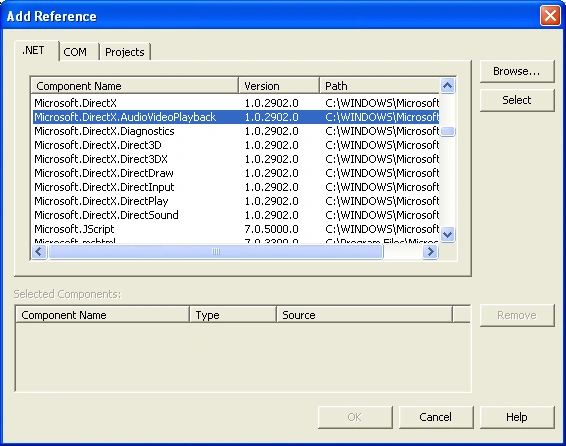
Figure 2 - Adding the DirectX AudioVideoPlayback Reference
Now you just need to add the using statement in your Form to begin using the Video class:
- using Microsoft.DirectX.AudioVideoPlayback;
So now let's take a look at the implementation of the Video Class. The first step is to construct a Video object with the name of the video file which we retrieve from an OpenFile dialog. We then assign the Video.Owner property to the panel inside our winform. Also we resize the video to fit the original dimensions of the panel. Finally we quickly play and pause the video, in order to see the first frame.
-
-
-
-
- void OpenVideo()
- {
- openFileDialog1.InitialDirectory = Application.StartupPath;
- if (openFileDialog1.ShowDialog() == DialogResult.OK)
- {
-
-
- int height = videoPanel.Height;
- int width = videoPanel.Width;
-
- if (_video != null)
- {
- _video.Dispose();
- }
-
- _video = new Video(openFileDialog1.FileName);
-
- _video.Owner = videoPanel;
-
- videoPanel.Width = width;
- videoPanel.Height = height;
-
- _video.Play();
- _video.Pause();
- }
-
- ControlLogic();
- }
That's really all there is to using the video object. If we want to play the video until the end, we simply call the Play method on the video object.
-
-
-
-
-
- private void btnPlay_Click(object sender, System.EventArgs e)
- {
- if (_video != null)
- {
- _video.Play();
- }
- }
Conclusion
The Video class in the Microsoft.DirectX.AudioVideoPlayback library is a powerful graphics class with a very simple implementation. Using this class, you can create powerful applications that include your favorite movie clips in the common avi format. I suspect it will play other movie formats as well (such as mpeg), however, I haven't tried it. Good luck with this powerful multimedia tool and using it to see sharp videos.


Dinesh GabhanePosted Nov 12, 2019, 6:04 AM
Nice Article. Thanks
kalu singh raoPosted Jul 7, 2016, 1:48 AM
Nice...
Munesh SharmaPosted May 22, 2016, 8:35 PM
nice
sushil singhPosted Jan 14, 2012, 1:45 PM
ghgfg gfghgh ghgh gghg ghhggh jhgjgjj ghjjhjkjkj kjkhhkjkkjhkjhj jkhjkhkjhjk hj jhhhjjhhj hjjhg jjhggjhg hgjhjh
AmitAkshay ChauhanPosted Dec 29, 2011, 2:25 AM
Sir When run the program this Exception is create. How to solve this Problem? DLL 'C:\Windows\assembly\GAC\Microsoft.DirectX\1.0.2902.0__31bf3856ad364e35\Microsoft.DirectX.dll' is attempting managed execution inside OS Loader lock. Do not attempt to run managed code inside a DllMain or image initialization function since doing so can cause the application to hang. PLZ Send me solution detail [email protected]
Bhuvan RamPosted Feb 1, 2011, 6:13 AM
Does the client needs to install the player
Caio MoreiraPosted Apr 19, 2010, 2:12 PM
When I have more than one video playing at same time they flicker - this happens on my notebook, do you know how to fix it? My code follows: public partial class Form1 : Form { Panel panel; Panel panel2; Video video; Video video2; public Form1() { InitializeComponent(); panel = new Panel(); Controls.Add(panel); video = new Video("M2U00149.MPG"); video.Owner = panel; video.Play(); panel.Size = new Size(128, 128); panel.BackColor = Color.White; panel2 = new Panel(); Controls.Add(panel2); video2 = new Video("M2U00150.MPG"); video2.Owner = panel2; video2.Play(); panel2.Size = new Size(128, 128); panel2.Location = new Point(panel.Location.X + panel.Width, panel.Location.Y); panel2.BackColor = Color.White; } } Best regards,
Povilas JuzeliunasPosted Apr 15, 2010, 5:44 PM
Do you have any ideas how to make the application able to return back from the full-screen mode? For example when the user presses 'Esc' key or double-click's on full-screen mode. How to create double-click event for full-screen mode?
AHMED BADRPosted Mar 30, 2010, 6:41 PM
NICE SAMPLE<!--Session data-->
Simon MuwangaPosted Mar 8, 2010, 8:57 AM
I need help on how to convert .ppt files to .avi /3gp format. I've looked at existing solutions, but there is no solution with whose code is opensource. Am comfortable using any .NET language. Please advise. Simon.
sarala bashamPosted Jan 6, 2010, 12:36 PM
Hi , I saved a avi file but i dont have any idea to open the avi file . i want to open the avi file using opencv and c# . I have done using cvCapturefrmavi method but i am getting an error.please help
johnPosted Dec 19, 2009, 3:57 PM
just migrated to net from vb6 finding help and hints hard to find. Your site looks the answer
a bPosted Oct 13, 2009, 3:16 PM
When you change the volume for a Video object, the "Ending" event handler gets NEVER inkoked... nag, nag, nag...
clay boPosted Apr 4, 2009, 9:11 PM
I've tried it with AVI, MPEG, and WMV files and no problem. The VIDEO class gives much, but not all, functionality. Good exapmple.
Aqil AhmedPosted Oct 30, 2008, 3:34 AM
Is it possible to browse the sites using Web browser control within the Panel. I want that web browser control should be fit in the Panel, there should be no borders of the sites. Like video is playing in small Panel. Thanks...
SergioPosted Mar 12, 2008, 1:40 PM
Great Article, i´m very novice about c# but i´m trying to improve dialy. I have a question, i think someone ask the same but i´m not sure, ¿Is it possible to make an app using this class and run the app on another computer without the DirectX SDK? ¿how? this doubt is killing me. Thank you for all and sorry about my poor english but i´m spanish. Regards
Rex GathPosted Mar 8, 2008, 6:06 AM
Hi Mike Can you tell me if it is possible to play multiple snippets of video files pre selected through user interface in series seamlessly
byranPosted Jan 15, 2008, 6:38 AM
Hi, i'm currently working on streaming video on web forms. So my question is, is it possible to using this library in Web form?
rajkumar sriramuluPosted Dec 15, 2007, 3:24 PM
how to get Total time of an AVI movie????
Ron McKitoPosted Dec 1, 2007, 11:27 PM
I have never used the using statement before and I don't know where to put it. I keep getting compile errors. Does it go inside the form? Can someone give me an example of how and where to put this statement? Please Public Class Form2 End Class
Ron McKitoPosted Dec 1, 2007, 11:16 PM
I have never used the using statement before and I don't know where to put it. I keep getting compile errors. Does it go inside the form? Can someone give me an example of how and where to put this statement? Please Public Class Form2 End Class
chandrashekar snPosted Nov 27, 2007, 6:45 AM
i am able to do Fullscreen but not able to come back to Orginal video mode. can u help me the code that i tried is .... private void NewPlayer_MouseDoubleClick(object sender, MouseEventArgs e) { if (vd != null) { if (vd.Fullscreen == true) { vd.Fullscreen = false; } else { vd.Fullscreen = true; vd.ShowCursor(); } } } //NewPlayer is Form pls help me out.. thank u..
chandrashekar snPosted Nov 27, 2007, 6:45 AM
i am able to do Fullscreen but not able to come back to Orginal video mode. can u help me the code that i tried is .... private void NewPlayer_MouseDoubleClick(object sender, MouseEventArgs e) { if (vd != null) { if (vd.Fullscreen == true) { vd.Fullscreen = false; } else { vd.Fullscreen = true; vd.ShowCursor(); } } } //NewPlayer is Form pls help me out.. thank u..
chandrashekar snPosted Nov 27, 2007, 6:45 AM
i am able to do Fullscreen but not able to come back to Orginal video mode. can u help me the code that i tried is .... private void NewPlayer_MouseDoubleClick(object sender, MouseEventArgs e) { if (vd != null) { if (vd.Fullscreen == true) { vd.Fullscreen = false; } else { vd.Fullscreen = true; vd.ShowCursor(); } } } //NewPlayer is Form pls help me out.. thank u..
Bidhan ChakrabortyPosted Sep 6, 2007, 3:31 AM
will this code in .NET 2.0 thanks for the code.it was owsome
Joan Paolo De LucaPosted Aug 25, 2007, 10:55 AM
Hello, Nice program. I wonder if you can help me include a Seek Bar in the Video Player, so the user can skip to the last part of the video. I also woud like to create a Playlist in a Listbox to the right, so it will play each file every time one ends. And be able to play the file selected in the playlist. Another thing, is there an easy way to display the current time of the video in a label? Anything you can help I'd be obliged.
Joan Paolo De LucaPosted Aug 25, 2007, 10:41 AM
Hello, Nice program. I wonder if you can help me include a Seek Bar in the Video Player, so the user can skip to the last part of the video. I also woud like to create a Playlist in a Listbox to the right, so it will play each file every time one ends. And be able to play the file selected in the playlist. Another thing, is there an easy way to display the current time of the video in a label? Anything you can help I'd be obliged.
shiza ameenPosted Aug 15, 2007, 4:10 AM
Nice work but would u like to tell how I can transmit any video file from server to Client but in .NET Remoting Environment
Jose Alberto 0Posted May 18, 2007, 2:53 PM
Hi, i have problem with the example, i have VS 2005, I try to open the project but the studio ask me to migrate the version. I do that, the source look good, the project starts but when I try to open a video the debuger says: "LoaderLock was detected Message: DLL 'C:\WINDOWS\assembly\GAC\Microsoft.DirectX\1.0.2902.0__31bf3856ad364e35\Microsoft.DirectX.dll' is attempting managed execution inside OS Loader lock. Do not attempt to run managed code inside a DllMain or image initialization function since doing so can cause the application to hang. " this happend on line _video = new Video(openFileDialog1.FileName); The Path is ok, the file too. Someone can help with that?
JAMIE BALFOURPosted May 13, 2007, 10:45 AM
I cant do this in visual basic 2005 express edition, if you can do it in this edition, please help me!
Robert EverettPosted Apr 25, 2007, 1:55 PM
I can't get this to work at all! If you place the Video object at class level, you obviously can't have it in any event handlers! If you place it in an event handler it is only visible in that method and then you cant' use the Play() etc methods in other event handlers as they won't be visible! Can someone please resolve this conundrum as the code above does not relate to the event handling structure of a typical Win form application. For instance what is ControlLogic() code???
Robert EverettPosted Apr 25, 2007, 1:26 PM
how come there is an underscore? Surely video is a valid identifier?
Aaron VincentPosted Apr 15, 2007, 2:39 AM
Your article really helped me a lot. I have a question, is it also possible to capture frames while that avi file is playing? if so, can you point me to the right direction. I also need to save the frame into a bitmap file. Thanks! :)
Wu YulongPosted Apr 7, 2007, 1:18 PM
After running the row--_video = new Video(openFileDialog1.FileName),the value of _video is still null,it means that I can't open a new video,Why?? Hope your help,thank you!
Ashish SharmaPosted Feb 15, 2007, 12:07 AM
can the above application can be used to play video file using browser. will be greatfull if u reply me back on [email protected]
kf lfdPosted Oct 2, 2006, 9:22 PM
Hi, I read your artical and tried the code and on one computer everything workout just fine and on another computer 2 windows opened. what happend is when it get to the part : owner = panel it's like nothing happans the onwer stays null after it and that why 2 windows were opened, one is the program and one is the video running. why? I couldn't found what was wrong on this computer and the other computer it worked fine??? goldmank
JoergPosted Aug 7, 2006, 8:26 AM
Hello, thanks for the article. However, I do wonder. How do I reach the image data itself? I have to do some image processing on avi files. Thus, I need more than a movie viewer. Is there any possibility to get the rgb-data using this library? The hints would help me a lot. Thanks
Vaibhav JoshiPosted Apr 21, 2006, 8:56 AM
Hello... Can I use the same code to play a video on a Web Browser. Can u please tell me how? Vicky.. :-)
kit chongeditedPosted Apr 13, 2006, 4:31 AMEdited Dec 28, 2006, 4:51 AM
if i build the solution and run on my computer (with Microsoft Visual Studio 2005 + DirectX 9 SDK installed), the application is running fine. however, if i run on other computers (without Microsoft Visual Studio 2005 + DirectX 9 SDK installed), there is a lot of error. for the DirectX 9 issue, i think i already fixed it by setting the DirectX Reference's 'Copy Local' to True. however, there is another error 'An unhandled exception of type 'System.Security.SecurityException' occurred in mscorlib.dll Additional information: Request for the permission of type 'System.Security.Permissions.FileIOPermission, mscorlib, Version=2.0.0.0, Culture=neutral, PublicKeyToken=b77a5c561934e089' failed.' could anyone help?
MonaeditedPosted Dec 31, 2005, 8:39 AMEdited Dec 9, 2006, 6:11 AM
Hello; After reading your article about playing AVI using c#.net and DX9. I want to know if there are any calsses or dlls using c#.net and DX9 (direct show) help me to "convert videos from any codec format to MPEG1 and MPEG2 formats?!!!" waiting from you reply because i got sick searching about that topic. thanks alot for your help.
francis chaieditedPosted Dec 30, 2005, 3:18 AMEdited Jul 13, 2006, 6:26 AM
nice article.....but i have a question. Does this applicable to recording videos?? If yes, can give sample code??? ~Thank You~
Ozz NeoneditedPosted Dec 17, 2005, 1:46 PMEdited Apr 17, 2006, 8:27 AM
I think, i can help, From the Debug menue, find the exceptions, The under Managed exception, Remove the LoaderLock exception, this will prevent that exception... Hope this help
Mahesh ChandPosted Nov 30, 2005, 6:03 PM
Nice article Mike. Hope you enjoyed Ausie vacation.