

Here in the dropdown we have one column record,
which is populated, and also there is a list named as ALL in the dropdown. When
we select ALL, then all the records from the database will be displayed. The
connection between PHP scripts and the MySQL database is done in the config.php file.
Table creation
Server: localhost Database: home_work
-- phpMyAdmin SQL Dump
-- version 2.10.1
-- http://www.phpmyadmin.net
--
-- Host: localhost
-- Generation Time: Nov 17, 2011 at 05:17 PM
-- Server version: 5.0.45
-- PHP Version: 5.2.5
SET SQL_MODE="NO_AUTO_VALUE_ON_ZERO";
--
-- Database: `home_work`
--
-- --------------------------------------------------------
--
-- Table structure for table `dropdown`
--
CREATE TABLE `dropdown` (
`id` int(10) NOT NULL auto_increment,
`sid` varchar(255) NOT NULL,
`sname` varchar(255) NOT NULL,
`age` int(11) NOT NULL,
PRIMARY KEY (`id`)
) ENGINE=MyISAM DEFAULT CHARSET=latin1 AUTO_INCREMENT=5 ;
--
-- Dumping data for table `dropdown`
--
INSERT INTO `dropdown` (`id`, `sid`, `sname`, `age`) VALUES
(1, 's001', 'raj', 25),
(2, 's002', 'rahul', 26),
(3, 's003', 'raju', 27),
(4, 's004', 'rajesh', 28);
config.php
<?php
$DBHOST = "localhost";
$DBNAME = "home_work";
$DBUSER = "root";
$sLink = mysql_connect($DBHOST,$DBUSER,'') or die('Connection with MySql Server
failed');
mysql_select_db($DBNAME, $sLink) or die('MySql DB was not found');
?>
showDetails1.php
<?php
$link = mysql_connect("localhost","root","");
mysql_select_db("home_work",$link);
$sql = "SELECT * FROM dropdown ";
$aResult = mysql_query($sql);
if($_REQUEST['frm_action'] == 3)
{
if ($_REQUEST['cust_id'] == 0)
{
$id = $_REQUEST['cust_id'];
$sqlCustomer = "SELECT * FROM dropdown ";
}
else
{
$id = $_REQUEST['cust_id'];
$sqlCustomer = "SELECT * FROM dropdown WHERE id ='$id'";
}
$aCustomer = mysql_query($sqlCustomer);
}
?>
<html>
<head>
<script type="text/javascript">
function changeSID()
{
oForm = eval(document.getElementById("frmForm"));
iCustomerId = document.getElementById("sid").value;
url = "showDetails1.php?frm_action=3&cust_id=" +iCustomerId;
document.location = url;
}
</script>
</head>
<body>
<form name="frmForm" id="frmForm" >
<table border="0" cellspacing="2" cellpadding="2" width="40%">
<tr>
<td align="right" ><strong>Sid</strong></td>
<td align="left"><select name="sid" id="sid" onchange="javascript:changeSID();">
<option value="">Select</option>
<option value="0">All</option>
<?php
$sid1 = $_REQUEST['cust_id'];
while($rows=mysql_fetch_array($aResult,MYSQL_ASSOC))
{
$id = $rows['id'];
$sid = $rows['sid'];
if($sid1 == $id)
{
$chkselect = 'selected';
}
else
{
$chkselect ='';
}
?>
<option value="<?php echo $id;?>"<?php echo $chkselect;?>><?php echo $sid;?></option>
<?php } ?>
</td>
</tr>
<?php if($_REQUEST['frm_action'] == 3) { ?>
<tr>
<td colspan="2">
<table style="border:1px solid #003366;" cellspacing="2" cellpadding="2"
width="100%" bgcolor="#003366">
<tr bgcolor="#EFEFEF">
<td><b><font color='Red'>Sid</font></b></td>
<td><b><font color='Red'>Sname</font></b></td>
<td><b><font color='Red'>Age</font></b></td>
</tr>
<?php
while($row1 = @mysql_fetch_array($aCustomer,MYSQL_ASSOC))
{
$sid = $row1['sid'];
$sname = $row1['sname'];
$age = $row1['age'];
?>
<tr bgcolor="#FFFFFF">
<td><b><font color='#663300'><?php echo $sid;?></font></b></td>
<td><b><font color='#663300'><?php echo $sname;?></font></b></td>
<td><b><font color='#663300'><?php echo $age;?></font></b></td>
</tr>
<?php } ?>
</table>
</td>
</tr>
<?php } ?>
</table>
</form>
</body>
</html>
Running the application
Run the WampServer then write the below line in the Url
http://localhost/Populate Dropdown box/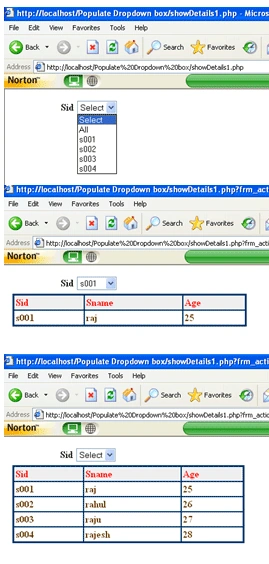
Imran AliPosted Jun 30, 2020, 12:44 AM
Code error
sanket mistryPosted Nov 16, 2016, 5:23 AM
Hi in this code some error accrued i.e Notice: Undefined index: frm_action also Undefined index: cust_id
Kanagasabai SaravananPosted Oct 13, 2015, 3:25 AM
where did u declared the frm_action name?
Kanagasabai SaravananPosted Oct 13, 2015, 3:15 AM
hi in this code some error accrued i.e Notice: Undefined index: frm_action
wajid aliPosted Jul 17, 2015, 1:18 PM
great tutorial.. really helpful
shiva kumarPosted Jun 8, 2015, 3:42 AM
hi in this code some error accrued i.e Notice: Undefined index: frm_action
Muhammad Mohsin HasanuddinPosted Jun 19, 2013, 5:15 AM
hello friend, nice code..but can you help me how can i display the related values with s001 if the Sid have two of s001..i try use your code but it seems that the value of s001 are duplicated..thank you
Rina guptaPosted Apr 11, 2013, 4:47 AM
How to solve this ??? PLz~ Notice: Undefined index: frm_action on line 6Notice: Undefined index: cust_id in on line 44Notice: Undefined index: frm_action in on line 62; i am develop php code in apache server, how to solve this given up. plz quick reply
wong wengtimeditedPosted Apr 3, 2013, 7:41 AMEdited Apr 3, 2013, 7:42 AM
How to solve this ??? PLz~ Notice: Undefined index: frm_action in C:\wamp\www\cascarding\showDetails1.php on line 6Notice: Undefined index: cust_id in C:\wamp\www\cascarding\showDetails1.php on line 44Notice: Undefined index: frm_action in C:\wamp\www\cascarding\showDetails1.php on line 62
ashokPosted Apr 2, 2013, 1:11 AM
nice code thanks
majid khanPosted Oct 2, 2012, 3:42 AM
Notice: Undefined index: frm_action in C:\xampp\htdocs\dynamicmenu\Populate Dropdown box\showDetails1.php on line 6 Notice: Undefined index: frm_action in C:\xampp\htdocs\dynamicmenu\Populate Dropdown box\showDetails1.php on line 62 when i run this script i have got this error
Vineet Kumar SainieditedPosted Mar 3, 2012, 3:30 PMEdited Mar 3, 2012, 3:31 PM
Hi Nayak Ji In this article you explained dropdownlist in very good way. Using this article one can easily understand use of the dropdown list in PHP. Thanks.....