

Introduction
Power BI is a relatively new product in the field of BI and it is evolving. Each month there is a new update which makes the product more intuitive with more and more options over time. Last December one of the most awaited features became available, i.e., the option to print reports in PDF format. This was one of the most awaited features and now that it is out, we will be learning about how to do it.
We will begin with the assumption that the reports are already in the dashboard in the Power BI portal. Now the next step is to have the charts and reports pinned on to the dashboard as per your requirement. Remember: The PDF will be in the same format as you put it on the Dashboard.
To print the PDF report, follow the following steps.
1. Pin and arrange the reports in the form that you wish to print.
2. Arrange the reports in the form that you wish to print.
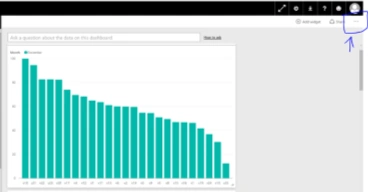
3. On the top right corner, there are three dots. Click there.
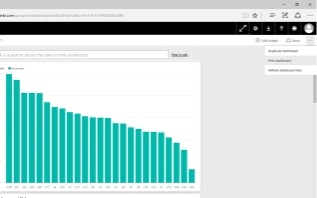
6. Now you will get the following new window for various options to print the dashboard. You can directly print it through a printer. But for our purposes we will save the report in PDF format.
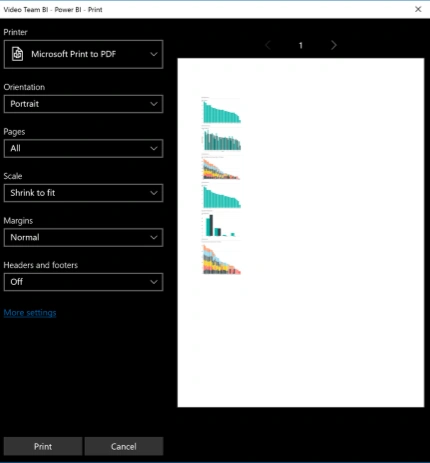
7. To save the report as a PDF, you will need to select Microsoft Print to PDF as a printer option.
8. You will also see options such as, page orientation, pages to print, scale of the report, and header, and footer. Select option as required.
9. Now click the Print Button.
10. A file explorer to save the file will appear. Select the desired path, input the file name, and then save it.
11. Your report is now saved in PDF format.
Read more articles on Power BI:
Kuppurasu NagarajPosted Apr 11, 2016, 1:31 PM
Nice Sharing
Mahesh ChandPosted Mar 7, 2016, 10:17 PM
Nice to see experts on Power BI. Power BI is becoming one essential tool for businesses. I see a good future ahead in this field. Cheers!
Sibeesh VenuPosted Mar 7, 2016, 7:33 AM
Nice Share
Jithil JohnPosted Mar 7, 2016, 7:07 AM
Good one
Debasis SahaPosted Mar 6, 2016, 11:44 PM
Nice one..
Saillesh PawarPosted Mar 6, 2016, 11:02 PM
Simple article on learning basics of power bi will be useful. As i am not fully aware of power bi.
Humayun Kabir MamunPosted Mar 6, 2016, 10:47 PM
Nice...
Vignesh ManiPosted Mar 6, 2016, 12:14 PM
Good