

Introduction
- Internal style
- Embedded style
- External style
You can find through the following link how these three style sheets work for an HTML document:
http://www.c-sharpcorner.com/uploadfile/abhikumarvatsa/working-with-css/
Step 2
Let's start with some HTML design and give an inline style for the body background color; see:
- <html>
- <head>
- <title>Untitled Document</title>
- </head>
- <body style="background: #6CC7E1">
- <div>
- Text Line one</div>
- <div>
- Text Line two</div>
- <div>
- Text Line three</div>
- </body>
- </html>
Output
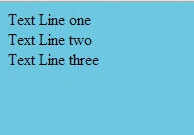 Note: It is only an HTML design; I had not applied any CSS styles except body background.
Step 3
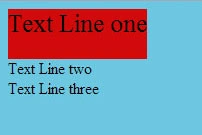
- <div style="height:50px; font:Arial, Helvetica, sans-serif; font-size:25px; background:#D10A0A; display:inline-block">Text Line one</div>
- <html>
- <head>
- <title>Untitled Document</title>/*embedded CSS style starts*/
- <style>
- .textbox
- {
- height: 70px;
- font-size: 35px;
- background: #C04ACA;
- }
- </style>
- /*embedded CSS style ends*/
- </head>
- <body style="background: #6CC7E1">
- <div class="textBox" style="height: 50px; font: Arial, Helvetica, sans-serif; font-size: 25px;
- background: #D10A0A">
- Text Line one</div>
- <div class="textBox">
- Text Line two</div>
- <div class="textBox">
- Text Line three</div>
- </body>
- </html>
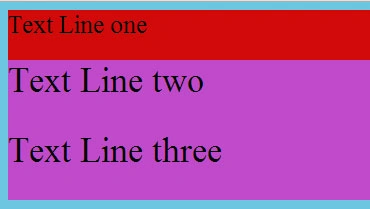
Output
 Step 5
I will apply an external CSS style to this HTML structure div (the class selector will be used in external CSS also). The Inline & Internal (Embedded) style will remain the same.
I will provide a link to the external style sheet below the internal style.
- <head>
- <title>Untitled Document</title>
- <style>
- .textbox
- {
- height: 70px;
- font-size: 35px;
- background: #C04ACA;
- }
- </style>
- <link href="cssvalues.css" rel="stylesheet" type="text/css" />
- </head>
CSS
The following is the CSS:
Output
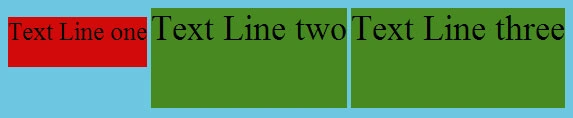 Note: Here note that the properties defined in the external CSS override the properties defined in the embedded CSS because it uses a top to bottom approach.
Step 6
Now I will change the selector in the external CSS. I will replace the class selector by a tag (div) selector.
Output
Note: Here note that the properties defined in the external CSS override the properties defined in the embedded CSS because it uses a top to bottom approach.
Step 6
Now I will change the selector in the external CSS. I will replace the class selector by a tag (div) selector.
Output
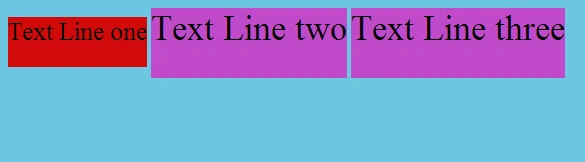 Note: Here note that the properties defined in the embedded CSS override the properties defined in the external CSS because the class selector has a higher priority than the tag selector and here the top to bottom approach is not used.
Step 7
The CSS value given with "important" has a higher priority for an HTML document. In external CSS for the Height property, I will provide a value with important and inline, the embedded CSS will remain the same.
External CSS
Note: Here note that the properties defined in the embedded CSS override the properties defined in the external CSS because the class selector has a higher priority than the tag selector and here the top to bottom approach is not used.
Step 7
The CSS value given with "important" has a higher priority for an HTML document. In external CSS for the Height property, I will provide a value with important and inline, the embedded CSS will remain the same.
External CSS
- body{background:#6CC7E1}
- .textbox{height:100px; font-size:35px; background:#488921; display:inline-block}
The following is the external CSS:
Output
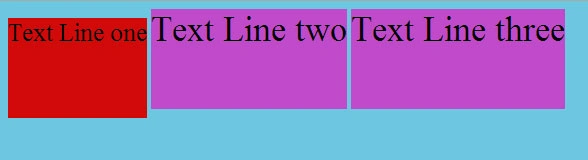 Note: Here note that the value given for the height property in external CSS overrides the values given to this property in Inline and Embedded CSS because in external CSS this value is defined as an important value.
Now we can say that the priority of the CSS property in an HTML document is applied top to bottom and left to right.
Values defined as Important will have the highest priority.
Inline CSS has a higher priority than embedded and external CSS.
So the final order is:
Value defined as Important > Inline >id nesting > id > class nesting > class > tag nesting > tag.
Feel free to post your opinion about this topic by clicking on post comment.
- body{background:#6CC7E1}
- div{height:100px !important; font-size:35px; background:#488921; display:inline-block}
Arya StevePosted Oct 16, 2019, 3:30 AM
I think this is an informative post and it is very useful and knowledgeable. therefore, I would like to thank you for the efforts you have made in writing this article. <a href="http://gexton.com/website-development/">website development firm</a>
Amit TripathiPosted Jul 15, 2014, 8:03 AM
nice article ..
Sanjay SinghPosted Jun 30, 2014, 2:45 PM
very nice
Mohit SharmaPosted Oct 9, 2013, 3:47 AM
Preeti can u give me some example of less css. why we use less css, importance of less css.
Preeti ZutshieditedPosted May 6, 2013, 9:02 AMEdited May 14, 2013, 2:24 AM
Yes Chandradev Important is also follows top to bottom approach If its used for same with different values then inline IMPORTANT will override others.......
Chandradev PrasadPosted May 5, 2013, 2:44 AM
Important is one of the cool feature in CSS. Generally i used to prefer to use external css. It makes eassy for maintenance.
Mudita RathorePosted May 1, 2013, 10:58 PM
too good.....