

In this article, we are explaining how we can perform several queries on a DataTable object using the select method and Lambda expression.
If you have your data in a DataTable object and we want to retrieve specific data from a data table on some certain conditions, so it becomes quite easy to query a data table using its select method and Lamda Expression. A sample code is also attached with this article to explain the concept.
Suppose we have a DataTable object having four fields: SSN, NAME, ADDRESS and AGE. We could create a data table and add columns in the following way:
DataTable dt = new DataTable();
dt.Columns.Add("SSN", typeof(string));
dt.Columns.Add("NAME", typeof(string));
dt.Columns.Add("ADDR", typeof(string));
dt.Columns.Add("AGE", typeof(int));
// Showing how to set Primary Key(s) in a Data table (Although it's not compulsory to have one)
DataColumn[] keys = new DataColumn[1];
keys[0] = dt.Columns[0];
dt.PrimaryKey = keys;
Now we store some data in our data table "dt" to show how we can perform several queries on the DataTable object like filtering some data, finding a person's record on certain conditions, sorting the person's records into ascending or descending order etc. These types of operations can easily be performed using a "Lambda Expression" and the select method.
dt.Rows.Add("203456876", "John", "12 Main Street, Newyork, NY", 15);
dt.Rows.Add("203456877", "SAM", "13 Main Ct, Newyork, NY", 25);
dt.Rows.Add("203456878", "Elan", "14 Main Street, Newyork, NY", 35);
dt.Rows.Add("203456879", "Smith", "12 Main Street, Newyork, NY", 45);
dt.Rows.Add("203456880", "SAM", "345 Main Ave, Dayton, OH", 55);
dt.Rows.Add("203456881", "Sue", "32 Cranbrook Rd, Newyork, NY", 65);
dt.Rows.Add("203456882", "Winston", "1208 Alex St, Newyork, NY", 65);
dt.Rows.Add("203456883", "Mac", "126 Province Ave, Baltimore, NY", 85);
dt.Rows.Add("203456884", "SAM", "126 Province Ave, Baltimore, NY", 95);
Now we see how we can perform various queries against our data table on the list using a one-line query using a simple Lambda expression. A DataTable object has a built-in select method that has the following signature:
DataRow[] DataTable.Select(string filterExpression, string sort)
Where the input parameters are:
- filterExpression: criteria to use to filter the rows.
- sort: string specifying the column and sort direction.
Return Value
An array of DataRow objects matching the filter expression. The following code retrieves all the person's records except persons having the name "SAM". Here the filter expression is "NAME <> 'SAM'" where the "<>" is a NOT operator. See:
Console.WriteLine(" Retrieving all the person except having name 'SAM'\n");
foreach (DataRow o in dt.Select("NAME <> 'SAM'"))
{
    Console.WriteLine("\t" + o["SSN"] + "\t" + o["NAME"] + "\t" + o["ADDR"] + "\t" + o["AGE"]);
}
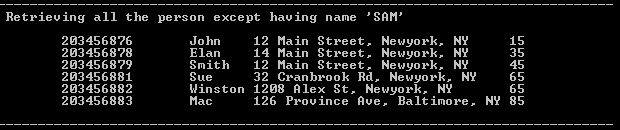
The following code retrieves the two oldest people older than 60 years. Here the filter expression is "AGE > 60" and then we are selecting two persons from the top.
Console.WriteLine(" Retrieving Top 2 aged persons from the list who are older than 60 years\n");
foreach (DataRow o in dt.Select("AGE > 60").Take(2))
{
    Console.WriteLine("\t" + o["SSN"] + "\t" + o["NAME"] + "\t" + o["ADDR"] + "\t" + o["AGE"]);
}

The following code gets the average of all the person's age. Here we keep the filter criteria empty and then use a Lambda expression in the Average() method:
Console.WriteLine("\n Getting Average of all the person's age...");
double avgAge = dt.Select("").Average(e => (int)e.ItemArray[3]);
Console.WriteLine(" The average of all the person's age is: " + avgAge);

The following code checks whether a person having the name "SAM" exists or not. Here we keep the filter criteria empty and then use a Lambda expression in the Any() method:
Console.WriteLine("\n Checking whether a person having name 'SAM' exists or not...");
if(dt.Select().Any(e => e.ItemArray[1].ToString() == "SAM"))
{
    Console.WriteLine("\tYes, A person having name  'SAM' exists in our list");
}

The following code checks whether any person is a teenager or not. Here the filter expression in the Select method is "AGE >= 13 AND AGE <= 19" and then check for the existence of such a person with Any(). See:
Console.WriteLine("\n Checking whether any person is teen-ager or not...");
if(dt.Select("AGE >= 13 AND AGE <= 19").Any())
{
    Console.WriteLine("\t Yes, we have some teen-agers in the list");
}

The following code gets a sorted list of persons in descending order by their age. Here we keep the filter criteria empty and the sorting criteria as AGE DESC:
Console.WriteLine("\nSorting data table in Descening order by AGE ");
foreach (DataRow o in dt.Select("","AGE DESC"))
{
    Console.WriteLine("\t" + o["SSN"] + "\t" + o["NAME"] + "\t" + o["ADDR"] + "\t" + o["AGE"]);
}
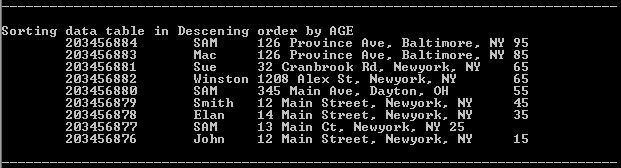
The following code gets a sorted list of persons in ascending order by their name. Here we keep the filter criteria empty and the sorting criteria is NAME ASC:
Console.WriteLine("\nSorting data table in Aescening order by NAME ");
foreach (DataRow o in dt.Select("", "NAME ASC"))
{
    Console.WriteLine("\t" + o["SSN"] + "\t" + o["NAME"] + "\t" + o["ADDR"] + "\t" + o["AGE"]);
}
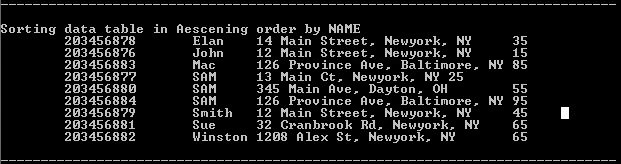
Following code gets the name of the most aged person in the list. Here we keep the filter criteria empty and sort the list by age. Then use the Last() method to determine the oldest person.
Console.WriteLine("\n Getting the name of the most aged person in the list ...");
DataRow mostAgedPerson = dt.Select("", "AGE ASC").Last();
Console.WriteLine("\t"+mostAgedPerson["SSN"] + "\t" + mostAgedPerson["NAME"] + "\t" + mostAgedPerson["ADDR"]  + "\t" + mostAgedPerson["AGE"]);

The following code gets the sum of everyone's ages. Here we keep the filter criteria empty and then use a Lambda expression in the Sum() method, whereas ItemArray[3] indicates the Age column. See:
Console.WriteLine("\n Getting Sum of all the person's age...");
int sumOfAges =dt.Select().Sum(e=> (int) e.ItemArray[3]);
Console.WriteLine("\t The sum of all the persons's age = " + sumOfAges);

The following code skips everyone whose age is less than 60 years. Here we keep the filter criteria empty and then use a Lambda expression in the SkipWhile () method, whereas ItemArray[3] indicates the Age column. See:
Console.WriteLine("\n Skipping every person whose age is less than 60 years...");
foreach (DataRow o in dt.Select().SkipWhile(e=> (int)e.ItemArray[3] < 60))
{
    Console.WriteLine("\t"+o["SSN"] + "\t" + o["NAME"] + "\t" + o["ADDR"] + "\t" + o["AGE"]);
}

The following code gets everyone until we find a person with a name beginning with any character other than "S". Here we keep the filter criteria empty and then use a Lambda expression in the Where () method, whereas ItemArray[1] indicates the Name column. See:
Console.WriteLine(" Displaying the persons until we find a person with name starts with other than 'S'");
foreach (DataRow o in dt.Select().Where(e=> e.ItemArray[1].ToString().StartsWith("S")))
{
    Console.WriteLine("\t" + o["SSN"] + "\t" + o["NAME"] + "\t" + o["ADDR"] + "\t" + o["AGE"]);
}

The following code checks everyone to determine if they have a SSN. Here we keep the filter criteria empty and then use a Lambda expression in the All () method, whereas ItemArray[0] indicates the SSN column. See:
Console.WriteLine("\n Checking all the persons have SSN or not ...");
if(dt.Select().All(e => e.ItemArray[0] != null))
{
    Console.WriteLine("\t No person is found without SSN");
}

The following code searches for whoever has the SSN "203456876":
Console.WriteLine("\n Finding the person whose SSN = 203456876 in the list");
foreach (DataRow o in dt.Select("SSN = '203456876'"))
{
    Console.WriteLine("\t" + o["SSN"] + "\t" + o["NAME"] + "\t" + o["ADDR"] + "\t" + o["AGE"]);
}

Ajeet SinghPosted May 31, 2019, 2:11 AM
Foreach (DataRow o in dt.Select("SSN = '203456876'")) How to supply a variable instead '203456876'
srinivas tdgPosted May 29, 2019, 1:04 AM
Very helpful, How can we use and statement in these statements. Thanks in advance
Ajeet SinghPosted May 11, 2019, 8:44 AM
A very helpful articles.... Thank you so much
Heiko JuergensPosted Nov 21, 2017, 10:57 AM
A really helpful page for tweaking DataTables, thanks!
kalu singh raoPosted Aug 2, 2016, 3:14 AM
Nice
Hemant SrivastavaPosted Jun 30, 2016, 10:00 AM
Thanks Tarun!
Tarun SaraswatPosted Jun 30, 2016, 12:52 AM
Super sir
Marc TecpilePosted May 20, 2016, 9:24 AM
Thank you very much, for the article.
Hemant SrivastavaPosted Mar 17, 2016, 9:57 AM
Thanks Vipul and Amatya !
Amatya AgyeyPosted Mar 17, 2016, 2:22 AM
Fantastic 1 .. Keep going
Vipul MalhotraPosted Mar 8, 2016, 2:57 AM
nice. Thanks for sharing
Jaipal ReddyPosted Dec 28, 2015, 12:00 AM
Nice one
Hemant SrivastavaPosted Nov 10, 2015, 4:49 PM
Thanks Ajeet!
Ajeet MishraPosted Nov 6, 2015, 8:48 AM
Nice One
Rakesh ShrivastavaPosted Sep 24, 2015, 9:27 AM
very nice example..Thanks
Upendra Pratap ShahiPosted Jul 14, 2015, 5:03 AM
great one
Hemant SrivastavaPosted May 27, 2015, 3:18 PM
Similarly dt.Select("AGE > 13 AND NAME <> 'SAM'") will give a list of persons older than age 13 but not having name = "SAM"
Anwar HassanPosted May 27, 2015, 6:35 AM
how to search with multiple conditions
Hemant SrivastavaPosted Aug 29, 2013, 1:52 PM
Thanks Jide
Jide AregbePosted Aug 29, 2013, 8:58 AM
Great post. Thank you.
Iyyappan IyyappanPosted Apr 2, 2013, 10:07 AM
Nice example for developers
lijo leecorpPosted Jan 8, 2013, 4:09 AM
Nice One
Sudhakar ChaudharyPosted Oct 25, 2012, 1:03 PM
gud one... thanks.
Kunal VaishyaPosted Oct 19, 2012, 1:40 AM
good example to understand nice one
Spyros PonarisPosted Oct 18, 2012, 4:52 AM
Very good article and very usefull because we use dataset or datatables in every day life , so is very cool to know how to query a datatable with lamda expressions. Thank you
Abhimanyu K VatsaPosted Oct 17, 2012, 2:44 AM
luckily seen this space, fabulous sir.
Swati AgarwalPosted Oct 17, 2012, 12:28 AM
Sir i visit given link....helps me a lot....Thanks sir..
Hemant SrivastavaPosted Oct 16, 2012, 3:43 PM
@Swati Agarwal, To get more detailed answer of you question, you may visit to my blog: http://hemant-srivastava.blogspot.com/2012/10/selecting-columns-in-data-table-in-c.html
Hemant SrivastavaPosted Oct 16, 2012, 1:20 PM
@Swati,...How can i select few columns from the table?... We can select columns in easy way like as: for (int i = 0; i < dt.Rows.Count; i++) { Console.WriteLine(dt.Rows[i]["SSN"]+ "\t"+ dt.Rows[i]["NAME"]); } But there are other ways too.. like using DataView or using LINQ
Swati AgarwalPosted Oct 16, 2012, 4:19 AM
Nice article...How can i select few columns from the table?
sandeep raju dantuluriPosted Oct 16, 2012, 3:06 AM
nice..
Richa GargPosted Oct 15, 2012, 11:44 PM
Thanks Sir for posting this article I help me a lot.. Really a very nice article.
Hemant SrivastavaPosted Oct 15, 2012, 11:15 PM
Thanks guys..
isha goelPosted Oct 15, 2012, 11:07 PM
Yaa lamda expression are mostly used in order to enhance the performance of the application
Nishant RoyPosted Oct 15, 2012, 11:04 PM
Very knowledgeable article.
David BallackPosted Oct 15, 2012, 11:04 PM
This is a very informative article to know about select method.
Gaurav GuptaPosted Oct 15, 2012, 11:03 PM
Thanks for sharing. It helps lot to understand Lambda much more...