

A Queue in C# represents a first-in, first-out (FIFO) collection of objects. An example of a queue is a line of people waiting.
The Queue<T> class in the System.Collection.Generic namespace represents a queue in C#, where T specifies the type of elements in the queue. In this article and code examples, I explain the use of Queue in C#, Queue class properties and methods, and how to use these methods in C#.
C# Queue Constructors
The Queue<T> class has several overloaded constructors.
Queue<T> Constructor - Initializes a new instance of the Queue<T> class that is empty. The next lines show how we create the empty queue.
Queue<string> queue = newQueue<string>();
Queue<T> Constructor (IEnumerable<T>) - Initializes a new instance of the Queue<T> class that contains elements copied from the specified collection.
string[] courses = { "MCA","MBA", "BCA","BBA", "BTech","MTech" };
Queue<string> queue = newQueue<string>(courses);
Queue<T> Constructor (Int32) - Initializes a new instance of the Queue<T> class that is empty and has the specified initial capacity.
Queue<string> queue = newQueue<string>(4);
Queue. Count Property
The Count property gets the number of elements of Queue<T>. The following code sample creates a queue of strings and gets the item count in the collection.
namespace Queue {
    classProgram {
        staticvoid Main(string[] args) {
            string[] courses = {
                "MCA",
                "MBA",
                "BCA",
                "BBA",
                "BTech",
                "MTech"
            };
            Queue < string > queue1 = newQueue < string > ();
            Queue < string > queue2 = newQueue < string > (courses);
            Queue < string > queue3 = newQueue < string > (4);
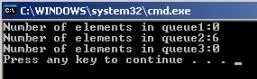
            Console.WriteLine("Number of elements in queue1:" + queue1.Count());
            Console.WriteLine("Number of elements in queue2:" + queue2.Count());
            Console.WriteLine("Number of elements in queue3:" + queue3.Count());
        }
    }
}
The output looks like this,
Queue.Enqueue Method
The Queue. The enqueue method adds an object to the end of the Queue<T>. For example,
namespace Queue {
    classProgram {
        staticvoid Main(string[] args) {
            Queue < string > queue1 = newQueue < string > ();
            queue1.Enqueue("MCA");
            queue1.Enqueue("MBA");
            queue1.Enqueue("BCA");
            queue1.Enqueue("BBA");
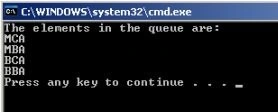
            Console.WriteLine("The elements in the queue are:");
            foreach(string s in queue1) {
                Console.WriteLine(s);
            }
        }
    }
}
Output
Queue.Dequeue() method
Removes and returns the object at the beginning of the Queue<T>. For example,
namespace Queue {
    classProgram {
        staticvoid Main(string[] args) {
            Queue < string > queue1 = newQueue < string > ();
            queue1.Enqueue("MCA");
            queue1.Enqueue("MBA");
            queue1.Enqueue("BCA");
            queue1.Enqueue("BBA");
            Console.WriteLine("The elements in the queue are:");
            foreach(string s in queue1) {
                Console.WriteLine(s);
            }
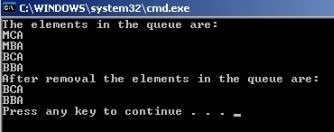
            queue1.Dequeue(); //Removes the first element that enter in the queue here the first element is MCA
            queue1.Dequeue(); //Removes MBA
            Console.WriteLine("After removal the elements in the queue are:");
            foreach(string s in queue1) {
                Console.WriteLine(s);
            }
        }
    }
}

Join the conversation! Your thoughts help the community grow.