
Introduction
There are so many people who asked in the forums how we can build a quiz application using ASP.NET MVC. I would like to share with you a simple solution to achieve this application.
In this post, we will build our quiz application with an easy and simple approach. But you should have some basic skills in ASP.NET MVC 5, jQuery, and Bootstrap. I hope it will be helpful for you.
Prerequisites
Make sure you have installed Visual Studio 2015 (.NET Framework 4.5.2) and SQL Server.
In this post, we are going to,
- Create Database.
- Create an MVC application.
- Configuring Entity framework ORM to connect to the database.
- Create our Quiz controller.
- Create Razor pages in order to build our application.
SQL Database part
Here, you will find the script to create a database and tables.
Create Database
USE [master]
GO

/****** Object:  Database [DBQuiz]    Script Date: 11/18/2017 10:57:17 AM ******/
CREATE DATABASE [DBQuiz]
  CONTAINMENT = NONE
  ON  PRIMARY
  (
    NAME = N'DBQuiz',
    FILENAME = N'c:\Program Files (x86)\Microsoft SQL Server\MSSQL11.MSSQLSERVER\MSSQL\DATA\DBQuiz.mdf',
    SIZE = 3072KB,
    MAXSIZE = UNLIMITED,
    FILEGROWTH = 1024KB
  )
  LOG ON
  (
    NAME = N'DBQuiz_log',
    FILENAME = N'c:\Program Files (x86)\Microsoft SQL Server\MSSQL11.MSSQLSERVER\MSSQL\DATA\DBQuiz_log.ldf',
    SIZE = 1024KB,
    MAXSIZE = 2048GB,
    FILEGROWTH = 10%
  )
GO

ALTER DATABASE [DBQuiz] SET COMPATIBILITY_LEVEL = 110
GO

IF (1 = FULLTEXTSERVICEPROPERTY('IsFullTextInstalled'))
BEGIN
    EXEC [DBQuiz].[dbo].[sp_fulltext_database] @action = 'enable'
END
GO

ALTER DATABASE [DBQuiz] SET ANSI_NULL_DEFAULT OFF
GO

ALTER DATABASE [DBQuiz] SET ANSI_NULLS OFF
GO

ALTER DATABASE [DBQuiz] SET ANSI_PADDING OFF
GO

ALTER DATABASE [DBQuiz] SET ANSI_WARNINGS OFF
GO

ALTER DATABASE [DBQuiz] SET ARITHABORT OFF
GO

ALTER DATABASE [DBQuiz] SET AUTO_CLOSE OFF
GO

ALTER DATABASE [DBQuiz] SET AUTO_CREATE_STATISTICS ON
GO

ALTER DATABASE [DBQuiz] SET AUTO_SHRINK OFF
GO

ALTER DATABASE [DBQuiz] SET AUTO_UPDATE_STATISTICS ON
GO

ALTER DATABASE [DBQuiz] SET CURSOR_CLOSE_ON_COMMIT OFF
GO

ALTER DATABASE [DBQuiz] SET CURSOR_DEFAULT GLOBAL
GO

ALTER DATABASE [DBQuiz] SET CONCAT_NULL_YIELDS_NULL OFF
GO

ALTER DATABASE [DBQuiz] SET NUMERIC_ROUNDABORT OFF
GO

ALTER DATABASE [DBQuiz] SET QUOTED_IDENTIFIER OFF
GO

ALTER DATABASE [DBQuiz] SET RECURSIVE_TRIGGERS OFF
GO

ALTER DATABASE [DBQuiz] SET DISABLE_BROKER
GO

ALTER DATABASE [DBQuiz] SET AUTO_UPDATE_STATISTICS_ASYNC OFF
GO

ALTER DATABASE [DBQuiz] SET DATE_CORRELATION_OPTIMIZATION OFF
GO

ALTER DATABASE [DBQuiz] SET TRUSTWORTHY OFF
GO

ALTER DATABASE [DBQuiz] SET ALLOW_SNAPSHOT_ISOLATION OFF
GO

ALTER DATABASE [DBQuiz] SET PARAMETERIZATION SIMPLE
GO

ALTER DATABASE [DBQuiz] SET READ_COMMITTED_SNAPSHOT OFF
GO

ALTER DATABASE [DBQuiz] SET HONOR_BROKER_PRIORITY OFF
GO

ALTER DATABASE [DBQuiz] SET RECOVERY SIMPLE
GO

ALTER DATABASE [DBQuiz] SET MULTI_USER
GO

ALTER DATABASE [DBQuiz] SET PAGE_VERIFY CHECKSUM
GO

ALTER DATABASE [DBQuiz] SET DB_CHAINING OFF
GO

ALTER DATABASE [DBQuiz] SET FILESTREAM(NON_TRANSACTED_ACCESS = OFF)
GO

ALTER DATABASE [DBQuiz] SET TARGET_RECOVERY_TIME = 0 SECONDS
GO

ALTER DATABASE [DBQuiz] SET READ_WRITE
GO
Create Tables
After creating the database, we will move to create all the needed tables.
Users Table
USE [DBQuiz]
GO

/****** Object:  Table [dbo].[Users]    Script Date: 11/18/2017 10:58:08 AM ******/
SET ANSI_NULLS ON
GO

SET QUOTED_IDENTIFIER ON
GO

SET ANSI_PADDING ON
GO

CREATE TABLE [dbo].[Users] (
    [UserID] int IDENTITY(1,1) NOT NULL,
    [FullName] varchar(50) NULL,
    [ProfilImage] varchar(50) NULL,
    CONSTRAINT [PK_Users] PRIMARY KEY CLUSTERED
    (
        [UserID] ASC
    ) WITH (PAD_INDEX = OFF, STATISTICS_NORECOMPUTE = OFF, IGNORE_DUP_KEY = OFF, ALLOW_ROW_LOCKS = ON, ALLOW_PAGE_LOCKS = ON) ON [PRIMARY]
) ON [PRIMARY]

GO

SET ANSI_PADDING OFF
GO
Quiz Table
USE [DBQuiz]
GO

/****** Object:  Table [dbo].[Quiz]    Script Date: 11/18/2017 10:58:43 AM ******/
SET ANSI_NULLS ON
GO

SET QUOTED_IDENTIFIER ON
GO

SET ANSI_PADDING ON
GO

CREATE TABLE [dbo].[Quiz] (
    [QuizID] int IDENTITY(1,1) NOT NULL,
    [QuizName] varchar(80) NULL,
    CONSTRAINT [PK_Quiz] PRIMARY KEY CLUSTERED
    (
        [QuizID] ASC
    ) WITH (PAD_INDEX = OFF, STATISTICS_NORECOMPUTE = OFF, IGNORE_DUP_KEY = OFF, ALLOW_ROW_LOCKS = ON, ALLOW_PAGE_LOCKS = ON) ON [PRIMARY]
) ON [PRIMARY]

GO

SET ANSI_PADDING OFF
GO
Questions Table
USE [DBQuiz]
GO

/****** Object:  Table [dbo].[Questions]    Script Date: 11/18/2017 10:59:29 AM ******/
SET ANSI_NULLS ON
GO

SET QUOTED_IDENTIFIER ON
GO

SET ANSI_PADDING ON
GO

CREATE TABLE [dbo].[Questions] (
    [QuestionID] int IDENTITY(1,1) NOT NULL,
    [QuestionText] varchar(max) NULL,
    [QuizID] int NULL,
    CONSTRAINT [PK_Questions] PRIMARY KEY CLUSTERED
    (
        [QuestionID] ASC
    ) WITH (PAD_INDEX = OFF, STATISTICS_NORECOMPUTE = OFF, IGNORE_DUP_KEY = OFF, ALLOW_ROW_LOCKS = ON, ALLOW_PAGE_LOCKS = ON) ON [PRIMARY]
) ON [PRIMARY] TEXTIMAGE_ON [PRIMARY]

GO

SET ANSI_PADDING OFF
GO

ALTER TABLE [dbo].[Questions] WITH CHECK ADD CONSTRAINT [FK_Questions_Quiz] FOREIGN KEY ([QuizID])
REFERENCES [dbo].[Quiz] ([QuizID])
GO

ALTER TABLE [dbo].[Questions] CHECK CONSTRAINT [FK_Questions_Quiz]
GO
Choices Table
USE [DBQuiz]
GO

/****** Object:  Table [dbo].[Choices]    Script Date: 11/18/2017 11:00:03 AM ******/
SET ANSI_NULLS ON
GO

SET QUOTED_IDENTIFIER ON
GO

SET ANSI_PADDING ON
GO

CREATE TABLE [dbo].[Choices] (
    [ChoiceID] int IDENTITY(1,1) NOT NULL,
    [ChoiceText] varchar(max) NULL,
    [QuestionID] int NULL,
    CONSTRAINT [PK_Choices] PRIMARY KEY CLUSTERED
    (
        [ChoiceID] ASC
    ) WITH (PAD_INDEX = OFF, STATISTICS_NORECOMPUTE = OFF, IGNORE_DUP_KEY = OFF, ALLOW_ROW_LOCKS = ON, ALLOW_PAGE_LOCKS = ON) ON [PRIMARY]
) ON [PRIMARY] TEXTIMAGE_ON [PRIMARY]

GO

SET ANSI_PADDING OFF
GO

ALTER TABLE [dbo].[Choices] WITH CHECK ADD CONSTRAINT [FK_Choices_Questions] FOREIGN KEY ([QuestionID])
REFERENCES [dbo].[Questions] ([QuestionID])
GO

ALTER TABLE [dbo].[Choices] CHECK CONSTRAINT [FK_Choices_Questions]
GO
Answers Table
USE [DBQuiz]
GO

/****** Object:  Table [dbo].[Answers]    Script Date: 11/18/2017 11:00:46 AM ******/
SET ANSI_NULLS ON
GO

SET QUOTED_IDENTIFIER ON
GO

SET ANSI_PADDING ON
GO

CREATE TABLE [dbo].[Answers] (
    [AnswerID] int IDENTITY(1,1) NOT NULL,
    [AnswerText] varchar(max) NULL,
    [QuestionID] int NULL,
    CONSTRAINT [PK_Answers] PRIMARY KEY CLUSTERED
    (
        [AnswerID] ASC
    ) WITH (PAD_INDEX = OFF, STATISTICS_NORECOMPUTE = OFF, IGNORE_DUP_KEY = OFF, ALLOW_ROW_LOCKS = ON, ALLOW_PAGE_LOCKS = ON) ON [PRIMARY]
) ON [PRIMARY] TEXTIMAGE_ON [PRIMARY]

GO

SET ANSI_PADDING OFF
GO

ALTER TABLE [dbo].[Answers] WITH CHECK ADD CONSTRAINT [FK_Answers_Questions] FOREIGN KEY ([QuestionID])
REFERENCES [dbo].[Questions] ([QuestionID])
GO

ALTER TABLE [dbo].[Answers] CHECK CONSTRAINT [FK_Answers_Questions]
GO
Create your MVC application
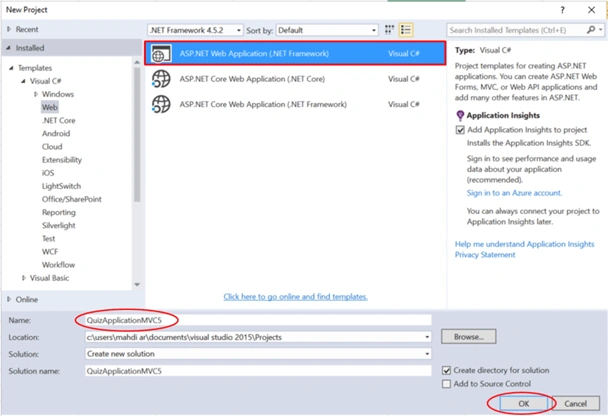
Open Visual Studio and select File >> New Project.
The "New Project" window will pop up. Select ASP.NET Web Application (.NET Framework), name your project, and click OK.
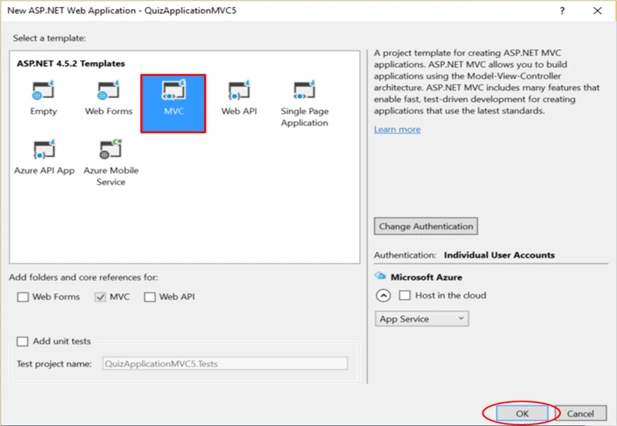
Next, a new dialog will pop up for selecting the template. We are going to choose the MVC template and click OK.
Once our project is created, let us add the ADO.NET Entity Data Model.
Adding ADO.NET Entity Data Model
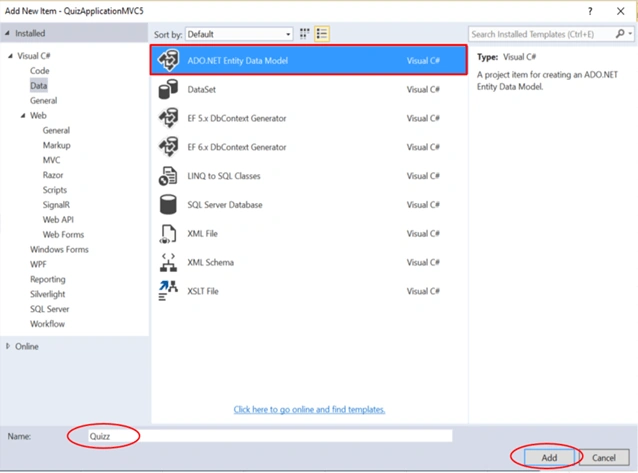
Right-click on the project name, click Add >> Add New Item.
A dialog box will pop up. Inside Visual C#, select Data >> ADO.NET Entity Data Model, and enter the name for your DbContext model as Quizz, then click Add.
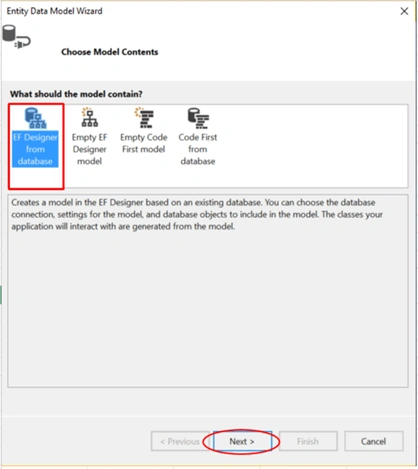
As you can see, we have 4 model contents. We are selecting the first approach (EF Designer from the database).
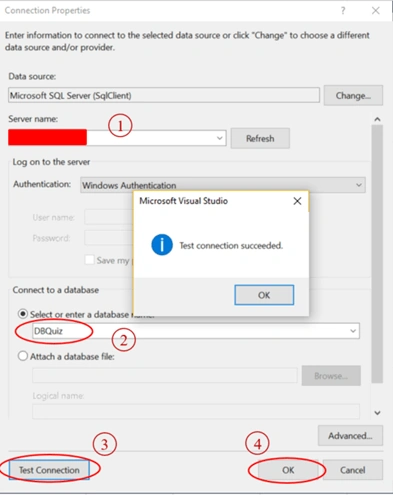
As you can see below, we need to select the server name via the drop-down list in the "connect to a database" section. You must choose your database name and finally click OK.
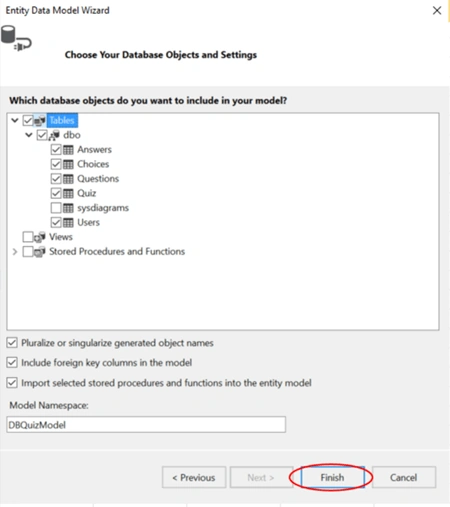
For the next step, the dialog Entity Data Model Wizard will pop up for choosing objects that will be used in our application. We select all the tables except sys diagrams and click Finish.
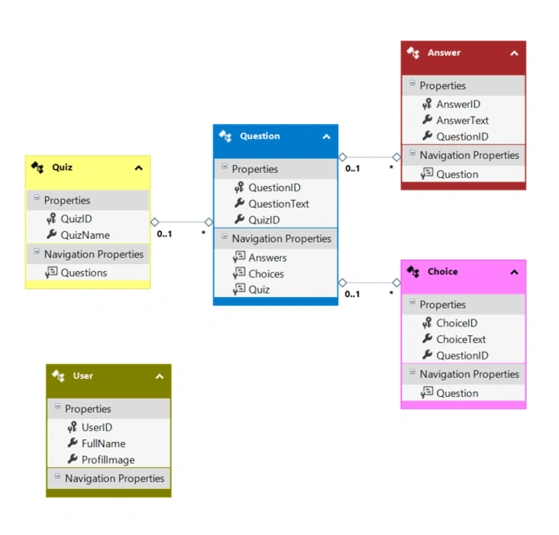
Finally, we see that the EDMX model generates all the objects, as shown below.
Create a controller
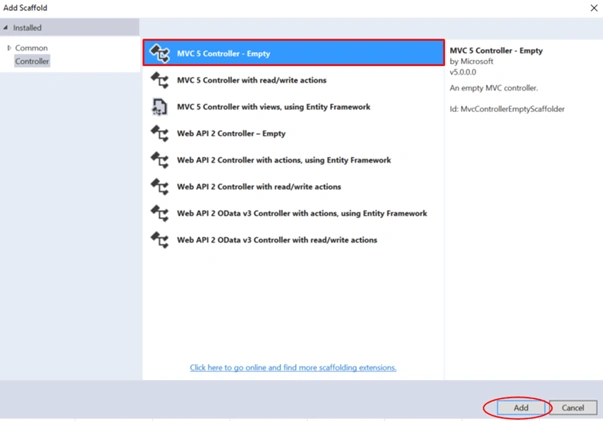
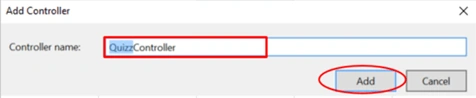
Now, we are going to create a Controller. Right-click the Controllers folder, go to Add >> Controller>> MVC 5 Controller - Empty>> click Add. In the next dialog, name the controller as QuizzController and then click Add.
QuizzController.cs

The user needs to be authenticated by providing her/his full name, then if the user already exists in the user's table, we will redirect him to select the quiz via the dropdown list, and if not, a message will be displayed 'Sorry: the user is not found'. The responsible action is the GetUser action.
[HttpGet]
public ActionResult GetUser()
{
    return View();
}

[HttpPost]
public ActionResult GetUser(UserVM user)
{
    UserVM userConnected = dbContext.Users
        .Where(u => u.FullName == user.FullName)
        .Select(u => new UserVM
        {
            UserID = u.UserID,
            FullName = u.FullName,
            ProfilImage = u.ProfilImage,
        })
        .FirstOrDefault();

    if (userConnected != null)
    {
        Session["UserConnected"] = userConnected;
        return RedirectToAction("SelectQuizz");
    }
    else
    {
        ViewBag.Msg = "Sorry : user is not found !!";
        return View();
    }
}
GetUser.cshtml
@model QuizApplicationMVC5.viewModels.UserVM

@{
    ViewBag.Title = "User";
}

<div class="panel panel-default" style="width: 37%; margin: 20% 32%;">
    <div class="panel-heading">Let's Begin  ^_^</div>
    <div class="panel-body">

        @using (Html.BeginForm("GetUser", "Quizz", FormMethod.Post))
        {
            @Html.EditorFor(c => c.FullName, new { htmlAttributes = new { @class = "form-control", @placeholder = "FullName ...", @style = "width:100%; margin-left: 56px;" } })<br/>
            <button type="submit" id="Enter" class="btn btn-info btn-lg" style="width:100%;">
                <span class="glyphicon glyphicon-user"></span> Enter
            </button>
        }

    </div>

    @if (ViewBag.Msg != null)
    {
        <div class="well well-sm well-danger"> @ViewBag.Msg </div>
    }
</div>
Select Quiz [HttpGet] action is responsible for getting the list of quiz names from the quiz table and displaying them on the SelectQuizz.cshtml page.
Select Quiz [HttpPost] action accepts the quiz object as a parameter that contains the selected quiz, and after that, we will redirect the authenticated user to the quiz test action, which will display all the questions related to the selected quiz.
[HttpGet]
public ActionResult SelectQuizz()
{
    QuizVM quiz = new viewModels.QuizVM();
    quiz.ListOfQuizz = dbContext.Quizs.Select(q => new SelectListItem
    {
        Text = q.QuizName,
        Value = q.QuizID.ToString()
    }).ToList();

    return View(quiz);
}

[HttpPost]
public ActionResult SelectQuizz(QuizVM quiz)
{
    QuizVM quizSelected = dbContext.Quizs
        .Where(q => q.QuizID == quiz.QuizID)
        .Select(q => new QuizVM
        {
            QuizID = q.QuizID,
            QuizName = q.QuizName,
        })
        .FirstOrDefault();

    if (quizSelected != null)
    {
        Session["SelectedQuiz"] = quizSelected;
        return RedirectToAction("QuizTest");
    }

    return View();
}
SelectQuizz.cshtml
@model QuizApplicationMVC5.viewModels.QuizVM

@{
    ViewBag.Title = "SelectQuizz";
}

<div class="container">

    <div class="userConnected" style="border:2px dashed #cecaca; border-radius: 10px; margin-top: 3%;">
        @{ Html.RenderPartial("_UserInfo");}
    </div>

    <div class="SelQuiz">
        <div class="panel panel-default" style="width: 37%; margin: 20% 32%;">
            <div class="panel-heading">Select Your Quiz  ^_^</div>
            <div class="panel-body">
                @using (Html.BeginForm("SelectQuizz", "Quizz", FormMethod.Post))
                {
                    @Html.DropDownListFor(model => model.QuizID, Model.ListOfQuizz, new { @class = "form-control", @style = "margin-left:51px;" })<br/>
                    <button type="submit" id="Enter" class="btn btn-success btn-lg" style="width:100%;">
                        <span class="glyphicon glyphicon-ok"></span> Let's GO
                    </button>
                }
            </div>
        </div>
    </div>
</div>  <!-- END CONTAINER -->
As you can see, the QuizTest [HttpGet] action will display all the questions based on the selected quiz.
QuizTest [HttpPost] action accepts the answers list as a parameter. Then it will proceed to verify all the answers submitted by the user and return the result in JSON format.
[HttpGet]
public ActionResult QuizTest()
{
    QuizVM quizSelected = Session["SelectedQuiz"] as QuizVM;
    IQueryable<QuestionVM> questions = null;

    if (quizSelected != null)
    {
        questions = dbContext.Questions.Where(q => q.Quiz.QuizID == quizSelected.QuizID)
            .Select(q => new QuestionVM
            {
                QuestionID = q.QuestionID,
                QuestionText = q.QuestionText,
                Choices = q.Choices.Select(c => new ChoiceVM
                {
                    ChoiceID = c.ChoiceID,
                    ChoiceText = c.ChoiceText
                }).ToList()
            }).AsQueryable();
    }

    return View(questions);
}

[HttpPost]
public ActionResult QuizTest(List<QuizAnswersVM> resultQuiz)
{
    List<QuizAnswersVM> finalResultQuiz = new List<viewModels.QuizAnswersVM>();

    foreach (QuizAnswersVM answser in resultQuiz)
    {
        QuizAnswersVM result = dbContext.Answers.Where(a => a.QuestionID == answser.QuestionID).Select(a => new QuizAnswersVM
        {
            QuestionID = a.QuestionID.Value,
            AnswerQ = a.AnswerText,
            isCorrect = (answser.AnswerQ.ToLower().Equals(a.AnswerText.ToLower()))
        }).FirstOrDefault();

        finalResultQuiz.Add(result);
    }

    return Json(new { result = finalResultQuiz }, JsonRequestBehavior.AllowGet);
}
QuizTest.cshtml
@model IQueryable<QuizApplicationMVC5.viewModels.QuestionVM>

@{
    int count = 1, countR = 0;
}

<div class="container">

    <!-- User Info -->
    <div class="userConnected" style="border:2px dashed #cecaca; border-radius: 10px; margin-top: 3%;">
        @{ Html.RenderPartial("_UserInfo"); }
    </div>

    <div class="Quiz">
        <h4 style="margin-top: 4%;">
            <span class="label label-info">Questions :</span>
        </h4>

        @if (Model != null && Model.Any())
        {
            foreach (var question in Model)
            {
                <div class="BlockQ" style="border: 1px solid #bdbdbd; width: 75%; border-radius: 4px; margin-top: 40px; background-color: #f0ffff; padding: 8px;">
                    <div class="Question" style="padding: 2%;">
                        <span class="label label-warning">@string.Format("{0}{1}.", "Q", count)</span>
                        <span id="@string.Format("{0}{1}", "ID_Q", count)" style="display:none;">@question.QuestionID</span>
                        <p style="display: inline; padding: 2%;" id="@string.Format("{0}{1}", "Q", count)">@question.QuestionText</p>
                    </div>

                    <div class="Choices" style="margin-left: 8%;">
                        @foreach (var choice in question.Choices)
                        {
                            <label class="radio-inline">
                                <input type="radio" name="@string.Format("{0}{1}", "inlineRadioOptions", count)" id="@string.Format("{0}{1}", "inlineRadio", countR)" value="@choice.ChoiceText" style="margin-left: -16px;"> @choice.ChoiceText
                            </label><br />
                            countR++;
                        }
                    </div> <!--END Choices-->

                    <div id="@string.Format("{0}{1}{2}", "Ans", "Q", count)">
                    </div>
                </div> <!-- END BlockQ -->
                count++;
            }
            <span id="countQuections" style="display:none;">@count</span>
            <button type="button" id="SubmitQuiz" class="btn btn-default" style="margin-top: 10px;">
                <span class="glyphicon glyphicon-ok"></span> Submit Quiz
            </button>
        }
    </div> <!-- END QUIZ -->

</div> <!-- END CONTAINER -->

@section MyScritps
{
    <script type="text/javascript">
        $(document).ready(function () {
            $('#SubmitQuiz').on('click', function () {
                //count Questions
                var sel = $('#countQuections').text();
                console.log(sel);

                var resultQuiz = [], countQuestion = parseInt(sel), question = {}, j = 1;

                for (var i = 1; i < countQuestion; i++) {
                    question = {
                        QuestionID: $('#ID_Q' + i).text(),
                        QuestionText: $('#Q' + i).text(),
                        AnswerQ: $('input[name=inlineRadioOptions' + i + ']:checked').val()
                    };

                    resultQuiz.push(question);
                }

                $.ajax({
                    type: 'POST',
                    url: '@Url.Action("QuizTest", "Quizz")',
                    data: { resultQuiz },
                    success: function (response) {
                        if (response.result.length > 0) {
                            for (var i = 0; i < response.result.length; i++) {
                                if (response.result[i].isCorrect == true) {
                                    $('#AnsQ' + j).html('<div class="alert alert-success" role="alert"><span class="glyphicon glyphicon-thumbs-up" aria-hidden="true"></span> Correct answer</div>');
                                } else {
                                    $('#AnsQ' + j).html('<div class="alert alert-danger" role="alert"> <span class="glyphicon glyphicon-thumbs-down" aria-hidden="true"></span> Incorrect answer - The Good Answer is <b>' + response.result[i].AnswerQ + '</b></div>');
                                }
                                j++;
                            }
                        } else {
                            alert("Something Wrong");
                        }
                    },
                    error: function (response) {
                        // Handle error
                    }
                });

                console.log(resultQuiz);
            });
        });
    </script>
}
View Model
Don’t forget to add the following view models.
using System;
using System.Collections.Generic;
using System.Linq;
using System.Web;
using System.Web.Mvc;

namespace QuizApplicationMVC5.viewModels
{
    public class UserVM
    {
        public int UserID { get; set; }
        public string FullName { get; set; }
        public string ProfilImage { get; set; }
    }

    public class QuizVM
    {
        public int QuizID { get; set; }
        public string QuizName { get; set; }
        public List<SelectListItem> ListOfQuizz { get; set; }
    }

    public class QuestionVM
    {
        public int QuestionID { get; set; }
        public string QuestionText { get; set; }
        public string QuestionType { get; set; }
        public string Anwser { get; set; }
        public ICollection<ChoiceVM> Choices { get; set; }
    }

    public class ChoiceVM
    {
        public int ChoiceID { get; set; }
        public string ChoiceText { get; set; }
    }

    public class QuizAnswersVM
    {
        public int QuestionID { get; set; }
        public string QuestionText { get; set; }
        public string AnswerQ { get; set; }
        public bool isCorrect { get; set; }
    }
}
Shared/_UserInfo.cshtml
We need to display the user details, which will be shared in SelectQuizz.cshtml and QuizzTest.cshtml. To do that, from the Solution Explorer, expand the Views folder and right-click on Shared folder >> Add >> View. Don’t forget to check Create as a partial view option.
@using QuizApplicationMVC5.viewModels

@{
    UserVM userConnected = Session["UserConnected"] as UserVM;
    QuizVM quizSelected = Session["SelectedQuiz"] as QuizVM;
}

@if (userConnected != null)
{
    <div class="row">
        <div class="col-md-4">
            <img src="@string.Format("{0}{1}", Url.Content("~/images/"), userConnected.ProfilImage)" class="img-circle" style="width: 12%;" />
            <span><b>Welcome:</b> @userConnected.FullName</span>
        </div>

        <div class="col-md-4" style="margin-top: 15px;">
            @if (quizSelected != null && !string.IsNullOrEmpty(quizSelected.QuizName))
            {
                <span><b>Quiz Selected:</b> @quizSelected.QuizName</span>
            }
            else
            {
                <span><b>Please Select your Quiz</b></span>
            }
        </div>

        <div class="col-md-4" style="margin-top: 15px;">
            <span><b>Date:</b> @DateTime.Now</span>
        </div>
    </div>
}
Output
Now, our quiz application is ready. We can run and see the output in the browser.
That’s all. Please send your feedback and queries in the comments box.
mani pathakPosted Mar 28, 2020, 2:55 AM
The download code provided is not running at all.
Tina MoranPosted Feb 15, 2020, 1:02 PM
Hi. Using Visual Studio 2019 and CREATE, SET, ALTER, IF are errored as "SQL70001 this statement is not recognised in this context in SQL" Could you help or is there updated code for this?
Sankeerth MaragantiPosted Apr 11, 2019, 11:21 PM
Getting issuse in partial View @{ UserVM userConnected = Session["UserConnected"] as UserVM; QuizVM quizSelected = Session["SelectedQuiz"] as QuizVM; } Please help me on this.
Fahad TankoPosted Mar 11, 2019, 8:51 AM
It works perfectly. thanks alot..
Hamid KhanPosted Feb 6, 2019, 12:05 PM
Good effort Thanks alot.....................
BalaSwamy MadanuPosted Aug 7, 2018, 10:16 AM
Can you say how did you created mdf file
Kelwin Gavidia C.Posted Jul 18, 2018, 10:42 PM
Thanks, Very good!
Joydeep RoyPosted Feb 8, 2018, 2:13 AM
I am getting an error in dbContext.
First LastPosted Jan 11, 2018, 6:25 PM
Bug: The QuizTest.cshtml had @section MyScritps. It needed to be changed to: @section Scripts
First LastPosted Jan 11, 2018, 6:13 PM
After researching this, I discovered that I had to put App_Data. in front of Quizz.csdl, Quizz.ssdl and Quizz.msl. It now runs.
First LastPosted Jan 11, 2018, 5:16 PM
This was added to the Web.config after going threw your steps. Is it correct? <connectionStrings> <add name="DBQuizEntities" connectionString="metadata=res://*/Quizz.csdl|res://*/Quizz.ssdl|res://*/Quizz.msl;provider=System.Data.SqlClient;provider connection string="data source=(localdb)\MSSQLLocalDB;initial catalog=DBQuiz;integrated security=True;MultipleActiveResultSets=True;App=EntityFramework"" providerName="System.Data.EntityClient" /> </connectionStrings>
First LastPosted Jan 11, 2018, 5:14 PM
I get an error after entering a User. An exception of type 'System.Data.Entity.Core.MetadataException' occurred in EntityFramework.dll but was not handled in user codeAdditional information: Unable to load the specified metadata resource. -----> I see that It is failing in the HttpPost GetUser(UserVm user). At this line: UserVM userConnected = dbContext.Users.Where(u => u.FullName == user.FullName) -----> The searches on this issue indicate it may be the connection string.
First LastPosted Jan 7, 2018, 4:05 PM
I did the tutorial...can you post the test data to be loaded into the tables? Your tutorial is really not complete without it.