

Introduction
Rating Bar is a commonly used control in Android applications for showing some ratings about some items in the activity or allowing the user to set ratings about something. We all find there is a rating bar in the Google Play store for rating every application. This is exactly the same control. This control we can use in our application also for rating something.
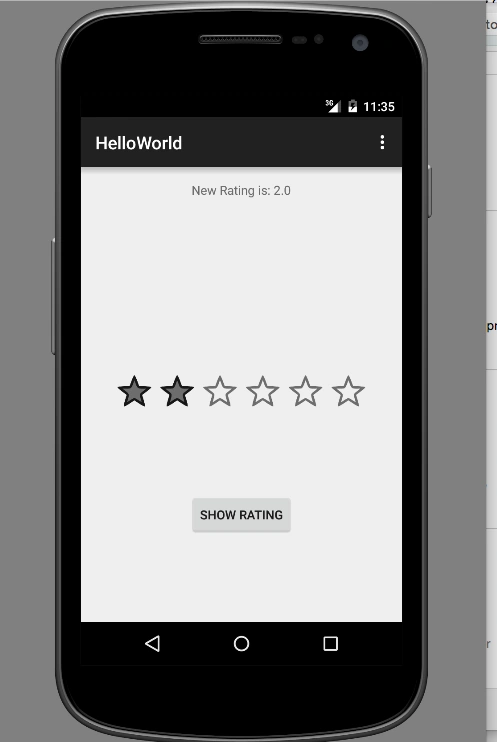
Here I am going to show you how we can use this control and how we can set and get values from this control. Here I am going to demonstrate an Activity with one TextView, Rating Bar and a Button. The TextView will show the current rating of the Rating Bar, the user can change the rating on clicking in the rating bar. And on clicking on the button the I will show a Toast message about the current rating; this is what I am going to show you.
First, I am going to create the main layout. The main layout is a Relative layout and I added a TextView at the top center of the screen. Now I added the Rating Bar at the center of the screen. The rating bar shows some attributes like numStars, rating, stepSize. numStars means the number of starts we need in the rating control, most commonly used is five. But here we can change this as we like. The rating means the initial rating of the control, that is if the initial rating is 2 then on running this application it will show a rating bar with 2 stars selected. stepSize means how many steps we want to go forward and backward on clicking it. The main layout will look like the following.
In the MainActivity we will initialise all these control and create a listner for rating changed event.
- <RelativeLayout xmlns:android="http://schemas.android.com/apk/res/android"
- xmlns:tools="http://schemas.android.com/tools" android:layout_width="match_parent"
- android:layout_height="match_parent" android:paddingLeft="@dimen/activity_horizontal_margin"
- android:paddingRight="@dimen/activity_horizontal_margin"
- android:paddingTop="@dimen/activity_vertical_margin"
- android:paddingBottom="@dimen/activity_vertical_margin" tools:context=".MainActivity">
- <TextView android:text="@string/hello_world" android:layout_width="wrap_content"
- android:layout_height="wrap_content"
- android:id="@+id/textView"
- android:layout_alignParentTop="true"
- android:layout_centerHorizontal="true" />
- <RatingBar
- android:layout_width="wrap_content"
- android:layout_height="wrap_content"
- android:id="@+id/ratingBar"
- android:layout_centerVertical="true"
- android:layout_centerHorizontal="true"
- android:numStars="6"
- android:rating="2"
- android:stepSize="1" />
- <Button
- android:layout_width="wrap_content"
- android:layout_height="wrap_content"
- android:text="New Button"
- android:id="@+id/button"
- android:layout_below="@+id/ratingBar"
- android:layout_centerHorizontal="true"
- android:layout_marginTop="82dp" />
- </RelativeLayout>
- ratingBar.setOnRatingBarChangeListener(new RatingBar.OnRatingBarChangeListener()
- {
- @Override
- public void onRatingChanged(RatingBar ratingBar, float v, boolean b)
- {
- textView.setText("New Rating is: " + v);
- }
- });
- button.setOnClickListener(new View.OnClickListener()
- {
- @Override
- public void onClick(View view)
- {
- Toast.makeText(MainActivity.this, "New Rating is " + ratingBar.getRating(), Toast.LENGTH_SHORT).show();
- }
- });
Read more articles on Android
Vipul MalhotraPosted Sep 17, 2018, 12:48 PM
I was trying the same thing but with 10 stars but it was always showing only 8 stars that too was giving wrong value when picking the rating. Any idea why?
Debasis SahaPosted Apr 15, 2016, 12:30 AM
Nice article..
Rahul Kumar SaxenaPosted Apr 14, 2016, 2:51 PM
Good one