

Introduction:
This article demonstrates how to fetch data from Twitter using LinqToTwitter.
Background:
- VS2013
- C#
- LinqToTwitter
First we need to register an app in Twitter, for that here are the steps:
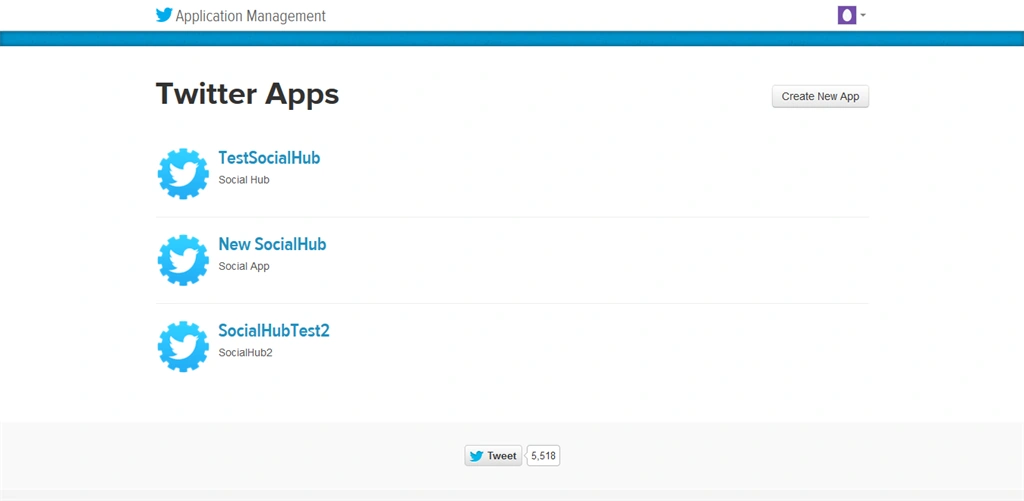
Step 1: Login to twitter and go to https://dev.twitter.com/ and scroll down to bottom under Tools section, click on Manage your apps. You will be able to see the dashboard with listing of apps that are created before. Here's the screenshot:
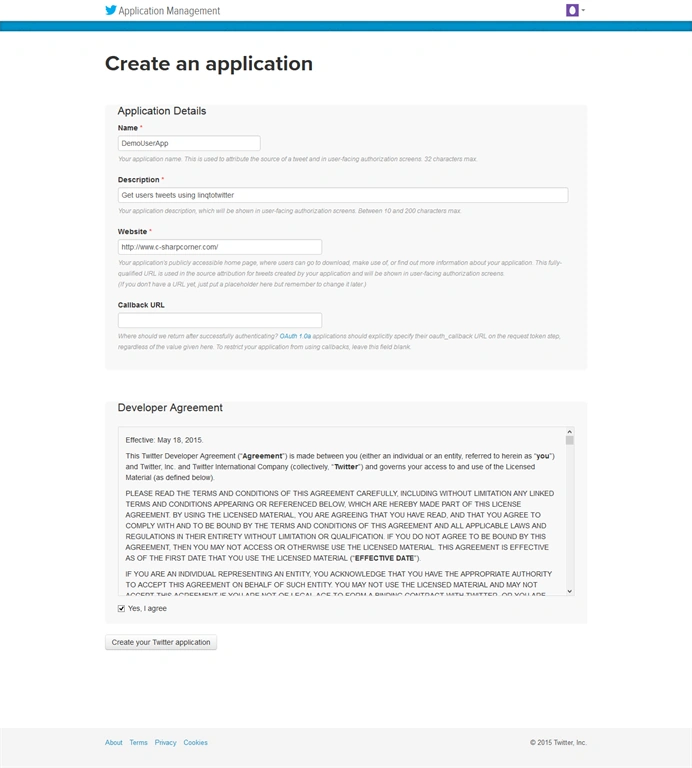
Step 2: Click Create New App and you will get the following screen. Now, fill the fields accordingly:
Step 3: Go to keys and Access tokens tab, inside that we will have Consumer key and Consumer Secret key and we need Access token and Access TokenSecret. To get Access keys, click on Generate Access Token button. Now Access token and Acess Token Secret will be visible. We need these 4 keys to fetch data from twitter.
Step 4: Now open VS 2013 and create console application (c#) and add LinqToTwitter library from nuget.
Step 5. Create Method as in the following code snippet:
- private static void Main(string[] args)
- {
- Console.WriteLine("working on it....");
- var tweetList = GetTwitterFeeds();
- Console.WriteLine("Tweets Count "+tweetList.Count);
- var file = new System.IO.StreamWriter("D:\\TweetsList.txt",true); // Make sure to change the path according to your system
- foreach (var item in tweetList)
- {
- file.WriteLine(item.CreatedAt);
- }
- file.Close();
- Console.WriteLine("Done! check your drive file has been created");
- Console.ReadLine();
- }
- public static List<Status> GetTwitterFeeds()
- {
- string screenname = "csharpcorner";
- var auth = new SingleUserAuthorizer
- {
- CredentialStore = new InMemoryCredentialStore()
- {
- ConsumerKey = ConfigurationManager.AppSettings["consumerkey"],
- ConsumerSecret = ConfigurationManager.AppSettings["consumersecret"],
- OAuthToken = ConfigurationManager.AppSettings["accessToken"],
- OAuthTokenSecret = ConfigurationManager.AppSettings["accessTokenSecret"]
- }
- };
- var twitterCtx = new TwitterContext(auth);
- var ownTweets = new List<Status>();
- ulong maxId = 0;
- bool flag = true;
- var statusResponse = new List<Status>();
- statusResponse = (from tweet in twitterCtx.Status
- where tweet.Type == StatusType.User
- && tweet.ScreenName == screenname
- && tweet.Count == 200
- select tweet).ToList();
- if (statusResponse.Count > 0)
- {
- maxId = ulong.Parse(statusResponse.Last().StatusID.ToString()) - 1;
- ownTweets.AddRange(statusResponse);
- }
- do
- {
- int rateLimitStatus = twitterCtx.RateLimitRemaining;
- if (rateLimitStatus != 0)
- {
- statusResponse = (from tweet in twitterCtx.Status
- where tweet.Type == StatusType.User
- && tweet.ScreenName == screenname
- && tweet.MaxID == maxId
- && tweet.Count == 200
- select tweet).ToList();
-
- if (statusResponse.Count != 0)
- {
- maxId = ulong.Parse(statusResponse.Last().StatusID.ToString()) - 1;
- ownTweets.AddRange(statusResponse);
- }
- else
- {
- flag = false;
- }
- }
- else
- {
- flag = false;
- }
- } while (flag);
- return ownTweets;
- }
- }
Description: The LINQ to Twitter authorizers are designed to bypass the Twitter authorization process and just sign a request, if you have all the four keys.
Twitter API allows only 180 request per 15mins if it gets exceeded we will get RateLimit Exceeded Exception.
For twitter rate limit exceeding, check the following link: https://dev.twitter.com/rest/public/rate-limiting
Akshay jainPosted Mar 14, 2018, 4:29 AM
This code is giving me error at statusResponse = (from tweet in twitterCtx.Status where tweet.Type == StatusType.User && tweet.ScreenName == screenname && tweet.MaxID == maxId && tweet.Count == 200 select tweet).ToList();
Yogesh PatilPosted Sep 18, 2017, 12:43 AM
What if tweets contain emoji? Means how to read it and display in proper format?? Please help me
Eric LynchPosted Aug 18, 2017, 5:51 PM
I keep getting "Access to directory <name of directory> is denied." What do I have to adjust to allow a Win forms app access to a local directory? I get this even if I run Visual Studio as administrator (I know the answer in asp.net, but I don't do many winforms apps anymore)
Vijay Kumar YadavPosted Jul 5, 2017, 7:26 AM
Https://stackoverflow.com/questions/32132953/how-to-get-more-tweet-from-a-user-using-linq-to-twitter/32133347#32133347 , there link code also not working im stuck not getting any solution .
Vijay Kumar YadavPosted Jul 5, 2017, 7:25 AM
I am using this code but getting issue as System.AggregateException' occurred in mscorlib.dll
Muhammad FaizanPosted Mar 15, 2017, 7:30 AM
I got aggregate exception in statusResponse Query => An unhandled exception of type 'System.AggregateException' occurred in mscorlib.dll
Aisha MukherjeePosted Jan 18, 2017, 1:39 AM
Sir there are some error on the code.. would you help me to resolve it ..GetTwitterFeeds() ,ConfigurationManager the name doesnt exit on current context .. help me..
Santhakumar MunuswamyPosted Sep 12, 2015, 3:14 AM
Welcome
Santhakumar MunuswamyPosted Sep 12, 2015, 3:14 AM
Good Start
Nilesh JadavPosted Sep 11, 2015, 9:24 AM
Good one sir
Ankit BansalPosted Sep 11, 2015, 5:29 AM
nice share...
Harshad PansuriyaPosted Sep 11, 2015, 1:00 AM
Very Nice Article Sir..
Karthikeyan KPosted Sep 10, 2015, 11:17 PM
Good one sir...Thanks for sharing us:)
Shridhar SharmaPosted Sep 10, 2015, 5:57 PM
welcome Rakesh. Cheers !
RakeshPosted Sep 10, 2015, 9:33 AM
Good Start welcome to C# Corner
Mahesh ChandPosted Sep 10, 2015, 9:10 AM
Welcome to C# Corner, Rakesh. Cheers!
Sibeesh VenuPosted Sep 10, 2015, 8:10 AM
Nice Share
Pankaj Kumar ChoudharyPosted Sep 10, 2015, 8:07 AM
Nice Article Sir.......
Rajeesh MenothPosted Sep 10, 2015, 7:39 AM
Good One , Change "In this blog " to "In this article"
Sabyasachi MishraPosted Sep 10, 2015, 2:22 AM
Good start.Thanks for sharing.