
We are going to establish a communication between a WCF service and a WPF client using the wsDualHttpBinding that allows a Server application take the initiative to start an asynchronous communication with connected client, to notify them about an event.
I will not explain how to achieve this, because it is a well-known topic and it is also well explained here. I will focus on how to obtain communication between the database and a WCF server application.
Receive notification from database to Server application
Let's assume that we must implement a stock change service, reporting real time prices. Also, let’s assume that these prices are stored in a database table feed by an eternal provider, such as a broker from stock market exchange. As soon as this table is updated, we want to notify our WPF clients about the price change. We have seen that it is relatively easy to send notifications from a WCF service to connected WPF clients, but how we can achieve this from DB to WCF service?
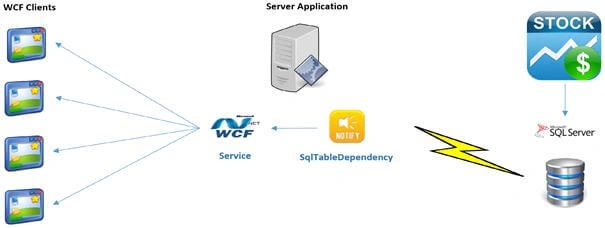
Ideally, we want for our database to instantly notify our server application about record changes, allowing us to execute a periodical SELECT. But how to monitor SQL Server table changes? Some options are:
- SQL Server Service Broker
- .NET SqlNotificationRequest
- .NET SqlDependency
All of these are work based on a notifications infrastructure. The first two options require us to have a good T-SQL and database knowledge to create database objects as service broker queue to monitor every change done on our records table, and notify us about any record table change. Although the last one does not require us to have this low-level knowledge, it presents a limitation: delivered notification does not report any information to us about which record has been changed, forcing us to perform a further SELECT to refresh the stock price.
Is it possible to receive record table change notifications containing modified, deleted or inserted records to avoid another SELECT to maintain updates to our cache?
Monitor table changes with SqlTableDependency
If we want get an alert about any table changes without paying attention to the underlying SQL Server infrastructure, then SqlTableDependency's record table change notifications will do that for us. Using notifications, an application can detect record changes saving us from having to continuously re-query the database to get new values.
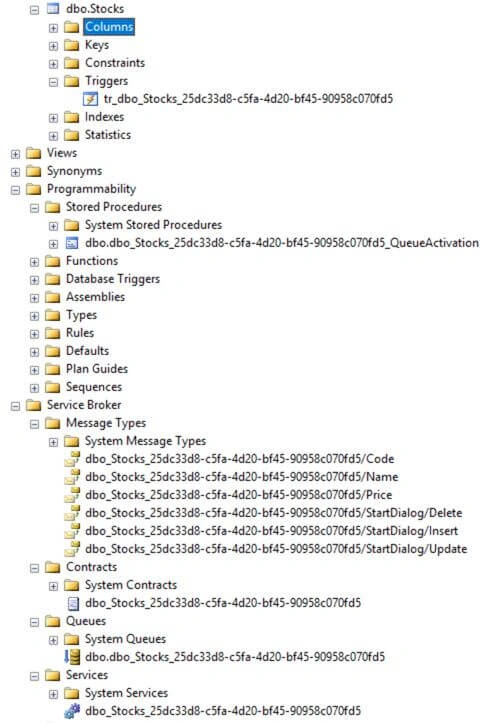
SqlTableDependency record change audit provides the low-level implementation to receive database notifications creating SQL Server trigger, queue and service broker that immediately notifies us when any record table changes happen.
Push table change notifications using WCF Publish-Subscribe pattern
Let's assume that we have a table that is continuously updated with stock value from an external thread. We want our WPF application to be notified every time a stock price is updated without periodically checking the stocks table.
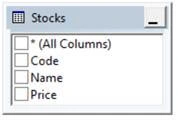
To achieve this, we need a service application that will take care of creating an SqlTableDependency object and for every change notification received, forward this new stock price to all interested WPF client applications.
For this, we are going to use a WCF service implementing the Publish-Subscribe pattern. This service will receive database notifications on any stock price change and in turn will notify subscribed WCF client applications.
Server application
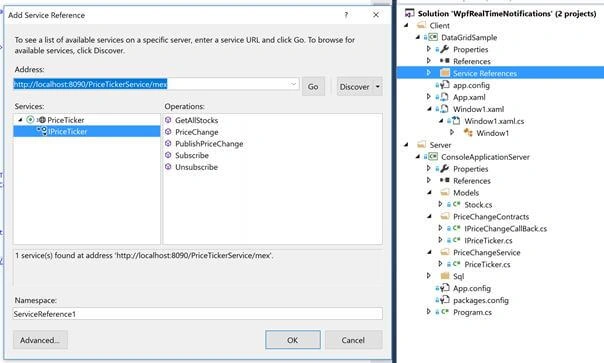
For simplicity, we create a console application acting as WCF host. In this application, we create a C# model that will be filled by notification with the new table value.
- public class Stock
- {
- public decimal Price { get; set; }
- public string Symbol { get; set; }
- public string Name { get; set; }
- }
- public interface IPriceChangeCallBack
- {
- [OperationContract]
- void PriceChange(string code, string name, decimal price);
- }
- [ServiceContract(CallbackContract = typeof(IPriceChangeCallBack))]
- public interface IPriceTicker
- {
- [OperationContract]
- void Subscribe();
- [OperationContract]
- void Unsubscribe();
- [OperationContract]
- IList<Stock> GetAllStocks();
- [OperationContract]
- void PublishPriceChange(string item, string name, decimal price);
- }
Now, we install SqlTableDependency nuget package in our server project.
PM> Install-Package SqlTableDependency
We now implement the WCF service. It creates an instance of SqlTableDependency pointing to the Stocks table: every record change on this table triggers a database notification that is cached from OnChanged event handler. Here, we simply push the new stock price to all connected clients.
- [ServiceBehavior(
- InstanceContextMode = InstanceContextMode.Single,
- ConcurrencyMode = ConcurrencyMode.Single)]
- public class PriceTicker : IPriceTicker, IDisposable
- {
- #region Instance variables
- private readonly List<IPriceChangeCallBack> _callbackList =
- new List<IPriceChangeCallBack>();
- private readonly string _connectionString;
- private readonly SqlTableDependency<Stock> _sqlTableDependency;
- #endregion
- #region Constructors
- public PriceTicker()
- {
- _connectionString = ConfigurationManager
- .ConnectionStrings["connectionString"]
- .ConnectionString;
- _sqlTableDependency = new SqlTableDependency<Stock>(
- _connectionString,
- "Stocks");
- _sqlTableDependency.OnChanged += TableDependency_Changed;
- _sqlTableDependency.OnError += (sender, args) =>
- Console.WriteLine($"Error: {args.Message}");
- _sqlTableDependency.Start();
- Console.WriteLine(@"Waiting for receiving notifications...");
- }
- #endregion
- #region SqlTableDependency
- private void TableDependency_Changed(
- object sender,
- RecordChangedEventArgs<Stock> e)
- {
- Console.WriteLine(Environment.NewLine);
- Console.WriteLine($"DML: {e.ChangeType}");
- Console.WriteLine($"Code: {e.Entity.Code}");
- Console.WriteLine($"Name: {e.Entity.Name}");
- Console.WriteLine($"Price: {e.Entity.Price}");
- this.PublishPriceChange(e.Entity.Code, e.Entity.Name, e.Entity.Price);
- }
- #endregion
- #region Publish-Subscribe design pattern
- public IList<Stock> GetAllStocks()
- {
- var stocks = new List<Stock>();
- using (var sqlConnection = new SqlConnection(_connectionString))
- {
- sqlConnection.Open();
- using (var sqlCommand = sqlConnection.CreateCommand())
- {
- sqlCommand.CommandText = "SELECT * FROM [Stocks]";
- using (var sqlDataReader = sqlCommand.ExecuteReader())
- {
- while (sqlDataReader.Read())
- {
- var code = sqlDataReader
- .GetString(sqlDataReader
- .GetOrdinal("Code"));
- var name = sqlDataReader
- .GetString(sqlDataReader
- .GetOrdinal("Name"));
- var price = sqlDataReader
- .GetDecimal(sqlDataReader
- .GetOrdinal("Price"));
- stocks.Add(new Stock {
- Code = code,
- Name = name,
- Price = price });
- }
- }
- }
- }
- return stocks;
- }
- public void Subscribe()
- {
- var registeredUser = OperationContext.
- Current
- .GetCallbackChannel<IPriceChangeCallBack>();
- if (!_callbackList.Contains(registeredUser))
- {
- _callbackList.Add(registeredUser);
- }
- }
- public void Unsubscribe()
- {
- var registeredUser = OperationContext
- .Current
- .GetCallbackChannel<IPriceChangeCallBack>();
- if (_callbackList.Contains(registeredUser))
- {
- _callbackList.Remove(registeredUser);
- }
- }
- public void PublishPriceChange(string code, string name, decimal price)
- {
- _callbackList.ForEach(delegate (IPriceChangeCallBack callback) {
- callback.PriceChange(code, name, price);
- });
- }
- #endregion
- #region IDisposable
- public void Dispose()
- {
- _sqlTableDependency.Stop();
- }
- #endregion
- }
Rajanikant HawaldarPosted Sep 21, 2019, 11:56 AM
very good, nice article
Tridip BhattacharjeePosted Aug 9, 2017, 5:50 AM
I like to thank you and all those people who write article in various web site. i like to share my experience about sql dependency. sql dependency is not very good and some time it can not detect changes and can not notify client too. one need admin rights in sql server to implement it. so it is not good if our database is hosted in shared environment. sql dependency is not push technology rather it is long polling. if anyone search google for sql dependency related issue then may see it has lots of down side. please do not mind because i have worse experience about it so said all the above. if possible we should avoid it. thanks
Tridip BhattacharjeePosted Aug 9, 2017, 5:46 AM
It would be better if you provide your code sample in zip format so other people can run it. also mention what .net version you have used. thanks
Alaa MasalmehPosted Jan 19, 2017, 2:03 AM
Good Explain... I may suggest to use Entity Framework instead o ADO.Net.
Amatya AgyeyPosted Dec 13, 2016, 11:19 PM
Very clear and specific .. Keep it up Mr. Bianco