

Introduction
This article explains how to remove all local storage and session storage or remove the storage depending on the key values. For example, if a key contains a specific string then we will remove that local storage and session storage. We will find all the local storage and session storage first and then we will loop through each. If a user needs to delete specific storage depending on a specific condition, we will delete that storage alone.
Both localStorage and sessionStorage have been introduced with HTML5. If you are new to the storage mechanism on the client side then you can find learn about that at Storage In HTML5.
Please see this article on my blog here.
Background
I am working on a client-side application where we use localStorage and sessionStorage for saving some key information. What I mean by key information is, like we store the mail id of the user using the application. There I got the requirement to delete the localStorage and sessionStorage depending on the key value. For example, I needed to delete the storage values whose keys start with “logged”. I did the requirement and thought to share it with you all. I hope someone will find it is useful.
Using the code
To start with you need to include the jQuery reference.
- <script src="https://code.jquery.com/jquery-2.1.4.min.js"></script>
Now we need to set the localStorage and sessionStorage, right?
Add the storage values in the ready event.
- localStorage.setItem("First1","First Local Storage");
- sessionStorage.setItem("First1","First Session Storage");
- localStorage.setItem("Second1","Second Local Storage");
- sessionStorage.setItem("Second1","Second Session Storage");
So we have set our localStorage and sessionStorage . Now we need to check whether it is saved or not, right? Just run your page and see your browser console.
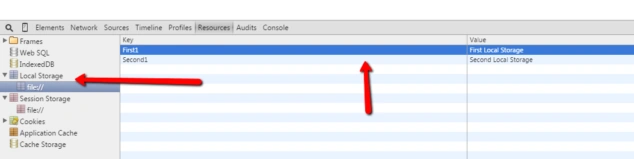
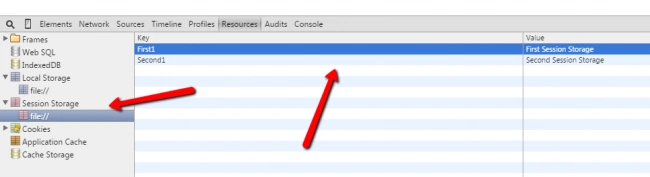
Now we will add some elements where we can fire the delete events. Cool?
- <a href="#" id="removeAllLocalStorage">Click To Remove All Local Storage</a>
- <br/>
- <br/> <a href="#" id="removeAllLocalStorageWhichStarts">Click To Remove All Local Storage Which Starts With "First"</a>
- <br/>
- <br/> <a href="#" id="removeAllSessionStorage">Click To Remove All Session Storage</a>
- <br/>
- <br/> <a href="#" id="removeAllSessionStorageWhichStarts">Click To Remove All Session Storage Which Starts With "First"</a>
- <br/>
- <br/>
Once that is done, we add the click event scripts
- < script>$(document).ready(function() { localStorage.setItem("First1", "First Local Storage"); sessionStorage.setItem("First1", "First Session Storage"); localStorage.setItem("Second1", "Second Local Storage"); sessionStorage.setItem("Second1", "Second Session Storage"); $("#removeAllLocalStorage").click(function() { Object.keys(localStorage) .forEach(function(key) { localStorage.removeItem(key); }); }); $("#removeAllLocalStorageWhichStarts").click(function() { Object.keys(localStorage) .forEach(function(key) { if ((/^First/.test(key))) { localStorage.removeItem(key); } }); }); $("#removeAllSessionStorage").click(function() { Object.keys(sessionStorage) .forEach(function(key) { sessionStorage.removeItem(key); }); }); $("#removeAllSessionStorageWhichStarts").click(function() { Object.keys(sessionStorage) .forEach(function(key) { if ((/^First/.test(key))) { sessionStorage.removeItem(key); } }); }); });
- < /script>
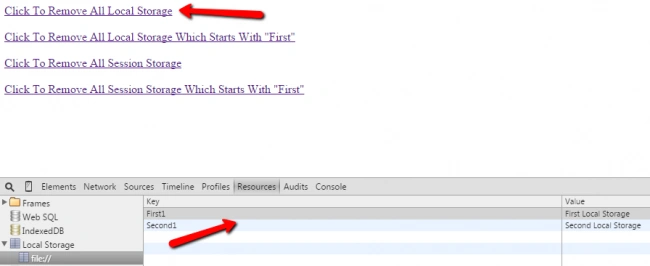

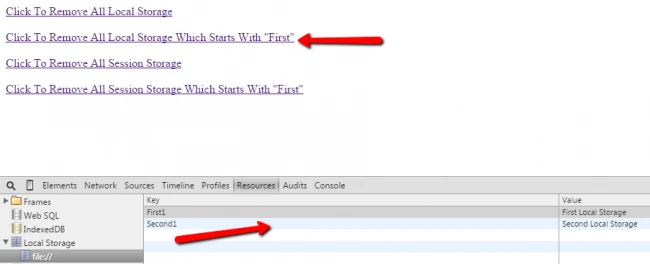

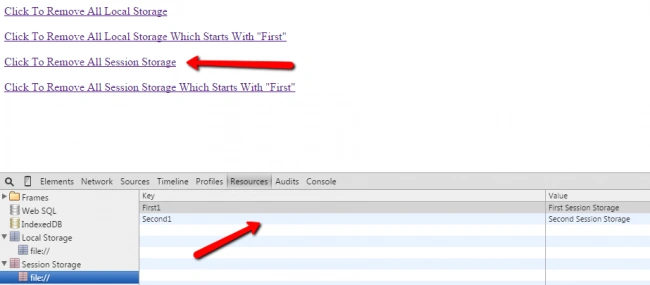
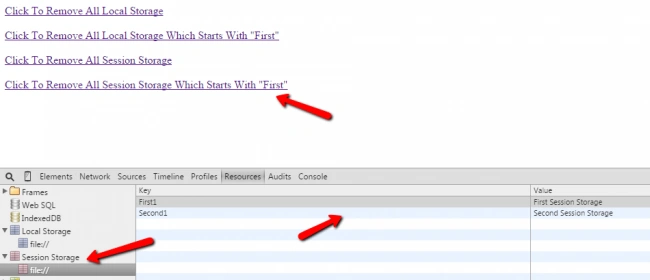
Next, we will fire the click event that removes all the session storage. Okay?


Complete Code
- <html>
- <head>
- <title>Remove all session storage,local storage or remove by key which starts with a particular string - Sibeesh Passion</title>
- <script src="https://code.jquery.com/jquery-2.1.4.min.js"></script>
- </head>
- <body>
- <a href="#" id="removeAllLocalStorage">Click To Remove All Local Storage</a>
- <br/>
- <br/>
- <a href="#" id="removeAllLocalStorageWhichStarts">Click To Remove All Local Storage Which Starts With "First"</a>
- <br/>
- <br/>
- <a href="#" id="removeAllSessionStorage">Click To Remove All Session Storage</a>
- <br/>
- <br/>
- <a href="#" id="removeAllSessionStorageWhichStarts">Click To Remove All Session Storage Which Starts With "First"</a>
- <br/>
- <br/>
- <div id="body"></div>
- <script>
- $(document).ready(function(){
- localStorage.setItem("First1","First Local Storage");
- sessionStorage.setItem("First1","First Session Storage");
- localStorage.setItem("Second1","Second Local Storage");
- sessionStorage.setItem("Second1","Second Session Storage");
- $("#removeAllLocalStorage").click(function(){
- Object.keys(localStorage)
- .forEach(function (key) {
- localStorage.removeItem(key);
- });
- });
- $("#removeAllLocalStorageWhichStarts").click(function(){
- Object.keys(localStorage)
- .forEach(function (key) {
- if ((/^First/.test(key))) {
- localStorage.removeItem(key);
- }
- });
- });
- sionStorage").click(function(){
- Object.keys(sessionStorage)
- .forEach(function (key) {
- sessionStorage.removeItem(key);
- });
- });
- $("#removeAllSessionStorageWhichStarts").click(function(){
- Object.keys(sessionStorage)
- .forEach(function (key) {
- if ((/^First/.test(key))) {
- sessionStorage.removeItem(key);
- }
- });
- });
- });
- </script>
- </body>
- </html>
Santhakumar MunuswamyPosted Aug 12, 2015, 3:03 PM
Good Article. Thanks for sharing
Sibeesh VenuPosted Aug 11, 2015, 12:51 AM
Ankit Bansal Thank you so much
Sibeesh VenuPosted Aug 11, 2015, 12:51 AM
Pankaj Kumar Choudhary Thank you so much
Sibeesh VenuPosted Aug 11, 2015, 12:51 AM
Shridhar Sharma Thank you so much
Sibeesh VenuPosted Aug 11, 2015, 12:51 AM
Nipesh Janghel Thank you so much
Sibeesh VenuPosted Aug 11, 2015, 12:51 AM
Gowtham K Thank you so much
Sibeesh VenuPosted Aug 11, 2015, 12:50 AM
Gopi Chand Thank you so much
Sibeesh VenuPosted Aug 11, 2015, 12:50 AM
Rajeesh Menoth Thank you so much
Sibeesh VenuPosted Aug 11, 2015, 12:50 AM
Manas Mohapatra Thank you so much
Ankit BansalPosted Aug 11, 2015, 12:36 AM
nice explain..
Pankaj Kumar ChoudharyPosted Aug 10, 2015, 8:48 PM
Nice Share Sir........
Shridhar SharmaPosted Aug 10, 2015, 5:25 PM
nice info.
Nipesh JanghelPosted Aug 10, 2015, 11:59 AM
Nice!!
Gowtham KPosted Aug 10, 2015, 11:15 AM
Nice one, thanks for sharing
Gopi ChandPosted Aug 10, 2015, 9:32 AM
Good...its very good
Rajeesh MenothPosted Aug 10, 2015, 5:50 AM
Nice One
Manas MohapatraPosted Aug 10, 2015, 5:42 AM
Good feature in HTML5. Thanks for sharing..