
A database developer and Database Administrator should be familiar with these methods.
If you don't know how to restore a SQL Server Backup then you need to look at this article. You can restore a full, differential or transaction log backup.
Note: When you are restoring a database the user cannot access the database. It will show restoring mode.
You can restore a SQL Server BACKUP with using one of multiple methods using TSQL as in the following:
- Restore a full database
- Restore the backup using a backup drive
- Restore full and differential database backups
- Restore a transaction log backup
- Restore multiple transaction log backups from same backup file
- Restore a database and move files
- Copying a database using Backup and Restore
- Copying a database using Backup and Restore with Backup Drive
- Restoring using TAPE syntax
Let's create a Test scenario.
- --Create Test DB.
- USE [Master]
- GO
- CREATE DATABASE RestoreDB
- GO
Restoring a Full backup
I will restore a full backup from the database "RestoreDB" using disk with/without (NOREVERY) and Backup Device.
For example:
- 1.--Restore full backup using disk
- USE [Master]
- GO
- RESTORE DATABASE RestoreDB FROM DISK = 'D:\backup\NewBackup\RestoreDB.BAK'
- GO

- 2.--Restore full backup using disk with NORECOVERY
- USE [Master]
- GO
- RESTORE DATABASE RestoreDB FROM DISK = 'D:\backup\NewBackup\RestoreDB.BAK'
- WITH NORECOVERY
- GO
- --Recover the database:
- RESTORE DATABASE RestoreDB WITH RECOVERY;
- GO

You can restore backup by Logical Backup drive that have stored multiple backup.
- --Restore full backup using backup device
- RESTORE DATABASE RestoreDB
- FROM [DBBackupDevice]
- GO

Restoring full and differential database backups
Note: differential backup will be restored after full backup restored.
- USE [Master]
- GO
- --Restore full backup using disk with NORECOVERY
- RESTORE DATABASE RestoreDB
- FROM DISK = 'D:\backup\NewBackup\RestoreDB.BAK'
- WITH NORECOVERY
- GO
- --Restore differential backup using disk with RECOVERY
- RESTORE DATABASE RestoreDB
- FROM DISK = 'D:\backup\NewBackup\RestoreDB.DIF'
- WITH RECOVERY;
- GO

Restore a transaction log backup
Now you can restore the transaction log after a Full and differential backup restore.
- USE [master]
- GO
- RESTORE LOG RestoreDB FROM DISK = 'D:\backup\NewBackup\RestoreDB.TRN'
- WITH NORECOVERY;
- GO

You can use the same backup file, RestoreDB.TRN, to write all of our transaction log backups.
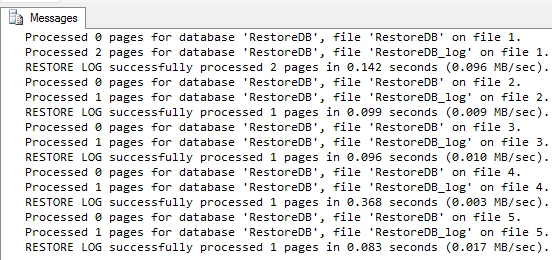
Now I will move MDF and LDF files to new files; you can see below:
- --Moving full database and transaction log
- RESTORE DATABASE RestoreDB
- FROM [DBBackupDevice] WITH NORECOVERY,
- MOVE 'RestoreDB' TO 'C:\Program Files\Microsoft SQL Server\MSSQL10_50.MSSQLSERVER\MSSQL\DATA\RestoreDB_New.mdf',
- MOVE 'RestoreDB_Log' TO 'C:\Program Files\Microsoft SQL Server\MSSQL10_50.MSSQLSERVER\MSSQL\DATA\RestoreDB_log_New.ldf';
- RESTORE LOG RestoreDB
- FROM [DBBackupDevice] WITH RECOVERY;

Copying a database using BACKUP and RESTORE
You can make a copy of a database using backup and restore, for example:
- --copy database using Full backup and restore
- ESTORE DATABASE RestoreDB_COPY
- FROM DISK = 'D:\backup\NewBackup\RestoreDB.BAK'
- ITH
- MOVE 'RestoreDB' TO 'C:\RestoreDB.mdf',
- MOVE 'RestoreDB_log' TO 'C:\RestoreDB_log.ldf',
- REPLACE, NORECOVERY;
- GO
- RESTORE DATABASE RestoreDB_COPY
- WITH RECOVERY;

Copying a database using BACKUP and Restore with Backup Drive
You can make a copy of a database using backup and restore with a logical Backup Drive as in the following:
- --copy database using Full backup and restore with backup device
- RESTORE DATABASE RestoreDB_NewCOPY
- FROM [DBBackupDevice]
- WITH
- MOVE 'RestoreDB' TO 'C:\RestoreDB.mdf',
- MOVE 'RestoreDB_log' TO 'C:\RestoreDB_log.ldf'
- GO

Restoring using Tape syntax
For must be Tape for Restores a full database backup from a TAPE backup device.
- -- Restore with Tape device
- USE [master]
- RESTORE DATABASE RestoreDB
- FROM TAPE = '\\.\tape0';
Summary
This article describes how to restore a SQL Server backup with multiple methods using Transact-SQL and how it will be used in SQL Server.
Shivom AgarwalPosted Aug 4, 2014, 2:08 AM
you can be solve using command line with replace keyword or To restore using SSMS go to the options page for the restore select "Overwrite the existing database.
Guest UserPosted Aug 1, 2014, 10:52 PM
what happens sql server throws error in restore then i goto log folder directory and remove earlier log file? can we solve it via command line so it overrite that old log file
Guest UserPosted Aug 1, 2014, 10:51 PM
nice explanation via command line. I sometime face issue in restoring DB, when the same name db Log file is there? how can we solve for this.