

Introduction
This article shows how to retrieve data from MySQL using Ajax in PHP. Ajax is very useful in PHP for developing a dynamic website. It is used to create dynamic and fast web pages. This helps in updating part of a web page without reloading the entire page. In this article I will first create two files. The first file sends a request using jQuery and Ajax and second file processes the request and returns the response to the first file. You will see in the example below.
Example
The first example explains the "$.Ajax" method and the second example explains the "$.Post" method. Let's start with the first example of using the $.Ajax method.
First of all create a file "school.php" and include the jQuery library file and write some JavaScript functions for sending the request to "data.php" to receive the response for displaying the results on the same page.
<html>
<head>
<script src="http://code.jquery.com/jquery-latest.js"></script>
<script>
function information() {
var Username = $('#Username').val();
var RollNo = $('#RollNo').val();
$.ajax({
type: "POST",
url: "data.php",
data: { Username: Username, RollNo: RollNo }
}).done(function (result) {
$("#message").html("Roll no: " + RollNo + " and Address: " + result);
});
}
</script>
</head>
<body>
<table>
<tr>
<td>Username:</td>
<td><input type="text" Username="Username" id="Username" /><td>
</tr>
<tr>
<td>Roll Number:</td>
<td><input type="text" Username="RollNo" id="RollNo" /><td>
</tr>
<tr>
<td></td>
<td><input type="button" Username="submit" id="submit" value="submit" onClick = "information()" /></td>
</tr>
</table>
<div id="message"></div>
</body>
</html>
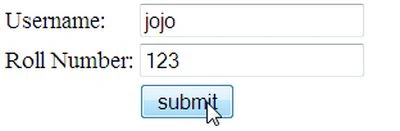
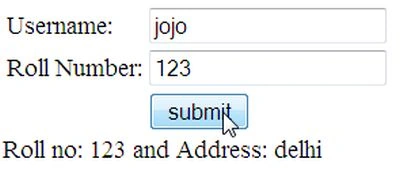


Join the conversation! Your thoughts help the community grow.