

Introduction
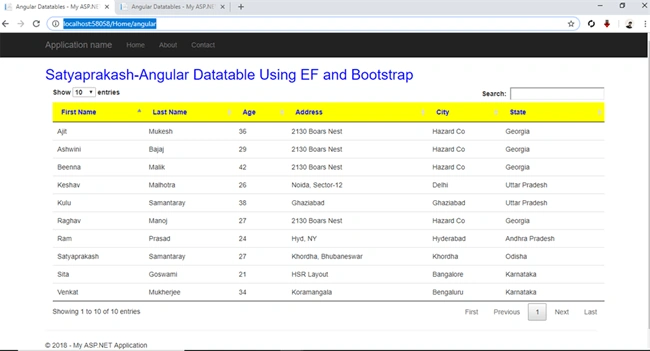
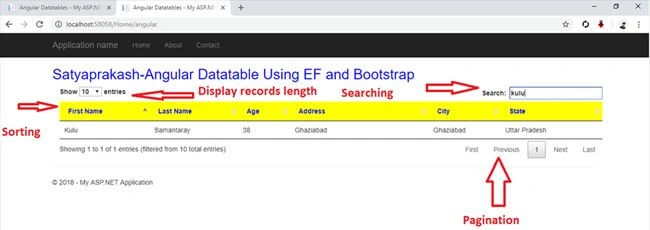
In this session, I will show you the steps of implementing Angular Datatable in ASP.NET MVC application. There is no need for adding filter data and pagination manually. You can get all these benefits by using Datatable which is open source.
Description
DataTables is a powerful and easy to use jQuery plugin for displaying tabular data with features for Pagination, searching, State saving, Multi-column sorting with data type detection and lots more with ZERO or minimal configuration. For resolving the datatable performance issue like server-side filtering, sorting, and paging features when working with a large amount of data, many Angular grid tools are available.
Note
Before you go through this session I will suggest you visit my previous Datatable session as mentioned below. As I have used the same table structure with the data and same Entity Data Model in both sessions and under the same project I have created both these datatable based applications.
Steps to be followed,
Step 1
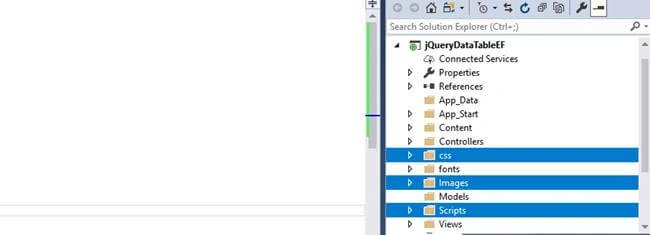
Add required JS, CSS files and 3 image files for sorting icons in the application that are the dependencies of angular-datatables.
You can find these files from the attachment and the structure should look like as mentioned below.
Step 2
Here, I have added a JavaScript file in the "Scripts" folder for adding Angular components (module, controller etc). Right-click on your "Scripts" folder > Add > New Item > select "javascript" file > Enter name (here "myApp.js")> Ok.
Code Ref
- var app = angular.module('MyApp', ['datatables']);
- app.controller('homeCtrl', ['$scope', '$http', 'DTOptionsBuilder', 'DTColumnBuilder',
- function ($scope, $http, DTOptionsBuilder, DTColumnBuilder) {
- $scope.dtColumns = [
- DTColumnBuilder.newColumn("FirstName", "First Name"),
- DTColumnBuilder.newColumn("LastName", "Last Name"),
- DTColumnBuilder.newColumn("Age", "Age"),
- DTColumnBuilder.newColumn("Address", "Address"),
- DTColumnBuilder.newColumn("City", "City"),
- DTColumnBuilder.newColumn("State", "State")
- ]
- $scope.dtOptions = DTOptionsBuilder.newOptions().withOption('ajax', {
- url: "/home/getdata",
- type: "POST"
- })
- .withPaginationType('full_numbers')
- .withDisplayLength(10);
- }])
I have included the datatables module in our module (here "MyApp") for implementing datatables in our AngularJS application.
- var app = angular.module('MyApp', ['datatables']);
Here, I have defined some function parameters with the controller name.
- app.controller('homeCtrl', ['$scope', '$http', 'DTOptionsBuilder', 'DTColumnBuilder',
- function ($scope, $http, DTOptionsBuilder, DTColumnBuilder)
I have mentioned the columns of table (Entity Types) as uploaded using enitity data model using scope object. The scope is a JavaScript object which basically binds the "controller" and the "view". One can define member variables in the scope within the controller which can then be accessed by the view.
- $scope.dtColumns = [
- DTColumnBuilder.newColumn("FirstName", "First Name"),
- DTColumnBuilder.newColumn("LastName", "Last Name"),
- DTColumnBuilder.newColumn("Age", "Age"),
- DTColumnBuilder.newColumn("Address", "Address"),
- DTColumnBuilder.newColumn("City", "City"),
- DTColumnBuilder.newColumn("State", "State")
- ]
Sarathlal SaseendranPosted Nov 12, 2018, 9:35 AM
Very nice article