

Introduction
CodeIgniter is an Application Development Framework; a toolkit. It has a small performance footprint due to the modular approach to loading its libraries and does a great job of separating logic from presentation using a Model-View-Controller (MVC) dynamic. CodeIgniter allows information to be retrieved, inserted, updated and deleted in your database with minimal scripting. In some cases only one or two lines of code is necessary to perform a database action.
Requirements
- PHP Knowledge
- PHP 5.3+ (5.4 Preferred)
- MySQL
- Apache (enabled mod_rewrite)
- Or one of these setup: WAMP / XXAMP / MAMP / or LAM
When you need CodeIgniter
You can download at http://codeigniter.com/.
Retrieved Record
If you are using Codeigniter you can use SQL SELECT statements.
- $this->db-get(); // this function use to get all records into database .and this is by default function in codeigniter.
- $query = $this->db->get('database-table-name');
- // SELECT * FROM database-table-name'
- The second and third parameters enable you to set a limit and offset clause:
- $query = $this->db->get('database-table-name, 10, 20);
- // SELECT * FROM 'database-table-name LIMIT 20, 10 (in MySQL. Other databases have slightly different syntax)
- $query = $this->db->get(database-table-name);
- foreach ($query->result() as $row)
- {
- echo $row->field1;
- echo $row->field2;
- echo $row->field3;
- echo $row->field4;
- echo $row->field5;
- }
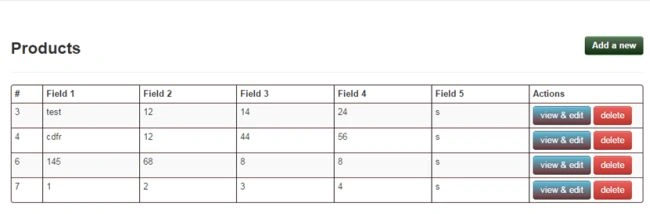
Insert data
You can either pass an array or an object to the function. Here is an example of using an array:
- $data = array(
- 'title' => 'My title' ,
- 'name' => 'My Name' ,
- 'date' => 'My date'
- );
- $this->db->insert(‘database-table-name’’, $data);
- // Produces: INSERT INTO database-table-name’ (title, name, date) VALUES ('My title', 'My name', 'My date')

Updating Data
You can pass an array or an object to the function. Here is an example of using an array:
- $data = array(
- 'title' => $title,
- 'name' => $name,
- 'date' => $date
- );
- $this->db->where('id', $id);
- $this->db->update(‘database-table-name’, $data);
- // Produces:
- // UPDATE mytable
- // SET title = '{$title}', name = '{$name}', date = '{$date}'
- // WHERE id = $id
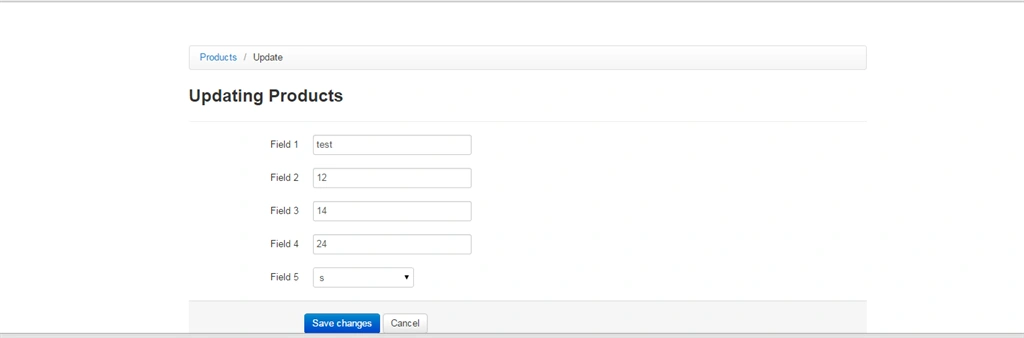
Deleting Data
- $this->db->delete();
- Generates a delete SQL string and runs the query.
- $this->db->delete(‘database-table-name’, array('id' => $id));
- // Produces:
- // DELETE FROM mytable
- // WHERE id = $id
- The first parameter is the table name, the second is the where clause. You can also use the where() or or_where() functions instead of passing the data to the second parameter of the function:
- $this->db->where('id', $id);
- $this->db->delete(‘database-table-name’);
- // Produces:
- // DELETE FROM database-table-name
- // WHERE id = $id
- An array of table names can be passed into delete() if you would like to delete data from more than 1 table.
- $tables = array('table1', 'table2', 'table3');
- $this->db->where('id', '5');
- $this->db->delete($tables);
Kuber RawatPosted Dec 29, 2015, 1:35 AM
databse
Bhushan SinghPosted Apr 13, 2015, 12:17 AM
-- phpMyAdmin SQL Dump-- version 4.1.12-- http://www.phpmyadmin.net -- -- Host: 127.0.0.1 -- Generation Time: Apr 13, 2015 at 06:20 AM -- Server version: 5.5.36 -- PHP Version: 5.4.27 SET SQL_MODE = "NO_AUTO_VALUE_ON_ZERO"; SET time_zone = "+00:00"; /*!40101 SET @OLD_CHARACTER_SET_CLIENT=@@CHARACTER_SET_CLIENT */; /*!40101 SET @OLD_CHARACTER_SET_RESULTS=@@CHARACTER_SET_RESULTS */; /*!40101 SET @OLD_COLLATION_CONNECTION=@@COLLATION_CONNECTION */; /*!40101 SET NAMES utf8 */; -- -- Database: `dummy_db` -- -- -------------------------------------------------------- -- -- Table structure for table `ci_cookies` -- CREATE TABLE IF NOT EXISTS `ci_cookies` ( `id` int(11) NOT NULL AUTO_INCREMENT, `cookie_id` varchar(255) DEFAULT NULL, `netid` varchar(255) DEFAULT NULL, `ip_address` varchar(255) DEFAULT NULL, `user_agent` varchar(255) DEFAULT NULL, `orig_page_requested` varchar(120) DEFAULT NULL, `php_session_id` varchar(40) DEFAULT NULL, `created_at` datetime DEFAULT NULL, `updated_at` datetime DEFAULT NULL, PRIMARY KEY (`id`) ) ENGINE=InnoDB DEFAULT CHARSET=latin1 AUTO_INCREMENT=1 ; -- -------------------------------------------------------- -- -- Table structure for table `ci_sessions` -- CREATE TABLE IF NOT EXISTS `ci_sessions` ( `session_id` varchar(40) NOT NULL DEFAULT '0', `ip_address` varchar(45) NOT NULL DEFAULT '0', `user_agent` varchar(120) NOT NULL, `last_activity` int(10) unsigned NOT NULL DEFAULT '0', `user_data` text NOT NULL, PRIMARY KEY (`session_id`), KEY `last_activity_idx` (`last_activity`) ) ENGINE=MyISAM DEFAULT CHARSET=latin1; -- -------------------------------------------------------- -- -- Table structure for table `manufacturers` -- CREATE TABLE IF NOT EXISTS `manufacturers` ( `id` int(11) unsigned NOT NULL AUTO_INCREMENT, `name` varchar(50) DEFAULT NULL, PRIMARY KEY (`id`) ) ENGINE=InnoDB DEFAULT CHARSET=utf8 AUTO_INCREMENT=1 ; -- -------------------------------------------------------- -- -- Table structure for table `membership` -- CREATE TABLE IF NOT EXISTS `membership` ( `id` int(11) NOT NULL AUTO_INCREMENT, `first_name` varchar(255) DEFAULT NULL, `last_name` varchar(255) DEFAULT NULL, `email_addres` varchar(255) DEFAULT NULL, `user_name` varchar(255) DEFAULT NULL, `pass_word` varchar(32) DEFAULT NULL, PRIMARY KEY (`id`) ) ENGINE=InnoDB DEFAULT CHARSET=latin1 AUTO_INCREMENT=1 ; -- -------------------------------------------------------- -- -- Table structure for table `products` -- CREATE TABLE IF NOT EXISTS `products` ( `id` int(11) unsigned NOT NULL AUTO_INCREMENT, `description` varchar(40) DEFAULT NULL, `stock` double DEFAULT NULL, `cost_price` double DEFAULT NULL, `sell_price` double DEFAULT NULL, `manufacture_id` int(11) DEFAULT NULL, PRIMARY KEY (`id`) ) ENGINE=InnoDB DEFAULT CHARSET=latin1 AUTO_INCREMENT=1 ; /*!40101 SET CHARACTER_SET_CLIENT=@OLD_CHARACTER_SET_CLIENT */; /*!40101 SET CHARACTER_SET_RESULTS=@OLD_CHARACTER_SET_RESULTS */; /*!40101 SET COLLATION_CONNECTION=@OLD_COLLATION_CONNECTION */;
Suhan alam RanaPosted Apr 10, 2015, 4:41 PM
Hi .Where the sql file??