Introduction
This article's intention is to explain the main skills measured in this sub-topic of the AZ-204 Certification. Azure Event Grid, Azure Notification Hub, and Azure Event Hub are the main components that will have their fundamentals explained here alongside a practical example.
This certification is very extensive and this article approaches only the main topics, make sure you know those components in depth before taking the exam. Another great tip is to do exam simulators before the official exam in order to validate your knowledge.
What is the Certification AZ-204 - Developing Solutions for Microsoft Azure?
The AZ-204 - Developing Solutions for Microsoft Azure certification measures designing, building, testing, and maintaining skills of an application and/or service in the Microsoft Azure Cloud environment. It approaches, among others, those components.
- Azure Virtual Machines
- Docker
- Azure Containers
- Service Web App
- Azure Functions
- Cosmos DB
- Azure Storage
- Azure AD
- Azure Key Vault
- Azure Managed Identities
- Azure Redis Cache
- Azure Logic App
- Azure Event Grid
- Azure Event Hub
- Azure Notification Hub
- Azure Service Bus
- Azure Queue Storage
Target Audience
Any IT professional willing to improve his knowledge in Microsoft Azure is encouraged to take this certification, it is a great way to measure your skills within trending technologies. But, some groups of professionals are more keen to take maximum advantage of it.
- Azure Developers, with at least 1 year of experience with Microsoft Azure.
- Experienced Software Developers, looking for an Architect position in a hybrid environment;
- Software Developers, working to move applications to the cloud environment.
Skills Measured
According to today's date, the skills that are measured in the exam are split as follows.
- Develop Azure compute solutions (25-30%)
- Implement Azure functions
- Develop for Azure storage (10-15%)
- Implement Azure security (15-20%)
- Monitor, troubleshoot, and optimize Azure solutions (10-15%)
- Connect to and consume Azure services and third-party services (25- 30%)
Benefits of Getting Certified
The main benefit here is having a worldwide recognized certification that proves that you have knowledge of this topic. Among intrinsic and extrinsic benefits, we have,
- Higher growth potential, as certifications, are a big plus.
- Discounts and deals in Microsoft products and partners, like PluralSight and UpWork.
- MCP Newsletters, with trending technologies.
- Higher exposure on LinkedIn, as recruiters usually search for specific certifications.
- With a higher salary, you will be more valuable to your company.
- Unique happiness when getting the result and you were approved, knowing that all your efforts were worth it.
Main Skills Measured by this Topic
What is Azure Event Grid?
Azure Event Grid is an Azure service to manage routing events from any source to any destination. It provides a simple and strong customizable event delivery process where you can manage at a minimum level which type of events are going to be received as well as manage at a minimum level which subscribers are going to receive those events.
It works perfectly with event-based architectures where you can subscribe to events from Azure resources and publish those events to an event handler or webhook. With Custom Topics you can also create your custom events to be published in your Event Grid.
Azure Event Grid is grouped by Event Sources and Event Handlers. Event sources are the services that are sending information to the Event Grid while Event Handlers are the services that are going to be receiving. Nowadays Event Grid supports the following Event Sources and Event Handles.
- Event Sources
- Azure App Configuration
- Azure Blob Storage
- Azure Communication Services
- Azure Container Registry
- Azure Event Hubs
- Azure IoT Hub
- Azure Key Vault
- Azure Machine Learning
- Azure Maps
- Azure Media Services
- Azure resource groups
- Azure Service Bus
- Azure SignalR
- Azure subscriptions
- Event Handlers
- Azure Automation
- Azure Functions
- Event Hubs
- Relay Hybrid Connections
- Logic Apps
- Power Automate
- Service Bus
- Queue Storage
- WebHooks
Azure Event Grid supports events fan-out with 24-hour retry reliability to make sure events are delivered, it is a serverless product that supports dynamic scalability at a low cost where you only pay for the events used. In order for a better understanding of Event Grid particularities, some key concepts also have to be better explained as follows.
- Domain, groups Event Grid topics related to the same application in order to better management.
- Topic, the endpoint where events are sent
- System Topics, built-in topics provided by Azure Services.
- Custom Topics, applications, and third-party topics.
- Partner Events provides a way for third parties SAAS to publish events.
- Events, the events that happened in the service.
- Publishers, the service that published the event.
- Event Sources, where the event took place.
- Event Subscriptions, the mechanism that routes the events.
- Event Subscriptions Expiration
- Event Handlers, the app or service receiving the events.
- Event Delivery, batch or single events.
- Batching, a group of events sent in the same request.
What is Azure Event Hub?
Azure Event Hub is an event ingestion, being able to consume millions of events from anywhere and it is also able to process those events, in real-time or micro-batching, with the help of the auto-inflate feature, which scales automatically the number throughput to attend your dynamic needs. It provides an easy way to connect with your Apache Kafka applications and clients.
Azure Event Hub helps you build your big data pipeline in order to analyze logging, anomalies, user, and device telemetry where you only pay for what you use. In order to have a better understanding of Azure Event Hub, the following terminologies have to be better understood.
- Namespace is an endpoint to receive your events and distribute them to event hubs.
- Event Hub, where your events are going to be delivered.
- Event Hub Cluster, dedicated Event Hub with a 99,99% SLA.
- Event Hub Capture enables automatic capture of streaming events and saving them.
- Events Hubs for Apache Kafka, Event Hub endpoint compatible with Apache Kafka.
- Event Publishers, applications, or services that publish events to an Event Hub.
- Publisher Policy, a unique ID used to identify publishers.
- Partitions ordered sequence of events in an Event Hub.
- Event Consumer, applications or services reading events from an Event Hub.
- Consumer Group enables multiple consumers to each have a particular view of the consumed events.
- Stream Offset, holds the position of an event inside a partition.
- Checkpointing is the process of tracking events that are read from the ones that are not.
Azure Hub X Azure Grid
Azure Event Hub and Azure Event Grid both handle events but in a very different form and with a completely different type of usage as the following comparative table shows.

What is Azure Notification Hub?
Different from the previous topics, this is not a service to consume and publish events. Azure Notification Hub's focus is to send notifications to mobile apps in order to increase app engagement or app usage, you can filter the apps or users that are going to receive those notifications with the help of tags and those apps can be registered within Azure Notification Hub in two different models.
In the installation model, the app sends an installation request to Azure Notification Hub with all the required information to complete the installation process. This model is easier to implement and maintain.
In the registration model, the app sends a registration request to Azure Notification Hub with the PNS handlers and tags while the Azure Notification Hub answers with the registration ID. Native or generic templates can be used in order to define the message.
Azure Notification Hub main concepts.
- Routing is the process of selecting the registrations to receive the push notification.
- Broadcast, all registrations are going to receive the push notification.
- Tag, registrations that contain the specific tag are going to receive the push notification.
- Tag Expression, registrations that match the tag expressions are going to receive the push notification.
- Notification Hub Namespace, groups one or more Notification Hubs.
- Tags are used to label applications for a better routing experience.
- Templates define the format of how the client is going to receive the push notifications. Is platform-independent.
- Platform Notification Service - PNS, each platform has its own PNS which is responsible for sending push notifications.
Practical Examples
Azure Event Grid with Azure Function
Here we are going to configure an Event Subscription capturing subscribed to your Azure Subscription and having its events handled by an Azure Function.
Pre-requisites
- Existent Azure Function App. Here, it is named "samplefunctioneventgrid" and with the .Net Core 3.1 runtime stack.
Creating the Event Grid with Azure Portal
From your Azure Subscription, go to Events and then add an Event Subscription.
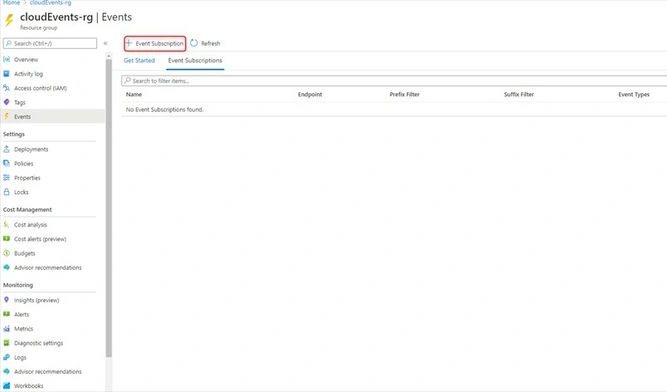
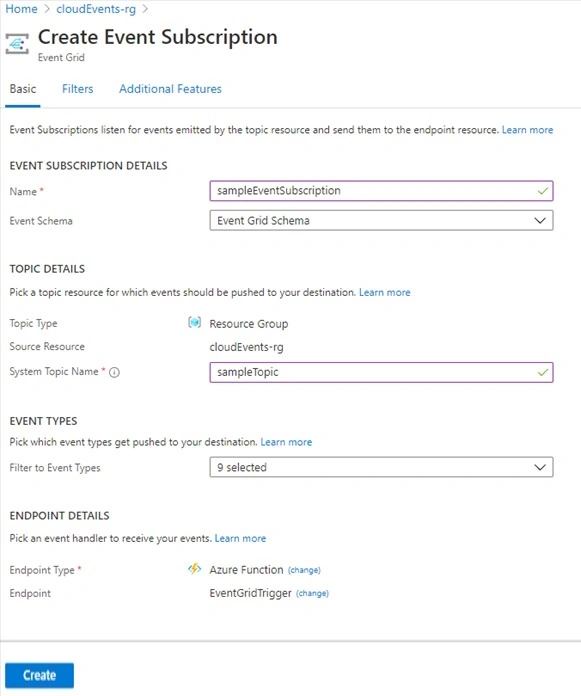
Configure the Event Subscription to collect every event that happens in your Azure Subscription and set the event handler as the Azure Function.
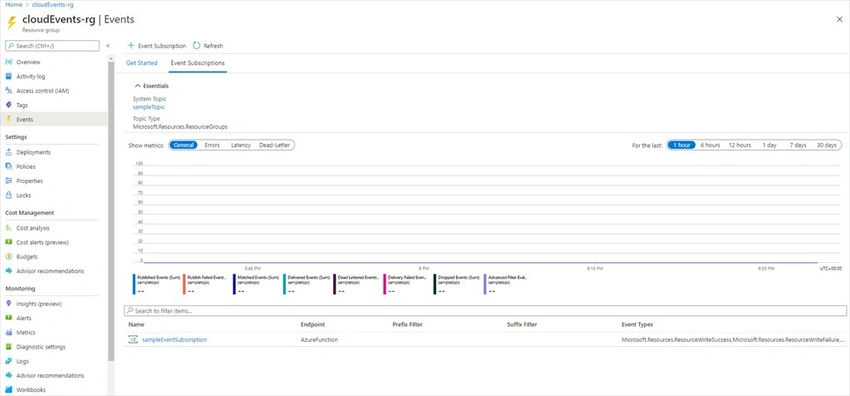
Result
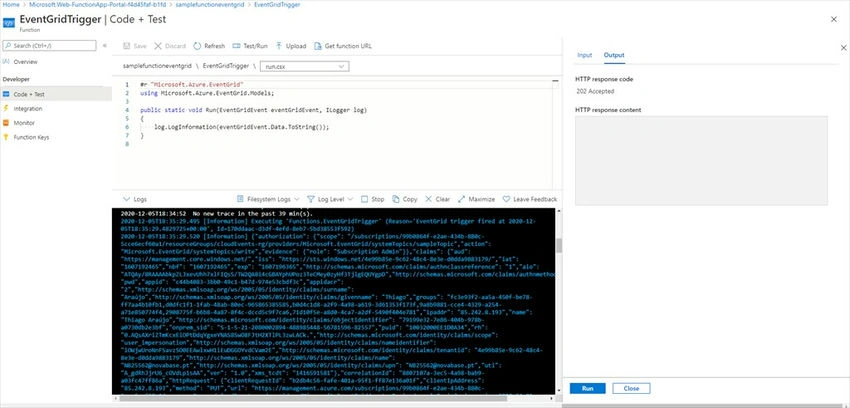
Testing the Event Grid with Azure Function
Let's delete a resource and check the result.
Azure Event Hub with .Net Core
Create the Event Hub
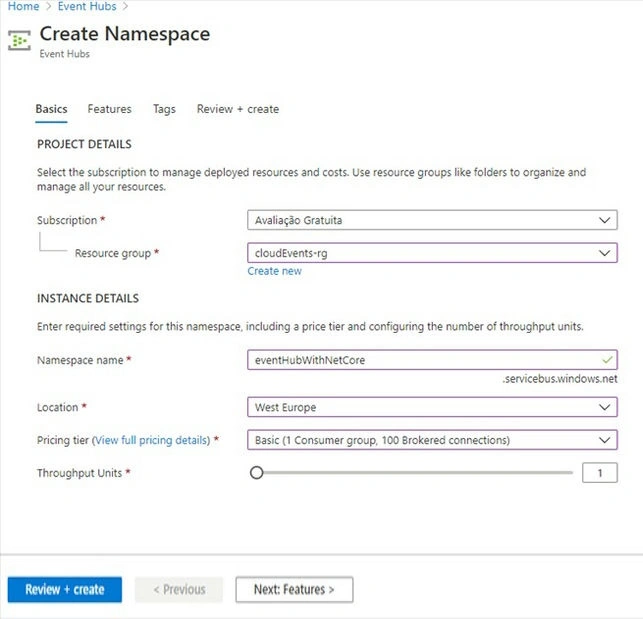
From your Azure Portal, go to Event Hub Namespace and create a new one. Here it's named eventHubWithNetCore.
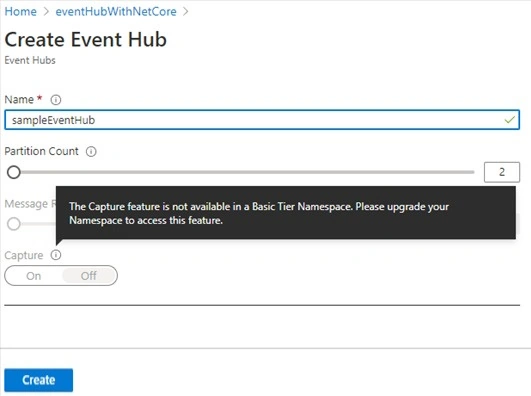
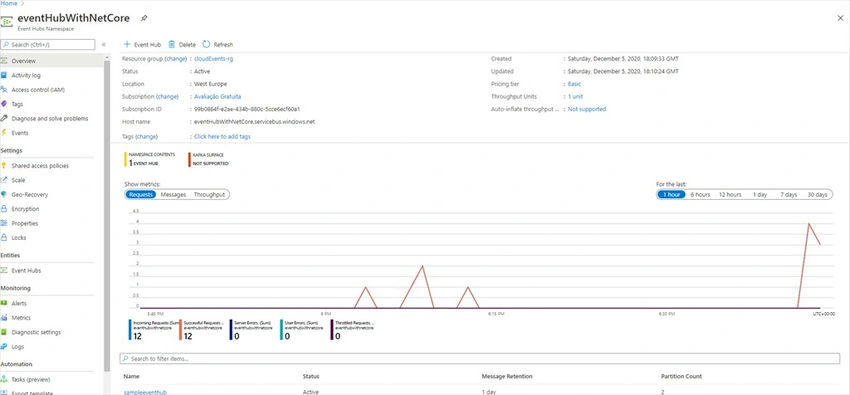
Create a new Event Hub, from your Event Hub Namespace go to Entities and then Event Hub and add a new one. Here it's named sampleeventhub.
Result
Sending Events to your Azure Event Hub
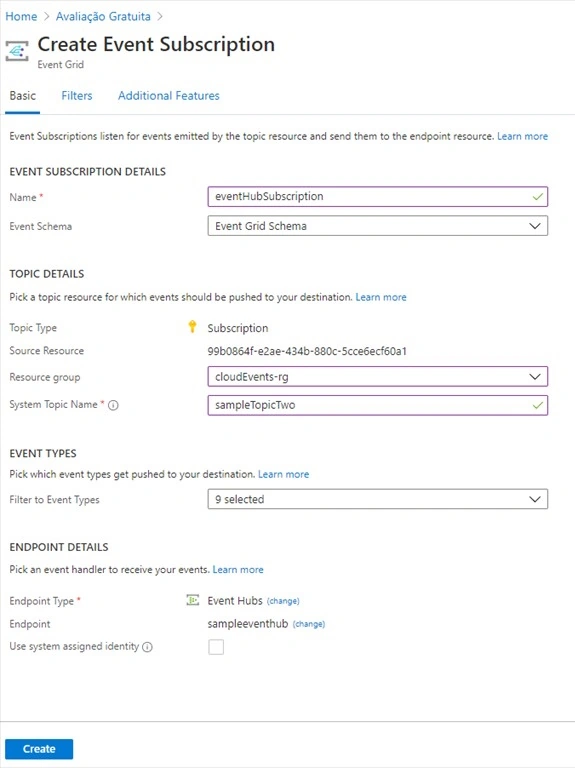
Similar to what we did before, we are going to create an Event Grid Subscription to get events related to our Azure Subscription but at this time we are going to use Azure Event Hub as an event handler.
.Net Core Application to consume events
Pre-Requisites
- Existent .Net Core Project
- Event-Hub Connection String
- Existent Blob Container. Here named as a sample-blob container
- Blob Container Connection String
- NuGet Package Azure.Messaging.EventHubs
- NuGet Package Azure.Messaging.EventHubs.Processor
Retrieving your Event Hub Connection String. From your Event Hub Namespace go to Shared Access Signatures under Settings.
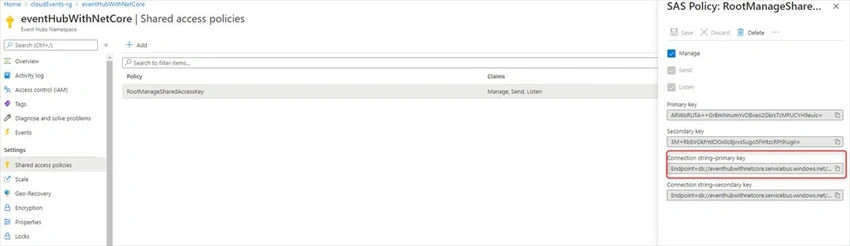
Connecting and handling Events from an Event Hub.
private const string ehubNamespaceConnectionString = "Endpoint=sb://eventhubwithnetcore.servicebus.windows.net/;SharedAccessKeyName=RootManageSharedAccessKey;SharedAccessKey=ARWoRUTA++GrBmNnumYvDBveo2Gkrs7cMFUCYH9euic=";
private const string eventHubName = "sampleeventhub";
private const string blobStorageConnectionString = "DefaultEndpointsProtocol=https;AccountName=storageaccountcloud8c65;AccountKey=oRVheUO8Xs/5PiimGjJoOwCA7Ee0YMCh4HQXAicCzg8noRYZMT8M2oWbyevLeodvmtv099Yj0UPJeFL23/K8RQ==;EndpointSuffix=core.windows.net";
private const string blobContainerName = "sampleblobcontainer";

static async Task Main(string[] args)
{
    // Read from the default consumer group: $Default
    string consumerGroup = EventHubConsumerClient.DefaultConsumerGroupName;

    // Create a blob container client that the event processor will use
    BlobContainerClient storageClient = new BlobContainerClient(blobStorageConnectionString, blobContainerName);

    // Create an event processor client to process events in the event hub
    EventProcessorClient processorClinet = new EventProcessorClient(storageClient, consumerGroup, ehubNamespaceConnectionString, eventHubName);

    // Register handlers for processing events and handling errors
    processorClinet.ProcessEventAsync += ProcessEventHandler;
    processorClinet.ProcessErrorAsync += ProcessErrorHandler;

    // Start processing
    await processorClinet.StartProcessingAsync();

    // Processing time
    DateTime finishProcessing = DateTime.Now.AddMinutes(10);

    while (DateTime.Now < finishProcessing)
    {
        // Wait for 10 seconds for the events to be processed
        await Task.Delay(TimeSpan.FromSeconds(10));
    }

    // Stop processing
    await processorClinet.StopProcessingAsync();
}
Consuming a successful event.
static async Task ProcessEventHandler(ProcessEventArgs eventArgs)
{
    // Write the body of the event to the console window
    Console.WriteLine("\tReceived event: {0}", Encoding.UTF8.GetString(eventArgs.Data.Body.ToArray()));

    // Update checkpoint in the blob storage so that the app receives only new events the next time it's run
    await eventArgs.UpdateCheckpointAsync(eventArgs.CancellationToken);
}
Consuming an event with error.
static Task ProcessErrorHandler(ProcessErrorEventArgs eventArgs)
{
    // Write details about the error to the console window
    Console.WriteLine($"\tPartition '{eventArgs.PartitionId}': an unhandled exception was encountered.");
    Console.WriteLine(eventArgs.Exception.Message);
    return Task.CompletedTask;
}
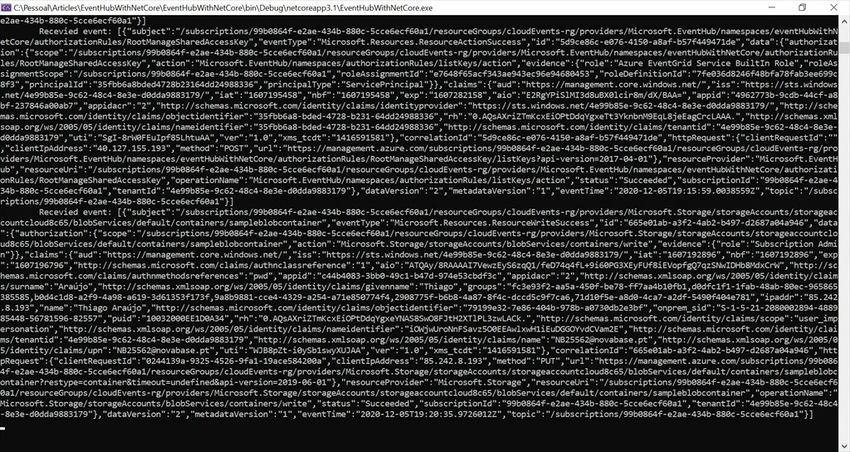
Result
From the console window
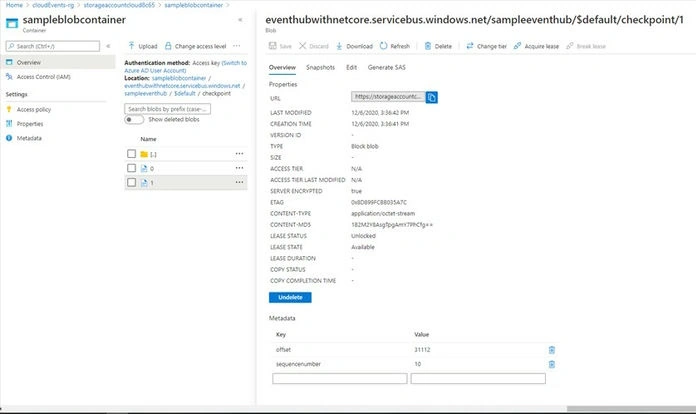
From the Blob Container
.Net Core Application to publish a batch of events
Pre-Requisites
- Existent .Net Core Project
- Event-Hub Connection String
- Nuget Package Azure.Messaging.EventHubs
Sending a random batch of events
private const string connectionString = "Endpoint=sb://eventhubwithnetcore.servicebus.windows.net/;SharedAccessKeyName=RootManageSharedAccessKey;SharedAccessKey=ARWoRUTA++GrBmNnumYvDBveo2Gkrs7cMFUCYH9euic=";
private const string eventHubName = "sampleeventhub";

static async Task Main(string[] args)
{
    Random random = new Random();
    int numberOfEvents = random.Next(5, 10);

    await using (var producerClient = new EventHubProducerClient(connectionString, eventHubName))
    {
        // Create a batch of events
        using EventDataBatch eventBatch = await producerClient.CreateBatchAsync();

        // Add events to the batch. An event is represented by a collection of bytes and metadata.
        for (int i = 0; i < numberOfEvents; i++)
        {
            eventBatch.TryAdd(new EventData(Encoding.UTF8.GetBytes($"Event number {i}")));
        }

        // Use the producer client to send the batch of events to the event hub
        await producerClient.SendAsync(eventBatch);
        Console.WriteLine($"A batch of {numberOfEvents} events has been published.");
    }
}
The result from the console client.

From Event Hub
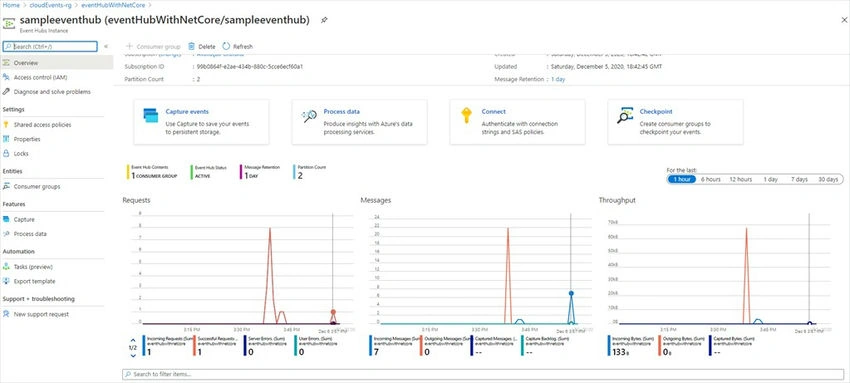
Azure Notification Hub
In order to demonstrate an Azure Notification Hub an existent mobile app is required, and my friend Prasanna Murali gives an excellent walkthrough on how to use it:
External References


Join the conversation! Your thoughts help the community grow.