

Introduction
This article's intention is to explain the main skills measured in this sub-topic of the AZ-204 Certification. OAuth2, Shared Access Signatures, Azure AD, and Role-Based Access controls are the main components that will have their fundamentals explained here alongside a practical example.
This certification is very extensive and this article approaches only the main topics, make sure you know those components in depth before taking the exam. Another great tip is to do exam simulators before the official exam in order to validate your knowledge.
What is the Certification AZ-204 - Developing Solutions for Microsoft Azure?
The AZ-204 - Developing Solutions for Microsoft Azure certification measures designing, building, testing, and maintaining skills of an application and/or service in the Microsoft Azure Cloud environment. It approaches, among others, those components.
- Azure Virtual Machines
- Docker
- Azure Containers
- Service Web App
- Azure Functions
- Cosmos DB
- Azure Storage
- Azure AD
- Azure Key Vault
- Azure Managed Identities
- Azure Redis Cache
- Azure Logic App
- Azure Event Grid
- Azure Event Hub
- Azure Notification Hub
- Azure Service Bus
- Azure Queue Storage
Check more information On the AZ - 204 Developing Solutions for Microsoft Azure Official Website.
Target Audience
Any IT professional willing to improve his knowledge in Microsoft Azure is encouraged to take this certification, it is a great way to measure your skills within trending technologies. But, some groups of professionals are more keen to take maximum advantage of it.
- Azure Developers, with at least 1 year of experience with Microsoft Azure.
- Experienced Software Developers, looking for an Architect position in a hybrid environment.
- Software Developers, working to move applications to the cloud environment.
Skills Measured
According to today's date, the skills that are measured in the exam are split as follows.
- Develop Azure compute solutions (25-30%)
- Develop for Azure storage (10-15%)
- Implement Azure security (15-20%)
- Implement user authentication and authorization
- Implement secure cloud solutions
- Monitor, troubleshoot, and optimize Azure solutions (10-15%)
- Integrate caching and content delivery within solutions
- Instrument solutions to support monitoring and logging
- Connect to and consume Azure services and third-party services (25- 30%)
- Develop an App Service Logic App
- Implement API Management
- Develop event-based solutions
- Develop message-based solutions
Updated skills can be found On the AZ - 204 Official Measured Skills Website.
Benefits of Getting Certified
The main benefit here is having a worldwide recognized certification that proves that you have knowledge of this topic. Among intrinsic and extrinsic benefits, we have,
- Higher growth potential, as certifications, are a big plus.
- Discounts and deals in Microsoft products and partners, like PluralSight and UpWork.
- MCP Newsletters, with trending technologies.
- Higher exposure on LinkedIn, as recruiters usually search for specific certifications.
- With a higher salary, you will be more valuable to your company.
- Unique happiness when getting the result and you were approved, knowing that all your efforts were worth it.
Official Microsoft Certification Program Benefits Website.
Main Skills Measured by this Topic
What is OAuth2?
OAuth 2.0 is an authorization framework, it provides an interface for third-party applications to obtain access to protected HTTP resources.
The OAuth 2.0 framework is divided into 4 main pieces, as follows.
- Resource Owner, where we have users. They are uniquely identified by their login.
- Client Apps, are the application itself. They are identified by their unique client ID.
- Resource Server has endpoints protected that may only be accessed after successfully validating the token provided by the Client App against the Authorization Server.
- The Authorization Server holds the logic to generate and validate tokens based on the Resource Owner and Client Apps.

OAuth2 Scopes
Scopes are used to limit the Resource Server's access to information by the User. Client Apps may request access to a wide type of scopes in order to perform its operation whereas the user has to consent or not.
As an example of using scopes, we have mobile applications that ask consent to have access to different resources on our phone, like the contact list, camera, audio, etc. Each one of those resources is a scope.
OAuth2 Client Types
OAuth 2.0 supports two types of client types according to their capability to store credentials securely which will directly impact how they can read the token, as follows,
- Confidential Client can store credentials securely: The token can be read symmetrically with the client's secret or Asymmetrically with a private key.
- Public Client, can not store credentials securely: The token can be read Asymmetrically with a private key or with the public key used to sign the private key.
OAuth2 Grant Types
OAuth 2.0 has a wide range of grant types available as far as the possibility to create custom ones but their most used grant types are as follows.
- Authorization Code is the most used grant type whereas public and confidential clients exchange the authorization code for an access token.
- Client Credentials, when the app sends its own credentials (client id and client secret) in order to obtain an access token.
- Device Code, used by devices to exchange a previously obtained device code for an access token;
- Refresh Token, is used when the token is expired so the client exchanges the refresh token for a brand new token without any interaction with the user.
OAuth2 Bearer Token
The Bearer token is the most used type of token used with OAuth 2.0. It is composed of the word Bearer followed by the token, this token may range from hexadecimal string to more structured types of tokens.
Example of usage
Authorization: Bearer eyJhbGciOiJSUzI1NiIsastpZCI6IkM3MDQ2QjI0Mzc4RTJCNjYwMjI1MzFCNTcwQjY5NDNEREYyOEMwRDAiLCJ0eXAiOiJKV1QiLCJ4NXQiOiJ4d1JySkRlT0syWUNKVEcxY0xhVVBkOG93TkEifQ.eyJuYmsYiOjE2MDIyNTU1NDcsImV4cCI6MTYwMjI2OTk0NywiaXNzIjoiaHR0cHM6Ly9hdXRoLmFcuZXBlcmYuY29tIiwiYXVkIjpbImh0dHBzOi8vYXV0aC5hbmVwZXJmLmNvbS9yZXNvdXJjZXMiLCJld3BlbmV0d29ya2FwaSIsImV3cG
Microsoft Identity Platform
- Microsoft Identity Platform works as an Authorization Server but is much stronger than any normal Authorization Server because it has other functionalities such as passwordless authentication, step-up authentication, and conditional access.
- Microsoft Identity Platform offers an interface to manage authorization among Azure resources, being capable of assigning resources to access other resources without explicitly doing an authorization request.
It is built by several components in order to achieve its so powerful engine as follows.
- OAuth2.0 for authorizations.
- OpenId Connect for authentications.
- Microsoft Authentication Library ( MSAL ) for authenticating users against the Microsoft Identity platform.
- Azure Portal to manage and configure your applications, authorizations, and authentications.
What are Shared Access Signatures - SAS?
Shared Access Signatures handle authorization and authentication, they are tokens generated with very specific purposes to access resources, those tokens may have limitations such as which resource it may access, which operations (read, write, delete) may be executed, and during which time range it can be used. Shared Access Signatures are grouped into 3 different types as follows.
- User delegation SAS is applied for Blob Storages only and combines the security of the Azure AD with the permissions from the SAS.
- Service SAS is applied at the Blob storage level, Queue storage level, Table storage level, or Azure Files level. Can be assigned with a Stored Access Policy.
- Account SAS is applied at the Storage Account level and can not be used with a Stored Access Policy.
Stored Access Policy with SAS
Stored Access Policies are policies, on the container level, associated with one or more SAS that define constraints for those associated with SAS.
It is a good practice to associate SAS with Stored Access Policy because when a SAS is associated with a Stored Access Policy this SAS inherits all the constraints from the Stored Access Policy, and if you need to revoke access for this SAS you only need to terminate the access from the Stored Access Policy instead of needing to generate a new storage account key. By generating a new storage account key you would have to update your clients to use the new key in order to access its resources.
Those constraints are the ones as follows.
- Start time, the date that the Stored Access Policy will start to be valid. SAS associated with this Stored Access Policy can not be used before the start time.
- End time, the date that the Stored Access Policy will expire. Those SAS associated with this Stored Access policy are going to expire together.
- Permissions, the resources, and operations that this Stored Access Policy will be able to manipulate.
What are Role-Based Access Controls (RBAC)?
Azure Role-Based Access Controls is another security functionality that helps how you manage access through your resources. It handles users' authorization, managing who has access to each resource, and what each user can do with each resource.
In order to understand better how to Azure Role-Based Access Controls works let's go through its key concepts, as follows.
- Security Principal is an object that represents a user, group, service principal, or managed identity who is requesting access to an Azure resource. Roles are assigned to Security Principals.
- Role Definition, collection of permissions with a list of operations that may be executed by each permission.
- Scope, holding access for each role. Scopes can be configured at a management group, subscription, resource group, or resource level.
- Role Assignment, which is the process of assigning a role to a security principal.
- Multiple Assignments happen when you have more than one role assigned to the same security principal to the same resource. When it happens, Azure sums the roles without impacting any of them.
- Deny Assignment, is the opposite of the Role Assignment whereas we specify a set of actions that are denied.
To organize those roles, Azure distributes the managing among some types of custom roles and pre-created roles, the pre-created roles are the ones as follows.
- Subscription Administrator Roles, having full access to the subscription account are grouped in 3 subcategories as follows.
- Account Administrator, 1 per Azure Account, and manages mainly the billing.
- Service Administrator, 1 per Azure Subscription, and manages the services in the Azure Portal.
- Co-Administrator, 200 per subscription, and has the same privileges as the Service Administrator.
- Azure Roles, providing access management to Azure resources. Some resources have their specific roles but there are some fundamental roles applied to all resources as follows.
- The owner has full access to all resources and can delegate access to others.
- Contributor, full access to all resources.
- Reader, reading resources but not being able to update/delete/create it.
- User Access Administrator, managing users' access to Azure resources.
- Azure AD Roles are used to manage Azure AD resources and are grouped into 3 main categories as follows.
- Global Administrator manages access to Azure AD Resources and assigns the User Administrator role to others.
- User Administrator manages access to users and groups. Also, manages tickets and health.
- Billing Administrator, managing the billing of the account.
Read more about Azure Role-Based Access Controls.
What is Azure AD?
Azure Active Directory is Microsoft's cloud-based identity that handles Authorization and Authentication for internal(Azure, Microsoft 365, etc..) and external resources (your company intranet, corporate network, etc..), one of its main features is to access a wide range of Applications and Systems within a Single Sign-On.
Within Azure AD you can manage all your users and apps in a single location, which means that your users may change from one app to another without needing to log in again, without risking security. Actually, your security is going through a big boost as far as your users will not need to store and input different usernames and passwords when they are accessing different apps, Azure AD also offers multi-factor authentication, which will help you and your organization with governance and a higher layer of security.
In order to understand better about Azure AD, we are going through a brief explanation of its main terminologies as follows.
- Identity could be a user, an application, or even another server that needs to get authenticated.
- Account, an identity with related data.
- Azure AD Account, is an identity created through Azure AD or another Microsoft cloud service.
- Azure Tenant represents a single organization inside Azure AD.
- Single Tenant APPs, apps that belong to a single Azure Tenant.
- Multi-Tenant APPs, apps that belong to more than one Azure Tenant.
- Azure AD directory, the dedicated Azure AD directory owned by the tenant. It has users, groups, and apps.
- Custom Domain, domains now owned by Microsoft.
- MSA, the Microsoft Account (Outlook, Xbox Live, Office 365 accounts).
Practical Examples
OAuth2 Authentication
I could not create a better practical example than my friend Asma Khalid did, please check his article to understand better how to do an OAuth2 Authentication using .Net:
Shared Access Signatures - SAS
The following examples are going to be applied in a Blob Container inside a Storage Account. Check in this article how to create a Blob Container inside a Storage Account.
Creating an Account SAS
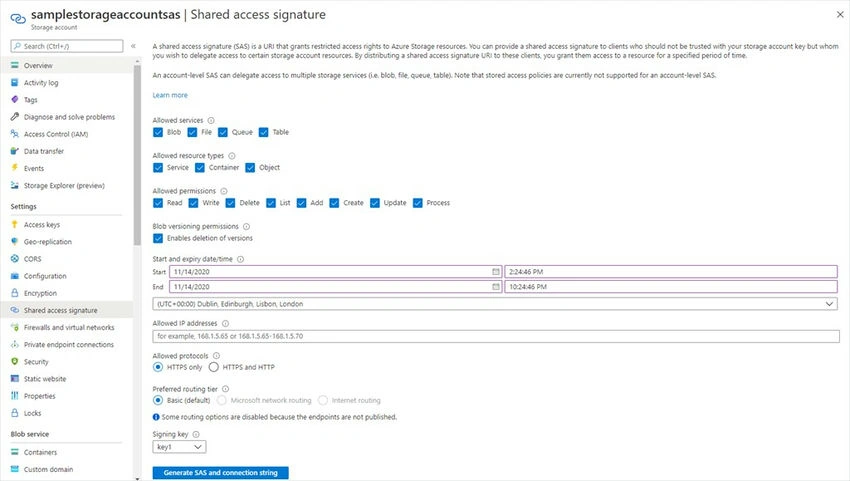
From your Storage Account, go to Settings and then Shared Access Signature.
- Allowed services, the services accessible with the SAS.
- Allowed resource types, the resource types accessible with the SAS.
- Allowed permissions, the possible permissions with the SAS on the resource types.
- Blob versioning permissions enable deletions of versions.
- Start and expiry date/time, the SAS valid time range.
- Allowed IP Addresses, IP addresses range acceptable to use the SAS.
- Allowed Protocols, acceptable protocols to be used with the SAS.
- Preferred routing tier, the preferred routing tiers to the SAS.
- The signing key is the access key assigned with this SAS. If you require to invalidate this SAS before its expiry date you have to generate a new Access Key, also every other SAS assigned to this access key will be invalidated.
After creating the SAS, you will be prompted with its keys.
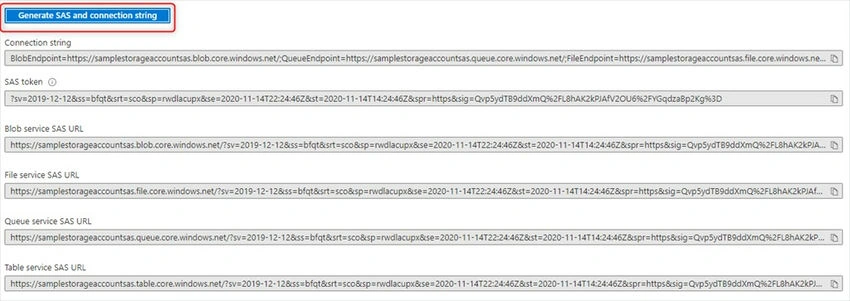
SAS Token
?sv=2019-12-12&ss=bfqt&srt=sco&sp=rwdlacupx&se=2020-11-14T22:24:46Z&st=2020-11-14T14:24:46Z&spr=https&sig=Qvp5ydTB9ddXmQ%2FL8hAK2kPJAfV2OU6%2FYGqdzaBp2Kg%3D
Creating a Service SAS
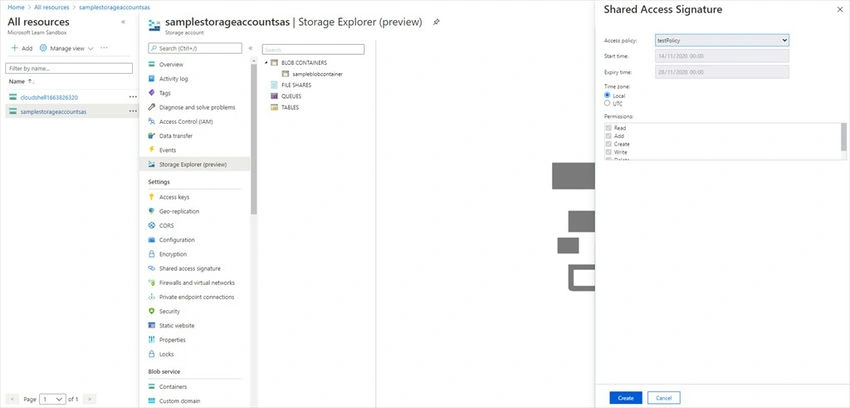
From your Storage Account, go to Storage Explorer and right-click on the Blob Container, then select Get Shared Access Signature. Configure the constraints and create the SAS.
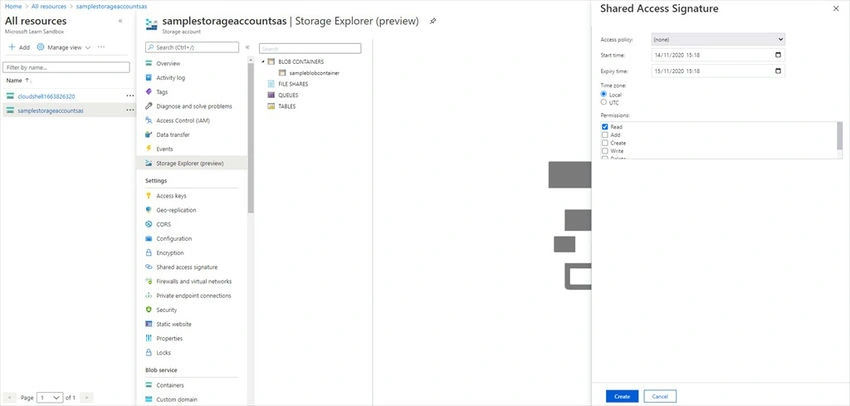
Creating a Service SAS with Stored Access Policy
Let's create the Stored Access Policy, from your container go to Access Policy, and then add a new policy.
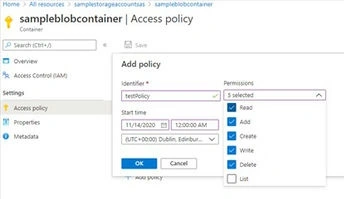
From your Storage Account, go to Storage Explorer and right-click on the Blob Container, then select Get Shared Access Signature. Select the Access Policy and create your Service SAS.
Creating a User Delegation SAS
User Delegation SAS combines the SAS security with the RBAC security.
From your item, go to Generate SAS and select the User Delegation Key as the signing method.
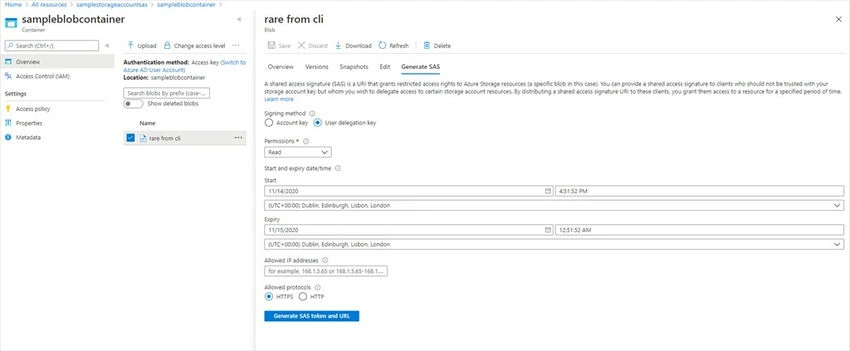
If you try to use your User Delegation SAS without configuring the RBAC, you will get an error

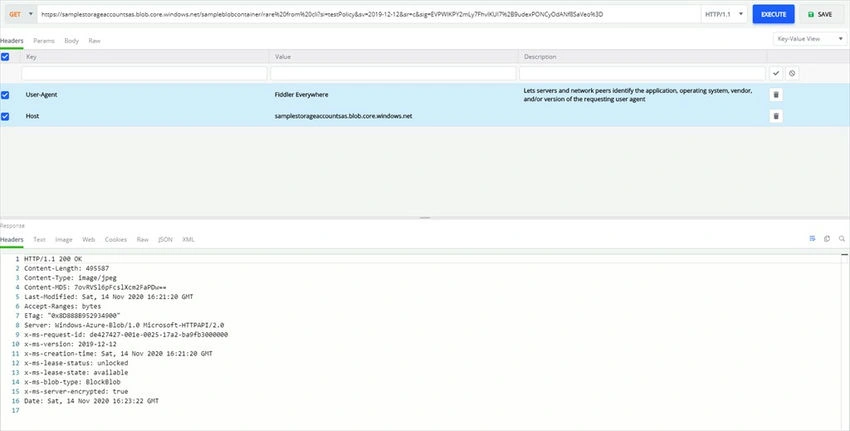
Using a SAS With Rest API
Using a Service SAS with permissions to do the operation. Here our Service SAS has the right to read a Blob.
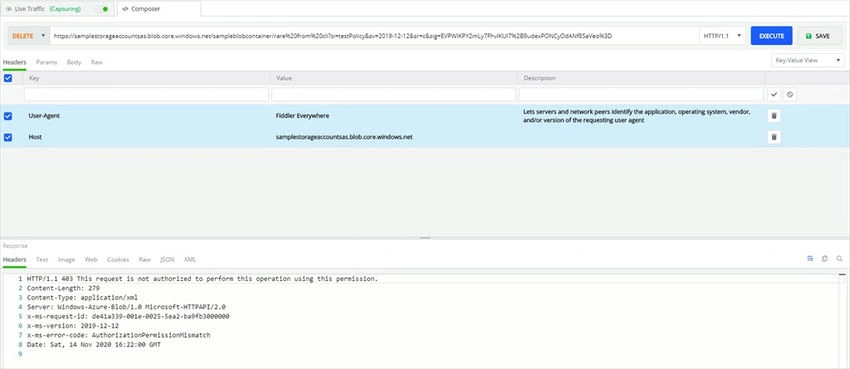
Using a Service SAS without permission to do the operation. Here our Service SAS has no right to delete a Blob.
Using SAS with Azure CLI
Using an Account SAS with rights to read Blobs
az storage blob show --name "rare from cli" --account-name $storageAccountName --container-name $containerName --sas-token '"sv=2019-12-12&ss=bfqt&srt=sco&sp=rwdacupx&se=2020-11-15T00:25:05Z&st=2020-11-14T16:25:05Z&spr=https&sig=o5qaN1cDWRdn0%2F98O8ey%2FqnUeUE%2FmUJLnOEYBQZSX8s%3D"'
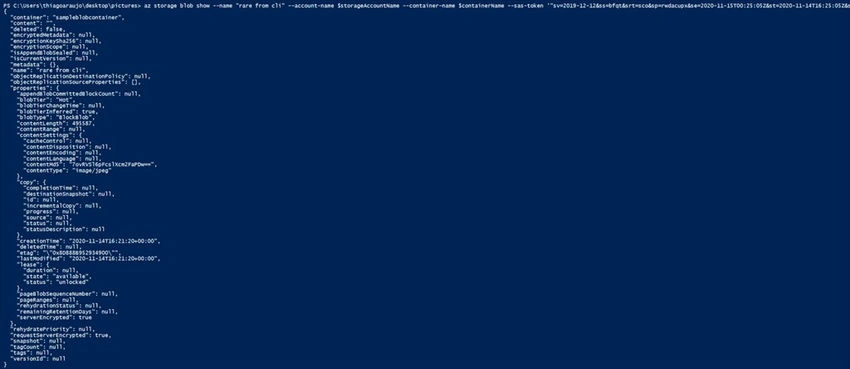
Using an Account SAS with no right to list Blobs.
az storage blob list --output table --account-name $storageAccountName --container-name $containerName --sas-token '"sv=2019-12-12&ss=bfqt&srt=sco&sp=rwdacupx&se=2020-11-15T00:25:05Z&st=2020-11-14T16:25:05Z&spr=https&sig=o5qaN1cDWRdn0%2F98O8ey%2FqnUeUE%2FmUJLnOEYBQZSX8s%3D"'

Revoking a SAS Without Stored Access Policy
You need to generate a new access key. You and any other SAS based on this access key immediately have access revoked to all resources.

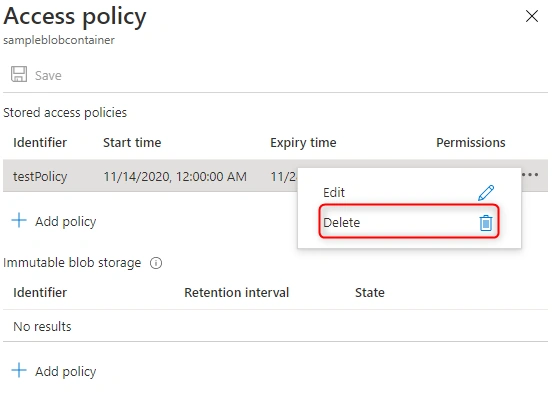
Revoking an SAS With a Stored Access Policy
You only need to delete the stored access policy and you immediately revoke the access to that SAS

Azure AD
Azure AD is another huge topic that would not be possible to be well described in a single article, so I recommend visiting my friends' articles with practical examples regarding the required features of Azure AD for this certification.
- Creating Azure AD using Azure Portal
- Registering an App to Azure AD
- Authenticating Users through Azure AD
Role-Based Access Roles
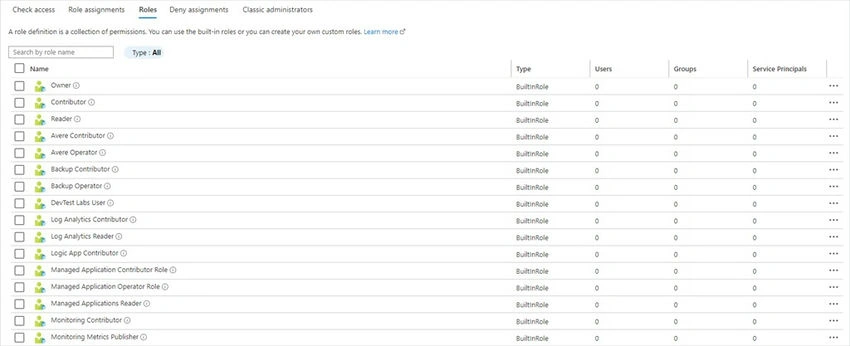
Checking existing roles
From your resource, go to Access Control (IAM)
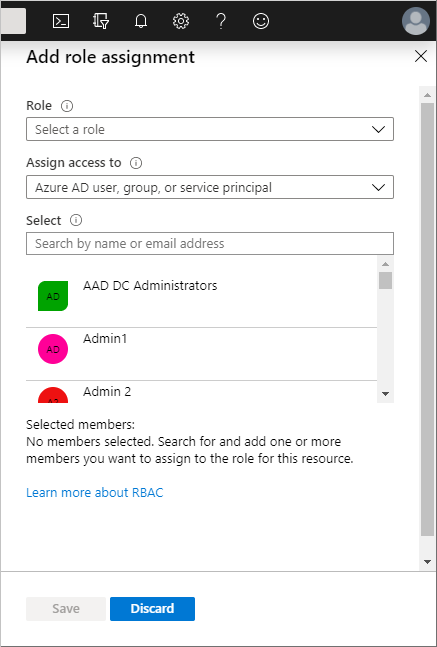
Creating an RBAC
From your resource, go to Access Control (IAM) and then click on Add Role Assignment. Select the role that you want to assign, the type of resource that will be assigned to
this role, and the resource name.
Accessing resources using RBAC
Accessing resources using RBAC is implicit, when you try to access a resource Azure AD is going to check if you are in the role that matches your request. If you are in the role with permission, your request will be successful, if you do not have permission your request will be denied with a 403 response.
External References
- OAuth 2.0 Official Website
- Microsoft Identity Platform Official Documentation
- Azure Role-Based Access Roles Official Documentation
- Azure Shared Access Signatures Official Documentation
- Azure AD Official Website
- Azure AD Official Documentation
- Az-204 Measured Skills
- Az-204 Official Website
- Create a Blob Container
- Shared Access Signatures SAS Official Documentation
Join the conversation! Your thoughts help the community grow.