

Introduction
- LM35 is used for finding the temperature of a place.
- This sensor circuitry is sealed and therefore it is not subjected to oxidation and other processes.
- It also possess low self heating and does not cause more than 0.1 degree Celsius temperature rise in still air.
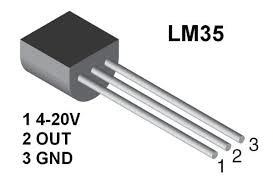
Figure 1: LM35
Parts of list
- Arduino
- LCD Display
- LM35 temperature sensor
- Potentiometer
- Breadboard
- Hookup wire.
Connection from sensor to board
- The first pin can be connected to the Vcc of the 5V to an Arduino board.
- The second pin can be connected to the A1 of analog side to an Arduino board.
- The third pin can be connected to the Gnd to an Arduino board.
Connection from LCD Display to Arduino
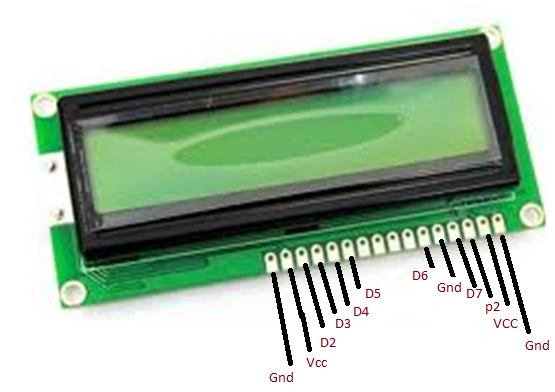
Figure 2: LCD Display
- Fix the LCD in the 16 to 2 in the bread board.
- The 16 pin to the Gnd
- The 15 pin to the Vcc
- The 14 pin to the Digital pin 02
- The 13 pin to the Digital pin 03
- The 12 pin to the Digital pin 04
- The 11 pin to the Digital pin 05
- The 01 pin to the Gnd.
- The 02 pin to the Vcc.
- The 03 pin to the potentiometer.
- The 04 pin to the Digital pin 07.
- The 05 pin to the Gnd.
- The 06 pin to the Digital pin 06.
Connection from Potentiometer to Arduino
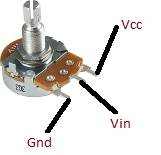
Figure 3: Potentiometer
- Connect as per the preceding figure to the Arduino board and the LCD Display.
- The Vin connected to the LCD display in 03.
Programming
#include <LiquidCrystal.h>

// initialize the library with the numbers of the interface pins
LiquidCrystal lcd(2 ,3 ,4 ,5 ,6 ,7);

//declare variables
float tempC;
float tempF;
int tempPin = 1;

void setup(){
  // set up the LCD's number of columns and rows:
  lcd.begin(16, 2);
  lcd.print("Temp1=");
  lcd.setCursor(0, 1);
  lcd.print("Temp2=");
}

void loop(){
  tempC = analogRead(tempPin);           //read the value from the sensor
  tempC = (5.0 * tempC * 100.0)/1024.0;  //convert the analog data to temperature
  tempF = ((tempC*9)/5) + 32;            //convert celcius to farenheit

  // print result to lcd display
  lcd.setCursor(6, 0);
  lcd.print(tempC,1);
  lcd.print("'C");

  lcd.setCursor(6, 1);
  lcd.print(tempF,1);
  lcd.print("'F");

  // sleep...
  delay(1000);
}
Explanation
- It shows the current room temperature in the location.
- It will display in the LCD monitor as the Celsius to Fahrenheit.
- The temperature can be display as the temp1, temp2 in the monitor.
Output
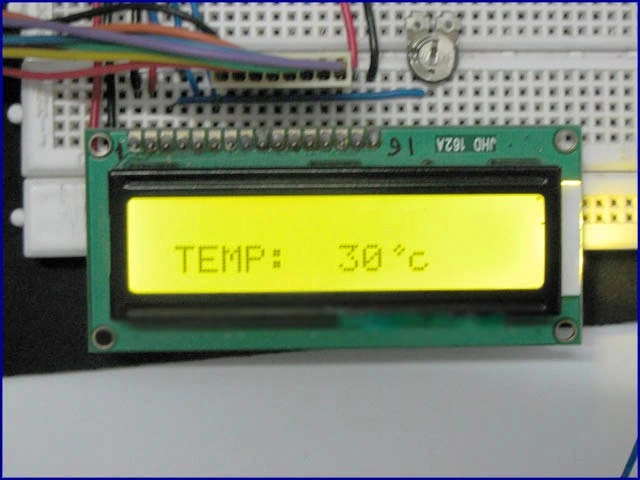
Figure 4: Output
Read more articles on Arduino:
Munish APosted Oct 31, 2017, 12:57 PM
Sir article sister..............
Sr KarthigaPosted Feb 9, 2016, 8:51 AM
Thank you raja sir
Raja TPosted Feb 9, 2016, 8:45 AM
Nice, Thanks for sharing
Sr KarthigaPosted Feb 9, 2016, 3:10 AM
Thank you kumaresh sir
Kumaresh RajalingamPosted Feb 8, 2016, 10:17 AM
Good one
Sr KarthigaPosted Feb 8, 2016, 8:39 AM
Thank you nanddeep nachan sir
Sr KarthigaPosted Feb 8, 2016, 8:38 AM
Thank you Humayun Kabir Mamun sir
Sr KarthigaPosted Feb 8, 2016, 8:38 AM
Thank you Shubham Kumar siir
Sr KarthigaPosted Feb 8, 2016, 8:37 AM
Thank you Sibeesh Venu sir
Sr KarthigaPosted Feb 8, 2016, 8:36 AM
Thank you Ankur Mistry sir
Nanddeep NachanPosted Feb 8, 2016, 4:00 AM
Nice share
Humayun Kabir MamunPosted Feb 8, 2016, 12:58 AM
Nice...
Shubham KumarPosted Feb 8, 2016, 12:03 AM
Interesting nice one
Sibeesh VenuPosted Feb 8, 2016, 12:03 AM
Nice Share
Ankur MistryPosted Feb 7, 2016, 11:55 PM
Nice share
Sr KarthigaPosted Feb 7, 2016, 8:03 PM
Thank you kumaresh sir
Kumaresh RajalingamPosted Feb 7, 2016, 7:49 PM
Nice share SR