

Azure App Service support increases performance and throughput for your web apps on Microsoft Azure. Three types of plans are available in Azure Web Apps. They are Free mode to Shared, Basic, Standard, or Premium mode.
You can see my previous articles for creating Azure Websites here,
Prerequisites
- Azure account
Let's get started with the following steps:
Firstly, Sign in to the online Microsoft Azure Portal.
Scaling Up in Azure Web Sites
In the web app's blade in the Portal, click All settings, then click Scale Up.
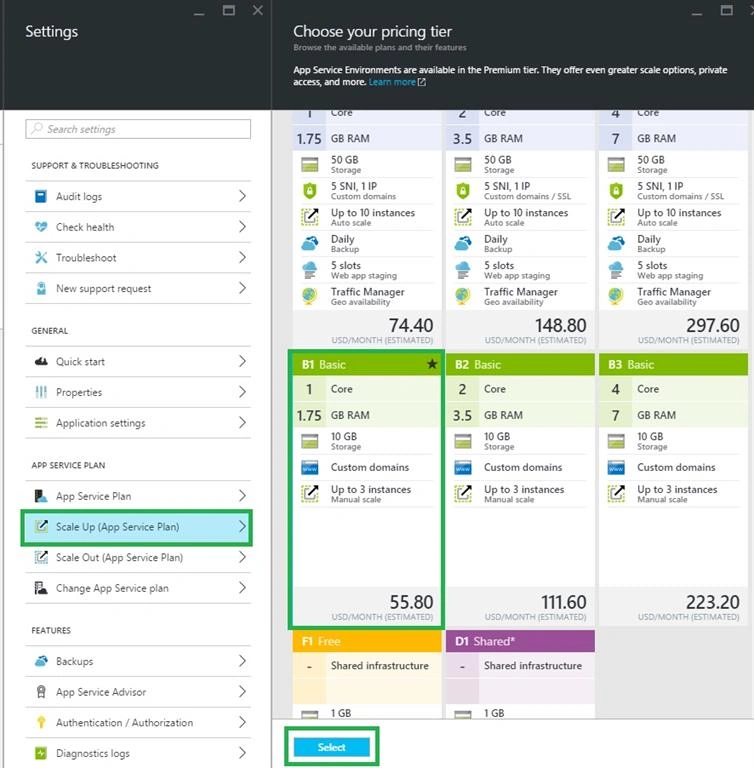
In the Choose your pricing tier blade, choose either Shared or a Basic mode, then click Select. Now you can scale up your web Apps.
Scaling Out in Azure Web Sites
In the web app's blade in the Portal, click All settings, then click Scale Out.
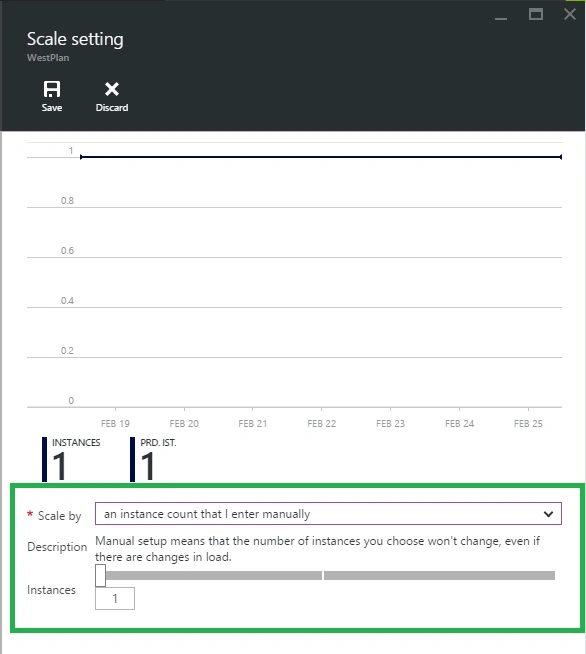
Now you can select instance count that I selected manually in the drop down, slide the Instance bar from left to right to increase the number of instances, then click Save.
Anbu ManiPosted May 5, 2016, 2:13 AM
Nice
Bhavik PatelPosted May 5, 2016, 12:26 AM
nice share..
Vignesh ManiPosted May 4, 2016, 4:25 PM
Nice sir
Debasis SahaPosted May 4, 2016, 10:23 AM
Nice One..
Pritam ZopePosted May 4, 2016, 9:07 AM
Nice....
Bhuvanesh MohankumarPosted May 4, 2016, 1:51 AM
Can we make this logic (scaling) automatic
RajaPosted May 4, 2016, 1:15 AM
Good Work :)