

In my previous article, we learned How to Insert, Update and Delete Record in DataGridView C#.
Let's begin.
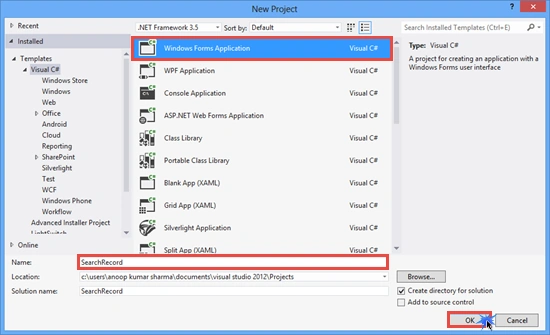
Create a new Windows Forms application.
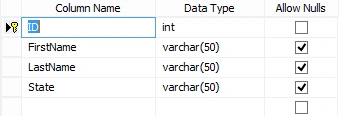
Create a database (named Sample). Add a table, tbl_Employee. The following is the table schema for creating tbl_Employee.
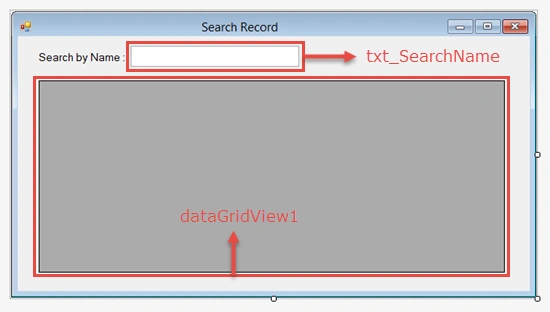
Create a form (named frmSearch) and Drop Label, TextBox and DataGridView control from the ToolBox.
Now, go to the frmSearch.cs code and add the System.Data and System.Data.SqlClient namespaces. The following is the frmSearch.cs code:
- using System;
- using System.Data;
- using System.Windows.Forms;
- using System.Data.SqlClient;
- namespace SearchRecord
- {
- public partial class frmSearch : Form
- {
- //Connection String
- string cs = "Data Source=.;Initial Catalog=Sample;Integrated Security=true;";
- SqlConnection con;
- SqlDataAdapter adapt;
- DataTable dt;
- public frmSearch()
- {
- InitializeComponent();
- }
- //frmSearch Load Event
- private void frmSearch_Load(object sender, EventArgs e)
- {
- con = new SqlConnection(cs);
- con.Open();
- adapt = new SqlDataAdapter("select * from tbl_Employee",con);
- dt = new DataTable();
- adapt.Fill(dt);
- dataGridView1.DataSource = dt;
- con.Close();
- }
- //txt_SearchName TextChanged Event
- private void txt_SearchName_TextChanged(object sender, EventArgs e)
- {
- con = new SqlConnection(cs);
- con.Open();
- adapt = new SqlDataAdapter("select * from tbl_Employee where FirstName like '"+txt_SearchName.Text+"%'", con);
- dt = new DataTable();
- adapt.Fill(dt);
- dataGridView1.DataSource = dt;
- con.Close();
- }
- }
- }
In the preceding code, we have created a frmSearch_Load event for displaying the tbl_Employee data in the DataGridView when the form loads.
The txt_SearchName_TextChanged event fires when the text of the txt_SearchName TextBox changes.
The txt_SearchName_TextChanged event fires when the text of the txt_SearchName TextBox changes.

Final Preview
I hope you will like it. Thanks.
Zahid FarazPosted Nov 16, 2019, 9:47 AM
But What if i want to search by Id (Number).
Dinesh GabhanePosted Nov 12, 2019, 6:38 AM
Thanks , it is very helpful
Danny VienPosted May 26, 2019, 12:29 AM
I tried using your code but it says my Sql connection is bad
Adnan DaniPosted May 4, 2018, 12:07 AM
Thanks , it is very helpful
ARIF ALIPosted Apr 30, 2018, 2:13 PM
I want not show report but when search name then show only name with detail
Ze r0Posted Feb 22, 2018, 7:04 AM
What if i want to search from different columns?
Niks shinePosted Feb 19, 2018, 6:14 PM
Can you give me a hint about, how to put a validation on already bound cell. Eg. there is a label 4 th cell of datagrid view & i need to check if it is lesser than 30. Thanks!
Arthur RangoPosted Nov 9, 2017, 4:55 AM
I'm using MySQL, I don't get any compilation errors, but the data grid is blank. I add MySqlConnection, MySqlCommand,MySqlDataAdapter etc, but fail
Ayşe PolatdemirPosted Sep 18, 2017, 7:18 AM
I tried it to search in my colomn including notes.if the text i typed is the first one, it works but else it does not. how can i change it?
Ayşe PolatdemirPosted Sep 18, 2017, 7:17 AM
Hey,Thats very usefull thank you.
Zikriya HabibPosted Aug 26, 2017, 3:08 PM
Yow......it works fine, fabulous
angelo capongcolPosted Aug 3, 2017, 7:29 PM
How about paramatized search query? can you give some code snippet. thanks
Joseph Jr.Posted Jul 10, 2017, 11:40 PM
How to do this in MySql ? please do help me sir. Thank you in advance
Nino PieroPosted Apr 25, 2017, 3:48 PM
How to apply to an Access database
kiros gebrePosted Apr 8, 2017, 10:16 AM
Super... thank you for wonderful coding
الأمل كبير والله اكبرPosted Mar 30, 2017, 1:50 AM
Nice but it not search arabic keywords
ali ashrafiPosted Feb 11, 2017, 5:46 PM
I have problem by this part private void textBox_DataContextChanged(object sender, DependencyPropertyChangedEventArgs e) { SqlConnection con = new SqlConnection("Server =.; User Id=Sa;Password=asd-123;Database=arayeshga"); con.Open(); SqlDataAdapter dt = new SqlDataAdapter("select?*?from sabteqeymat?where?kar?like?'" + textBox.Text + "%'", con); DataSet ds = new DataSet(); dt.Fill(ds,"sabteqeymat"); dataGrid2.ItemsSource = ds.Tables["sabteqeymat"].DefaultView; con.Close(); } datagrid2.datasource is not found
Abhilash Raj R SPosted Nov 15, 2016, 4:35 AM
Is this work with listview
Hassaan AfzalPosted Oct 7, 2016, 1:38 PM
Nice
kalu singh raoPosted Jul 8, 2016, 3:25 AM
Nice...
Hafiz Usman Asghar AliPosted May 18, 2016, 2:23 PM
how to search data in datagridview using textbox in c# and but how would I make it display all rows
Anoop Kumar SharmaPosted Nov 12, 2015, 7:28 AM
Thanks Divya for your valuable comment :-)
DivyaPosted Nov 12, 2015, 3:32 AM
super... thank you for wonderful coding
José RamírezPosted Mar 27, 2015, 9:12 AM
Although the search work, I think there should be a dynamic local search as converting records to a view, collection or simplicarlo with Linq.Using the method openings connecting to a SQL Server engine, whenever you create a new DataAdapter object queries to tables filled, clean the datagridview and again you charge to finally close connection to the motor. For each character to search is to establish full connection and if we delete (like all users), is another process. A table with 2 million rows and a view not indexed strong conditional parameters, and represents a more realistic result. There is a fairly optimal method that allows you to work with local data without direct you to the source: DataView RowFilter through. The official documentation is at: https://msdn.microsoft.com/en-us/library/system.data.dataview.rowfilter(v=vs.110).aspx I appreciate your input. Best regards.
erkan erturalPosted Mar 26, 2015, 5:53 AM
Dataview.RowFilter ?
Former memberPosted Mar 26, 2015, 4:51 AM
Good one
Anoop Kumar SharmaPosted Mar 26, 2015, 12:23 AM
Thanks Gowtham Rajamanickam..!! :-)
Gowtham RajamanickamPosted Mar 25, 2015, 11:25 PM
good one,,
Pankaj Kumar ChoudharyPosted Mar 25, 2015, 10:23 PM
Nice Show Anoop Sir...........
Anoop Kumar SharmaPosted Mar 25, 2015, 10:22 PM
Thanks Khargesh Rajput..!!
Khargesh RajputPosted Mar 25, 2015, 9:08 PM
Nice