

Select Data using OData Service
Question: What is select data using OData service via EDM Framework?
In simple terms "It provides flexibility to pull out the data with help of data services via the EDM Framework".
Step 1: Create a new web application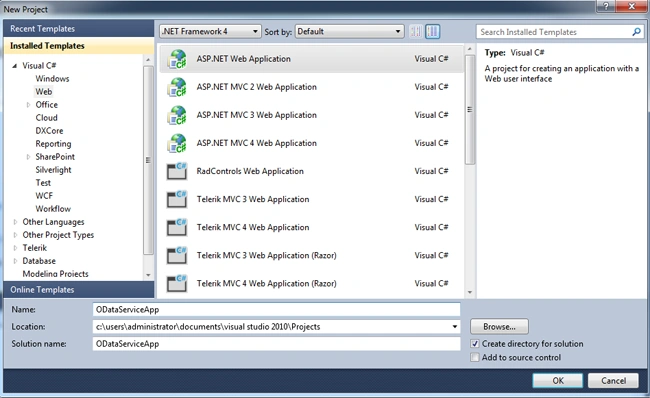
Step 2: Set up a new EDM Framework for the project: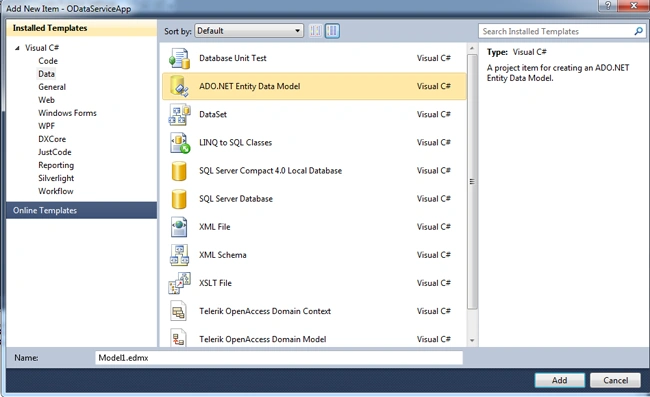

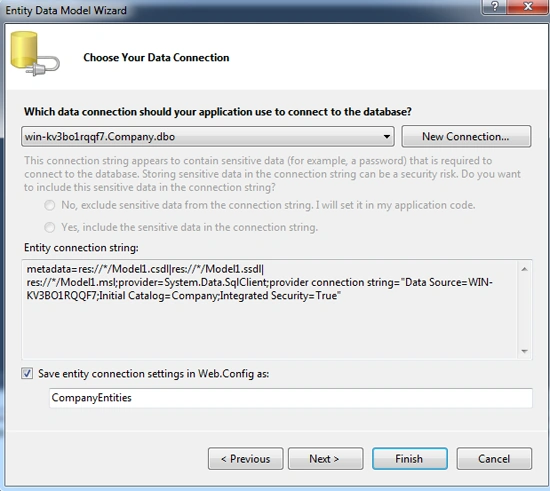
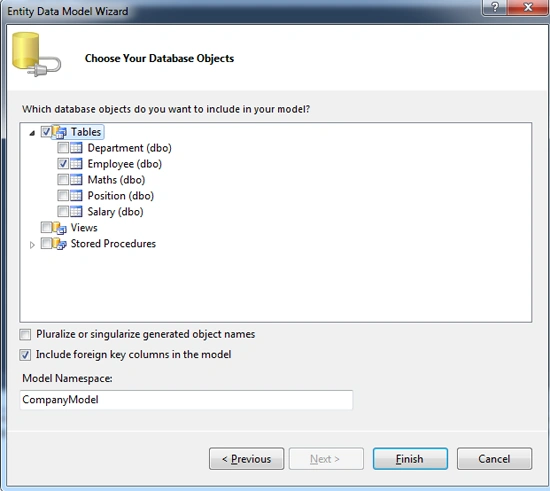
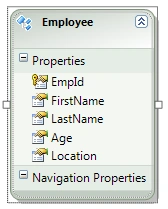
Step 3: Add a New WCF Data Service item to the project: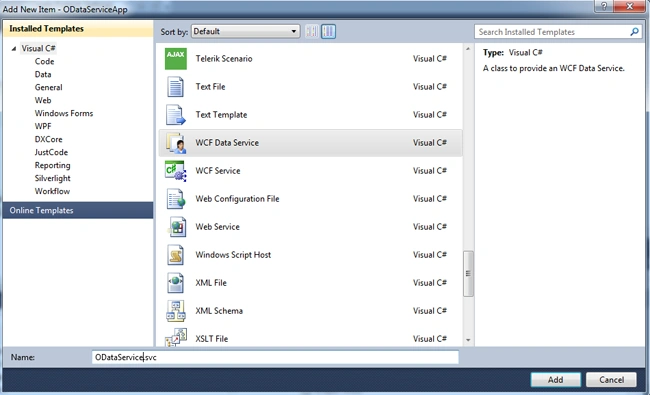
Step 4: The Complete code of ODataService.svc.cs looks like this:
using System;
using System.Collections.Generic;
using System.Data.Services;
using System.Data.Services.Common;
using System.Linq;
using System.ServiceModel.Web;
using System.Web;
namespace DeleteODataServiceApp
{
public class DeleteDataService : DataService<CompanyEntities>
{
// This method is called only once to initialize service-wide policies.
public static void InitializeService(DataServiceConfiguration config)
{
// TODO: set rules to indicate which entity sets and service operations are visible, updatable, etc.// Examples:
config.SetEntitySetAccessRule("*", EntitySetRights.AllRead | EntitySetRights.AllWrite);
config.SetServiceOperationAccessRule("MyServiceOperation", ServiceOperationRights.All);
config.DataServiceBehavior.MaxProtocolVersion = DataServiceProtocolVersion.V2;
}
}
}
Step 5: Browse the of ODataService.svc.cs looks like this: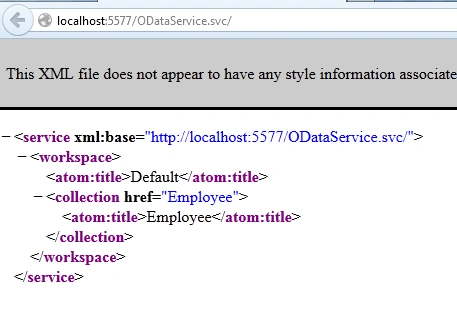
Step 6: Create a new web application to existing application:
Step 7: Add a service reference to the newly created web application: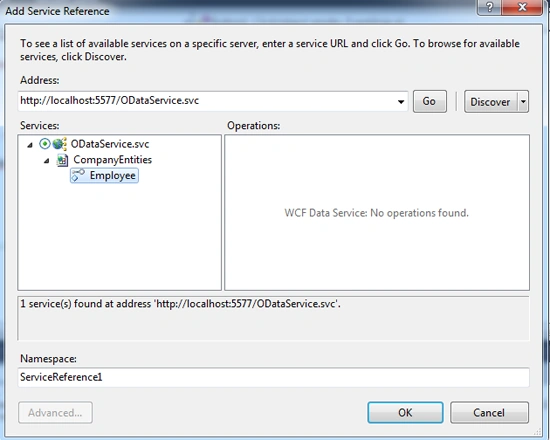
Step 8: The complete code of WebForm1.aspx looks like this:
<%@ Page Language="C#" AutoEventWireup="true" CodeBehind="WebForm1.aspx.cs" Inherits="SelectDataWCFServiceApp.WebForm1" %>
<!DOCTYPE html PUBLIC "-//W3C//DTD XHTML 1.0 Transitional//EN" "http://www.w3.org/TR/xhtml1/DTD/xhtml1-transitional.dtd">
<html xmlns="http://www.w3.org/1999/xhtml">
<head id="Head1" runat="server">
<style type="text/css">
.grid
{
margin-top: 50px;
}
</style>
<title></title>
</head>
<body>
<form id="form1" runat="server">
<center>
<div>
<table>
<tr>
<td colspan="2" align="center">
<asp:Label ID="Label1" runat="server" Text="Select Data using OData Service via EDM Framework"
Font-Bold="true" Font-Size="Large" Font-Names="Verdana" ForeColor="Maroon"></asp:Label>
</td>
</tr>
<tr>
<td colspan="2" align="center">
<asp:Button ID="Button1" runat="server" Text="Select Data" Font-Names="Verdana" Width="213px"
BackColor="Orange" Font-Bold="True" OnClick="Button1_Click" />
</td>
</tr>
<tr>
<td colspan="2" align="center">
<asp:GridView ID="GridView1" runat="server" CssClass="grid" BackColor="LightGoldenrodYellow"
BorderColor="Tan" BorderWidth="1px" CellPadding="2" ForeColor="Black" GridLines="None">
<AlternatingRowStyle BackColor="PaleGoldenrod" />
<FooterStyle BackColor="Tan" />
<HeaderStyle BackColor="Tan" Font-Bold="True" />
<PagerStyle BackColor="PaleGoldenrod" ForeColor="DarkSlateBlue" HorizontalAlign="Center" />
<SelectedRowStyle BackColor="DarkSlateBlue" ForeColor="GhostWhite" />
<SortedAscendingCellStyle BackColor="#FAFAE7" />
<SortedAscendingHeaderStyle BackColor="#DAC09E" />
<SortedDescendingCellStyle BackColor="#E1DB9C" />
<SortedDescendingHeaderStyle BackColor="#C2A47B" />
</asp:GridView>
</td>
</tr>
</table>
</div>
</center>
</form>
</body>
</html>
Step 9: The complete code of WebForm1.aspx.cs looks like this:
using System;
using System.Collections.Generic;
using System.Linq;
using System.Web;
using System.Web.UI;
using System.Web.UI.WebControls;
using SelectDataWCFServiceApp.ServiceReference1;
namespace SelectDataWCFServiceApp
{
public partial class WebForm1 : System.Web.UI.Page
{
protected void Page_Load(object sender, EventArgs e)
{
}
protected void Button1_Click(object sender, EventArgs e)
{
var query = from r in objEntities.Employee select new
{FirstName = r.FirstName, LastName = r.LastName, Age = r.Age};
GridView1.DataSource = query;GridView1.DataBind();
}
#region Instance MembersCompanyEntities objEntities = new CompanyEntities(new Uri("http://localhost:5577/ODataService.svc"));
#endregion
}
}
Step 10: The output of the application looks like this:
Step 11: The selected data output of the application looks like this: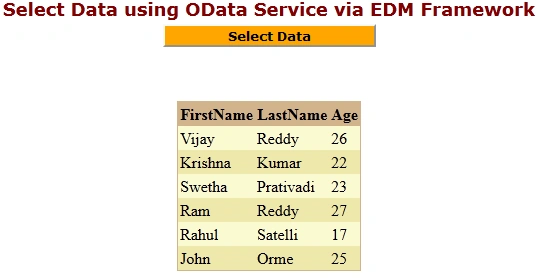
Delete Data using OData Service
Question: What is delete data using OData service via EDM Framework?
Now, to delete data using an OData service via EDM Framework you just need to follow Step 1, Step 2 and Step 3 as above.
Step 4: In ODataService.svc.cs you need to provide write permissions also:
public class ODataService : DataService<CompanyEntities>
{
// This method is called only once to initialize service-wide policies.
public static void InitializeService(DataServiceConfiguration config)
{
// TODO: set rules to indicate which entity sets and service operations are visible, updatable, etc.// Examples:
config.SetEntitySetAccessRule("*", EntitySetRights.AllRead);
config.SetServiceOperationAccessRule("MyServiceOperation", ServiceOperationRights.All);
config.DataServiceBehavior.MaxProtocolVersion = DataServiceProtocolVersion.V2;
}
}
Follow Step 5, Step 6 and Step 7 same as above.
Step 8: The complete code of WebForm1.aspx looks like this:
<%@ Page Language="C#" AutoEventWireup="true" CodeBehind="WebForm1.aspx.cs" Inherits="DeleteServiceApp.WebForm1" %>
<!DOCTYPE html PUBLIC "-//W3C//DTD XHTML 1.0 Transitional//EN" "http://www.w3.org/TR/xhtml1/DTD/xhtml1-transitional.dtd">
<html xmlns="http://www.w3.org/1999/xhtml">
<head id="Head1" runat="server">
<style type="text/css">
.grid
{
margin-top: 50px;
}
</style>
<title></title>
</head>
<body>
<form id="form1" runat="server">
<center>
<div>
<table>
<tr>
<td colspan="2" align="center">
<asp:Label ID="Label1" runat="server" Text="Delete with OData Service via EDM Framework"
Font-Bold="true" Font-Size="Large" Font-Names="Verdana" ForeColor="Maroon"></asp:Label>
</td>
</tr>
<tr>
<td>
<asp:Label ID="Label2" runat="server" Text="Please Enter Employee Id" ForeColor="Brown"
Font-Bold="true" Font-Size="Medium" Font-Names="Verdana"></asp:Label>
</td>
<td>
<asp:TextBox ID="TextBox1" runat="server"></asp:TextBox>
</td>
</tr>
<tr>
<td colspan="2" align="center">
<asp:Button ID="Button1" runat="server" Text="Delete Data" Font-Names="Verdana" Width="213px"
BackColor="Orange" Font-Bold="True" OnClick="Button1_Click" />
</td>
</tr>
<tr>
<td colspan="2" align="center">
<asp:GridView ID="GridView1" runat="server" CssClass="grid" BackColor="LightGoldenrodYellow"
BorderColor="Tan" BorderWidth="1px" CellPadding="2" ForeColor="Black" GridLines="None">
<AlternatingRowStyle BackColor="PaleGoldenrod" />
<FooterStyle BackColor="Tan" />
<HeaderStyle BackColor="Tan" Font-Bold="True" />
<PagerStyle BackColor="PaleGoldenrod" ForeColor="DarkSlateBlue" HorizontalAlign="Center" />
<SelectedRowStyle BackColor="DarkSlateBlue" ForeColor="GhostWhite" />
<SortedAscendingCellStyle BackColor="#FAFAE7" />
<SortedAscendingHeaderStyle BackColor="#DAC09E" />
<SortedDescendingCellStyle BackColor="#E1DB9C" />
<SortedDescendingHeaderStyle BackColor="#C2A47B" />
</asp:GridView>
</td>
</tr>
<tr>
<td colspan="2" align="center">
<asp:Label ID="Label3" runat="server" Font-Bold="true" Font-Size="Medium" Font-Names="Verdana"></asp:Label>
</td>
</tr>
</table>
</div>
</center>
</form>
</body>
</html>
Step 9: The complete code of WebForm1.aspx.cs looks like this:
using System;
using System.Collections.Generic;
using System.Linq;
using System.Web;
using System.Web.UI;
using System.Web.UI.WebControls;
using DeleteServiceApp.ServiceReference1;
namespace DeleteServiceApp
{
public partial class WebForm1 : System.Web.UI.Page
{
protected void Page_Load(object sender, EventArgs e)
{
TextBox1.Focus();
}
protected void Button1_Click(object sender, EventArgs e)
{
if (string.IsNullOrEmpty(TextBox1.Text))
{
Label3.Text = "Please Enter Id Value";
Label3.ForeColor = System.Drawing.Color.Red;
}
else
{
var deleteQuery = (from r in objEntities.Employeewhere r.EmpId ==int.Parse(TextBox1.Text)select r).Single();
objEntities.DeleteObject(deleteQuery);
objEntities.SaveChanges();
var query = from r in objEntities.Employee select new
{ Id = r.EmpId, FirstName = r.FirstName, LastName = r.LastName, Age = r.Age };
GridView1.DataSource = query;
GridView1.DataBind();
Label3.Text = "Record Deleted Successfully";
Label3.ForeColor = System.Drawing.Color.Green;
TextBox1.Text = string.Empty;
}
}
#region Instance MembersCompanyEntities objEntities = new CompanyEntities(new Uri("http://localhost:10541/DeleteDataService.svc/"));
#endregion
}
}
Step 10: The output of the application looks like this:
Step 11: The deleted data output of the application looks like this: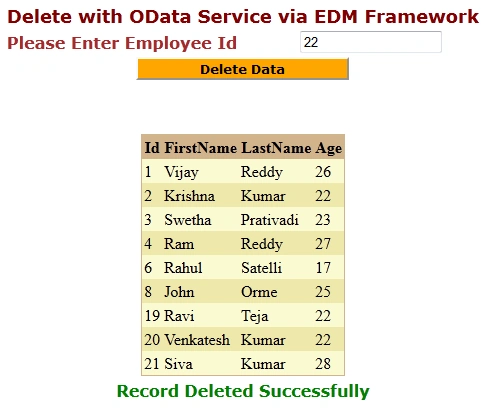
I hope this article is useful for you. I look forward for your comments and feedback.Thanks Vijay Prativadi
Join the conversation! Your thoughts help the community grow.