

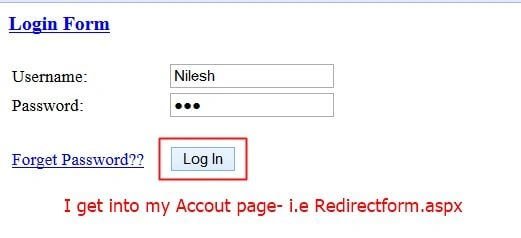
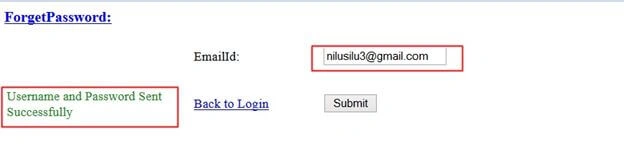
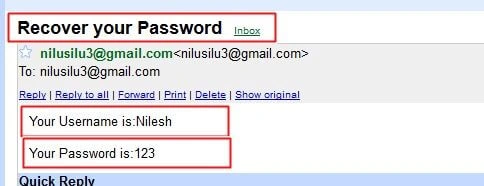
We have a login panel and account page and a forgetten password link, the user can login with his account details, but if he forgets the password and username he/she can access the username and password via the forgetten password link, in that they must feed their email and username and password will be sent to their respective emails.
Initial Chamber
Step 1
Open your Visual Studio 2010 and create an empty website, provide a suitable name (LoginForm_demo).
Step 2
In Solution Explorer you get your empty website, then add three Web Forms and SQL Server database.
For Web Form
LoginForm_demo (your empty website) then right-click then select Add New Item -> Web Form. Name it Login_demo.aspx. Again get to the same process and add another Web form and name it (Redirectpage.aspx). Again add one new web form and name it (ForgetPass.aspx).
For SQL Server Database
LoginForm_demo (your empty website) then right-click then select Add New Item -> SQL Server Database. (Add the database inside the App_Data_folder.)
Database Chamber
Step 3
In Server Explorer, click on your database (Database.mdf) then selet Tables -> Add New Table. Make the table like this:
Table -> tbl_data (Don't Forget to make ID as IS Identity -- True).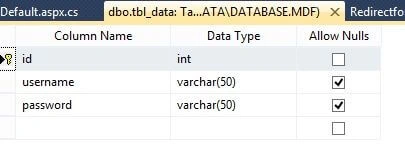
Now enter some data into your database by going to Tables then right-click then select Show Table Data then enter whatever you want to add in username and password. I had entered the following data. 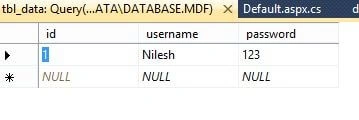
We will match this username and password so if the data is correct the user is redirected to his account page or otherwise the user gets an error message.
Design code
Step 4
Now make some design for your application by going to 3 web forms and try the code like the following.
Login_demo.aspx
- <%@PageLanguage="C#"AutoEventWireup="true"CodeFile="Default.aspx.cs"Inherits="_Default"%>
- <!DOCTYPEhtmlPUBLIC"-//W3C//DTD XHTML 1.0 Transitional//EN""http://www.w3.org/TR/xhtml1/DTD/xhtml1-transitional.dtd">
- <html
- xmlns="http://www.w3.org/1999/xhtml">
- <headrunat="server">
- <title></title>
- <styletype="text/css">
- .style1
- {
- text-decoration: underline;
- font-size: large;
- text-align: left;
- color: #0000FF;
- }
- .style2
- {
- width: 141px;
- }
- </style>
- </head>
- <body>
- <formid="form1"runat="server">
- <div>
- <tablestyle="width:100%;">
- <captionclass="style1">
- <strong>Login Form</strong>
- </caption>
- <tr>
- <tdclass="style2">
- </td>
- <td>
- </td>
- <td>
- </td>
- </tr>
- <tr>
- <tdclass="style2">
- Username:
- </td>
- <td>
- <asp:TextBoxID="TextBox1"runat="server">
- </asp:TextBox>
- </td>
- <td><%--
- <asp:RequiredFieldValidator ID="RequiredFieldValidator2" runat="server"
- ControlToValidate="TextBox1" ErrorMessage="Please Enter Your Username"
- ForeColor="Red"></asp:RequiredFieldValidator>--%>
- </td>
- </tr>
- <tr>
- <tdclass="style2">
- Password:
- </td>
- <td>
- <asp:TextBoxID="TextBox2"TextMode="Password"runat="server">
- </asp:TextBox>
- </td>
- <td><%--
- <asp:RequiredFieldValidator ID="RequiredFieldValidator1" runat="server"
- ControlToValidate="TextBox2" ErrorMessage="Please Enter Your Password"
- ForeColor="Red" Display="Dynamic"></asp:RequiredFieldValidator>--%>
- </td>
- </tr>
- <tr>
- <tdclass="style2">
- </td>
- <td>
- </td>
- <td>
- </td>
- </tr>
- <tr>
- <tdclass="style2">
- <asp:LinkButtonID="LinkButton1"runat="server"onclick="LinkButton1_Click">Forget Password??
- </asp:LinkButton>
- </td>
- <td>
- <asp:ButtonID="Button1"runat="server"Text="Log In"onclick="Button1_Click"/>
- </td>
- <td>
- <asp:LabelID="Label1"runat="server">
- </asp:Label>
- </td>
- </tr>
- </table>
- </div>
- </form>
- </body>
- </html>
- <%@PageLanguage="C#"AutoEventWireup="true"CodeFile="Redirectform.aspx.cs"Inherits="Redirectform"%>
- <!DOCTYPEhtmlPUBLIC"-//W3C//DTD XHTML 1.0 Transitional//EN""http://www.w3.org/TR/xhtml1/DTD/xhtml1-transitional.dtd">
- <html
- xmlns="http://www.w3.org/1999/xhtml">
- <headrunat="server">
- <title></title>
- </head>
- <body>
- <formid="form1"runat="server">
- <div>
- <p>
- <strongstyle="font-size: xx-large">Hello Everyone! Welcome to my Page.
- </strong>
- </p>
- </div>
- <asp:ImageID="Image1"runat="server"Height="335px"
- ImageUrl="~/redirectpageimage.jpg"Width="817px"/>
- <p>
- </p>
- <tablestyle="width:100%;">
- <tr>
- <td>
- </td>
- <td>
- </td>
- <td>
- </td>
- </tr>
- <tr>
- <td>
- </td>
- <td>
- <asp:ButtonID="Button2"runat="server"onclick="Button2_Click"
- style="margin-left: 313px"Text="Logout"/>
- </td>
- <td>
- </td>
- </tr>
- <tr>
- <td>
- </td>
- <td>
- </td>
- <td>
- </td>
- </tr>
- </table>
- </form>
- </body>
- </html>
- <%@PageLanguage="C#"AutoEventWireup="true"CodeFile="ForgetPassword.aspx.cs"Inherits="Default2"%>
- <!DOCTYPEhtmlPUBLIC"-//W3C//DTD XHTML 1.0 Transitional//EN""http://www.w3.org/TR/xhtml1/DTD/xhtml1-transitional.dtd">
- <html
- xmlns="http://www.w3.org/1999/xhtml">
- <headrunat="server">
- <title></title>
- <styletype="text/css">
- .style1
- {
- width: 225px;
- }
- .style2
- {
- width: 155px;
- }
- .style6
- {
- text-align: left;
- font-size: large;
- text-decoration: underline;
- color: #0000FF;
- }
- </style>
- </head>
- <body>
- <formid="form1"runat="server">
- <div>
- <tablestyle="width:100%;">
- <captionclass="style6">
- <strong>ForgetPassword:</strong>
- </caption>
- <tr>
- <tdclass="style1">
- </td>
- <tdclass="style2">
- </td>
- <td>
- </td>
- <td>
- </td>
- </tr>
- <tr>
- <tdclass="style1">
- </td>
- <tdclass="style2">
- EmailId:
- </td>
- <td>
- <asp:TextBoxID="TextBox1"runat="server">
- </asp:TextBox>
- </td>
- <td>
- </td>
- </tr>
- <tr>
- <tdclass="style1">
- </td>
- <tdclass="style2">
- </td>
- <td>
- </td>
- <td>
- </td>
- </tr>
- <tr>
- <tdclass="style1">
- <asp:LabelID="lbmsg"runat="server">
- </asp:Label>
- </td>
- <tdclass="style2">
- <asp:LinkButtonID="LinkButton1"runat="server"onclick="LinkButton1_Click">Back to Login
- </asp:LinkButton>
- </td>
- <td>
- <asp:ButtonID="Button1"runat="server"onclick="Button1_Click"Text="Submit"/>
- </td>
- <td>
- </td>
- </tr>
- </table>
- </div>
- </form>
- </body>
- </html>
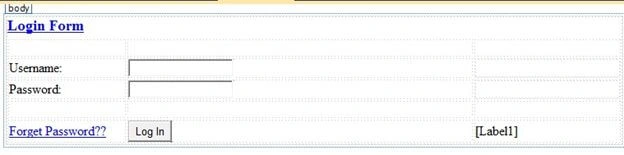
Login.aspx
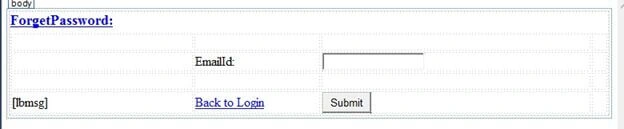
ForgetPassword.aspx
Code Chamber
Step 5
We will make some code in the respective web forms.cs file, starting from login.aspx.cs.
Login.aspx.cs
- using System;
- using System.Collections.Generic;
- using System.Linq;
- using System.Web;
- using System.Web.UI;
- using System.Web.UI.WebControls;
- using System.Data;
- using System.Data.SqlClient;
- publicpartialclass_Default: System.Web.UI.Page {
- protectedvoid Page_Load(object sender, EventArgs e) {
- }
- protectedvoid Button1_Click(object sender, EventArgs e) {
- SqlConnection con = newSqlConnection(@
- "Data Source=.\SQLEXPRESS;AttachDbFilename=|DataDirectory|\Database.mdf;Integrated Security=True;User Instance=True");
- SqlCommand cmd = newSqlCommand("select * from tbl_data where username=@username and password=@password", con);
- cmd.Parameters.AddWithValue("@username", TextBox1.Text);
- cmd.Parameters.AddWithValue("password", TextBox2.Text);
- SqlDataAdapter sda = newSqlDataAdapter(cmd);
- DataTable dt = newDataTable();
- sda.Fill(dt);
- con.Open();
- int i = cmd.ExecuteNonQuery();
- con.Close();
- if (dt.Rows.Count > 0) {
- Response.Redirect("Redirectform.aspx");
- } else {
- Label1.Text = "You're username and password is incorrect";
- Label1.ForeColor = System.Drawing.Color.Red;
- }
- }
- protectedvoid LinkButton1_Click(object sender, EventArgs e) {
- Response.Redirect("ForgetPassword.aspx");
- }
- }
- using System;
- using System.Collections.Generic;
- using System.Linq;
- using System.Web;
- using System.Web.UI;
- using System.Web.UI.WebControls;
- using System.Data;
- using System.Data.SqlClient;
- using System.Net;
- using System.Net.Mail;
- publicpartialclassDefault2: System.Web.UI.Page {
- protectedvoid Page_Load(object sender, EventArgs e) {
- }
- protectedvoid Button1_Click(object sender, EventArgs e) {
- string username = "";
- string password = "";
- SqlConnection con = newSqlConnection(@
- "Data Source=.\SQLEXPRESS;AttachDbFilename=|DataDirectory|\Database.mdf;Integrated Security=True;User Instance=True");
- SqlCommand cmd = newSqlCommand("select username, password from tbl_data where email=@email", con);
- cmd.Parameters.AddWithValue("email", TextBox1.Text);
- con.Open();
- using(SqlDataReader sdr = cmd.ExecuteReader()) {
- if (sdr.Read()) {
- username = sdr["username"].ToString();
- password = sdr["password"].ToString();
- }
- }
- con.Close();
- if (!string.IsNullOrEmpty(password)) {
- MailMessage msg = newMailMessage();
- msg.From = newMailAddress("[email protected]");
- msg.To.Add(TextBox1.Text);
- msg.Subject = " Recover your Password";
- msg.Body = ("Your Username is:" + username + "<br/><br/>" + "Your Password is:" + password);
- msg.IsBodyHtml = true;
- SmtpClient smt = newSmtpClient();
- smt.Host = "smtp.gmail.com";
- System.Net.NetworkCredential ntwd = newNetworkCredential();
- ntwd.UserName = "[email protected]"; //Your Email ID
- ntwd.Password = ""; // Your Password
- smt.UseDefaultCredentials = true;
- smt.Credentials = ntwd;
- smt.Port = 587;
- smt.EnableSsl = true;
- smt.Send(msg);
- lbmsg.Text = "Username and Password Sent Successfully";
- lbmsg.ForeColor = System.Drawing.Color.ForestGreen;
- }
- }
- protectedvoid LinkButton1_Click(object sender, EventArgs e) {
- Response.Redirect("Default.aspx");
- }
- }
- using System;
- using System.Collections.Generic;
- using System.Linq;
- using System.Web;
- using System.Web.UI;
- using System.Web.UI.WebControls;
- publicpartialclassRedirectform: System.Web.UI.Page {
- protectedvoid Page_Load(object sender, EventArgs e) {
- }
- protectedvoid Button2_Click(object sender, EventArgs e) {
- Response.Redirect("Default.aspx");
- }
- }
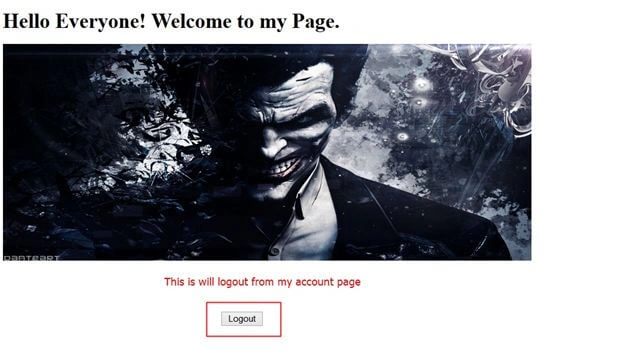
I haven't used an actual logout, it's just redirected to the login page. You can make a logout on your own using session. I had done it in my previous articles, just it check out in case you need it.
I hope you like this. Thank you for reading. Have a good day.
ramdas shindePosted Jun 28, 2018, 4:42 AM
Hello sir this code is not working properly ,in forgetpassword page i insert existing email id(present in database) then proceed ..........but your email id is not exist in database ........error arre occured .....pls help me
ahsan juttPosted Nov 10, 2017, 5:15 AM
I thin this is not good place for solution because you are not answering your audience i have posted my issue three days ago but you didnt give me answer i am very confuse about you are selecting from users and compare the user email with database email field even there is not any column that have email name of it. So if it is real so answer me immediately.
ahsan juttPosted Nov 7, 2017, 3:24 PM
Database Name, and data source passed in Forget Password.aspx.cs confusing me can you clear this line. SqlConnection con = newSqlConnection(@ "Data Source=.\SQLEXPRESS;AttachDbFilename=|DataDirectory|\Database.mdf;Integrated Security=True;User Instance=True"); So what data source we are using here. is it of my sqlserver or any online and whole string please can you clear it.
chhaya tPosted Sep 16, 2017, 1:42 AM
Hi,i have a problem in login page when i click forgot password not redirect on the page it show the error like username and password fill what i can do ??? plz tell me sir
Sanath KumarPosted Feb 23, 2017, 1:15 PM
Hi, I have done same code which you given but it doesn't work for me getting an error that "The SMTP server requires a secure connection or the client was not authenticated. The server response was: 5.5.1 Authentication Required. Learn more at" plz help me out rver response was: 5.5.1 Authentication Required. Learn more at"
Arul RPosted Oct 28, 2015, 5:37 AM
Good one !!!
Afzaal Ahmad ZeeshanPosted Jul 26, 2015, 2:22 AM
Let me request you to please stop and think what you are saying. Sending password in email? Passwords are so sensitive details on a user account, that even server doesn't need to know them. That is why, hashing is used to store the passwords. A hash is created for the password string that user provides and that hash is to be stored in the database. So when ever user wants to login, you create another hash and check it against the hash stored. Your article does the entire opposite. Saving raw passwords in database is first, you do even worse. You are teaching to send them over the network. Do you have any idea about TCP Hijacking? Any detail can be read from the network stream as if it was sent to a hacker himself. Please, do not share such approaches. Instead, try sending a token to the user that would allow them to reset the password. Most users use the same password on multiple websites, exposing password on one website would expose their privacy on multiple websites. Do you understand what I mean?
Munesh SharmaPosted Jul 25, 2015, 7:01 AM
good one nilesh
Humayun Kabir MamunPosted Jul 24, 2015, 10:35 AM
Nice...
Abhishek YadavPosted Jul 24, 2015, 8:15 AM
Wow!!! That's look good!! (Y)
Upendra Pratap ShahiPosted Jul 24, 2015, 6:58 AM
good one..
Debendra DashPosted Jul 24, 2015, 6:31 AM
good one.........
Sibeesh VenuPosted Jul 24, 2015, 4:13 AM
Nice Share. Thank you
SharadPosted Jul 24, 2015, 3:17 AM
Excellent..
Rajeesh MenothPosted Jul 24, 2015, 2:50 AM
Good One
Gopi ChandPosted Jul 24, 2015, 1:39 AM
Nice demo
RakeshPosted Jul 23, 2015, 11:42 PM
Good one
Shridhar SharmaPosted Jul 23, 2015, 3:28 PM
good one.