

In this article, I am going to demonstrate how to send the events to the Event Hub using Visual Studio. In my previous article, I showed how to create an Event Hub on the Azure portal, stream analytics input, and output of the events from the console application. An application, devices, gateways, and port can send events to Azure Event Hub using the Azure Events Hub REST API.
Prerequisites
- An Azure Subscription.
- Visual Studio 2015 or higher with an internet connection.
Follow the below steps to send an event to the Event Hub.
Step 1
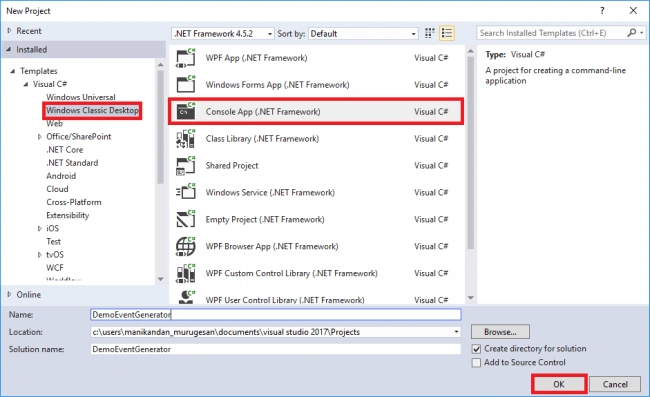
Open Visual Studio 2017 and press File-->New-->Project or click Ctrl+Shift+N to open the New Project.
Step 2
Under Visual C#-->Classic Window Desktop-->Console App(.NET Framework), enter the desired name for your project and press OK.
Step 3
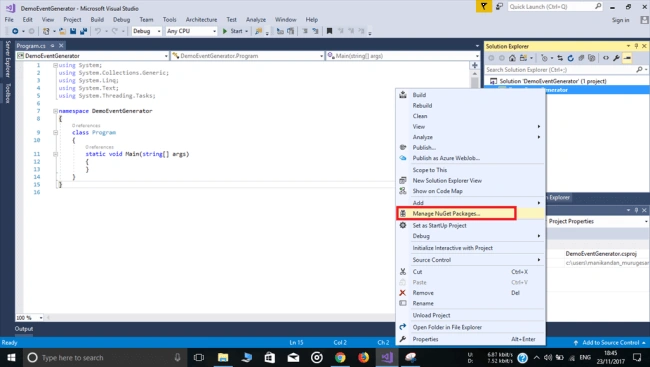
In the Solution Explorer, right-click your project and select the "Manage NuGet Packages" option.
Step 4
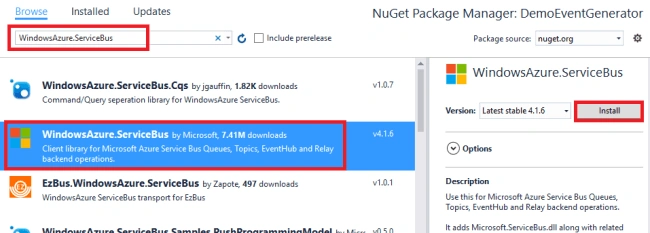
Click "Browse" and search for the package named WindowsAzure.ServiceBus. From the results, select the required package and click "Install" to install the package in our application. This package contains the files that our app will use to send events to the Event Hub.
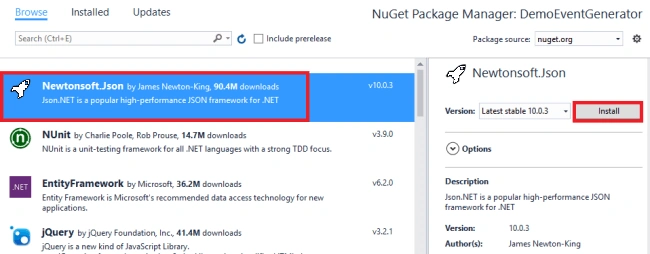
And also, search for the Newtonsoft.Json and click "Install" to install the package in our application. This package contains the APIs for creating and consuming JSON.
Step 4
Click "Browse" and search for the package named WindowsAzure.ServiceBus. From the results, select the required package and click "Install" to install the package in our application. This package contains the files that our app will use to send events to the Event Hub.
And also, search for the Newtonsoft.Json and click "Install" to install the package in our application. This package contains the APIs for creating and consuming JSON.
Step 5
Copy and replace the code in the program.cs file. Change the 16th line of this code with the Connection string that is copied from your Azure Event hub.
- using System;
- using System.Collections.Generic;
- using System.Linq;
- using System.Text;
- using System.Threading.Tasks;
- using Microsoft.ServiceBus.Messaging;
- using Newtonsoft.Json;
- namespace DemoEventGenerator
- {
- class Program
- {
- static double _probability = 0.01;
- static int _transactions = 0;
- static int _cardNumber = -1;
- static string _connectionString = "Connection String";
- static void Main(string[] args)
- {
- var rand = new Random();
- var client = EventHubClient.CreateFromConnectionString(_connectionString , "demoinputhub");
- while (true)
- {
- int card = 123456789 + rand.Next(0, 888888888);
- // Occasionally generate a fraudulent transaction by reusing a card number
- if (rand.NextDouble() < _probability && _cardNumber != -1)
- {
- card = _cardNumber;
- _cardNumber = -1;
- }
- // Formulate a transaction
- var transaction = new
- {
- transactionId = _transactions++,
- transactionTime = DateTime.UtcNow.ToString(),
- deviceId = 12345 + rand.Next(0, 88888),
- cardNumber = card,
- amount = rand.Next(1, 20) * 20
- };
- // Occasionally record a card number for later use in generating fraud
- if (rand.NextDouble() < _probability)
- {
- _cardNumber = transaction.cardNumber;
- }
- // Send an event to the event hub
- var message = JsonConvert.SerializeObject(transaction);
- client.Send(new EventData(Encoding.UTF8.GetBytes(message)));
- Console.WriteLine("[{0}] Event transmitted", transaction.transactionId);
- }
- }
- }
- }
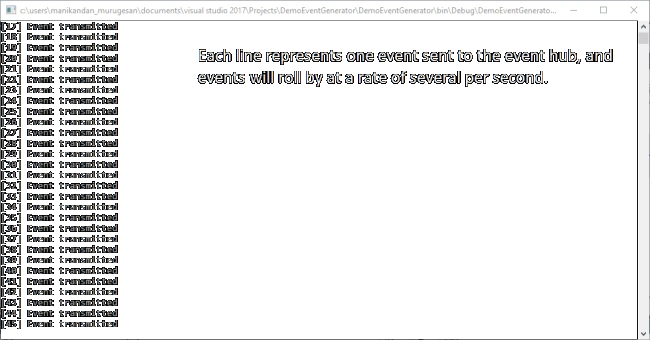
Click Ctrl+F5 or press "Start" to run the program and ensure that the output seems like the following. Each line of the output represents one event sent to the Event Hub at the rate of several seconds.
Summary
Summary
I hope you understood the process of sending an event to the Events Hub. This demo generator simulates these in the software.
abhishek singhPosted Sep 3, 2019, 2:06 AM
I have to ingest telemetry data from web api to event hub for that, i have created sender app which takes data from web api and send to event hub. But i am confuse how to deploy this solution n where , so that event hub can process and store data in blob.
Shyam VPosted May 14, 2018, 2:29 AM
Hi Nithya, I followed the exact steps as you have mentioned and I get the following error. "An error occurred during communication with 'N/A'. Check the connection information, then retry." What am I doing wrong? Or does it require any port opening or connections?
Tridip BhattacharjeePosted Nov 28, 2017, 3:58 AM
I never work with service bus before and my concept is not very clear about service. so can you explain what is message broker concept in service bus? please explain with a simple story. thanks
Prabu ElavarasanPosted Nov 27, 2017, 9:31 AM
Appreciate your hard work. However just wanted to know. What is the Need of EventHub for catching the events from VS. I believe when we write codes devs used to log everything using Log4Net / Custom Logs. Sounds like same. Is this will help in real scenario?
Tridip BhattacharjeePosted Nov 27, 2017, 5:00 AM
Why you choose WindowsAzure.ServiceBus. i never work with WindowsAzure.ServiceBus. so can you please tell me in what kind of scenario we need to use WindowsAzure.ServiceBus ? need some guide line for service Bus. thanks