

Background
In my previous article on Sending Emails In ASP.NET MVC From Razor View, we have learned how to send emails from View using WebMail Class , Now in this article we will learn how to send emails in ASP.NET MVC from controller with the help WebMail helper class. So let's learn step by step so beginners can also learn how to send emails in ASP.NET MVC from controller.
In my previous article on Sending Emails In ASP.NET MVC From Razor View, we have learned how to send emails from View using WebMail Class , Now in this article we will learn how to send emails in ASP.NET MVC from controller with the help WebMail helper class. So let's learn step by step so beginners can also learn how to send emails in ASP.NET MVC from controller.
Prerequisites
 Step 2: Create Model Class.
Now let us create the model class named EmployeeModel.cs by right clicking on model folder as in the following screenshot:
- Active internet connection.
- Email id of any provider such as Gmail, Yahoo or your organization to send emails.
Now let's create a simple MVC application to demonstrate this.
Step 1: Create an MVC Application.
Step 1: Create an MVC Application.
Now let us start with a step by step approach from the creation of a simple MVC application as in the following:
- "Start", then "All Programs" and select "Microsoft Visual Studio 2015".
- "File", then "New" and click "Project", then select "ASP.NET Web Application Template", then provide the Project a name as you wish and click OK. After clicking, the following window will appear:

3. As shown in the preceding screenshot, click on Empty template and check MVC option, then click OK. This will create an empty MVC web application whose Solution Explorer will look like the following:
Now let us create the model class named EmployeeModel.cs by right clicking on model folder as in the following screenshot:

Note:
It is not mandatory that Model class should be in Model folder, it is just for better readability you can create this class anywhere in the solution explorer. This can be done by creating different folder names or without folder name or in a separate class library.
EmployeeModel.cs class code snippet:
It is not mandatory that Model class should be in Model folder, it is just for better readability you can create this class anywhere in the solution explorer. This can be done by creating different folder names or without folder name or in a separate class library.
EmployeeModel.cs class code snippet:
- using System.ComponentModel.DataAnnotations;
- namespace SendingEmailsFromController.Models
- {
- public class EmployeeModel
- {
- [DataType(DataType.EmailAddress),Display(Name ="To")]
- [Required]
- public string ToEmail { get; set; }
- [Display(Name ="Body")]
- [DataType(DataType.MultilineText)]
- public string EMailBody { get; set; }
- [Display(Name ="Subject")]
- public string EmailSubject { get; set; }
- [DataType(DataType.EmailAddress)]
- [Display(Name ="CC")]
- public string EmailCC { get; set; }
- [DataType(DataType.EmailAddress)]
- [Display(Name ="BCC")]
- public string EmailBCC { get; set; }
- }
- }
Now let us add the MVC 5 controller as in the following screenshot:
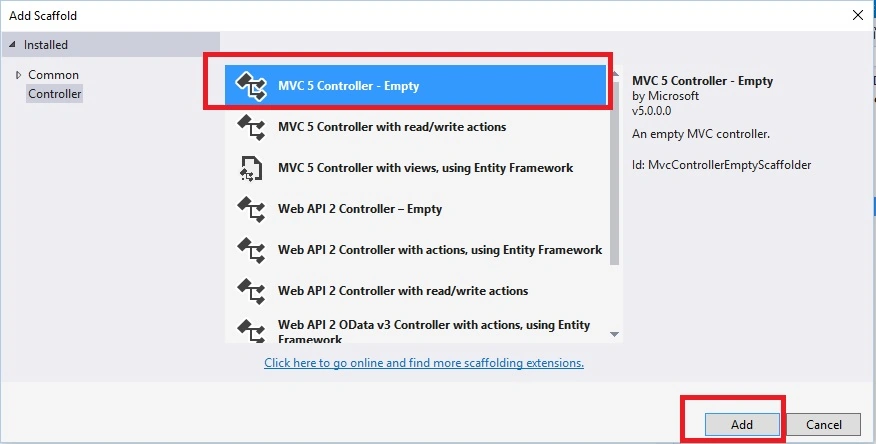
After clicking on Add button it will show the window. specify the Controller name as Home with suffix Controller.
Note:
The controller name must be having suffix as 'Controller' after specifying the name of controller. Now the default code in HomeController.cs will look like as follows,
HomeController.cs
- using SendingEmailsFromController.Models;
- using System;
- using System.Web.Helpers;
- using System.Web.Mvc;
- namespace SendingEmailsFromController.Controllers
- {
- public class HomeController : Controller
- {
- // GET: Home
- public ActionResult SendEmail()
- {
- return View();
- }
- [HttpPost]
- public ActionResult SendEmail(EmployeeModel obj)
- {
- try
- {
- //Configuring webMail class to send emails
- //gmail smtp server
- WebMail.SmtpServer = "smtp.gmail.com";
- //gmail port to send emails
- WebMail.SmtpPort = 587;
- WebMail.SmtpUseDefaultCredentials = true;
- //sending emails with secure protocol
- WebMail.EnableSsl = true;
- //EmailId used to send emails from application
- WebMail.UserName = "[email protected]";
- WebMail.Password = "YourGmailPassword";
- //Sender email address.
- WebMail.From = "[email protected]";
- //Send email
- WebMail.Send(to: obj.ToEmail, subject: obj.EmailSubject, body: obj.EMailBody, cc: obj.EmailCC, bcc: obj.EmailBCC, isBodyHtml: true);
- ViewBag.Status = "Email Sent Successfully.";
- }
- catch (Exception)
- {
- ViewBag.Status = "Problem while sending email, Please check details.";
- }
- return View();
- }
- }
- }
Create strongly typed view named SendEmail using EmployeeModel class.
Right click on View folder of created application and choose add view , select employee model class and scaffolding template as create . As shown in the following image,

Now open the SendEmail.cshtml view , Then following default code you will see which is generated by MVC scaffolding template as,
SendEmail.cshtml



Abhijeet AgrawalPosted Sep 17, 2019, 4:32 AM
How to integrate it with database
PK ramanPosted Jan 19, 2019, 2:03 AM
Problem while sending email, Please check details. this is my problem....I try to break point "" WebMail.Send(to: obj.ToEmail, subject: obj.EmailSubject, body: obj.EMailBody, cc: obj.EmailCC, bcc: obj.EmailBCC, isBodyHtml: true); "" after this line the control moves to catch directly it not show any specific error
Darryl Mickhel FloresPosted Sep 19, 2018, 10:03 AM
Problem while sending email, Please check details. this is my problem
asep roniPosted Aug 7, 2018, 5:39 AM
But, How i want sent to many receipt email?
asep roniPosted Aug 7, 2018, 5:39 AM
Thank you, this tutorial success, useful article.
Shakir AliPosted Dec 29, 2017, 2:33 AM
Very nice article thanks for sharing.....
Abbas HamzaPosted Nov 1, 2017, 5:30 AM
This is a useful article, but what if you have a dropdown list when select from it it will point to the selected item email e.g. if i select Info it should send email to [email protected] or if General is selected from the list the email should go to [email protected] how do I go about doing that
Bart VanPosted Jun 13, 2017, 5:38 PM
Great post! I have a question on how I can send an email to a dedicated email address? Users should only fill-in the From, Subject and Body fields?
Vithal WadjePosted Apr 24, 2016, 1:10 AM
thanks
Humayun Kabir MamunPosted Apr 24, 2016, 12:58 AM
Nice...
Vithal WadjePosted Apr 21, 2016, 10:19 AM
thanks
Jaipal ReddyPosted Apr 21, 2016, 6:17 AM
Nice. . .
Vithal WadjePosted Apr 20, 2016, 11:17 PM
Thanks
Vignesh ManiPosted Apr 20, 2016, 4:08 PM
Nice