

This article shows how to set a Welcome Image (an image shown on every Windows startup) using C#.
Introduction
In this article we will build a simple Windows Forms application that will set a Welcome Image for our Windows.
That is, every time we start our Windows the image will be shown.
Let me remind you of one thing that I have shown you previously, that is how to set a Welcome Message on every Windows Startup.
(For that you can visit here: Set a Welcome Greet on Every Windows Startup Using C#)
Background Idea
The concept is the same as in the previous article; that is, we will save the image file from one source to the following destination:
"C:\Users\<User-Name>\AppData\Roaming\Microsoft\Windows\Start Menu\Programs\Startup"
Procedures
Step 1: Create a new “Windows Forms Application” in Visual Studio and name it as you choose (I here named it "WelcomeImage").
Now a new form is created.
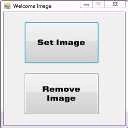
Step 2: Now go to the toolbox and add two Button Controls to the project and resize the window.
The form will look like this:
Step 3: Add the following using the directive:
using System.IO;
Step 4: Now navigate to the code file (Form1.cs) and the following to your project:
public partial class Form1 : Form
{
//Getting the Path "C:\Users\<User-
//Name>\AppData\Roaming\Microsoft\Windows\Start
// Menu\Programs\Startup" in destPathName
string destPathName = System.Environment.GetFolderPath(System.Environment.SpecialFolder.Startup);
string imgFileName = "";
string sourceImgPathName = "";
public Form1()
{
}
}
Step 5: Now generate the event for the "Set Image" Button and add the following code:
private void buttonSetImg_Click(object sender, EventArgs e)
{
//Filtering the openfileDialog's File Filter by
// setting it to 'png','jpg','jpeg'
//that is it only shows the file With Extension
//'.png','.jpg','.jpeg'
openFileDialog1.Filter = "Jpg File (.jpg)|*.jpg|Png
File (.png)|*.png|Jpeg File (.jpeg)|*.jpeg";
//Initially Setting File Name to empty
openFileDialog1.FileName = "";
//Open the File Dialog and saving the return
// result to result variable of DialogResult type
DialogResult result= openFileDialog1.ShowDialog();
Join the conversation! Your thoughts help the community grow.