
Introduction
Creating a Google API project
- Open the Google Developers Console.
- If you haven't created an API project yet, click Create Project.
- Supply a project name and click Create.
- If you have already a project then click on Enable and Manage API.
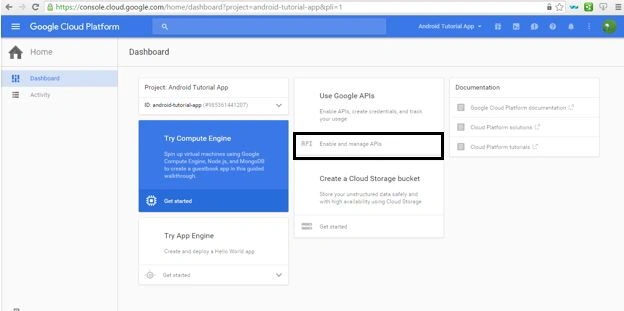
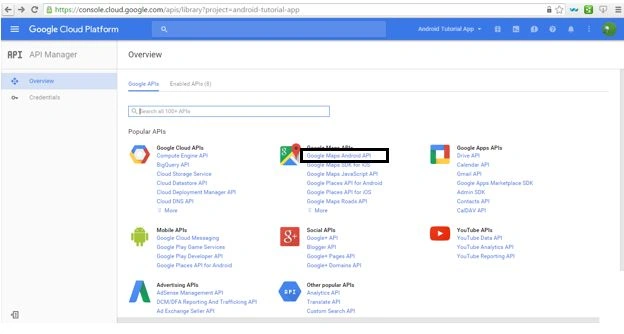
Enabling the MAPS Service
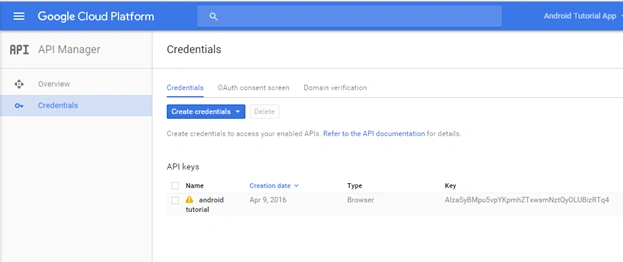
Obtaining an API Key
- In the sidebar, select APIs & auth > Credentials.
- Under Public API access, click Create new key.
- In the Create a new key dialog, click the Android key.
- Click Create.
- In the refreshed page, copy the API key. You will need the API key later in your Manifest meta-data.
Edit Application's Manifest: Permissions, Meta-Data & Features
- <uses-permission android:name="android.permission.ACCESS_NETWORK_STATE" />
- <uses-permission android:name="android.permission.WRITE_EXTERNAL_STORAGE" />
- <uses-feature
- android:glEsVersion="0x00020000"
- android:required="true" />
- <meta-data
- android:name="com.google.android.gms.version"
- android:value="@integer/google_play_services_version" />
- <meta-data
- android:name="com.google.android.maps.v2.API_KEY"
- android:value="AIzaSyBMpu5vpYKpmhZTxwsmNztQyOLUBizRTq4" />
- <LinearLayout xmlns:android="http://schemas.android.com/apk/res/android"
- android:layout_width="match_parent"
- android:layout_height="match_parent"
- android:orientation="vertical">
- <LinearLayout
- android:id="@+id/main_layout_map"
- android:layout_width="fill_parent"
- android:layout_height="fill_parent"
- android:orientation="vertical" >
- <fragment
- android:id="@+id/map"
- android:name="com.google.android.gms.maps.MapFragment"
- android:layout_width="match_parent"
- android:layout_height="match_parent" />
- </LinearLayout>
- </LinearLayout>
- package com.khawarislam.mainpage.Model;
- /**
- * Created by Hi on 4/25/2016.
- */
- public class Branch {
- public String getBranch_name() {
- return branch_name;
- }
- public void setBranch_name(String branch_name) {
- this.branch_name = branch_name;
- }
- public String getBranch_address() {
- return branch_address;
- }
- public void setBranch_address(String branch_address) {
- this.branch_address = branch_address;
- }
- public String getBranch_phone() {
- return branch_phone;
- }
- public void setBranch_phone(String branch_phone) {
- this.branch_phone = branch_phone;
- }
- public double getLatitude() {
- return latitude;
- }
- public void setLatitude(double latitude) {
- this.latitude = latitude;
- }
- public double getLongitude() {
- return longitude;
- }
- public void setLongitude(double longitude) {
- this.longitude = longitude;
- }
- private String branch_name;
- private String branch_address;
- private String branch_phone;
- private double latitude;
- private double longitude;
- }
- package com.khawarislam.mainpage.Model;
- import java.util.ArrayList;
- /**
- * Created by Hi on 4/25/2016.
- */
- public class BranchDatasource {
- public ArrayList<Branch> getList() {
- ArrayList<Branch> array_list = new ArrayList<Branch>();
- Branch branch1 = new Branch();
- branch1.setBranch_name("Korangi");
- branch1.setBranch_phone("0212566554");
- branch1.setBranch_address("ST-6/4, Sec. 24, Chamra Chowrangi, Korangi Industrial Area");
- branch1.setLatitude(24.880378);
- branch1.setLongitude(67.052693);
- array_list.add(branch1);
- Branch branch2 = new Branch();
- branch2.setBranch_name("Gulshan-e-Iqbal");
- branch2.setBranch_phone("0212566554");
- branch2.setBranch_address("36-B, Hina Centre, Gulshan-e-Iqbal");
- branch2.setLatitude(24.894393);
- branch2.setLongitude(67.108226);
- array_list.add(branch2);
- Branch branch3 = new Branch();
- branch3.setBranch_name("Clifton Branch");
- branch3.setBranch_phone("0212566554");
- branch3.setBranch_address("QM Building, Plot# BC 15, Block, Khayaban-e-Roomi, Clifton");
- branch3.setLatitude(24.914789);
- branch3.setLongitude(67.064624);
- array_list.add(branch3);
- Branch branch4 = new Branch();
- branch4.setBranch_name("Gulistan-e-Johar");
- branch4.setBranch_phone("0212566554");
- branch4.setBranch_address("Rashid Minhas Road, Gulistan-e-Joha");
- branch4.setLatitude(24.895716);
- branch4.setLongitude(67.031751);
- array_list.add(branch4);
- Branch branch5 = new Branch();
- branch5.setBranch_name("Atrium Mall");
- branch5.setBranch_phone("0212566554");
- branch5.setBranch_address("249, Staff Lines, Zaib un Nisa Street, Saddar");
- branch5.setLatitude(24.935883);
- branch5.setLongitude(67.048659);
- array_list.add(branch5);
- return array_list;
- }
- }

- <LinearLayout xmlns:android="http://schemas.android.com/apk/res/android"
- android:layout_width="fill_parent"
- android:layout_height="fill_parent"
- android:orientation="vertical" >
- <!-- Action bar -->
- <RelativeLayout style="@style/MyActionBar" >
- <TextView
- android:layout_width="wrap_content"
- android:layout_height="wrap_content"
- android:layout_centerInParent="true"
- android:text="Branch Detail"
- android:textColor="#ffffff"
- android:textSize="20sp" />
- </RelativeLayout>
- <LinearLayout
- android:layout_width="fill_parent"
- android:layout_height="wrap_content"
- android:layout_weight="1"
- android:orientation="vertical"
- android:padding="10dp" >
- <TextView
- android:id="@+id/branchDetail_textView_name"
- android:layout_width="fill_parent"
- android:layout_height="wrap_content"
- android:text="Branch Name" />
- <TextView
- android:id="@+id/branchDetail_textView_address"
- android:layout_width="fill_parent"
- android:layout_height="wrap_content"
- android:text="Branch Address" />
- </LinearLayout>
- <LinearLayout
- android:layout_width="fill_parent"
- android:layout_height="wrap_content"
- android:orientation="vertical"
- android:padding="10dp" >
- <Button
- android:layout_width="fill_parent"
- android:layout_height="wrap_content"
- android:onClick="onClick_call"
- android:text="Call" />
- </LinearLayout>
- </LinearLayout>
- package com.khawarislam.mainpage.Model;
- import android.app.Activity;
- import android.content.Intent;
- import android.net.Uri;
- import android.os.Bundle;
- import android.view.View;
- import android.widget.TextView;
- import com.khawarislam.mainpage.R;
- public class BranchDetailActivity extends Activity {
- public static Branch BRANCH;
- TextView tvBranchName;
- TextView tvBranchAddress;
- @Override
- protected void onCreate(Bundle savedInstanceState) {
- super.onCreate(savedInstanceState);
- setContentView(R.layout.activity_branch_detail);
- tvBranchName = (TextView) findViewById(R.id.branchDetail_textView_name);
- tvBranchAddress = (TextView) findViewById(R.id.branchDetail_textView_address);
- tvBranchName.setText(BRANCH.getBranch_name());
- tvBranchAddress.setText(BRANCH.getBranch_address());
- }
- public void onClick_call(View view) {
- dialPhoneNumber(BRANCH.getBranch_phone());
- }
- public void dialPhoneNumber(String phoneNumber) {
- Intent intent = new Intent(Intent.ACTION_DIAL);
- intent.setData(Uri.parse("tel:" + phoneNumber));
- if (intent.resolveActivity(getPackageManager()) != null) {
- startActivity(intent);
- }
- }
- }
- package com.khawarislam.mainpage.Model;
- import android.app.Activity;
- import android.content.Intent;
- import android.os.Bundle;
- import com.google.android.gms.maps.CameraUpdateFactory;
- import com.google.android.gms.maps.GoogleMap;
- import com.google.android.gms.maps.MapFragment;
- import com.google.android.gms.maps.model.CameraPosition;
- import com.google.android.gms.maps.model.LatLng;
- import com.google.android.gms.maps.model.Marker;
- import com.google.android.gms.maps.model.MarkerOptions;
- import com.khawarislam.mainpage.R;
- import java.util.ArrayList;
- import java.util.HashMap;
- import java.util.Map;
- public class BranchActivity extends Activity {
- private GoogleMap mMap;
- private ArrayList<Branch> array_list;
- private Map<Marker, Branch> mMarkerHashMap;
- @Override
- protected void onCreate(Bundle savedInstanceState) {
- super.onCreate(savedInstanceState);
- setContentView(R.layout.activity_branch);
- setupMap();
- }
- private void setupMap() {
- mMarkerHashMap = new HashMap<Marker, Branch>();
- BranchDatasource mBranchDatasource = new BranchDatasource();
- array_list = mBranchDatasource.getList();
- mMap = ((MapFragment) getFragmentManager().findFragmentById(R.id.map)).getMap();
- for (Branch item : array_list) {
- String _title = item.getBranch_name();
- String _snippet = item.getBranch_address();
- LatLng _latLng = new LatLng(item.getLatitude(), item.getLongitude());
- MarkerOptions mMarkerOptions = new MarkerOptions();
- mMarkerOptions.position(_latLng).title(_title).snippet(_snippet).flat(true);
- Marker marker = mMap.addMarker(mMarkerOptions);
- mMarkerHashMap.put(marker, item);
- CameraPosition cameraPosition = new CameraPosition.Builder()
- .target(marker.getPosition())
- .zoom(11.0f)
- .build();
- mMap.animateCamera(CameraUpdateFactory
- .newCameraPosition(cameraPosition));
- }
- mMap.setOnInfoWindowClickListener(new GoogleMap.OnInfoWindowClickListener() {
- @Override
- public void onInfoWindowClick(Marker marker) {
- Intent mIntent = new Intent(BranchActivity.this, BranchDetailActivity.class);
- BranchDetailActivity.BRANCH = mMarkerHashMap.get
- (marker);
- startActivity(mIntent);
- }
- });
- }
- }

Read more articles on Android

Shobana JPosted Jul 7, 2016, 7:28 AM
Nice explanation
Rahul Kumar SaxenaPosted Apr 30, 2016, 1:57 PM
Good Show
Debasis SahaPosted Apr 26, 2016, 10:19 AM
Nice One..
NitinPosted Apr 26, 2016, 5:17 AM
thanks for sharing
Pankaj Kumar ChoudharyPosted Apr 25, 2016, 12:21 PM
Nice Article Khawar.......