

Introduction
In this article we explore how to create and delete a user custom action on the Site Actions menu of a website in SharePoint. Custom actions are types of app experiences where you can develop and deploy them for menu item to provide new functionality.
Creating a user custom action on the Site Actions menu of a Web site is similar to creating an action for list items: You call the Add () method, set properties for the action, and then call Update (). The following example specifies Microsoft.SharePoint.StandardMenu for Location, and Site Actions for Group, to place the new action on the Site Actions menu.
For example, how to add a link to Site Actions menu using JavaScript CSOM.
Hereby, I have demonstrated the above functionality through snapshots of the implemented work and through code.
Before:
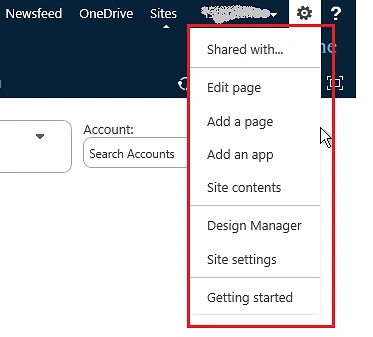
Solution
Here are the steps:
Step 1: Navigate to your SharePoint 2013 site.
Step 2: From this page select the Site Actions | Edit Page.
Edit the page, go to the "Insert" tab in the Ribbon and click the "Web Part" option. In the "Web Parts" picker area, go to the "Media and Content" category, select the "Script Editor" Web Part and press the "Add button".
Step 3:
Once the Web Part is inserted into the page, you will see an "EDIT SNIPPET" link; click it. You can insert the HTML and/or JavaScript as in the following:
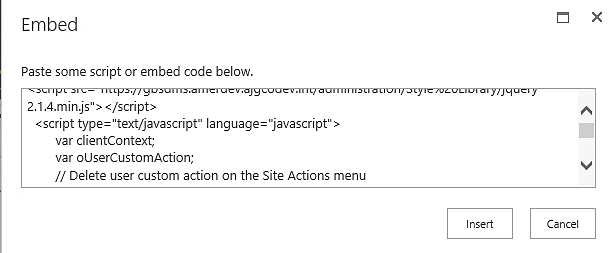
- <script type="text/javascript"src="http://ajax.aspnetcdn.com/ajax/jQuery/jquery-1.9.1.min.js"></script>
- <script type="text/javascript"language="javascript">
- var clientContext;
- var oUserCustomAction;
- // Delete user custom action on the Site Actions menu
- function deleteUserCustomAction()
- {
- clientContext = new SP.ClientContext()
- var oWebsite = clientContext.get_web();
- collUserCustomAction = oWebsite.get_userCustomActions();
- clientContext.load(oWebsite, 'UserCustomActions', 'Title');
- clientContext.executeQueryAsync(Function.createDelegate(this, this.deleteCustomAction), Function.createDelegate(this, this.onQueryFailed));
- }
- function deleteCustomAction()
- {
- var CstomAName = $("#text1").val();
- var customActionEnumerator = collUserCustomAction.getEnumerator();
- while (customActionEnumerator.moveNext())
- {
- var oUserCustomAction = customActionEnumerator.get_current();
- if (oUserCustomAction.get_title() == CstomAName)
- {
- oUserCustomAction.deleteObject();
- clientContext.load(oUserCustomAction);
- clientContext.executeQueryAsync(Function.createDelegate(this, this.onQuerySucceededdelete), Function.createDelegate(this, this.onQueryFailed));
- }
- }
- }
- function onQuerySucceededdelete()
- {
- $("#result").empty();
- $("#result").text('Custom action removed\n\nTo view the new menu item, refresh the page.');
- }
- function onQueryFailed(sender, args)
- {
- $("#result").empty();
- $("#result").text('Request failed. ' + args.get_message() + '\n' + args.get_stackTrace());
- }
- //Create user custom action on the Site Actions menu
- function CreateUserCustomAction()
- {
- var CstomAName = $("#text1").val();
- var clientContext = new SP.ClientContext();
- var site = clientContext.get_web();
- var collUserCustomAction = site.get_userCustomActions();
- var newUserCustomAction = collUserCustomAction.add();
- new UserCustomAction.set_location('Microsoft.SharePoint.StandardMenu');
- new UserCustomAction.set_group('SiteActions');
- new UserCustomAction.set_sequence(1000);
- new UserCustomAction.set_title(CstomAName);
- new UserCustomAction.set_imageUrl('/_layouts/images/myIcon.jpg');
- new UserCustomAction.set_description('Menu item added via ECMAScript');
- new UserCustomAction.set_url('/_layouts/create.aspx');
- new UserCustomAction.update();
- clientContext.executeQueryAsync(Function.createDelegate(this, this.onQuerySucceeded), Function.createDelegate(this, this.onQueryFailed));
- }
- function onQuerySucceeded(sender, args)
- {
- $("#result").empty();
- $("#result").text('New menu item added to Site Actions menu.\n\nTo view the new menu item, refresh the page.')
- }
- function onQueryFailed(sender, args)
- {
- $("#result").empty();
- $("#result").text('Request failed. ' + args.get_message() + '\n' + args.get_stackTrace());
- }
- </script>
- <h2>Example Custom Action using SharePoint 2013 CSOM </h2>
- </br>
- </br>
- Custom Action Name: <inputtype="text"id="text1"/>
- </br>
- </br>
- <input type="button"value="Create User CustomAction"id="create"onclick="CreateUserCustomAction()"/>
- </br>
- </br>
- <input type="button"value="Delete User CustomAction"id="Delete"onclick="deleteUserCustomAction()"/>
- </br>
- <div id="result"></div>

Delete a user custom action on the Site Actions menu:
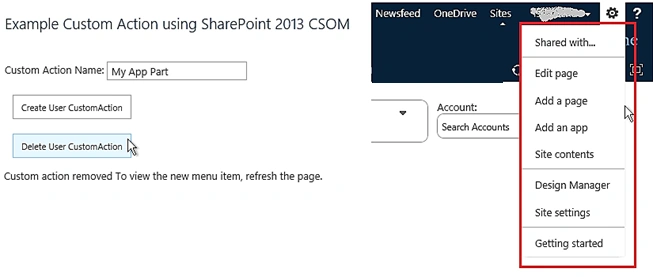
Summary:
I have tried creating and seleting a user custom action on the Site Actions menu, which would provide you a greater flexibility in user interaction on the application. I have achieved this using CSOM and JavaScript in SharePoint 2013. I hope this article is helpful to you and hereby I expect you to revert back to it in case of any queries.
Reference:
Aakash MauryaPosted Jun 2, 2017, 1:53 AM
Thanks for the share, this worked perfectly as expected, just it require some of the code changes, don't know why, but while we paste the code to article, the code get scattered sometimes, here in your code also same thing happened. "newUserCustomAction" is scattered as "new UserCustomAction" also "inputtype" should be like "input type". so if somebody will just try to copy and paste the code won't work.. if possible you can just edit this code.
Siva Krishna KumarPosted Aug 4, 2016, 3:20 AM
Good work through CSOM.
Sibeesh VenuPosted Mar 11, 2016, 4:46 AM
Nice Share
Mohammed IbrahimPosted Mar 10, 2016, 10:18 AM
nice
Vignesh ManiPosted Mar 10, 2016, 7:20 AM
Good
Akash KumharPosted Mar 10, 2016, 4:53 AM
Good One
Humayun Kabir MamunPosted Mar 10, 2016, 4:52 AM
Nice...
Prashant VermaPosted Mar 10, 2016, 4:51 AM
Keep it coming....
Prashant VermaPosted Mar 10, 2016, 4:50 AM
Very Well explained
Prashant VermaPosted Mar 10, 2016, 4:50 AM
Very Nice