

Implementation
- Make use of Search REST service : <Site URL>/_api/search/query?querytext=”<SearchTerm>”.
- Process the returned JSON result.
- Add required Search Service Permission to App.
Get Started
- Create a SharePoint-hosted ‘Apps for SharePoint 2013’ project using Visual Studio 2012/2013.
- Add a div in Default.aspx.
Note: Make sure you have referenced App.js script on Default.aspx. We are going to write the function searchAppWeb() there.- <!-- App Web Search-->
- <div id="searchDiv" style="display: none">
- <b>Search For</b>
- <input type="text" id="searchTerm" />
- <input type="button" id="btnSearch" value="Search" onclick="searchAppWeb()" />
- </div>
- <div id="SearchResultsDiv"></div>
- <!--Search Ends-->
- Add search function in App.js.
- //Search Implemenatation in App Web using Search REST API
- //Do not forget to provide Search Permission in AppManifest file
- var html;
- function searchAppWeb() {
- //Get the Search Term from textbox
- var searchTerm = $("#txtSearchTerm").val();
- //REST API query URL
- var queryUrl = _spPageContextInfo.webAbsoluteUrl + "/_api/search/query?querytext='" + searchTerm + "'";;
- //Empty the string
- html = "";
- //Make the ajax call
- $.ajax({
- url: queryUrl,
- method: "GET",
- headers: { "Accept": "application/json; odata=verbose" },
- success: onSearchSuccess,
- error: onSearchError
- });
- }
- function onSearchSuccess(data){
- // JSON object contains two elements which have search results
- //1. PrimaryQueryResult
- //2. SecondaryQueryResults (When documents are grouped on Host Web)
- //Get PrimaryQueryResult and Render it in HTML Table format
- html = "<table>";
- var primaryQueryResult = data.d.query.PrimaryQueryResult.RelevantResults.Table.Rows.results;
- if (primaryQueryResult != null && primaryQueryResult != undefined) {
- for (var iPrimaryResultCounter = 0; iPrimaryResultCounter < primaryQueryResult.length; iPrimaryResultCounter++) {
- html += "<tr><td>";
- html += primaryQueryResult[iPrimaryResultCounter].Cells.results[3].Value;
- html += "</td><td><a href=\""
- html += primaryQueryResult[iPrimaryResultCounter].Cells.results[6].Value;
- html += "\">" + primaryQueryResult[iPrimaryResultCounter].Cells.results[6].Value + "</a></td><tr>";
- }
- }
- //Get SecondaryQueryResults and continue rendering it in HTML Table format
- var secondaryResult = data.d.query.SecondaryQueryResults;
- if (data.d.query.SecondaryQueryResults != null && data.d.query.SecondaryQueryResults!=undefined) {
- for (var iSecondaryResultCounter = 0; iSecondaryResultCounter < data.d.query.SecondaryQueryResults.results.length; iSecondaryResultCounter++) {
- var resultBlock = data.d.query.SecondaryQueryResults.results[iSecondaryResultCounter].RelevantResults.Table.Rows.results;
- for (var iResults = 0; iResults < resultBlock.length; iResults++) {
- html += "<tr><td>";
- html += resultBlock[iResults].Cells.results[3].Value;
- html += "</td><td><a href=\""
- html += resultBlock[iResults].Cells.results[6].Value;
- html += "\">" + resultBlock[iResults].Cells.results[6].Value + "</a></td><tr>";
- }
- }
- }
- html += "</table>";
- $("#SearchResultsDiv").append(html);
- }
- function onSearchError(err){
- alert(JSON.stringify(err));
- }
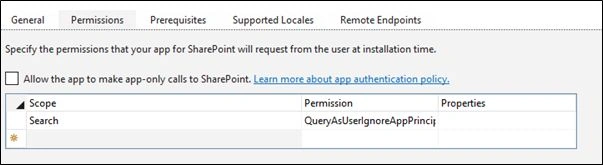
- Add required Search Service Permission to App. Add ‘Search’ in Scope and set permission to ‘QueryAsUserIgnoreAppPrincipal’
- Build and Deploy the App.
- If you have any List/Document library created on App web then add few items in that List or Document Library.

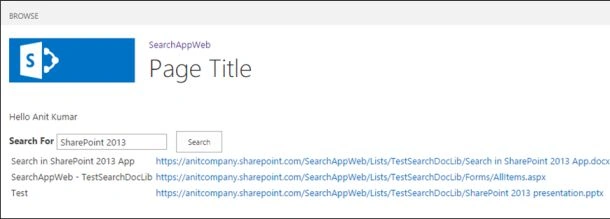
- Search for these items in App Web. Search Result will be displayed from App web.
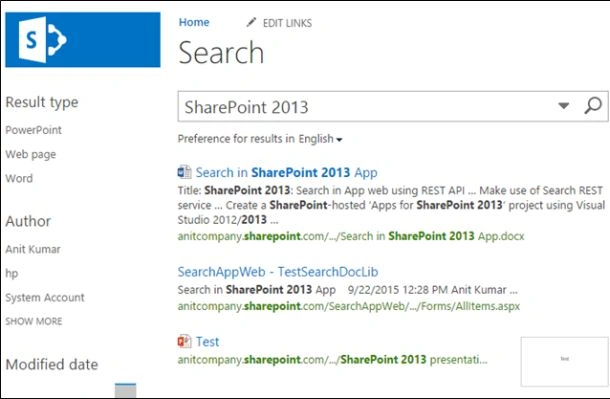
- You can search for these items from the host web too. Host Web search returns result from App web as well as Host Web.
Additional Data
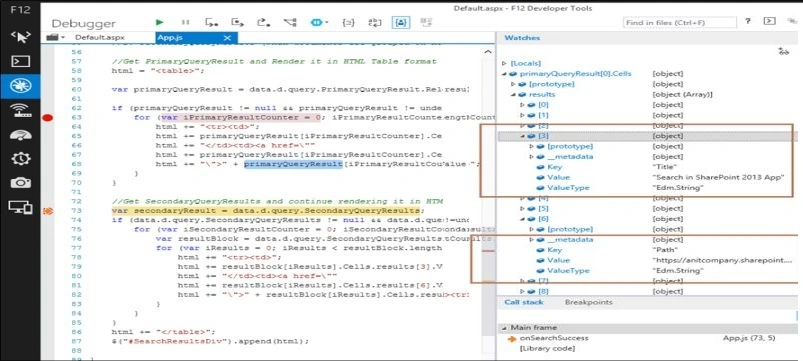
You can use developer tool to obtain additional result elements of Primary or Secondary Result from JSON and use it to display on the page. Here results[3] and results[6] have been used for display purpose.
Conclusion
This function can be used to get search result from App Web. Examine the returned JSON data to get more results elements. Styling can be done to display the result in any format.
Tejesh BarmaPosted Feb 5, 2017, 11:51 PM
It's very creative through Anit.....
Priyaranjan K SPosted Oct 6, 2015, 8:51 AM
Good One.. Very Useful ! ..
Anit KumarPosted Oct 2, 2015, 6:31 AM
Thanks Santhakumar!!
Santhakumar MunuswamyPosted Sep 26, 2015, 12:28 PM
Nice share
Gopi ChandPosted Sep 24, 2015, 4:57 AM
Nice work Ankit
Ankit BansalPosted Sep 23, 2015, 8:41 AM
thanks for sharing..
Vinodh NarayananPosted Sep 23, 2015, 3:49 AM
nice share
Harshad PansuriyaPosted Sep 23, 2015, 3:12 AM
Nice One
Sibeesh VenuPosted Sep 23, 2015, 3:03 AM
Nice Share