

Introduction
In this article, we explore one of the issues in the SharePoint online Task list displaying ID instead of Title. All of the task lists set for new experience began displaying the Task ID instead of the Task Title in all views in Edge and Chrome. We observed lots of people facing this issue in SharePoint online modern view for Task List
Problem
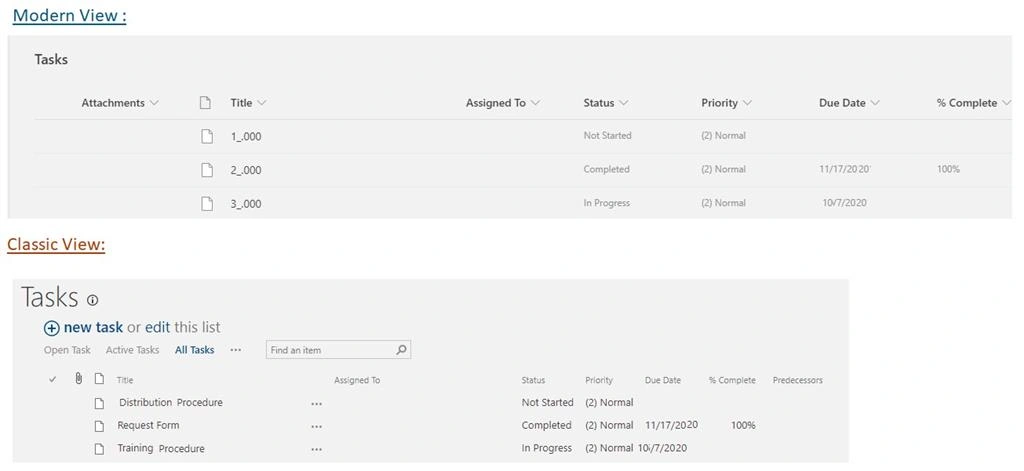
Users are not able to see the task name in the modern view. displaying the Task ID instead of the Task Title. Users have attempted to change the view with Task Name (linked to item), Task Name (linked to item with edit menu). However,
Users can see in the classic view only
Solutions
To fix this problem in modern SharePoint online. I have introduced in my previous article Column formatting Concept in Modern SharePoint online.
When we see in the modern experience displaying the Task ID instead of the Task Title. When we are trying to click on the Task title item instead of opening the display form downloaded the Take Id bank file.
We archive and resolve the SharePoint modem Task list problem using the following approach
Steps
Navigate to your SharePoint online site -> open SharePoint Task list -> Follow the numerical point as shown in the below screenshot.

JSON Code
- {
- "$schema": "https://developer.microsoft.com/json-schemas/sp/column-formatting.schema.json",
- "elmType": "a",
- "txtContent": "@currentField",
- "attributes": {
- "href": "= @currentWeb + '/Lists/Tasks/DispForm.aspx?ID=' + [$ID]"
- },
- "style": {
- "outline": "transparent",
- "position": "relative",
- "display": "inline-block",
- "box-sizing": "border-box",
- "min-height": "42px",
- "vertical-align": "top",
- "white-space": "nowrap",
- "overflow": "hidden",
- "text-overflow": "ellipsis",
- "padding-top": "11px",
- "padding-bottom": "11px",
- "padding-left": "12px",
- "text-decoration": "none",
- "color": "currentColor"
- }
- }
After adding the JSON and clicking the save button then we see the preview output of the result.
Final Output
Before applying the column formatting Screen,

After applying the column formatting Screen,

I hope it will be helpful !!!
Linda CPosted Apr 8, 2024, 8:47 PM
This worked except for now we don't see the menu context ellipse which we need to trigger manual Flows. How do we apply this same concept but keep the menu context ellipse?
William SelfPosted Mar 28, 2022, 2:32 PM
Dude, you are a rockstar!! Thank God for people like you that can makeup for the failures at Microsoft, you're better support than they have been for years with this problem.
vaibhav bhatiaPosted Oct 7, 2021, 6:12 PM
How you added task list as a webpart in modern page?