

Introduction
This is my third series of SharePoint Quick Start FAQ. We will cover page templates , page instances , WSS model , understand safe mode processing , deploy custom controls and understand WebParts. So let's drink the SharePoint wine series by series, slowly , maintain the hangover and enjoy this great product.Previous SharePoint QuickStart FAQ
- Quick Start FAQ Part 1 :- 11 basic FAQ questions , must for every new comer. It's a the basic Quick Start FAQ tutorial which talks about What is SharePoint ,WSS,MOSS,Site/Site collection , Virtual Path provider and then ends with explaining SitePages and Application pages First Article of Share Point
- Quick Start FAQ part 2:- This is the second part in the series which explains the ready made functionalities, custom pages,deploying/activating/deactivating features and lot. Second Part
How can we provision page template and page instances?
Before we move ahead with this question let's first define provisioning. Provisioning is a fancy name of making something available. So let's first create a page template using the 'Default.Master' and the see how we can provision this page on the website.. So below is the code snippet where we can create a master page from the 'Default.Master'.
|
<%@ Page MasterPageFile="~masterurl/default.master"%> <asp:Content ID="Content1" runat="server" ContentPlaceHolderID="PlaceHolderMain"> <h3>Hi this is a Page made from Page template</h3> </asp:Content> |
In order to use the template we need to create an instance in the SharePoint runtime. Creating a instance of the template in the SharePoint runtime is termed as provisioning.
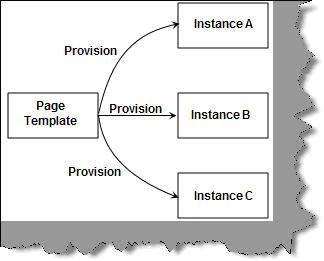
We need to use the 'Module' and 'File' tag to provision an instance of the template page. This is done in the 'ElementManifest.XML' file. Below is the code snippet of 'ElementManifest.XML' file which has the module tag with a file tag specifying what the URL page name is? This is the same template which we had shown on the top. 'PageA.aspx' is the instance name and 'MyPage.aspx' is the physical page name of the template page.
The type attribute has two values 'Ghostable' and 'GhostableInLibrary'. If you want to provision a resource inside a document library then you need to specify 'GhostableInLibrary'. If you do not want to provision a resource inside a document library then you need to specify 'Ghostable' value. For the current exercise we have given the value as 'Ghostable'.
A note the path attribute has the page in the 'MyPath' folder.
|
<Elements xmlns="http://schemas.microsoft.com/sharepoint/"> <Module Path="MyPage" Url="SitePages"> <File Url="MyPage.aspx" Name="PageA.aspx" Type="Ghostable" /> </Module> </Elements> |
As said previously we also need to define the feature.xml file which has the receiver class and the element manifest pointing to the elementmanifest.xml file.
|
<Feature Id="701B7EA3-0816-4a5f-8FFE-AD15F0E5B562" Title="Provision" Scope="Web" Description="This features enables us to goto Custom Page" Hidden="FALSE" ImageUrl="menuprofile.gif" ReceiverAssembly="ClassLibrary1, Version=1.0.0.0, Culture=neutral, PublicKeyToken=52bd1db23825a2e4" ReceiverClass="ClassLibrary1.clsFeatureActivator" xmlns="http://schemas.microsoft.com/sharepoint/"> <ElementManifests> <ElementManifest Location="ElementManifest.xml" /> </ElementManifests> </Feature> |
In the receiver class we will add menu items in the quick launch nodes. So in the activation event we will add a link which will activate this feature and in the deactivation event we will remove this feature.
So in the activation event we first need to get reference to the SpSite object using the URL.
| SPSite ObjQuickLaunch = new SPSite("http://mum2815dz:2/sites/LearnSharePoint"); |
From the SpSite object we get the 'SpWeb' object.
| SPWeb ObjSpWeb = ObjQuickLaunch.OpenWeb(); |
From the 'SpWeb' object we get reference to all node collection of the Quick launch menu.
| SPNavigationNodeCollection QuickLauncNodes = ObjSpWeb.Navigation.QuickLaunch; |
Now we create a menu of the page.
| SPNavigationNode objMenuItem = new SPNavigationNode("Quest", "SitePages/PageA.aspx"); |
Add the menu to the quick launch node.
| QuickLauncNodes.AddAsFirst(objMenuItem); ObjSpWeb.Update(); |
In the deactivation event we will remove the link.

Now that we have done with creating the two xml files and the class which will handle the feature events , use stsadm utility to register the feature. Once you have registered it you should see the feature in the feature list display. We have named the feature as 'Provision' so you can see the 'Provision' feature.
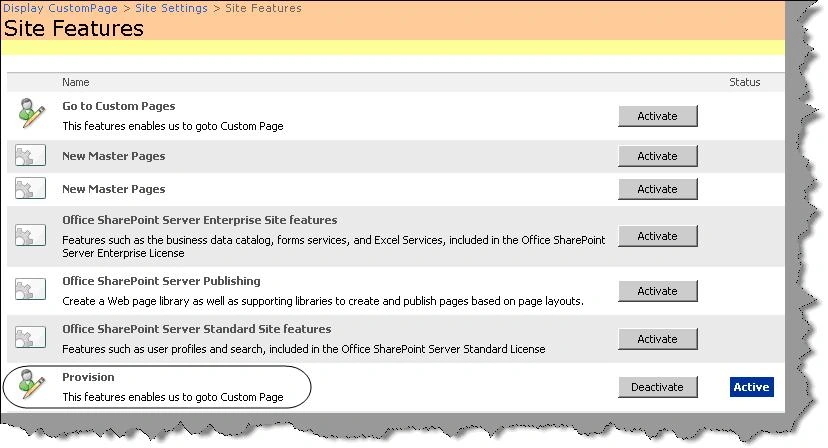
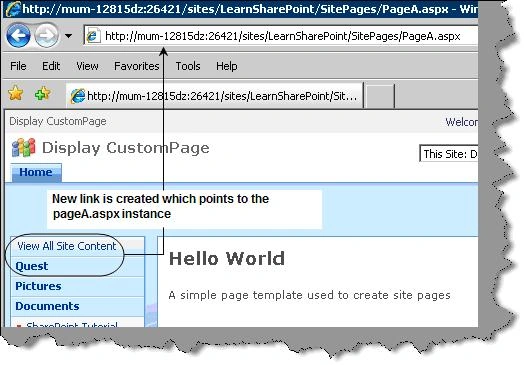
Once you activate the feature you should see the 'Quest' link which points to the template instance page 'PageA.aspx'. If you disable the feature you will not be able to browse the page instance.
Why customized pages are parsed using no-compile mode?
We had discussed previously two types of pages site pages and application pages. Site pages can be customized while application pages are standard pages like 'settings.aspx' which is common across sites.
When a user customizes a site page a customized version of the site page is saved in the content database. This provides lot of flexibility but it has its own disadvantages. We can customize site pages using 'SharePoint Designer'.
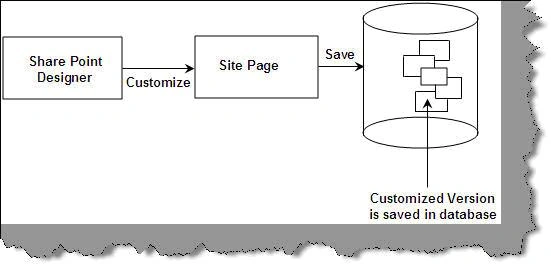
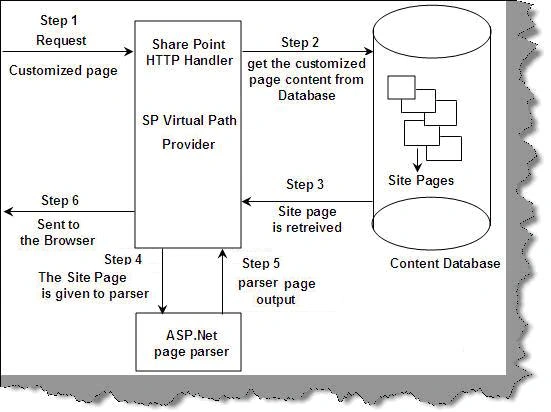
Now let's try to understand how a customized site page which is saved content is processed. Customized site pages are processed in six steps:-
- Step 1:- The user requests a customized page.
- Step 2:- SharePoint HTTP handler i.e. 'SPVirtualPathProvider' picks the request and shoots a query to the content database to fetch the page.
- Step 3:- Site page is retrieved and sent to the SharePoint handler.
- Step 4:- The site page data is given to the ASP.NET parser. Please note this ASP.NET parser is not the one which IIS uses. This is made especially for SharePoint.
- Step 5:- Parser parses and gives the output to the handler.
- Step 6:- Handler finally gives the output back to the client.
Below is the reason why non-compiled pages are more efficient then compiled pages.
Compiled pages Non-Compiled pages
Once the compiled ASP page DLL is loaded it gets unloaded only when the App Domain gets recycled. It can be loaded and unloaded. In this scenario the memory management is more efficient.
What is safe mode processing and Safe Controls?
Any customized page is parsed using safe mode processing. This parsing brings in security. Safe mode processing guarantees that there is no inline script in the customized page. In other words safe mode processing disallows in-line script because a hacker can mount attack using in-line script. If you try to run in-line script on customized page you will get error 'Code blocks are not allowed in this file'.
In case you still want to run in-line script in customized pages you need to specify 'AllowServerSideScript=true' in the 'SafeMode' tag section in web.config file.
|
<SharePoint> <SafeMode ...="" > <PageParserPaths> <PageParserPath VirtualPath="/sites/MySite/SitePages/*" IncludeSubFolders="true" CompilationMode="Always" AllowServerSideScript="true" /> </PageParserPaths> </SafeMode> </SharePoint> |
Safe controls help us define which controls the customized pages will have. Customized pages can only have controls which are defined in the web.config file in the 'SafeControls' tag. For instance in the below code snippet we have defined that customized pages can use controls from 'Microsoft.SharePoint.WebControls'.
|
<SafeControls> <SafeControl Assembly="Microsoft.SharePoint" Namespace="Microsoft.SharePoint.WebControls" TypeName="*" AllowRemoteDesigner="True" /> </SafeControls> |
Can you explain WSS model?
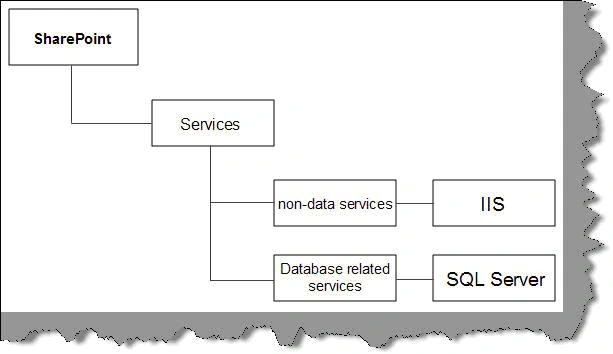
In order to understand WSS model we need to first understand different types of services used by SharePoint. SharePoint uses two major services in is IIS which is a non-data service and the other is SQL Server i.e. database related services.
SharePoint was designed from the view point that it can be used in web farms. So lets first visualize web farms and then we will try to understand how SharePoint visualized web farms.
Below figure shows two aspects one a normal visualization of a web farm and other the SharePoint view point. In our normal view (i.e. the left hand side of the image) we can think of farms having servers and servers having the two services (i.e. IIS and DB service). When SharePoint visualizes the farm infrastructure it's a bit different.
SharePoint visualizes the farm infrastructure in terms of database services and non-database services. So it visualizes database services attached to servers and non-database services like IIS differently.
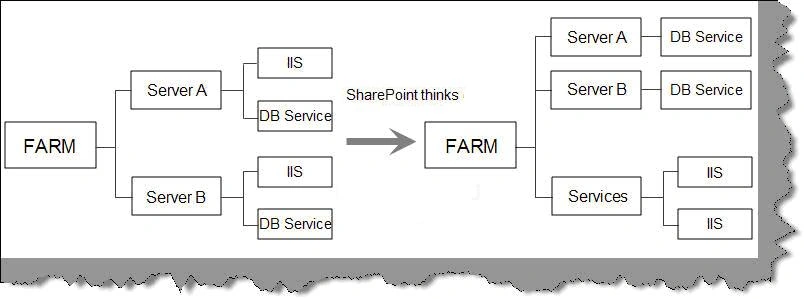
Note: - We are not sure why there is a change in visualization.
So let's visualize how the WSS object model of SharePoint is seen.
- The parent object in the SharePoint hierarchy is the SPfarm object.
- SPFarm will have collection of server objects i.e. the 'SPServer' objects.
- 'SPServer' objects further have 'SPDatabaseServiceInstance' object.
- 'SPDatabaseServiceInstance' has a 'SPContentDatabase' object instance.
- From the 'SPFarm' you can also browse to services on farm level. 'SPFarm' has 'SPService' collection.
- 'SPService' in turn allow us to browse through IIS application i.e. 'SPWebApplication'.
- 'SPWebApplication' has site collection which in turn has site object which can be browsed using 'SPSite' object.
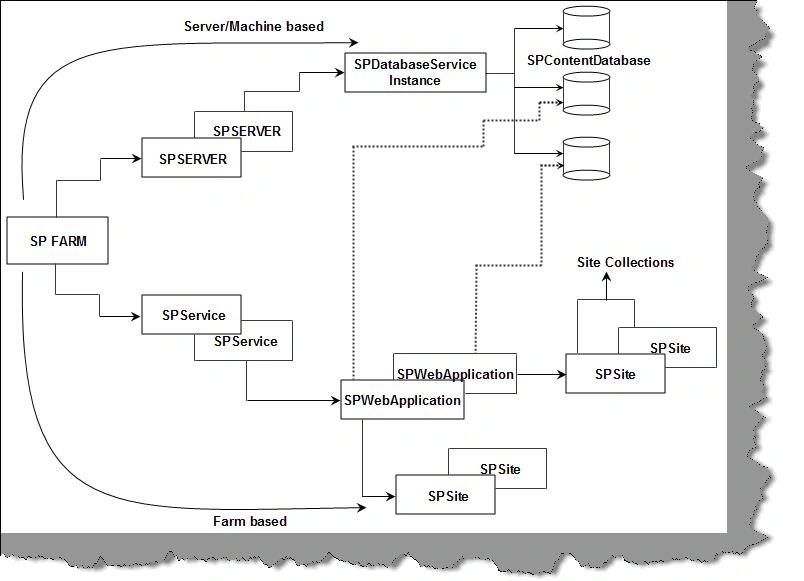
Now let's understand the object hierarchy below the 'SPSite'. 'SPSite' / Site belong to site collection. In other words one site collection can have many sites inside it. Site will have lists and list will have fields.
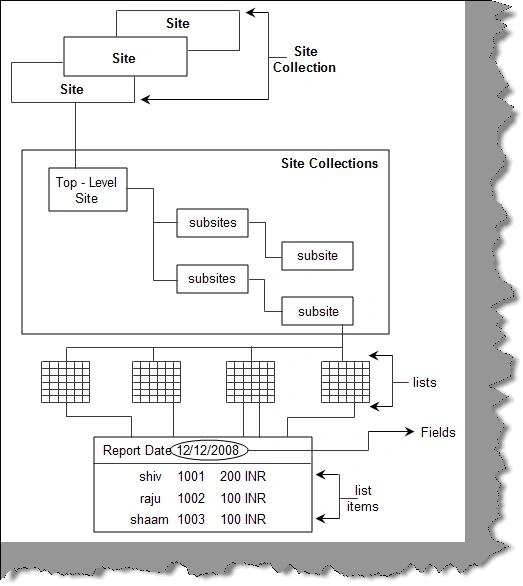
Below is the code snippet which takes the Farm object , browses through all its services , using the service object browses through all its web application and then using web application browses through all sites.
|
SPFarm oFarm = SPFarm.Local;
// Get all the services from the farm object foreach (SPService objService in oFarm.Services) { // Check if this is a WebService type of object if (objService is SPWebService) { // Cast it to a WebService object SPWebService oWebService = (SPWebService)objService;
// Get all Webapplications from the WebApplications collection foreach (SPWebApplication oWebApplication in oWebService.WebApplications) { // Loop through all the sites foreach (SPSite oSite in oWebApplication.Sites) { // Get reference of the Root object SPWeb oWebRoot = oSite.RootWeb;
// Any kind of processing
// Do not forget to dispose oWeb.Dispose(); oSite.Dispose(); } } } } |
How can we use custom controls in SharePoint?
Step 1:- Create the custom control by inheriting from the 'WebControl' class and override the 'RenderContents' method with your implementation. In the below code snippet we are just writing the site title and site URL to the browser.
|
using System.Web.UI; using System.Web.UI.WebControls; using Microsoft.SharePoint;
namespace NameSpaceCustomControl { public class CustomControl1 : WebControl { protected override void RenderContents(HtmlTextWriter output) { SPWeb site = SPContext.Current.Web; output.Write("The Site title is " + site.Title); output.Write("<br/>"); output.Write("The URL of the site is " + site.Url); } } } |
Step 2:- Compile the custom control class and generate the DLL from the same. Once the compiled DLL is generated, register the same in GAC.
Step 3:- Refer the custom control assembly in your ASPX page using the register attribute. Please note to specify the public key token of the GAC.
| <%@ Register Assembly="CustomControl,Version=1.0.0.0,Culture=neutral,PublicKeyToken=4adae03f3c0d5b8e" Namespace="NameSpaceCustomControl" TagPrefix="CustomSitePages" %> |
Specify the custom control with a proper unique ID.
| <CustomSitePages:CustomControl1 ID="cc1" runat="server" /> |
Below is the complete code of the page.
|
<%@ Page Language="C#" MasterPageFile="~masterurl/default.master" meta:progid="SharePoint.WebPartPage.Document"%>
<%@ Register Assembly="CustomControl,Version=1.0.0.0,Culture=neutral,PublicKeyToken=4adae03f3c0d5b8e" Namespace="NameSpaceCustomControl" TagPrefix="CustomSitePages" %>
<asp:Content runat="server" ContentPlaceHolderID="PlaceHolderMain">
<h3>Hi this is a Site Page</h3> <CustomSitePages:CustomControl1 ID="cc1" runat="server" /> </asp:Content> |
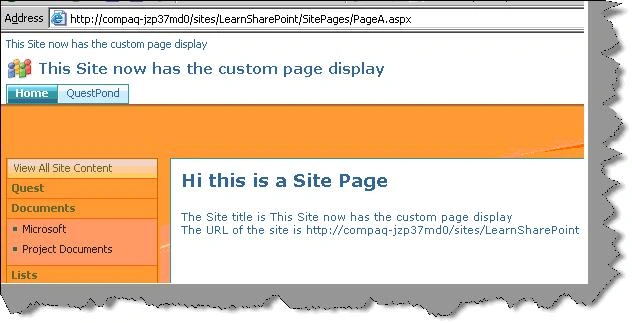
Now if you run the page you can see the custom control in action.
How can you view a detail error in SharePoint?
SharePoint does not give error in a user-friendly manner or in a confusing manner. For instance below figure shows it has shown 'File not found; but the root cause is something different. Developers would like to get the exact function / method name in which the error has occurred.
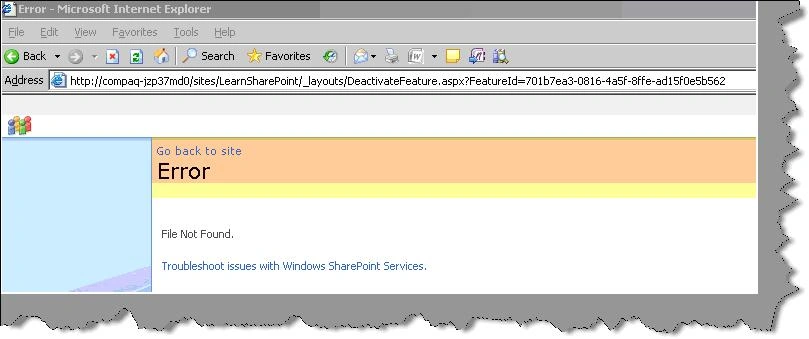
There are four steps, in other words there are three changes we need to make to the config file and do IIS reset. So let's go through the four steps to get the actual cause of the above error.
As said previously we need to change the 'web.config' file in three different places. You can get the 'web.config' file from 'C:\Inetpub\wwwroot\wss\VirtualDirectories\80' folder.
Step 1 :-Change callstack value from false to true in SafeMode attribute as shown below.
Change
|
<SafeMode MaxControls="200" CallStack="false" ...=""> |
to
| <SafeMode MaxControls="200" CallStack="true" ...=""> |
Step2:- Change 'customErrors' tag mode from 'On' to 'Off'.
Change
| <customErrors mode="On" /> |
to
| <customErrors mode="Off" /> |
Step3 :- Change 'Debug' from 'false' to 'true' in 'Compilation' attribute.
Change
| <compilation batch="false" debug="false"> |
to
| <compilation batch="true" debug="true"> |
Step 4 :- Restart the IIS.
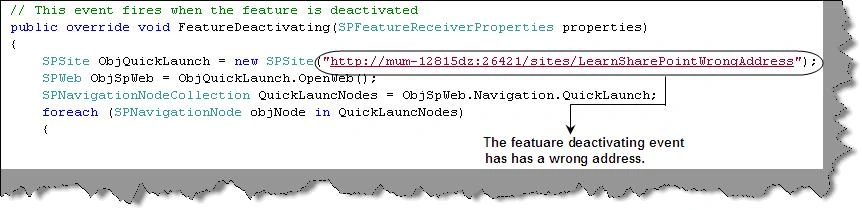
You can now see a detail stack error which shows which method exactly has the issue. For instance in this scenario the 'FeatureDeactivation' event has the error.
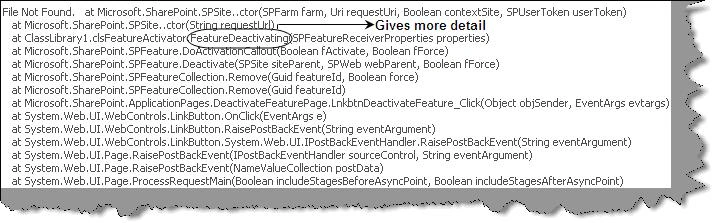
The error in 'FeatureDeactivation' event happened because of the wrong URL specified for the 'SPSite'. If you see the previous error it showed as 'File not found' , but in actual it was due to wrong URL name.
How can we display ASCX control in SharePoint pages?
Custom controls in ASP.NET provide huge level of reusability in ASP.NET. They are normally simple controls with ASCX extensions which can be reused in different ASPX pages. We will not be getting in to details of what an ASCX control is. In case you are not familiar with the basics please do read any ASP.NET basic book and we are sure it's not a rocket science.
To load an ASCX control in SharePoint environment is a simple five step process.
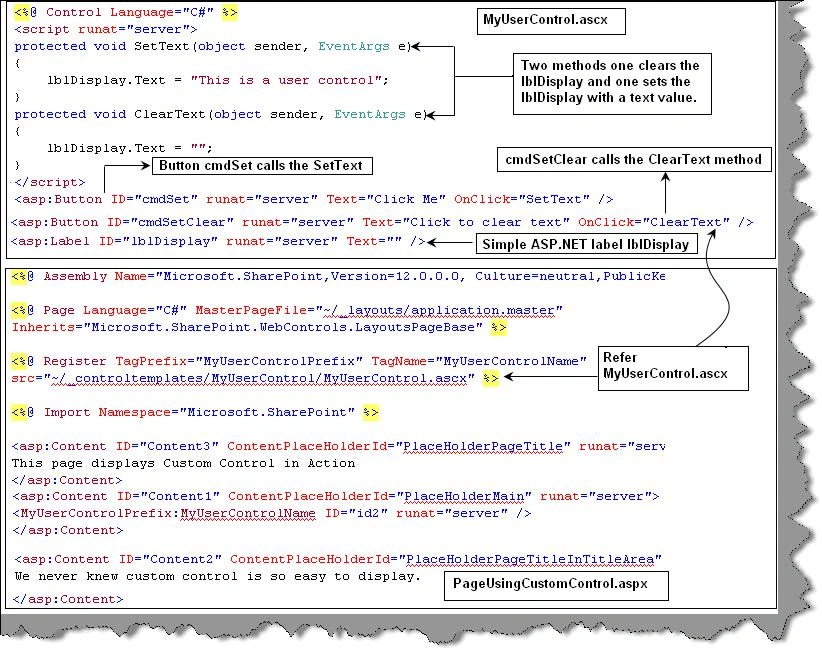
Step1:- We need to create an ASCX. So below is a simple ASCX file which has a label 'lblDisplay'. There are two functions 'setText' and 'ClearText' one which sets the label to value and the other clear the label. Both these methods 'setText' and 'clearText' are called by event click of two buttons 'cmdSet' and 'cmdClear' respectively.
|
<%@ Control Language="C#" %> <script runat="server"> protected void SetText(object sender, EventArgs e) { lblDisplay.Text = "This is a user control"; } protected void ClearText(object sender, EventArgs e) { lblDisplay.Text = ""; } </script> <asp:Button ID="cmdSet" runat="server" Text="Click Me" OnClick="SetText" /> <br/> <asp:Button ID="cmdSetClear" runat="server" Text="Click to clear text" OnClick="ClearText" /> <br/> <asp:Label ID="lblDisplay" runat="server" Text="" /> |
Step 2:- We need to refer this ASCX file in a ASPX page using the register attribute and refer the same using the 'TagPrefix' and 'TagName'. Below is the code snippet in which we have highlighted the same in bold.
|
<%@ Assembly Name="Microsoft.SharePoint,Version=12.0.0.0, Culture=neutral,PublicKeyToken=71e9bce111e9429c" %>
<%@ Page Language="C#" MasterPageFile="~/_layouts/application.master" Inherits="Microsoft.SharePoint.WebControls.LayoutsPageBase" %>
<%@ Register TagPrefix="MyUserControlPrefix" TagName="MyUserControlName" src="~/_controltemplates/MyUserControl/MyUserControl.ascx" %>
<%@ Import Namespace="Microsoft.SharePoint" %>
<asp:Content ID="Content3" ContentPlaceHolderId="PlaceHolderPageTitle" runat="server"> This page displays Custom Control in Action </asp:Content>
<asp:Content ID="Content1" ContentPlaceHolderId="PlaceHolderMain" runat="server"> <MyUserControlPrefix:MyUserControlName ID="id2" runat="server" /> </asp:Content>
<asp:Content ID="Content2" ContentPlaceHolderId="PlaceHolderPageTitleInTitleArea" runat="server"> We never knew custom control is so easy to display. </asp:Content> |
Below figure shows the overall view , interaction and explanation of 'MyUserControl.ascx' and 'PageUsingCustomControl.aspx'.
Step 3:- We need to copy the ASCX control in the 'C:\Program Files\Common Files\Microsoft Shared\web server extensions\12\TEMPLATE\CONTROLTEMPLATES' directory. For this sample we have created a simple directory called as 'MyUserControl' and uploaded 'MyUserControl.ascx' in the same. If you remember we had referred the ASCX file using the virtual path sign '~' with the 'MyUserControl' folder.
| <%@ Register TagPrefix="MyUserControlPrefix" TagName="MyUserControlName" src="~/_controltemplates/MyUserControl/MyUserControl.ascx" %> |
Step 4:- We also need to paste the ASP.NET page 'PageUsingCustomControl.aspx' in the layouts folder located at 'C:\Program Files\Common Files\Microsoft Shared\web server extensions\12\TEMPLATE\LAYOUTS'.
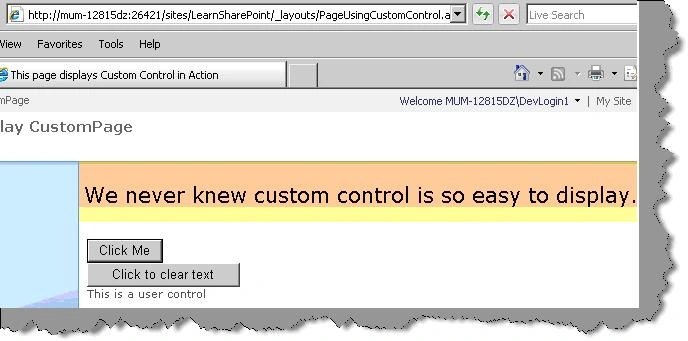
Step 5:- This is the easiest step we need to the run the ASPX page and enjoy the how user control runs under the SharePoint environment. Below is how the user controls looks. If you click the button 'Click me' the label is set with a text 'This is a user control'. If you click on 'Click to clear text' it will just clear the values of the label.
| Note: - If you are using behind code you need to register the behind code in to GAC and refer the same in the ASCX. In this example we have just used in-line code for simplicity. |
What are WebParts and how does it interact with SharePoint ?
It helps to build reusable components which can customized and personalized according to business user. We can either make our own webpart or we can reuse the existing one's from SharePoint itself.
Following WebParts are available with WSS :-
Data View Web Part: - Displays data with rich design support through Microsoft SharePoint Designer.
List View Web Part: - Helps us to display list content for any list in the SharePoint site.
Image Web Part: - Helps us to display image files.
Content Editor Web Part Use this to display static HTML content using a WYSIWYG editor or to link to a text file.
Members Web Part: - Helps us to display members of the site.
Page Viewer Web Part: - Displays web page in an Iframe.
WebPart is nothing but a simple class which inherits from System.Web.UI.WebControls.WebParts. In other words you can say WebPart is kind of a WebControl which can be deployed in a WebPartZoneControl.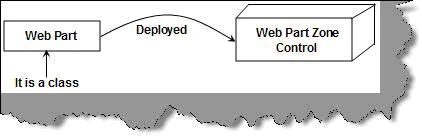
WebPart manager control is like controller which maintains instances of Webpart. It adds WebParts to the WebPartZone when the ASP.NET pages get initialized.
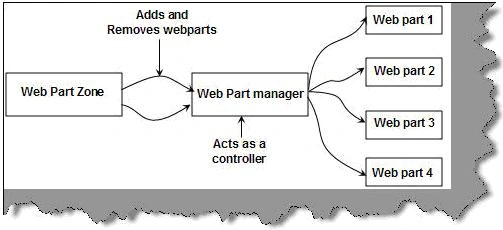
In my QuickStart fourth series I will make a point to cover WebPart's in more detail.
Source code
Attached the source code which we have referred in this article feel free to use it.
mariselvan rengarajanPosted May 27, 2010, 2:39 AM
hi, The articles are very fantastic .but i get the error message .whenever my .aspx page refer to the my masterpage stored in the layouts directory,give some suggestion to me
nalakaPosted Jan 20, 2009, 12:06 AM
Hi !! I have idea to develop web part of room plan. This is the requirement. User should enter location and item detail of room. Those data should be store in xml file. Then room plan graphic is automatically created. Can any one know how to draw plan (image) using web part..?? Please give me some idea to start this web part . thanX. regards, nalaka