

In this article, we will see how to develop a simple Silverlight application with MVVM, WCF services and Entity Framework.
In my earlier article, I have described how to develop simple Silverlight applications using the MVVM pattern. (Link to article)
In this article, we will include how to create a Silverlight application with WCF services also.
Steps
- Add new Silverlight project.
- Create a project for Model as type Class Library.
- Add WCF service project.
- Configure service.
- Add service reference to Silverlight project.
- Add cross domain policy.
- Run and debug the application.
Add a new Silverlight project
- Create a new Silverlight project as below:
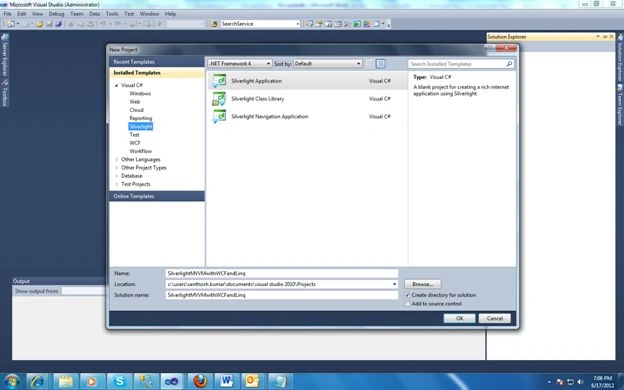
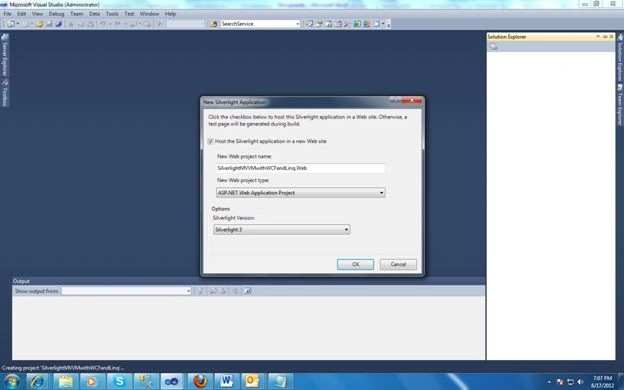
- Select Host application with website. This will include an aspx project we can use to host the Silverlight object.
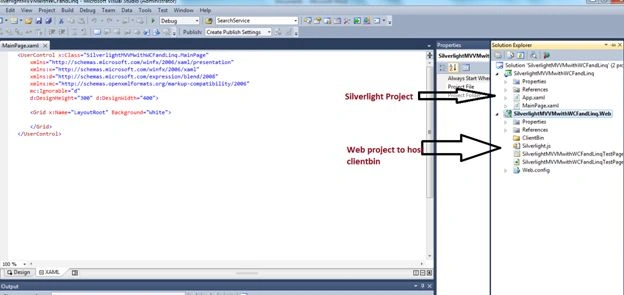
- Now two projects have been created in the solution; Silverlight and a web project.
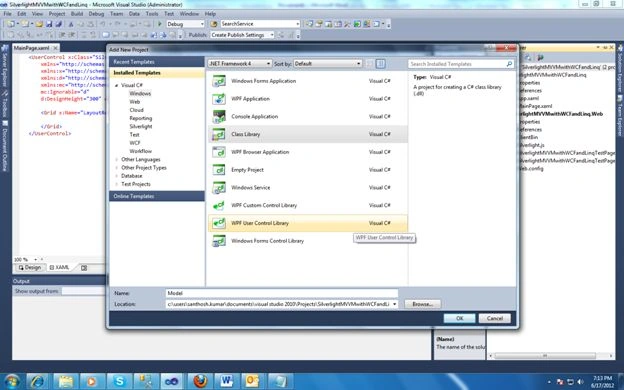
Creating Model Project
- Add a Class Library project to the solution.
- Add an .edmx file to the project.
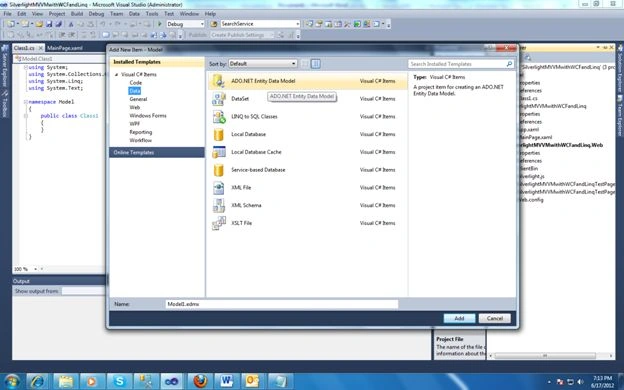
- Now select datasource and tables to import.
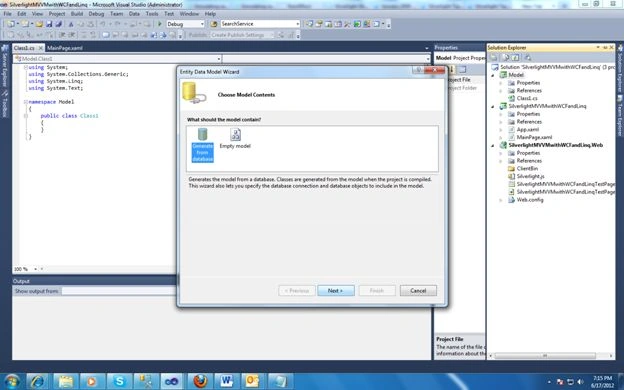
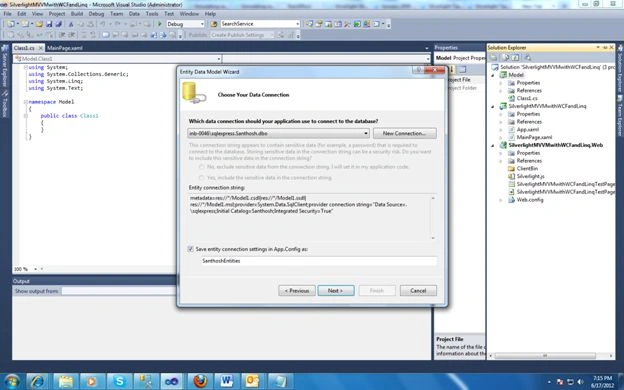
- Am adding schoolclass table to my entity model.
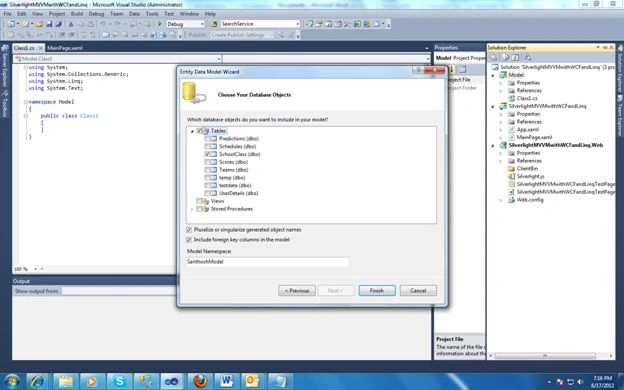
- Now you will see the Model1.edmx in the solution under Model project and schoolclass entity in the Model1.edmx.
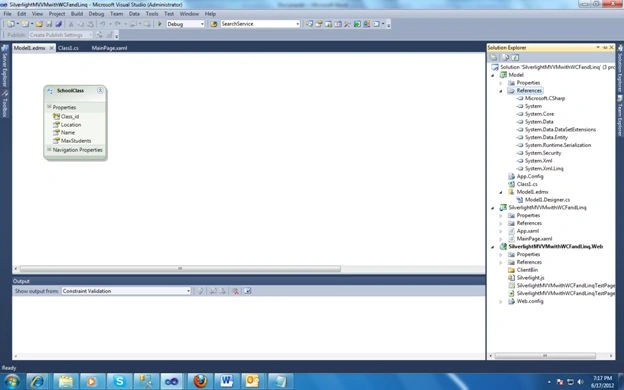
Add WCF service project
- Now add a WCF project to our solution.
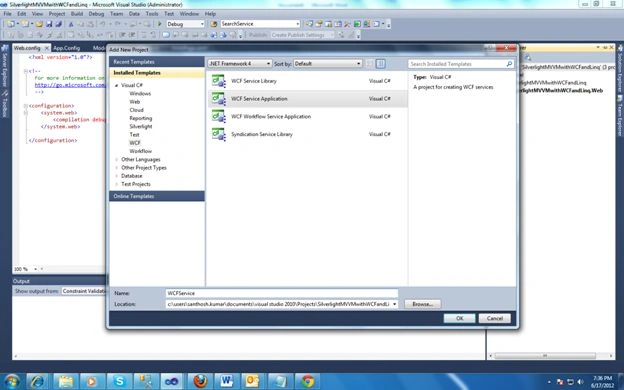
- Now the service is added. You will see Iservice1, Service.svc and service.svc.cs.
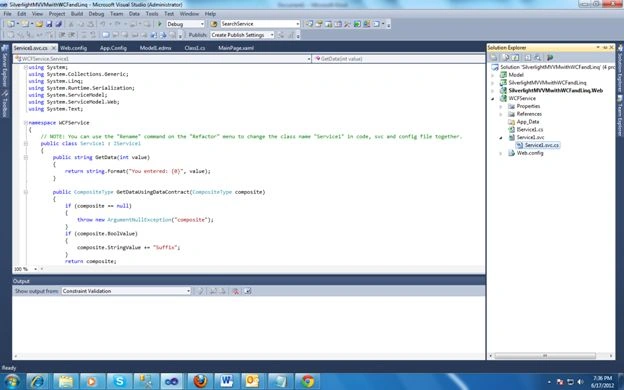
- Now write 2 methods in the service. One is to get the class names and the other is to get the school class details.
[OperationContract]
List<string> GetClasses();[OperationContract]
List<SchoolClass> GetSchoolClasses();
- Now implement these methods in service1.svc.cs.
public List<string> GetClasses()
{
SanthoshEntities entity = new SanthoshEntities();
List<SchoolClass> list = entity.SchoolClasses.ToList();
return list.Select(m => m.Name).ToList();
}
public List<SchoolClass> GetSchoolClasses()
{
SanthoshEntities entity = new SanthoshEntities();
return entity.SchoolClasses.ToList();
}
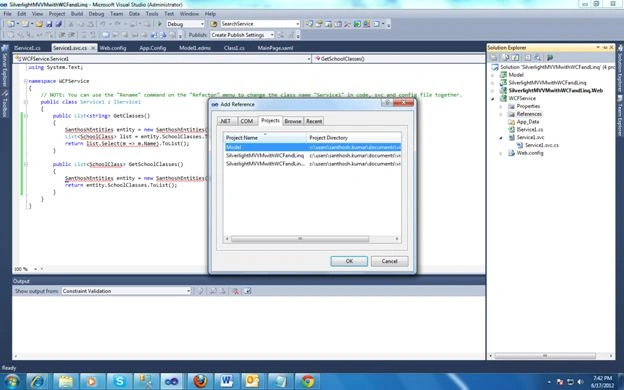
- Now you will see we are getting errors; this is because we forgot to add a reference of the Model project here. So add a reference to the model and include it in the .cs files.
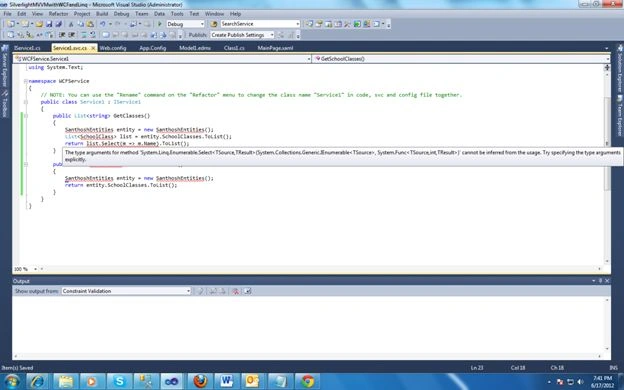
Configure service
1. Configuration of the service correctly is the critical thing. If we don't configure it properly then we will end up with various errors and its very difficult to identify the issue.
2. The first the item to configure is the connection string. Copy the connection string created with edmx in the model project. Here you can configure various databases and servers. The server and database details don't need to be the same in the edmx config and service config.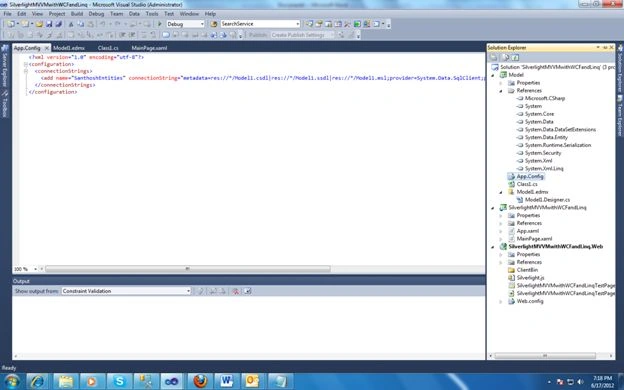

- We need to configure the service. Add the following service details inside the system.servicemodel tag. Here the contract name should be the interface of the service with namespace.
<services>
<service name="WcfService.Service1">
<endpoint address="" binding="basicHttpBinding" contract="WcfService.IService1" >
<identity>
<dns value="localhost" />
</identity>
</endpoint>
<endpoint address="mex" binding="mexHttpBinding" contract="IMetadataExchange" />
</service>
</services>
- So we are done with adding the model and service. Next what we have to do is to add this service as a reference to the Silverlight project. We have to build the project before adding this service as a reference.
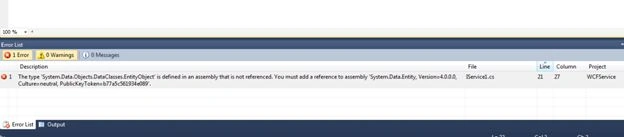
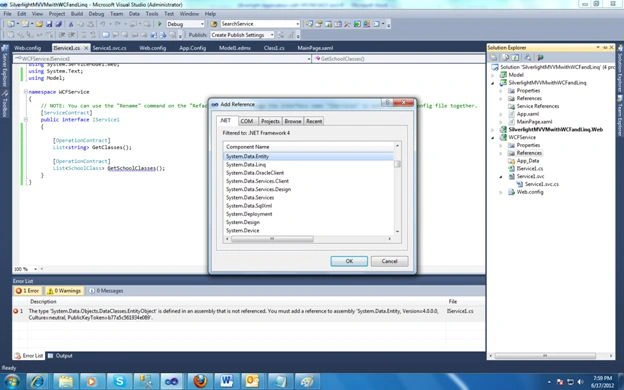
- So when I build the service, I am getting the following error. This is because we forgot to add System.Data.Entity as a reference.
Add Service reference to Silverlight
- This is the easiest thing. Go to the Silverlight project, right-click on the reference and click on Add service reference.
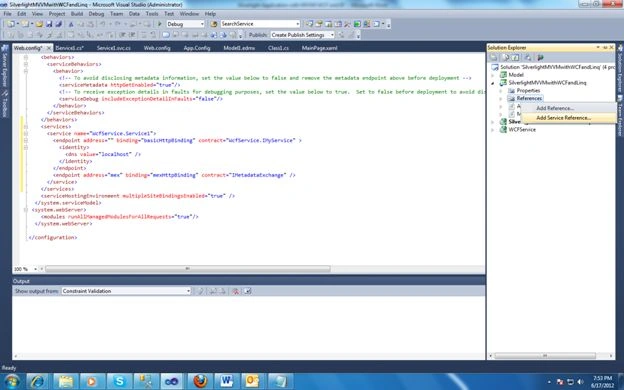
- Here our service is in the same project, so instead of typing the service address, I can click on discover, so that Visual Studio will find the services in the same solution.
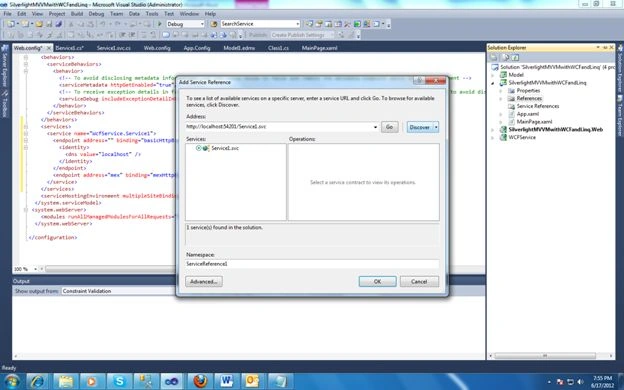
- Now update the namespace filed with the name you wanted and click on OK.
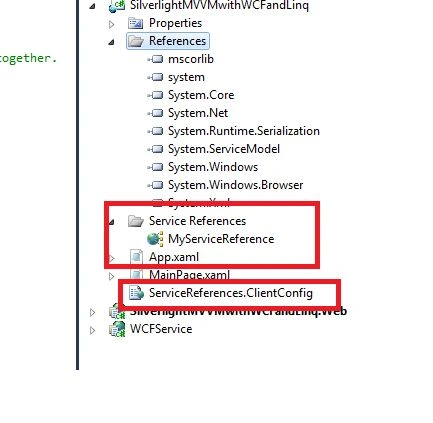
- Now you will see our service reference is added and also client.config file is also added. This will be the client-side configuration of the service reference.
Setting up the Silverlight project
- View and ViewModel
I created a view with a listbox and gridview. The Listbox is to display class names and the school class is to display all the details of a schoolclass. We have already seen about views and viewmodels in this article. Here we mainly discuss use of the service reference in the viewmodel.
In the constructor of viewmodel, add a service client for the service reference. And since we want to load the listbox and gridview in page load itself, we can call the service reference methods also. In the callback event, assign the properties to the method Result.
public MainViewModel()
{
MyServiceReference.Service1Client client = new MyServiceReference.Service1Client();
client.GetClassesCompleted += new EventHandler<MyServiceReference.GetClassesCompletedEventArgs>(client_GetClassesCompleted);
client.GetClassesAsync();
client.GetSchoolClassesCompleted += new EventHandler<GetSchoolClassesCompletedEventArgs>(client_GetSchoolClassesCompleted);
client.GetSchoolClassesAsync();
}
void client_GetSchoolClassesCompleted(object sender, GetSchoolClassesCompletedEventArgs e)
{
SchoolClasses = e.Result;
}
void client_GetClassesCompleted(object sender, MyServiceReference.GetClassesCompletedEventArgs e)
{
Classes = e.Result;
}
For the complete view and viewmodel code, refer to the attached solution.
Now Debug the application. It will give us the communicationexception error. This is because of the cross-domain violation. When the service is located in some other project, we have to add the clientaccesspolicy.xml file. To know more about cross domain boundaries, refer to the Microsoft link:
http://msdn.microsoft.com/en-us/library/cc197955%28v=vs.95%29.aspx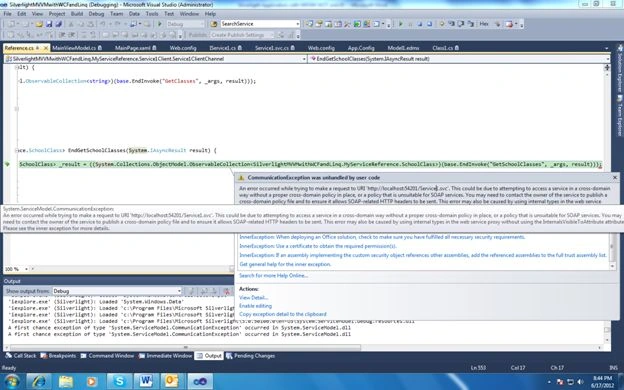
Add a new XML file and add the following code. Now run the application.
<?xml version="1.0" encoding="utf-8" ?>
<access-policy>
<cross-domain-access>
<policy>
<allow-from http-request-headers="SOAPAction">
<domain uri="*"/>
</allow-from>
<grant-to>
<resource path="/" include-subpaths="true"/>
</grant-to>
</policy>
</cross-domain-access>
</access-policy>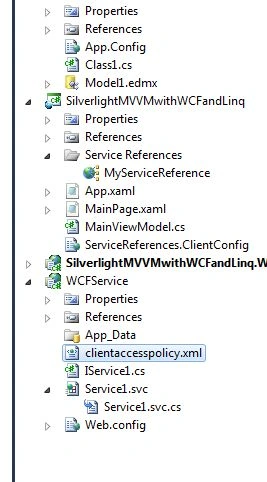
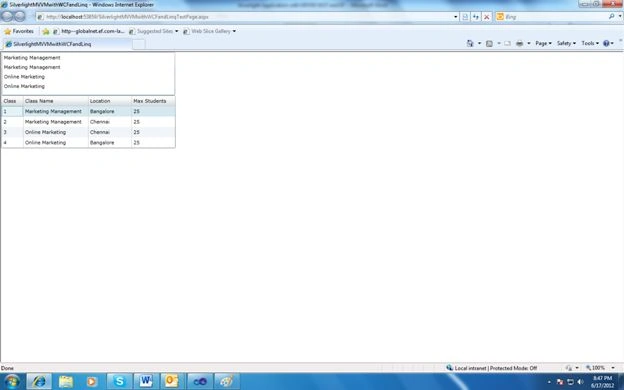
SO in this article, we have seen how to create a simple Silverlight application in the MVVM pattern with WCF and the Entity Framework.
For a complete set of source code, please find the attached file.
Please give your valuable comments to improve the article and don't forget to rate the article if you find it useful.
Rajamanikkam SPosted Oct 28, 2013, 8:48 PM
Hi dude...very nice article for beginner
Saroj MeshramPosted Jun 13, 2013, 8:40 AM
HI, its a nice example... Using it just now I have completed one simple demo...
John RushingPosted Dec 29, 2012, 10:22 PM
Hi. Great article.. This is exactly what I was looking for! I followed your example exactly and it works, which is great but I am getting an error that I can't seem to track down. Whenever I click on the mainpage.xaml the designer loads the listbox and grid briefly and then it goes away and I get a System.Reflection.TargetInvocationException error in the designer window. The error details show an [Async_ExceptionOccurred] and a System.UnauthorizedAccessException error (InvalidCrossThreadAccess). The odd thing is that when this happens, my MS Studio 2010 instance encounters a problem and has to restart. This only happens when I click on the MainPage.xaml file. The solution runs (in debug) fine, pulls the data back and displays it correctly, etc.. Any ideas what this might be?
Riddhi ValechaPosted Nov 6, 2012, 6:41 AM
Hi...nice article.... I also executed this out...... I have 2 queries about silverlihgt application. ques-1)When I add/delete/modify a function/methods in svc.cs file(Service File), the ServiceReference does not get updated. i.e. I don't get the EventArgs for all my methods. ques-2)What is Reference.cs file? Why is this file for? And it is also not shown in Solution Explorer. Please Help if you know these... Thanks in advance...