

http://www.c-sharpcorner.com/UploadFile/b19d5a/7996/
In my previous article we have seen how to create the LINQ to SQL class. And thereafter how to create the WCF service reference class and create the suitable method in that class for data insertion by using the reference
of LINQ to SQL class.
Now here we will be seeing how to call the WCF function and service in the code behind of the XAML page.
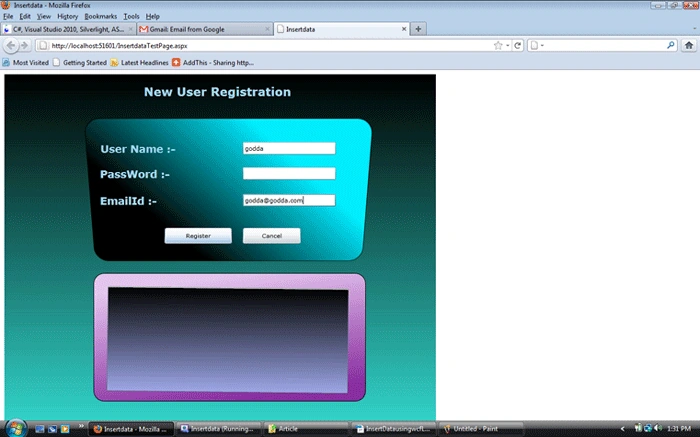
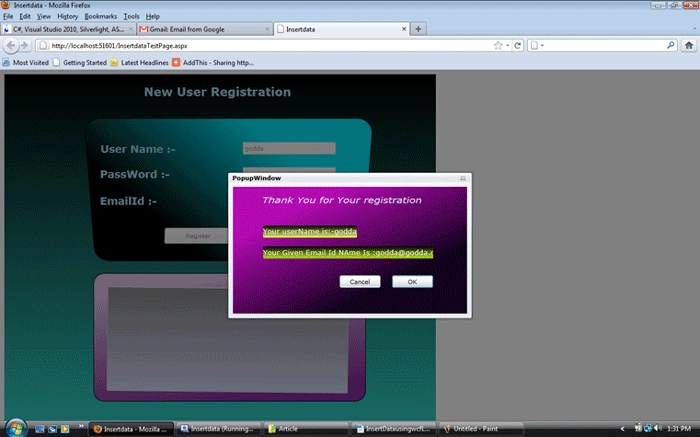
Objective: Here we have a Login registration page. When you enter your required credentials a child window will display your user name and the email id.
Now let's see the first step:
Step 1:
First go to the "insertData" project and right-click it. Click the service reference first, just like Figure 1 (marked wath red):
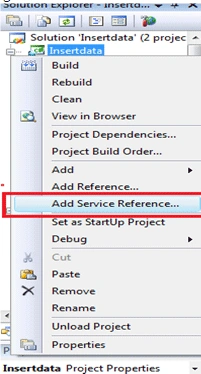
Figure 1:
Step 2:
After clicking the add reference you will see a window. In that window click the Discover button. We have already created our WCF service in the "Insertdata" web project so when you click the Discover button it will show you the "service1.svc file".
Now in the Namespace part give the name "Servicereference1". After that click Ok. Just like Figure 2 (marked with red).
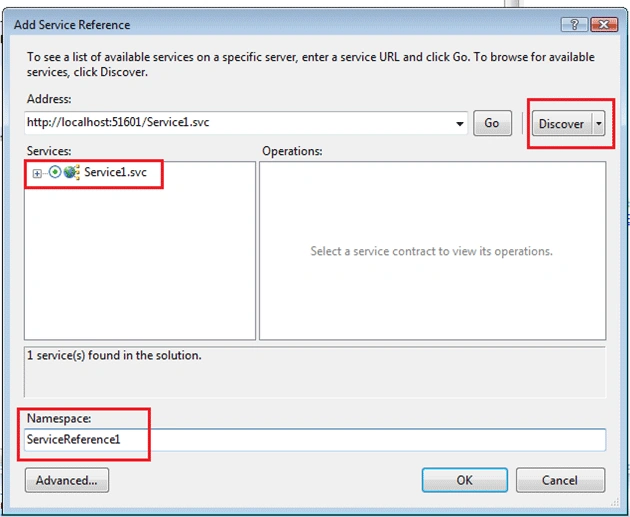
Figure 2:
Step 3:
Now go to the page.xaml file and paste the following code.
<Grid Margin="8,8,0,0" HorizontalAlignment="Left" Width="803" Height="659" VerticalAlignment="Top">
<Grid.Background>
<LinearGradientBrush EndPoint="0.5,1" StartPoint="0.5,0">
<LinearGradientBrush.RelativeTransform>
<TransformGroup>
<ScaleTransform CenterX="0.5" CenterY="0.5" ScaleX="0.99900001287460327"/>
<SkewTransform AngleX="0" AngleY="0" CenterX="0.5" CenterY="0.5"/>
<RotateTransform Angle="0" CenterX="0.5" CenterY="0.5"/>
<TranslateTransform/>
</TransformGroup>
</LinearGradientBrush.RelativeTransform>
<GradientStop Color="Black" Offset="0"/>
<GradientStop Color="#FF35DBD0" Offset="1"/>
</LinearGradientBrush>
</Grid.Background>
<dataInput:Label Height="36" Margin="255,17,263,0" VerticalAlignment="Top" Content="New User Registration" FontWeight="Bold" FontSize="21.333" Foreground="#FFA2D6F2"/>
<Rectangle Stroke="Black" Margin="163,91,132,295" RadiusX="27" RadiusY="27" RenderTransformOrigin="0.502,0.385">
<Rectangle.Projection>
<PlaneProjection RotationX="17"/>
</Rectangle.Projection>
<Rectangle.RenderTransform>
<TransformGroup>
<ScaleTransform/>
<SkewTransform/>
<RotateTransform/>
<TranslateTransform X="-7" Y="-11"/>
</TransformGroup>
</Rectangle.RenderTransform>
<Rectangle.Fill>
<LinearGradientBrush EndPoint="0.682,0.132" StartPoint="0.318,0.868">
<GradientStop Color="Black" Offset="0.029"/>
<GradientStop Color="#FF02ECFF" Offset="0.95"/>
</LinearGradientBrush>
</Rectangle.Fill>
</Rectangle>
<dataInput:Label x:Name="lblUserName" Height="23" HorizontalAlignment="Left" Margin="175,124,0,0" VerticalAlignment="Top" Width="151" FontSize="18.667" FontWeight="Bold" Foreground="#FFA2D6F2" Content="User Name :-" RenderTransformOrigin="0.5,0.5">
<dataInput:Label.RenderTransform>
<TransformGroup>
<ScaleTransform/>
<SkewTransform/>
<RotateTransform/>
<TranslateTransform X="1"/>
</TransformGroup>
</dataInput:Label.RenderTransform>
<dataInput:Label.Projection>
<PlaneProjection RotationY="-5" RotationX="12"/>
</dataInput:Label.Projection>
</dataInput:Label>
<dataInput:Label x:Name="lblPassword" Height="23" HorizontalAlignment="Left" Margin="175,170,0,0" VerticalAlignment="Top" Width="151" FontSize="18.667" FontWeight="Bold" Foreground="#FFA2D6F2" Content="PassWord :-"/>
<dataInput:Label x:Name="lblEmailid" Height="23" HorizontalAlignment="Left" Margin="175,219,0,0" VerticalAlignment="Top" Width="224" FontSize="18.667" FontWeight="Bold" Foreground="#FFA2D6F2" Content="EmailId :-"/>
<TextBox x:Name="txtUserName" Height="23" Margin="0,124,197,0" VerticalAlignment="Top" TextWrapping="Wrap" HorizontalAlignment="Right" Width="170"/>
<TextBox x:Name="txtPassword" Foreground="White" Height="23" Margin="0,170,197,0" VerticalAlignment="Top" TextWrapping="Wrap" HorizontalAlignment="Right" Width="170"/>
<TextBox x:Name="txtemailid" Height="23" Margin="0,219,197,0" VerticalAlignment="Top" TextWrapping="Wrap" HorizontalAlignment="Right" Width="170"/>
<Button x:Name="Register" Margin="293,279,387,0" Content="Register" Cursor="Hand" Click="Register_Click" Height="33" VerticalAlignment="Top">
<Button.Background>
<LinearGradientBrush EndPoint="0.5,1" StartPoint="0.5,0">
<GradientStop Color="Black" Offset="0"/>
<GradientStop Color="#FF93949E" Offset="1"/>
</LinearGradientBrush>
</Button.Background>
<Button.Projection>
<PlaneProjection RotationX="-28"/>
</Button.Projection>
</Button>
<Button x:Name="Cancel" HorizontalAlignment="Right" Margin="0,279,261,0" Width="106" Content="Cancel" Click="Cancel_Click" Height="33" VerticalAlignment="Top">
<Button.Projection>
<PlaneProjection RotationX="-28"/>
</Button.Projection>
</Button>
<Rectangle Stroke="Black" RadiusX="19" RadiusY="19" Height="235" Margin="163,0,142,60" VerticalAlignment="Bottom">
<Rectangle.Fill>
<LinearGradientBrush EndPoint="0.534,0.995" StartPoint="0.466,0.005">
<GradientStop Color="#FFE4C5EC" Offset="0.026"/>
<GradientStop Color="#FF872E9F" Offset="0.999"/>
</LinearGradientBrush>
</Rectangle.Fill>
</Rectangle>
<data:DataGrid Height="192" Margin="188,0,174,77" VerticalAlignment="Bottom" RenderTransformOrigin="0.869,0.137" UseLayoutRounding="False" d:LayoutRounding="Auto">
<data:DataGrid.Background>
<LinearGradientBrush EndPoint="0.5,1" StartPoint="0.5,0">
<GradientStop Color="Black" Offset="0"/>
<GradientStop Color="#FF9EA7E6" Offset="1"/>
</LinearGradientBrush>
</data:DataGrid.Background>
<data:DataGrid.AlternatingRowBackground>
<LinearGradientBrush EndPoint="0.5,1" StartPoint="0.5,0">
<GradientStop Color="Black" Offset="0"/>
<GradientStop Color="#FFAB7979" Offset="1"/>
</LinearGradientBrush>
</data:DataGrid.AlternatingRowBackground>
<data:DataGrid.RenderTransform>
<TransformGroup>
<ScaleTransform/>
<SkewTransform/>
<RotateTransform Angle="0.629"/>
<TranslateTransform X="0.755" Y="1.79"/>
</TransformGroup>
</data:DataGrid.RenderTransform>
</data:DataGrid>
</Grid>
</UserControl>
Step 4:
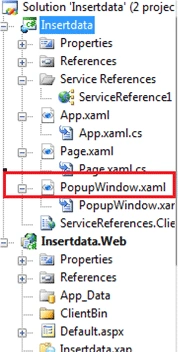
Now open this Silverlight Project in ExpressionBlend. Now add a new child window named "Popupwindow.xaml" in to the Silverlight "insertdata" project just like Figure 3 (marked with red):
sedi jafPosted Feb 4, 2012, 1:06 PM
and another error here: private void OKButton_Click(object sender, RoutedEventArgs e) { this.DialogResult = true; } private void CancelButton_Click(object sender, RoutedEventArgs e) { this.DialogResult = false; } Error 2 'InsertData.Popupwindow' does not contain a definition for 'DialogResult' and no extension method 'DialogResult' accepting a first argument of type 'InsertData.Popupwindow' could be found (are you missing a using directive or an assembly reference?)
sedi jafPosted Feb 4, 2012, 1:03 PM
i have some error plz help me to correct it here in this code we have two error private void Register_Click(object sender, RoutedEventArgs e) { Service1Client sc = new Service1Client(); a = txtUserName.Text; b = txtemailid.Text; sc.InsertDataAsync(txtUserName.Text, txtPassword.Text, txtemailid.Text); Popupwindow pw = new Popupwindow(a, b); pw.Show(); } Error 4 'InsertData.Popupwindow' does not contain a definition for 'Show' and no extension method 'Show' accepting a first argument of type 'InsertData.Popupwindow' could be found (are you missing a using directive or an assembly reference?) Error 1 The type or namespace name 'Service1Client' could not be found (are you missing a using directive or an assembly reference?)
Dhaval MevadaPosted Jul 12, 2011, 1:16 AM
nice post , keep posting ..
surender bhyanPosted Jul 8, 2011, 8:25 AM
Thanks Sir, keep on
Dinesh BeniwalPosted Jul 8, 2011, 2:41 AM
Good work Nandi..........