

View: View can be your Aspx page in your web applications or any user controls/Interface for the end user.
Model: Contains all the business logic.
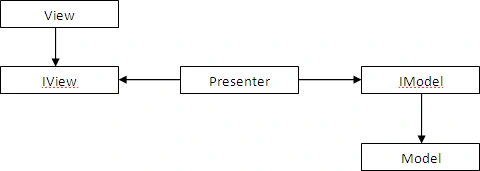
Presenter: Works as the intermediate agent for Model and View. It binds the view with the model. See the diagram below.

In the following diagram a couple of blocks are added which are interfaces through which the presenter will interact.
Let's take a simple example of how to implement it.
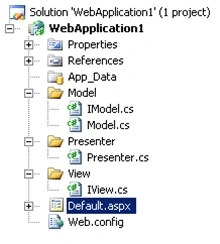
Create a web application project in your Visual Studio. Now add 3 more classes named View.cs, Presenter.cs and Model.cs and add the interfaces IView and IModel.
Start with the aspx page (View). Add a label, a button and a TextBox.
<html xmlns="http://www.w3.org/1999/xhtml" >
<head runat="server">
<title>Untitled Page</title>
</head>
<body>
<form id="form1" runat="server">
<div>
<asp:Label ID="Label1" runat="server" Text="Label"></asp:Label>
<asp:TextBox ID="TextBox1" runat="server"></asp:TextBox>
</div>
<asp:Button ID="Button1" runat="server" Text="Button" onclick="Button1_Click" />
</form>
</body>
</html>
Now we won't write anything in aspx.cs file. First write the code in IView.
namespace WebApplication1
{
public interface IView
{
String Label { get; set; }
String TextBox { get; set; }
}
}
Similarly write some code in IModel.cs
namespace WebApplication1
{
public interface IModel
{
List<String> setInfo();
}
}
Now Model.cs. Let's say we send the information about the Label and TextBox from Model.
namespace WebApplication1
{
class Model : IModel
{
public List<String> setInfo()
{
List<String> l = new List<string>();
l.Add("Enter Name:");
l.Add("Use capital letter only");
return l;
}
}
}
Now we need to write some code in the presenter so that the View and Model can communicate with each other. It'll go like this:
namespace WebApplication1
{
public class Presenter
{
IView _pView;
IModel _pModel;
public Presenter(IView PView, IModel PModel)
{
_pView = PView;
_pModel = PModel;\
}
public void BindModalView()
{
List<String> ls = _pModel.setInfo();
_pView.Label = ls[0];
_pView.TextBox = ls[1];
}
}
}
Finally go to aspx.cs and Implement the IView.
public partial class _Default : System.Web.UI.Page, IView
{
protected void Page_Load(object sender, EventArgs e)
{
}
HariharanPosted Jul 28, 2021, 5:27 AM
Good work Amit Choudhary
hari KrishnanPosted Dec 20, 2017, 8:32 AM
Really very usefull article..smart work
Sr KarthigaPosted Feb 26, 2016, 9:12 AM
good one
Sr KarthigaPosted Feb 26, 2016, 9:12 AM
nice explanation
santosh menonPosted Jun 5, 2015, 6:39 AM
Good Work
Kopiraj YogarajahPosted Nov 20, 2013, 6:35 AM
Really very usefull article.. Thnxs Amit.. :)
karthick meiyappanPosted Jan 10, 2013, 8:05 AM
By using your above given sample i have the following erors on line 14.how to clear the errors.is anything to bind r not. Server Error in '/mvp sample project' Application. Compilation Error Description: An error occurred during the compilation of a resource required to service this request. Please review the following specific error details and modify your source code appropriately. Compiler Error Message: CS1721: Class '_Default' cannot have multiple base classes: 'System.Web.UI.Page' and 'Iview' Source Error: Line 12: using System.Xml.Linq; Line 13: Line 14: public partial class _Default : System.Web.UI.Page, Iview Line 15: { Line 16: protected void Page_Load(object sender, EventArgs e) Source File: c:\Users\mkarthik\Desktop\karthick worked projects\mvp sample project\Default.aspx.cs Line: 14 Show Detailed Compiler Output: Version Information: Microsoft .NET Framework Version:4.0.30319; ASP.NET Version:4.0.30319.272
Raju PatilPosted Aug 7, 2012, 2:44 AM
Nice article
Mohammad ArifPosted Jul 13, 2011, 12:58 AM
very good and simple example...But you should avoid to take modal on ASPX page..You can just use modal only on Presenter.only send View to presenter.
javed khanPosted Mar 10, 2011, 2:52 AM
Simple to understand..plzz come up with more on MVP.