
I tried to learn about SPAs from online articles and there are some good ones for beginners with mainly CRUD operations for only one database table. In the real world, there are many tables you need to retrieve data from and insert into and I couldn't find any such article. So, I have decided to create on my own and I thank my project manager for asking me to show a sample using the AngularJs framework.
This is a two-part demo, in the first part, I will be showing how to insert a record into a database get all the records from the database, and display them. Part 2 will show the delete and update operations.
Introduction
These days users want faster web applications with a Rich UI and to be able to access apps from multiple gadgets (like Tablets, Mobiles, and so on). HTML5 and jQuery or JavaScript can be used to build Single Page Applications (SPAs).
SPAs
SPAs are web applications that fit on a single page and that provide a more fluid user experience, just like the desktop with a rich UI. SPAs are web apps that load a single HTML page and dynamically update the page as the user interacts with the app.
SPA vs Traditional Web Apps
Traditional Web Apps
You can see in the following image the traditional apps. Whenever the user makes a request, it goes back to the server and renders a new page with a page reload.

Source: https://msdn.microsoft.com/
SP App
In a SPA when the user requests a page it will load dynamically, calls to the server will be done using Ajax, and data is retrieved by JSON. In the SPA the data rendering and routing are done on the client side and that makes it responsive just like desktop apps.
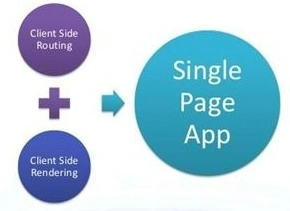
The following are the advantages of SPAs.
- No page flicker. Native application feel.
- Client-side routing and data rendering on the client side.
- Data from the server is in JSON format.
The following are the disadvantages of SPAs.
- User JavaScript must be enabled.
- Security.
Creating a project in Visual Studio
In this demo, I have used Visual Studio 2012, .NET Framework 4.5, AngularJs, Bootstrap, and .mdf files for database operations. I have provided all the necessary screenshots and source code to download.
Open Visual Studio 2012 and create a project with MVC4 template, I have named the project SingePageAngularJS, but you can name it anything you like.

Adding jQuery and AngularJs
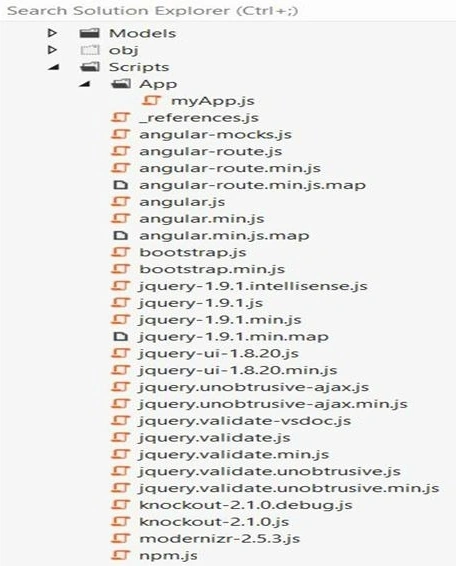
The following figure shows I installed Bootstrap, AngularJs, and Angular routing from NuGet packages. And added a new folder to the scripts folder named App and added a new JavaScript file called myApp. I will be adding AngularJs code in myApp later on.
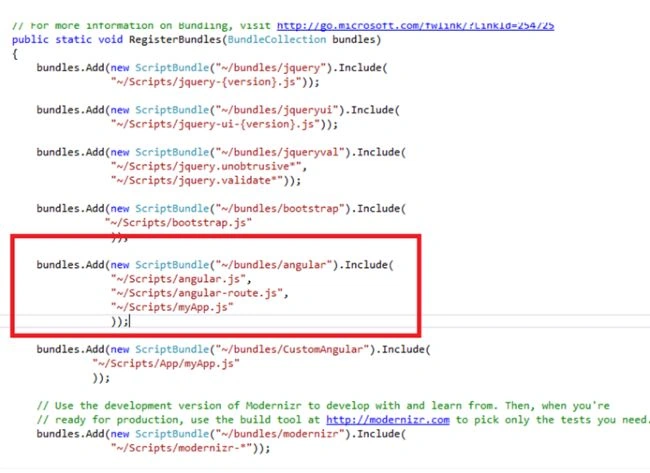
Now to add these installed files to the MVC project. Go To App_Start, then BundleConfig. Add the following lines as I have shown in the Red rectangle in the following.
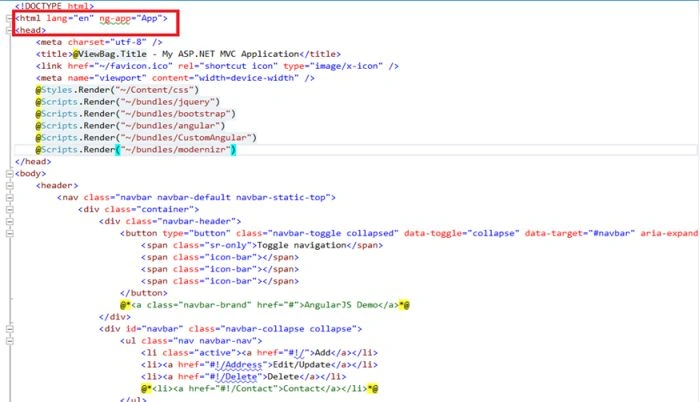
Now you need to ensure these files are added to your Master page (_Layout. cshtml) located in the Views -> Shared folder of the application. I always put my jQuery or required files inside the head tag of the project, to make it accessible to your entire application as in the following image.
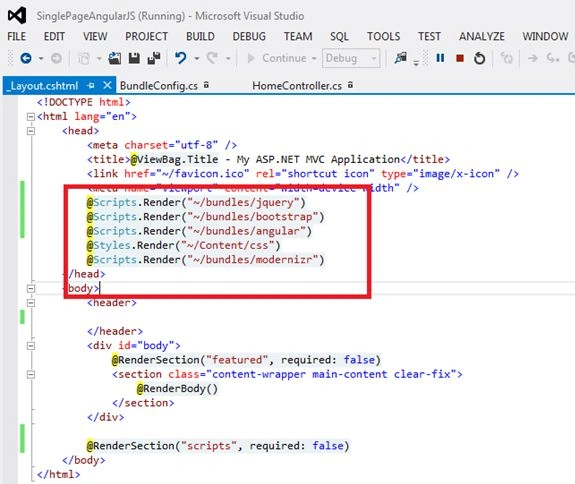
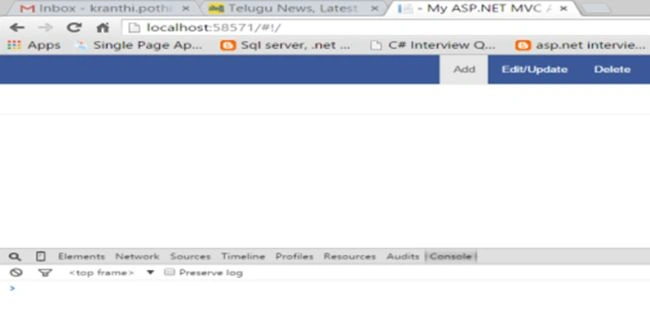
Now we have added jQuery, Angular, Angular routing, Bootstrap CSS, and the bootstrap.js files to our layout page and we need to be sure they are rendered on our browser properly without any errors. To double-check, run the application in the Chrome browser and press F12 to open the browser tools. Check that all the files are loaded by clicking on the Sources tab and check that there are no errors in the console tab. The following confirms that all the files are loaded properly with no errors in the console tab.
Setting up Database
I will add a .mdf file for the database operations and name it AngularDB.mdf. In the .mdf file, I created the two tables EmpDetails and EmpAddress and the scripts are provided below. The EmpDetails table contains employee information and EmpAddress contains the employee's multiple address. Between these two tables we have a foreign key relation with EmpId because whenever you select an employee I want to display all the addresses of the specific employee.
EmpDetails Table
CREATE TABLE [dbo].[EmpDetails] (
   [EmpID] INT IDENTITY (1, 1) NOT NULL,
   [EmpName] VARCHAR (50) NULL,
   [EmpPhone] VARCHAR (50) NULL,
   PRIMARY KEY CLUSTERED ([EmpID] ASC)
);
EmpAddress Table
CREATE TABLE [dbo].[EmpAddress] (
   [EmpAddressId] INT IDENTITY (1, 1) NOT NULL,
   [Address1] VARCHAR (500) NULL,
   [Address2] VARCHAR (500) NULL,
   [Address3] VARCHAR (500) NULL,
   [EmpID] INT NULL,
   PRIMARY KEY CLUSTERED ([EmpAddressId] ASC),
   FOREIGN KEY ([EmpID]) REFERENCES [dbo].[EmpDetails] ([EmpID])
);
Note. In this application, my concentration is not only on CRUD operations but also on showing how to display data from multiple tables to the UI and pass data to multiple tables.
MVVM Pattern
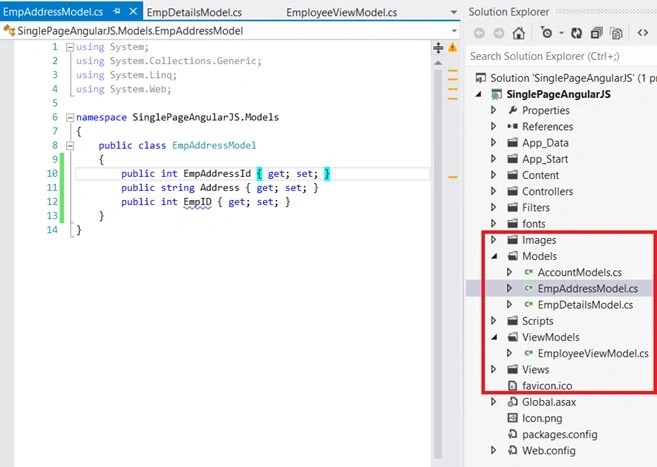
For this demo, I will be using the MVVM pattern for both the AngularJs script and Visual Studio. The following image shows I have created a folder called ViewModels (it has references of multiple models) and added two models in the model's folder. I named them EmpDetailsModel and EmpAddressModel.
AngularJs Code
In the previous section, we did some database-related stuff. Now we jump into the main topic of this demo.
In Adding jQuery and AngularJs: We have created the myApp.js file and left it empty, now just copy and paste the following code into it.
angular.module('App', ['AngularDemo.EmpAddController',
                      'AngularDemo.AddressController',
                      'AngularDemo.DeleteController'
])

.config(['$routeProvider', '$locationProvider', function ($routeProvider, $locationProvider) {

    $routeProvider.when('/', {
        templateUrl: '/Home/AddEmployee',
        controller: 'EmpAddCtrl',
    });
    $routeProvider.when('/Edit', {
        templateUrl: '/Home/EditEmployee',
        controller: 'EditCtrl'
    });
    $routeProvider.when('/Delete', {
        templateUrl: '/Home/DeleteEmployee',
        controller: 'DeleteCtrl'
    });
    $routeProvider.otherwise({
        redirectTo: '/'
    });
    // Specify HTML5 mode (using the History APIs) or HashBang syntax.
    $locationProvider.html5Mode(false).hashPrefix('!');
}]);

// Add Employee Controller
angular.module('AngularDemo.EmpAddController', ['ngRoute'])
.controller('EmpAddCtrl', function ($scope, $http) {

    $scope.EmpAddressList = {};
    $http.get('/Home/ShowEmpList').success(function (data) {
        $scope.EmpAddressList = data;
    });
    $scope.EmpDetailsModel =
    {
        EmpID: '',
        EmpName: '',
        EmpPhone: ''
    };
    $scope.EmpAddressModel =
    {
        Address1: '',
        Address2: '',
        Address3: ''
    };
    $scope.EmployeeViewModel = {
        empDetailModel: $scope.EmpDetailsModel,
        empAddressModel: $scope.EmpAddressModel
    };
    $scope.AddEmployee = function () {
        //debugger;
        $.ajax({
            url: '/Home/AddEmpDetails',
            type: 'POST',
            dataType: 'json',
            contentType: 'application/json',
            traditional: true,
            data: JSON.stringify({ EmployeeViewModelClient: $scope.EmployeeViewModel }),
            success: function (data) {
                $scope.EmpAddressList.push(data[0]);
                $scope.$apply();
                //$scope.$apply();
                alert("Record is been added");
            }
        });
    };
});
// Address Controller
angular.module('AngularDemo.AddressController', ['ngRoute'])
.controller('EditCtrl', function ($scope, $http) {
    $scope.Message = "Edit in Part 2 is coming soon";
});
angular.module('AngularDemo.DeleteController', ['ngRoute'])
.controller('DeleteCtrl', function ($scope, $http) {
    $scope.Message = "Delete in Part 2 is coming soon";
});
Angular Code Explanation
angular.module('App', ['AngularDemo.EmpAddController',
                       'AngularDemo.AddressController',
                       'AngularDemo.DeleteController'
]);
Note. The angular. module is a global place for creating, registering, and retrieving Angular modules. All modules that should be available to an application must be registered using this mechanism.

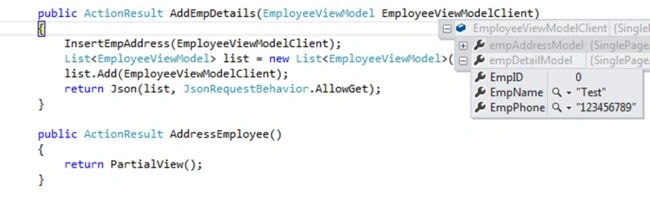
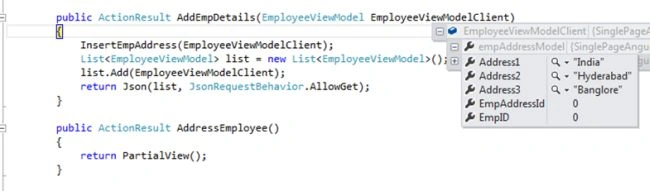
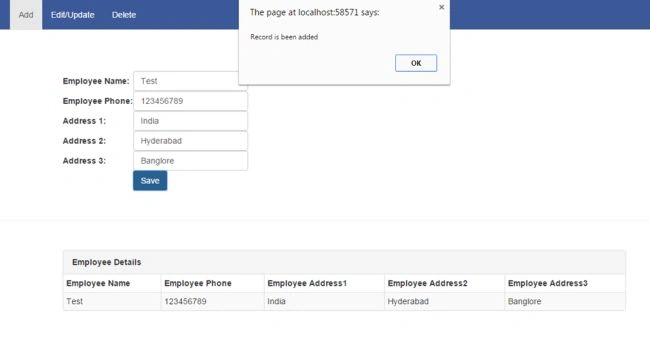
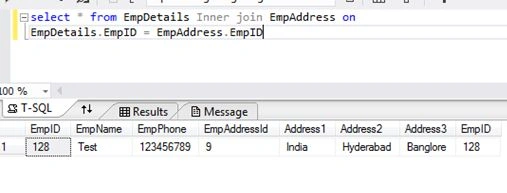
Maq SaidPosted Dec 1, 2017, 9:18 PM
Have you implemented Edit and Delete in Part 2. Can I have link to Part 2 as well!
Maq SaidPosted Dec 1, 2017, 9:09 PM
Amazing! Superbly written.
Zeeshan AzimPosted Dec 29, 2015, 10:30 AM
Superbly DONE !
Narasimha ReddyPosted Oct 18, 2015, 9:59 AM
Nice article. keep it up...:)
Vipul MalhotraPosted Sep 11, 2015, 4:49 AM
nice
Baimey RajeshPosted Sep 10, 2015, 1:19 AM
Good effort... Keep it up :)
Mark ColePosted Sep 9, 2015, 3:16 PM
Excellent article.
Dinesh RathodPosted Sep 9, 2015, 3:32 AM
Nice Article Dude
Yashwanth MuthineniPosted Aug 29, 2015, 5:40 AM
Nice Share
kranthi pothireddyPosted Aug 29, 2015, 5:35 AM
thanks all
Gopi ChandPosted Aug 25, 2015, 10:14 AM
Good work
Rodney ForehandPosted Aug 25, 2015, 9:01 AM
Very informative. Thank you.
Ankit BansalPosted Aug 25, 2015, 6:18 AM
good..
Vijay KumarPosted Aug 25, 2015, 2:39 AM
Great work Kranthi :)
Vaikesh K PPosted Aug 25, 2015, 1:27 AM
Good One
Debasis SahaPosted Aug 25, 2015, 12:30 AM
Nice Once..
Nilesh JadavPosted Aug 25, 2015, 12:17 AM
Nice one sir
prasadbcsPosted Aug 24, 2015, 11:23 PM
Good article
Gowtham KPosted Aug 24, 2015, 11:09 PM
Good one
Shridhar SharmaPosted Aug 24, 2015, 12:43 PM
very informative.
Surya PrakashPosted Aug 24, 2015, 10:17 AM
Good Post
Sumit JoshiPosted Aug 24, 2015, 9:57 AM
thanks for sharing.
Ram JPosted Aug 24, 2015, 9:40 AM
Good one Kranthi
Sibeesh VenuPosted Aug 24, 2015, 9:20 AM
Nice Share :)
Kiranteja JallepalliPosted Aug 24, 2015, 9:09 AM
Welcome to c# corner,Nice one Kranthi
Karthikeyan KPosted Aug 24, 2015, 8:40 AM
Good one
Upendra Pratap ShahiPosted Aug 24, 2015, 8:36 AM
nice share..
Rajeesh MenothPosted Aug 24, 2015, 8:29 AM
Good One
Chandradev PrasadPosted Aug 24, 2015, 8:29 AM
Good start-up kranthi. I am waiting to see more article like this.