

Singleton
Singleton is like a single resource which is being shared among multiple users; for example - sharing a single washing machine among all the residents in a hotel or sharing a single appliance like refrigerator among all the family members.
From Wikipedia, "The singleton pattern is a software design pattern that restricts the instantiation of a class to one object.”
Use Case
Let’s think about the customer who has multiple Windows-based (Desktop) applications currently in use for different financial purposes. Now, they want us to provide a solution to add the printing feature in all the applications they have.
One thing which is clearly stated is that they want printing functionality to be added to all their applications, which means, we need to create a printing library or class that can be shared or accessed from multiple applications.
For such kind of implementation where we have to restrict the instantiation of a class to one object meaning a single instance of a class that can be shared or accessed from multiple, Singleton pattern is the best we can follow. Now, let’s have a look at the implementation.
Classic & Simple Implementation
- ///<summary>
- /// This class is the implementation of singleton design pattern which restricts the instantiation of a class to one object
- ///</summary>
- publicsealedclassPrinter {
- //A static variable which holds a reference to the single created instance
- privatestaticPrinter _printerInstance;
- // A static variable which implements a Queue data structure and holds a documents to be printed
- privatestaticQueue < String > _queue = newQueue < string > ();
- ///<summary>
- /// private and parameterless constructor that prevents other classes from instantiating it
- ///</summary>
- private Printer() {}
- ///<summary>
- /// This method is to get the instance of Printer class
- ///</summary>
- ///<param name="instanceName">Name of an instance</param>
- ///<returns>An instance of Printer class</returns>
- publicstaticPrinter GetPrinterInstance(string instanceName) {
- //If there is no instance of printer class exists then instantiate
- if (_printerInstance == null) {
- Console.WriteLine("{0} printer object created", instanceName);
- _printerInstance = newPrinter();
- }
- return _printerInstance;
- }
The above code works as expected when it is accessed from a single thread or application but there is a possibility that the above code “if (_printerInstance == null)” might not work as expected when accessed from multiple threads or applications meaning when accessed from multiple threads. Simultaneously, the code “if (_printerInstance == null)” might return True for concurrent requests and create separate instances.
Let’s have a look at the request from multiple threads simultaneously and the corresponding response.
- staticvoid Main(string[] args) {
- InitializePrinterObject();
- }
- ///<summary>
- /// This method Initializes three Task and run at the same time with very
- /// less time gap in between. These task initialize Printer object and add document to printer queue
- ///</summary>
- staticvoid InitializePrinterObject() {
- Printer firstPrinterObject = null;
- Printer secondPrinterObject = null;
- Printer thirdPrinterObject = null;
- Task task1 = Task.Factory.StartNew(() => {
- firstPrinterObject = InitializePrinterObjectAndAddDocument("First", "First-Document");
- });
- Task task2 = Task.Factory.StartNew(() => {
- secondPrinterObject = InitializePrinterObjectAndAddDocument("Second", "Second-Document");
- });
- Task task3 = Task.Factory.StartNew(() => {
- thirdPrinterObject = InitializePrinterObjectAndAddDocument("Third", "Third-Document");
- });
- Task.WaitAll(task1, task2, task3);
- Console.WriteLine("All threads complete");
- Console.WriteLine("Are these First Printer Object And Second Printer Object Same - {0} ", firstPrinterObject.Equals(secondPrinterObject) ? "Yes" : "No");
- Console.WriteLine("Are these First Printer Object And Third Printer Object Same - {0} ", firstPrinterObject.Equals(thirdPrinterObject) ? "Yes" : "No");
- Console.WriteLine("Are these Second Printer Object And Third Printer Object Same - {0} ", secondPrinterObject.Equals(thirdPrinterObject) ? "Yes" : "No");
- Console.ReadLine();
- }
- privatestaticPrinter InitializePrinterObjectAndAddDocument(string instanceName, string documentName) {
- var printerObject = Printer.GetPrinterInstance(instanceName);
- printerObject.AddDocument(documentName);
- printerObject.PrintDocument();
- return printerObject;
- }
Output
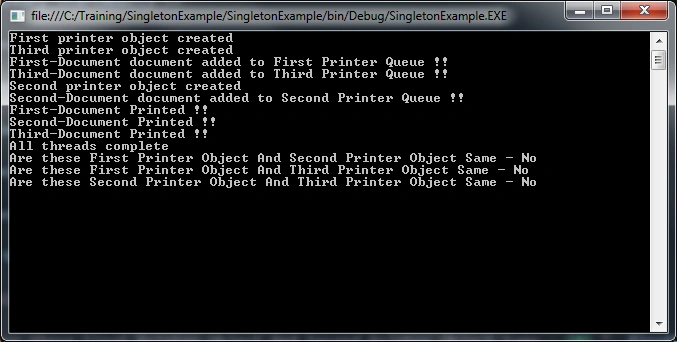
As we can see in the above output window that three different instances of Printer object have been created whereas we were expecting only one instance. Also, we can see the documents got added to their instance specific queue. We cannot be sure that we will always get the same output results as this depends on different aspects like no of CPU in the system. It is always better to make the implementation thread-safe to make sure that only one instance is created when accessed from multiple systems simultaneously.
Thread-Safe Implementation
- publicsealedclassThreadSafePrinter {
- //A static variable which holds a reference to the single created instance
- privatestaticThreadSafePrinter _threadSafePrinterInstance;
- // A static variable which implements a Queue data structure and holds a documents to be printed
- privateQueue < String > _queue = newQueue < string > ();
- privatestaticstring _instanceName;
- privatestaticobject _syncRoot = newobject();
- ///<summary>
- /// private and parameterless constructor that prevents other classes from instantiating it
- ///</summary>
- private ThreadSafePrinter() {}
- ///<summary>
- /// This method is to get the instance of Printer class
- ///</summary>
- ///<param name="instanceName">Name of an instance</param>
- ///<returns>An instance of Printer class</returns>
- publicstaticThreadSafePrinter GetPrinterInstance(string instanceName) {
- //The thread takes out a lock on a shared object, and then checks
- //whether or not the instance has been created before creating the instance
- lock(_syncRoot) {
- //If there is no instance of printer class exists then instantiate
- if (_threadSafePrinterInstance == null) {
- _instanceName = instanceName;
- Console.WriteLine("{0} printer object created", instanceName);
- _threadSafePrinterInstance = newThreadSafePrinter();
- }
- }
- return _threadSafePrinterInstance;
- }
- }
The above code ensures that only one thread will create an instance (as only one thread can be in that part of the code at a time - by the time the second thread enters it. The first thread will have created the instance, so the expression “if (_printerInstance == null)” will evaluate to false) but in this scenario, every thread will acquire a lock ,meaning lock is acquired every time the instance is requested that might lead to a performance issue.
Let’s have a look at the request from multiple threads simultaneously and the corresponding response.
- staticvoid Main(string[] args) {
- InitializeThreadSafePrinterObject();
- }
- ///<summary>
- /// This method Initializes three Task
- /// and run at the same time with very less time gap in between. These task
- /// initialize Printer object and add document to printer queue
- ///</summary>
- staticvoid InitializeThreadSafePrinterObject() {
- ThreadSafePrinter firstPrinterObject = null;
- ThreadSafePrinter secondPrinterObject = null;
- ThreadSafePrinter thirdPrinterObject = null;
- Task task1 = Task.Factory.StartNew(() => {
- firstPrinterObject = GetThreadSafePrinterInstance("First", "First-Document");
- });
- Task task2 = Task.Factory.StartNew(() => {
- secondPrinterObject = GetThreadSafePrinterInstance("Second", "Second-Document");
- });
- Task task3 = Task.Factory.StartNew(() => {
- thirdPrinterObject = GetThreadSafePrinterInstance("Third", "Third-Document");
- });
- Task.WaitAll(task1, task2, task3);
- Console.WriteLine("All threads complete");
- Console.WriteLine("Are these First Printer Object And Second Printer Object Same - {0} ", firstPrinterObject.Equals(secondPrinterObject) ? "Yes" : "No");
- Console.WriteLine("Are these First Printer Object And Third Printer Object Same - {0} ", firstPrinterObject.Equals(thirdPrinterObject) ? "Yes" : "No");
- Console.WriteLine("Are these Second Printer Object And Third Printer Object Same - {0} ", secondPrinterObject.Equals(thirdPrinterObject) ? "Yes" : "No");
- Console.ReadLine();
- }
- privatestaticThreadSafePrinter GetThreadSafePrinterInstance(string instanceName, string documentName) {
- var printerObject = ThreadSafePrinter.GetPrinterInstance(instanceName);
- printerObject.AddDocument(documentName);
- printerObject.PrintDocument();
- return printerObject;
- }
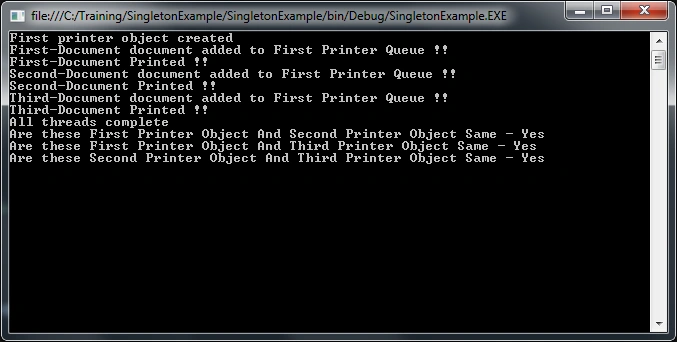
As we can see in the above output window, the single instance of Printer object is created. Also, we can see the documents got added into the single queue but as mentioned earlier in this scenario, every thread will acquire lock; meaning lock is acquired everytime the instance is requested that might lead to a performance issue.
Let’s have a look at the better thread-safe implementation that reduces the impact on performance because of lock on an object.
Double-check locking mechanism wherein we add expression “if (_printerInstance == null)” before acquiring lock. With double-check locking mechanism, it is not necessary that the lock is acquired every time the instance is requested which will reduce performance issues but is not completely optimized. The modified implementation looks as mentioned below.
- ///<summary>
- /// This method is to get the instance of Printer class
- ///</summary>
- ///<param name="instanceName">Name of an instance</param>
- ///<returns>An instance of Printer class</returns>
- publicstaticThreadSafePrinter GetPrinterInstance(string instanceName) {
- //If there is no instance of printer class exists then instantiate
- if (_threadSafePrinterInstance == null) {
- //The thread takes out a lock on a shared object, and then checks whether or not the instance has been created before creating the instance
- lock(_syncRoot) {
- //If there is no instance of printer class exists then instantiate
- if (_threadSafePrinterInstance == null) {
- _instanceName = instanceName;
- Console.WriteLine("{0} printer object created", instanceName);
- _threadSafePrinterInstance = newThreadSafePrinter();
- }
- }
- }
- return _threadSafePrinterInstance;
- }
harshit porwalPosted Aug 29, 2019, 8:13 AM
Code not readable