

Introduction
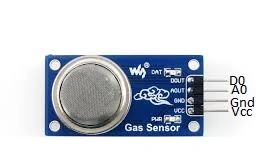
A smoke detector is a device that senses smoke, typically as an indicator of fire. Commercial security devices issue a signal to a fire alarm control panel as part of a fire alarm system. It is also a household detector, known as a smoke alarm. Generally, it issues a local audible or visual alarm from the detector itself. (Source Wikipedia).
Part of the list:
- Arduino
- Smoke sensor MQ-5
- Bread Board
- Hookup wires
- Buzzer
- Led.
Connection From Sensor To Arduino Board:
- The first pin can take A0 or D0 connected to an Arduino board.
- The second pin Gnd can be connected to Gnd to an Arduino board.
- The third pin Vcc can be connected to 5V to an Arduino board.
Connection From Led To Arduino Board:
- The positive pin on the led can be connected to digital pin 13.
- The negative pin on the led can be connected to Gnd.
Connection From Buzzer To Arduino Board:
- The positive pin on the buzzer can be connected to digital pin 10.
- The negative pin on the buzzer can be connected to Gnd.
Programming
- const int sensorpin = A0; // sensor output pin to Arduino analog A0 pin
- int led = 13;
- int buzzer = 10;
- int sensorValue = 0;
- void setup()
- {
- pinMode(led, OUTPUT);
- pinMode(buzzer, OUTPUT);
- Serial.begin(9600); //Initialize serial port - 9600 bps
- }
- void loop()
- {
- Serial.println("Welcome to c#corner");
- sensorValue = analogRead(sensorpin);
- Serial.println(sensorValue);
- if (sensorValue < 100)
- {
- Serial.println("Smoke Detected");
- Serial.println("LED on");
- digitalWrite(led, HIGH);
- digitalWrite(buzzer, HIGH);
- delay(1000);
- }
- digitalWrite(led, LOW);
- digitalWrite(buzzer, LOW);
- delay(sensorValue);
- }
Explanation
When the smoke is detected the LED can be set HIGH.
The value can be shown in the serial monitor accurately.
Then the smoke detected automatically the buzzer can produce the sound.
Output
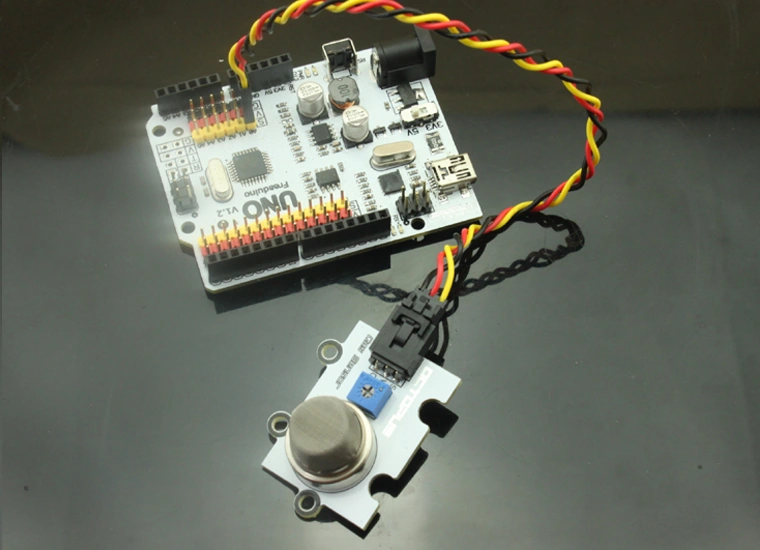
Read more articles on Arduino:
Sr KarthigaPosted Feb 24, 2016, 7:46 PM
Thank you vignesh mani sir
Vignesh ManiPosted Feb 24, 2016, 6:12 PM
Nice one
Sr KarthigaPosted Feb 22, 2016, 7:37 PM
Thank you Asfend sir
Asfend YarPosted Feb 22, 2016, 2:09 PM
good work done
Asfend YarPosted Feb 22, 2016, 2:09 PM
keep it up
Asfend YarPosted Feb 22, 2016, 2:08 PM
thanks for sharing
Sr KarthigaPosted Feb 9, 2016, 8:49 AM
Thank you raja sir
Raja TPosted Feb 9, 2016, 8:46 AM
Nice, Thanks for sharing
Sr KarthigaPosted Feb 8, 2016, 7:59 PM
Thank you sibeesh sir
Sibeesh VenuPosted Feb 8, 2016, 12:08 AM
Nice Share
Sr KarthigaPosted Feb 7, 2016, 8:14 PM
Thank you santhakumar sir
Santhakumar MunuswamyPosted Feb 7, 2016, 1:23 PM
thanks for nice article.
Sr KarthigaPosted Feb 7, 2016, 3:27 AM
Thank you Humayun Kabir Mamun sir
Humayun Kabir MamunPosted Feb 7, 2016, 3:01 AM
Nice...
Sr KarthigaPosted Feb 7, 2016, 1:08 AM
Thank you Jaco Zwarts sir
Sr KarthigaPosted Feb 7, 2016, 1:07 AM
Thank you Vignesh Mani sir
Sr KarthigaPosted Feb 7, 2016, 1:07 AM
Thank you kumaresh sir
Kumaresh RajalingamPosted Feb 6, 2016, 8:36 PM
Nice share
Vignesh ManiPosted Feb 6, 2016, 5:18 PM
Good one
Jaco ZwartsPosted Feb 6, 2016, 1:16 PM
Thank you big fan of Arduino. Will follow you