
Introduction
The article is about creating the SMS messaging framework to allow users to send a SMS message to their application subscribers using the Twilio REST API. It provides a lot of boilerplate code for someone to quickly get the task done.
Background
I was assigned a task to develop a SMS messaging framework using the TWILIO API. I decided to write this article to help others to use the code to save their time.
Prerequisites
This article requires knowledge of VS 2010, WCF REST Service template and MSMQ.
Let us start developing the SMS inbound and outbound messaging framework using the TWILIO API. First of all you need to buy an account with TWILIO or use a Trial account. They will give you a number that will be used for sending and receiving the messages. Also, you will receive the AccountId and Auth token to be used to access the TWILIO API.
OK, so now this framework contains the following components:
- Outbound Message queue to persist the messages sent from the application.
- Windows service to poll the message queue and send the SMS to the interested parties.
- REST API to collect the response received to the SMS sent from your application.
- Inbound Message queue to collect the response messages.
- Windows service to process the inbound messages.
Creating Queues
I am assuming you have the queues installed on your machine otherwise you can install it from Windows Components. Create a queue in the following manner (on Windows 7 OS):
Go to "Administrative Tools" -> "Computer Management" -> "Services and Applications" -> "Message Queuing" -> "Private Queues":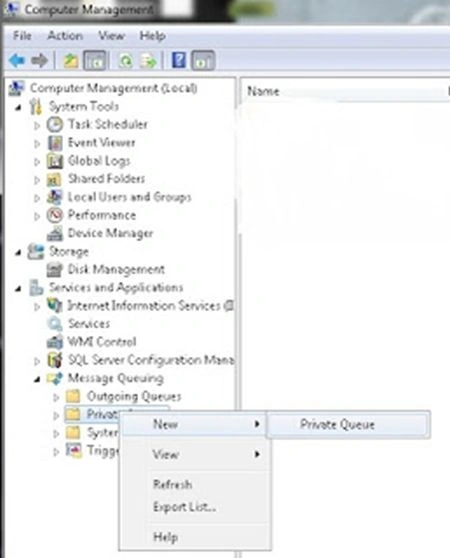
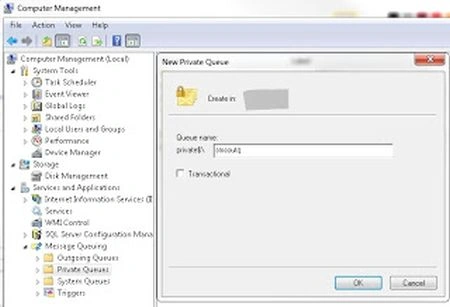
Note: If we enabled Journaling then we can audit the messages later on. 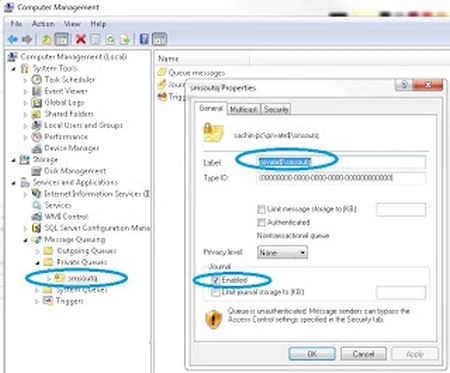
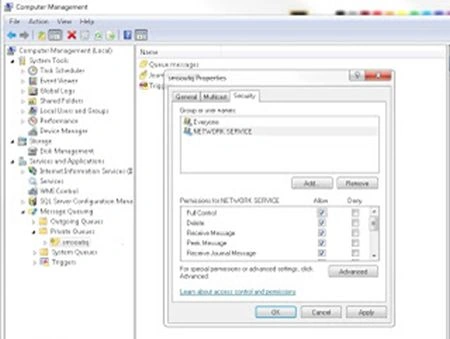
In the same way you can create the "smsinq" for collecting the inbound SMS. Create a MessageDTO class with the desired properties and don't forget to mark it Serializable.
[Serializable]
public class MessageDTO
{
public MessageDTO() { }
public Guid MessageGUID { set; get; }
public string To { set; get; } //Phone number to whom message need to send
public string Subject { set; get; }
public string Body { set; get; }
public string From { set; get; } //Phone number from whom message need to send
public DateTime CreatedOn { set; get; }
public DateTime SentOn { set; get; }
}
Utility.cs
Now you need the function that will push the messages in the outbound SMS queue (smsoutq). This function can be put in the Utility class to be reusable and is quite easy and can be used for pushing both inbound and outbound messages in their respective queues as follows:
public class Utility
{
private static string smsOutQueuePath = ".\private$\smsoutq";
private static string smsInQueuePath = ".\private$\smsinq";
private static Message SetMessageProperties(Message objMsg)
{
objMsg.Recoverable = true;
objMsg.UseDeadLetterQueue = true;
objMsg.UseJournalQueue = true;
objMsg.Formatter = new BinaryMessageFormatter();
return objMsg;
}
public static MessageQueue GetMessageQueue(string queuePath)
{
MessageQueue msgQ = null;
try
{
if(!MessageQueue.Exists(queuePath))
{
msgQ = MessageQueue.Create(queuePath);
}
msgQ = new MessageQueue(queuePath, QueueAccessMode.SendAndReceive);
msgQ.Formatter = new BinaryMessageFormatter();
msgQ.DefaultPropertiesToSend.UseJournalQueue = true;
msgQ.DefaultPropertiesToSend.Recoverable = true; //Messages remain if server goes down
msgQ.DefaultPropertiesToSend.UseDeadLetterQueue = true;
msgQ.MessageReadPropertyFilter.SetAll();
}
catch (Exception ex)
{
//your exception logging code
}
return msgQ;
}
public static bool PostToSMSQueue(MessageDTO objMsg, string direction = Constants.MESSAGE_DIRECTION_OUT)
{
bool success = false;
try
{
Message objMessage = new Message();
objMessage = SetMessageProperties(objMessage);
objMessage.Body = objMsg;
MessageQueue msgQ = null;
if(direction == Constants.MESSAGE_DIRECTION_OUT)
msgQ = GetMessageQueue(smsOutQueuePath);
else
msgQ = GetMessageQueue(smsInQueuePath);
msgQ.Send(objMessage);
success = true;
}
catch (Exception ex)
{
//your exception logging code
}
return success;
}
public static NameValueCollection ConvertUrlStringToNSCollection(string strUri)
{
NameValueCollection nsCol = new NameValueCollection();
if(!String.IsNullOrEmpty(strUri))
{
try
{
int endPos = 0;
string[] messageArray = null;
messageArray = strUri.Split('&');
for(int count = 0; count < messageArray.Length; count++)
{
endPos = messageArray[count].LastIndexOf('=');
nsCol.Add(messageArray[count].Substring(0, endPos),
messageArray[count].Substring(endPos + 1, messageArray[count].Length - (endPos + 1)));
}
}
catch(Exception ex)
{
throw ex;
}
}
return nsCol;
}
}
Creating OutboundMsgPoller Service to Send Message to TWILIO
Now you must write the windows service (OutboundMsgPoller) that will read the messages to the desired parties at some defined time interval and seelct the messages and send them to TWILO using their API to be sent further. Note that the code will be the same for the ReponseProcessor (Windows service to process the received responses, read inline comments below), so you can reuse it.
public partial class OutboundMsgPoller : ServiceBase
{
private static string smsOutQueuePath = ".\private$\smsoutq";
private static string accountSID = string.Empty;
private static string authToken = string.Empty;
private static string callbackURL = string.Empty;
private Thread m_oPollingThread = null;
private bool shallRun = false;
protected override void OnStart(string[] args)
{
try
{
Mahesh ChandPosted Feb 14, 2013, 7:18 PM
Welcome Sachin and great article. Could you please add little bit introduction of TWILIO API? Do you need to buy a license or service? Does it work in all countries? I believe SMS service is based on a region.