

When you're trying to access an app and receive "Authentication Required" popup in every click then you need to understand whats going on.
The apps and SharePoint Portal are different environments. Two cannot work in same DNS and AppDomain, you need to configure Apps to have different DNS and AppDomain by using Powershell when adding App Support to your SharePoint Portal.
Because of this AppDomain issue, you're receiving the loopback popup window named "Authentication Required".
To solve this, there's a workaround many people use: Regedit entry.
- Click Windows Key + R and enter regedit or simply run regedit (all the same).
- Locate HKEY_LOCAL_MACHINE\SYSTEM\CurrentControlSet\Control\Lsa.
- Create a new DWORD 32bit named DisableLoopbackCheck.
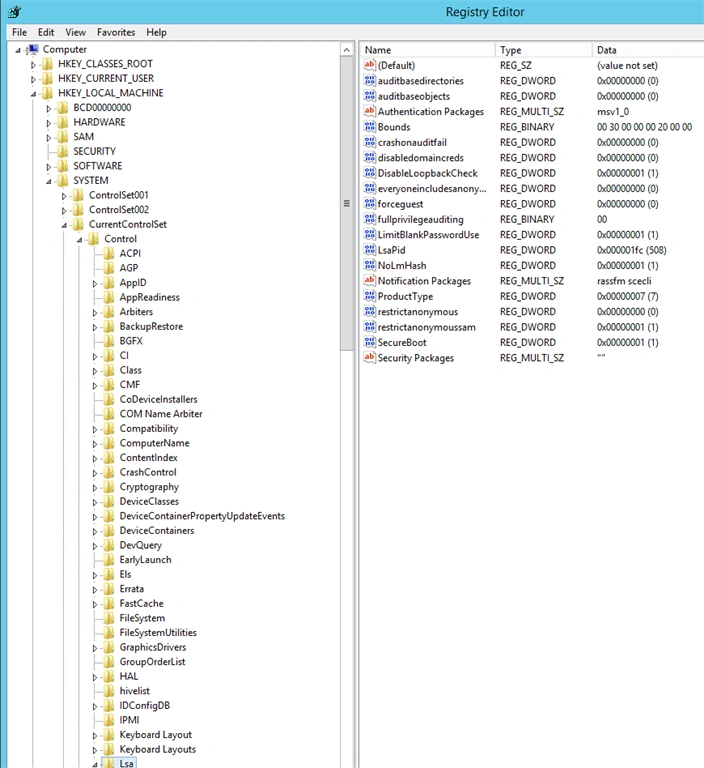
- Assign its value as "1".
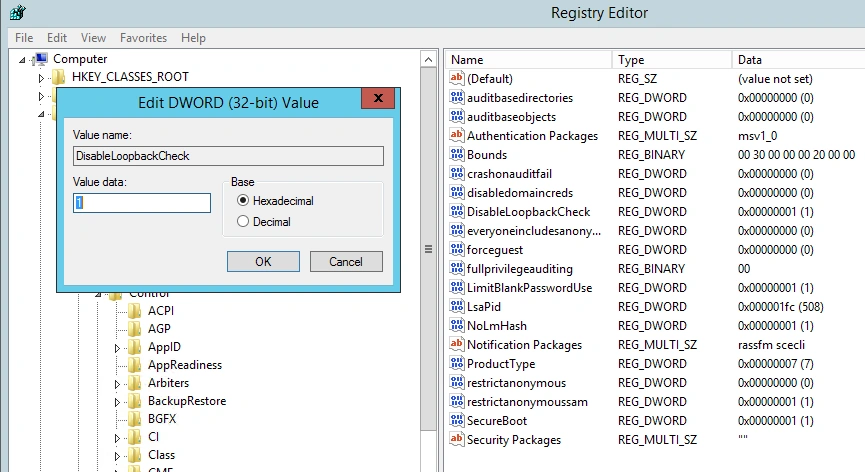
- Reboot.
- Open the app again.
Santhakumar MunuswamyPosted Sep 17, 2015, 10:27 AM
Thanks for nice article:)
Ankit BansalPosted Sep 17, 2015, 4:34 AM
thanks for share..
RakeshPosted Sep 16, 2015, 11:11 AM
Good share sir
Sibeesh VenuPosted Sep 16, 2015, 4:07 AM
Nice Share
Sibeesh VenuPosted Sep 16, 2015, 4:07 AM
Nice Share
Jacob RobinsonPosted Sep 16, 2015, 12:31 AM
Good One..
Harshad PansuriyaPosted Sep 16, 2015, 12:00 AM
Nice one
Karthikeyan KPosted Sep 15, 2015, 11:16 PM
Thanks for sharing sir...
Mohammed IbrahimPosted Sep 15, 2015, 8:06 PM
nice
Rajeesh MenothPosted Sep 15, 2015, 2:31 PM
Thanks for sharing..