

This is xaml code
<Window x:Class="SpellCheckerInWPF.MainWindow"
xmlns="http://schemas.microsoft.com/winfx/2006/xaml/presentation"
xmlns:x="http://schemas.microsoft.com/winfx/2006/xaml"
Title="Spell Check in WPF" Height="350" Width="525">
<Grid>
<Grid.RowDefinitions>
<RowDefinition Height="20"></RowDefinition>
<RowDefinition Height="20"></RowDefinition>
<RowDefinition Height="20"></RowDefinition>
<RowDefinition Height="Auto"></RowDefinition>
<RowDefinition Height="20"></RowDefinition>
</Grid.RowDefinitions>
<Grid.ColumnDefinitions>
<ColumnDefinition Width="20"></ColumnDefinition>
<ColumnDefinition Width="100"></ColumnDefinition>
<ColumnDefinition Width="200"></ColumnDefinition>
<ColumnDefinition Width="Auto"></ColumnDefinition>
<ColumnDefinition Width="20"></ColumnDefinition>
</Grid.ColumnDefinitions>
<Grid Grid.Row="1" Grid.Column="1">
<TextBlock x:Name="txtBlckSpellMessage" Text="Comment:"></TextBlock>
</Grid>
<Grid Grid.Row="1" Grid.Column="2">
<TextBox x:Name="txtSpellCheck" SpellCheck.IsEnabled="True" AcceptsReturn="True" Width="200"></TextBox>
</Grid>
</Grid>
</Window>
When we run the application and if we type wrong spelling then the text will have red underline indicating that it is wrong spelling. If we right click on this word then a list of words is shown. We can select the correct word from the list available with us. Working of spell checker is shown in the below figure.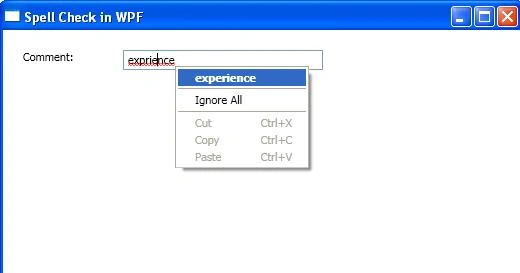
Figure 1.
Join the conversation! Your thoughts help the community grow.