

Introduction
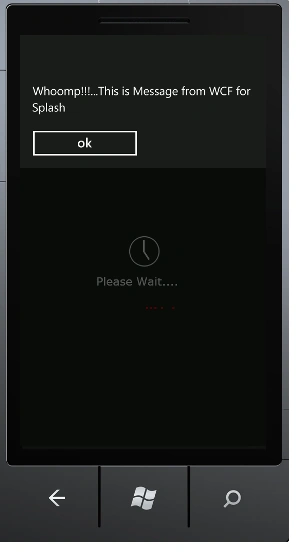
Today, in this article let's play around with one more interesting concept in Windows Phone whereby communication with a WCF Service is used to get a message after the phone's main screen is displayed.
The Question Arises: What is a Splash Screen?
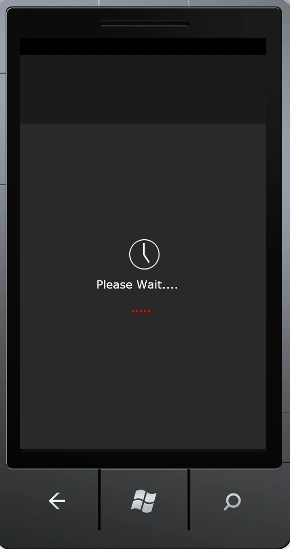
In simple terms a "Splash Screen is Rich UI Enabled Screen which is shown to the phone user. It is shown when the user has to wait for process to execute or perform some operation which takes long time. So instead of being idle empty screen, the Windows Phone 7 has integrated with some new feature which enables to show some good screen in the meanwhile. So the user wouldn't get distracted or irritated until the whole task is completed".
I think we are now good to go and implement this interesting concept!!!
Step 1: The Complete Code of IService1.cs looks like this.
using System;
using System.Collections.Generic;
using System.Linq;
using System.Runtime.Serialization;
using System.ServiceModel;
using System.ServiceModel.Web;
using System.Text;
namespace WCF_Splash_Screen
{
// NOTE: You can use the "Rename" command on the "Refactor" menu to change the interface name "IService1" in both code and config file together.
[ServiceContract]
public interface IService1
{
[OperationContract]
string Splash();
}
}
Step 2: The Complete Code of Service1.svc.cs looks like this.
using System;
using System.Collections.Generic;
using System.Linq;
using System.Runtime.Serialization;
using System.ServiceModel;
using System.ServiceModel.Web;
using System.Text;
namespace WCF_Splash_Screen
{
// NOTE: You can use the "Rename" command on the "Refactor" menu to change the class name "Service1" in code, svc and config file together.
public class Service1 : IService1
{
public string Splash()
{
return "Whoomp!!!...This is Message from WCF for Splash";
}
}
}
Step 3: The Complete Code of Web.Config looks like this.
<?xml version="1.0"?>
<configuration>
<system.web>
<compilation debug="true" targetFramework="4.0" />
</system.web>
<system.serviceModel>
<behaviors>
<serviceBehaviors>
<behavior>
<!-- To avoid disclosing metadata information, set the value below to false and remove the metadata endpoint above before deployment -->
<serviceMetadata httpGetEnabled="true"/>
<!-- To receive exception details in faults for debugging purposes, set the value below to true. Set to false before deployment to avoid disclosing exception information -->
<serviceDebug includeExceptionDetailInFaults="false"/>
</behavior>
</serviceBehaviors>
</behaviors>
<serviceHostingEnvironment multipleSiteBindingsEnabled="true" />
</system.serviceModel>
<system.webServer>
<modules runAllManagedModulesForAllRequests="true"/>
</system.webServer>
</configuration>
Step 4: The Complete Code of the Splas_Screen.xaml(User Control) looks like this.
<UserControl x:Class="Splash_Screen_Application.Splas_Screen"
xmlns="http://schemas.microsoft.com/winfx/2006/xaml/presentation"
xmlns:x="http://schemas.microsoft.com/winfx/2006/xaml"
xmlns:d="http://schemas.microsoft.com/expression/blend/2008"
xmlns:mc="http://schemas.openxmlformats.org/markup-compatibility/2006"
mc:Ignorable="d"
FontFamily="{StaticResource PhoneFontFamilyNormal}"
FontSize="{StaticResource PhoneFontSizeNormal}"
Foreground="{StaticResource PhoneForegroundBrush}"
d:DesignHeight="800" d:DesignWidth="480">
<Grid x:Name="LayoutRoot" Background="{StaticResource PhoneChromeBrush}">
<Image Source="/SplashScreenImage.jpg" VerticalAlignment="Center" HorizontalAlignment="Center" Stretch="UniformToFill" Margin="0,166,0,-166" />
<TextBlock FontFamily="Verdana" FontSize="22" Text="Please Wait...." Margin="148,465,136,299" />
<ProgressBar Height="30" Margin="0,516,121,254" HorizontalAlignment="Right" Width="246" Name="Progress1" IsIndeterminate="True" Foreground="Red"/>
</Grid>
</UserControl>
Step 5: The Complete Code of the Splas_Screen.xaml.cs(User Control) looks like this.
using System;
using System.Collections.Generic;
using System.Linq;
using System.Net;
using System.Windows;
using System.Windows.Controls;
using System.Windows.Documents;
using System.Windows.Input;
using System.Windows.Media;
using System.Windows.Media.Animation;
using System.Windows.Shapes;
namespace Splash_Screen_Application
{
public partial class Splas_Screen : UserControl
Join the conversation! Your thoughts help the community grow.