

Introduction
In this post, we’ll explore the IIF SQL functionality. IIF (If and only if) function, and we’ll use the AdventureWorks database for our testing purposes. Let’s get started.
What’s IIF Function?
- Introduced in SQL Server 2012
- This function returns one of two values depending on the boolean expression [also known as condition] that evaluates true or false.
- IIF is composed of the logical statement, the boolean expression known as the condition, followed by the “true” and the “false” expressions.
- This function can be compared to CASE expressions and a shorthand way of writing a CASE expression.
IIF Syntax
-- Syntax
    IIF(boolean_expressions, true, false)
-- OR
    IIF(condition, true, false)
- Boolean expression or condition – this is required, and it is because of the value that needs to be tested.
- True - this is optional, but the value is returned if the condition is true.
- False - this is optional, but the value is returned if the condition is false.
Examples
1. Compare Numbers
-- Let's declare and initialize two numbers
DECLARE @NUM1 INT = 20;
DECLARE @NUM2 INT = 25

--OUTPUT: 25 is greater than 20
SELECT IIF( (@NUM2 > @NUM1), FORMATMESSAGE('%i is greater than %i', @NUM2, @NUM1),
                             FORMATMESSAGE('%i is greater than %i', @NUM1, @NUM2))
                             AS [ComparingNumbers];
--OUTPUT: TRUE
SELECT IIF(@NUM2 > @NUM1, 'TRUE', 'FALSE')  AS [ComparingNumbers];

SET @NUM1  = 120;
SET @NUM2  = 25;

--OUTPUT: 120 is greater than 25
SELECT IIF((@NUM1 > @NUM2), FORMATMESSAGE('%i is greater than %i', @NUM1, @NUM2),
                            FORMATMESSAGE('%i is greater than %i', @NUM2, @NUM1))
                             AS [ComparingNumbers];
--OUTPUT: TRUE
SELECT IIF(@NUM2 > @NUM1, 'FALSE', 'TRUE')  AS [ComparingNumbers];
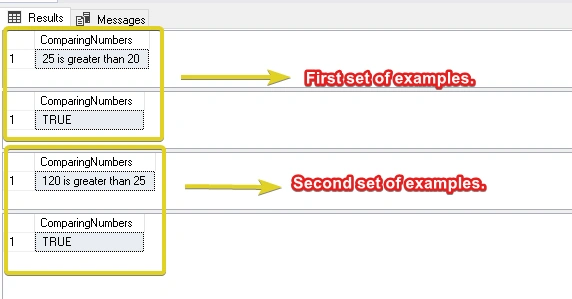
As you can see from the example we have shown how we can easily compare numbers using the IIF function.
Output
2. Compare numbers within a table column
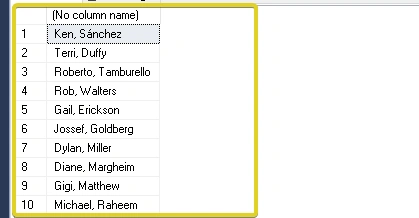
This section will try to explore some examples using the AdventureWorks database. Checking the Person Person table of the AdventureWorks database, you’ll see a NameStyle column. This column uses bit as its datatype. When it is 0, FirstName and LastName are stored in Western-style (first name, last name). Otherwise, when it is 1, it is stored in an Eastern-style (Lastname, first name) order.
Let’s try to use the IIF function here.
USE [AdventureWorks2019]
/** Let’s try to format the person’s names using either western-style or eastern-style by using IIF.*/
SELECT IIF(NameStyle = 0,
    CONCAT(FirstName, ', ' , LastName),
    CONCAT(LastName, ', ', FirstName))
FROM
[Person].[Person]
Output
3. Compare strings within a table column
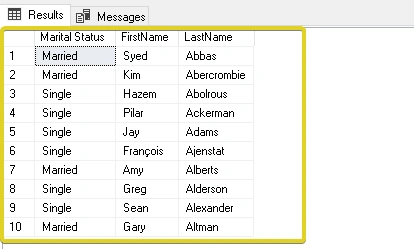
In this example, we’ll try to get the Employee’s marital status by using the IIF function and joining the two tables [HumanResources].[Employee] and [Person].[Person] inside the AdventureWorks database. The column MaritalStatus uses the nchar(1) datatype, and M stands for married, while S stands for single.
Let’s see an example below.
USE [AdventureWorks2019]

SELECT TOP 10 IIF(MaritalStatus = 'M', 'Married', 'Single') as [Marital Status],
    FirstName,
    LastName
FROM [HumanResources].[Employee] E
INNER JOIN [Person].[Person] P
ON E.[BusinessEntityID] = P.[BusinessEntityID]
Output
4. Nested SQL IIF Statement
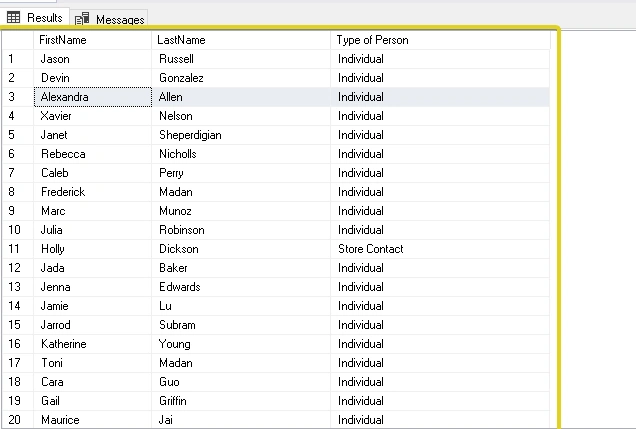
In this example, we’ll try to get the Person’s type by using a nested IIF function and checking the PersonType column, which uses nchar(2) as its datatype. Has many meanings.
Let’s see the list below.
- SC = Store Contact
- IN = Individual
- SP = Sales Person
- EM = Employee
- VC = Vendor Contact
- GC = General Contact
USE [AdventureWorks2019]

-- Randomly select rows in this table (10 percent)
SELECT TOP 10 PERCENT
       FirstName,
       LastName,
       IIF(PersonType = 'EM', 'Employee',
       IIF(PersonType = 'SC', 'Store Contact',
       IIF(PersonType = 'IN', 'Individual',
       IIF(PersonType = 'SP', 'Sales Person',
       IIF(PersonType=  'VC', 'Vendor Contact',
       IIF(PersonType = 'GC', 'General Contact', 'n/a')))))) AS [Type of Person]
FROM [Person].[Person]
ORDER BY NEWID()
Just a reminder, as you can see, the query sample is randomly selecting records on the [Person].[Person] table to see different results every time we execute the query. So your results will be further from the output shown below.
Output
5. SQL IIF and NULL Value
When dealing with the IIF function and passing a NULL value within both the true and false expressions/parameters, it will throw an exception. But before we see an example, we’ll be using the [Production].[Product] table as our example and let’s try to see the number of days to manufacture a certain product.
USE [AdventureWorks2019]
SELECT MIN(DaysToManufacture), Max (DaysToManufacture) FROM [Production].[Product]
If you will execute the query above, this will show us that the minimum number of days to manufacture a product is 0, and the maximum number of days to manufacture a product is 4 days.
Now, let’s try to use the IIF function and check if the [DaysOfManufacture] is zero and pass the value NULL to both parameters.
USE [AdventureWorks2019]
SELECT IIF(DaysToManufacture = 0, NULL, NULL) FROM [Production].[Product]
Output

It’s clearly saying that we need to have at least one true or false argument and be mindful next time not to encounter this exception.
Let’s see an example below.
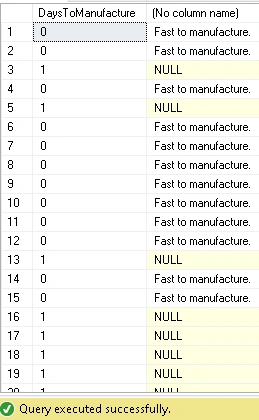
USE [AdventureWorks2019]
SELECT DaysToManufacture,
         IIF(DaysToManufacture = 0, 'Fast to manufacture.', NULL) FROM [Production].[Product]
Output
Summary
In this article, we have discussed the following:
- What’s IIF Function
- IIF Syntax
- Examples
- Compare numbers
- Compare numbers within a table column
- Compare strings within a table column
- Nested SQL IIF Statement
- SQL IIF and NULL Value
Once again, I hope you have enjoyed reading this article/tutorial as much as I have enjoyed writing it.
Stay tuned for more. Until next time, happy programming!
Please don't forget to bookmark, like, and comment. Cheers! And Thank you!
Join the conversation! Your thoughts help the community grow.