

Building enterprise-grade AI applications is no longer just about prompt engineering; it is about system architecture. When you move from a simple chatbot to an Enterprise Multi-Agent Retrieval-Augmented Generation (RAG) system using LangGraph, you face a harsh reality: LLM inference and vector database retrievals are slow, expensive, and prone to timeouts. To build a system that is resilient, scalable, and cost-effective, you must decouple your AI agents. This is where AWS messaging services SQS, SNS, and EventBridge become the nervous system of your AI architecture. In this article, we will break down when and why to use each service, and then build an end-to-end implementation of an Enterprise Multi-Agent LangGraph RAG system powered by an event-driven AWS backend.
Part 1: The "When and Why" of AWS Messaging
Before writing code, we must understand the distinct roles of these three services in an event-driven architecture.
1. Amazon EventBridge: The "Smart Router"
What it is: A serverless event bus with rich filtering, schema registries, and routing capabilities.
When to use it: When you need to route events based on their content, integrate with SaaS applications, or trigger events on a schedule (Cron).
Why in AI: It acts as the "Front Door" for your AI system. It ingests user queries, analyzes the payload, and intelligently routes the request to the correct downstream workflow without writing custom routing code.
2. Amazon SNS (Simple Notification Service): The "Broadcaster"
What it is: A fully managed pub/sub messaging service.
When to use it: When you need fan-out architecture. You want to send a single message to multiple subscribers simultaneously.
Why in AI: When a complex user query requires parallel processing by multiple independent agents (e.g., a Research Agent and a Compliance Agent both need to start working at the exact same time), SNS broadcasts the query to all of them instantly.
3. Amazon SQS (Simple Queue Service): The "Reliable Worker"
What it is: A fully managed message queuing service.
When to use it: When you need to decouple microservices, buffer heavy workloads, and guarantee at-least-once delivery. It is point-to-point.
Why in AI: LLM calls take seconds. If an agent crashes, you cannot lose the user's query. SQS holds the message safely until the specific LangGraph agent worker is ready to pull it, process it, and acknowledge it. It also allows you to scale your agent workers independently based on queue depth.
Part 2: The Use Case - Enterprise Financial RAG
The Scenario: A financial institution uses an AI system to process complex client inquiries.
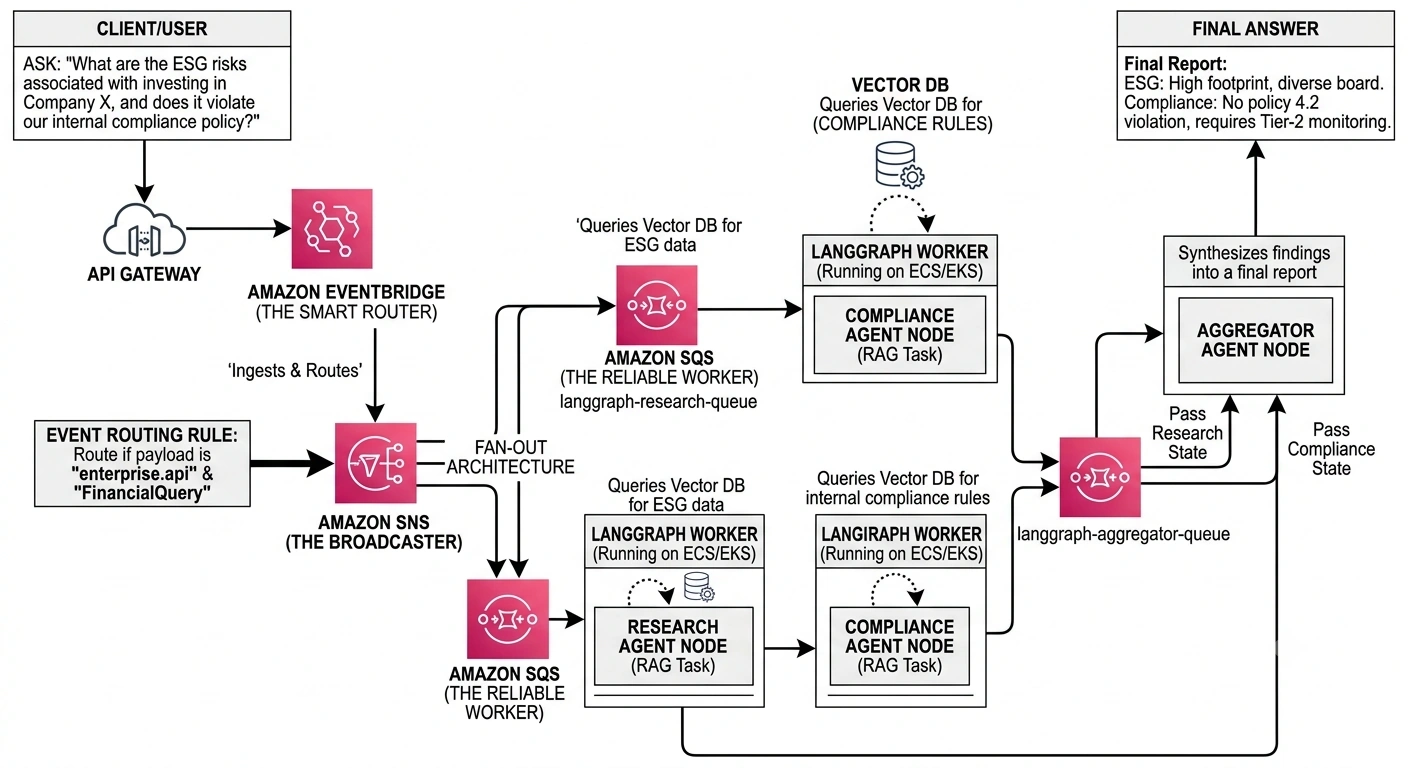
When a client asks: "What are the ESG risks associated with investing in Company X, and does it violate our internal compliance policy?"
This requires a Multi-Agent LangGraph RAG approach:
Router Agent: Analyzes the intent.
Research Agent: Queries the Vector DB for ESG data.
Compliance Agent: Queries the Vector DB for internal compliance rules.
Aggregator Agent: Synthesizes the findings into a final report.
The Event-Driven Architecture
API Gateway receives the user query and sends it to EventBridge.
EventBridge routes the query to an SNS Topic (based on query type).
SNS fans out the message to three SQS Queues:
research-queue,compliance-queue, andaggregator-queue.LangGraph Workers (running on ECS/EKS) pull from their respective SQS queues, execute their specific RAG tasks, and pass state to the next agent.
Part 3: End-to-End Code Implementation
Prerequisites: boto3, langgraph, langchain, langchain-openai
Step 1: AWS Infrastructure Setup (Python/Boto3)
First, let's provision the messaging backbone.
import boto3
import json

sns = boto3.client('sns')
sqs = boto3.client('sqs')
events = boto3.client('events')

# 1. Create SQS Queues for our Agents
research_queue = sqs.create_queue(QueueName='langgraph-research-queue')
compliance_queue = sqs.create_queue(QueueName='langgraph-compliance-queue')
aggregator_queue = sqs.create_queue(QueueName='langgraph-aggregator-queue')

research_queue_arn = sqs.get_queue_attributes(
    QueueUrl=research_queue['QueueUrl'], AttributeNames=['QueueArn'])['Attributes']['QueueArn']
compliance_queue_arn = sqs.get_queue_attributes(
    QueueUrl=compliance_queue['QueueUrl'], AttributeNames=['QueueArn'])['Attributes']['QueueArn']

# 2. Create SNS Topic for Fan-out
topic = sns.create_topic(Name='financial-query-topic')
topic_arn = topic['TopicArn']

# 3. Subscribe SQS queues to SNS Topic (Allow SNS to send messages to SQS)
# Note: In production, you must set the SQS Queue Policy to allow SNS to send messages.
sns.subscribe(TopicArn=topic_arn, Protocol='sqs', Endpoint=research_queue_arn)
sns.subscribe(TopicArn=topic_arn, Protocol='sqs', Endpoint=compliance_queue_arn)

# 4. Create EventBridge Rule to route API payloads to SNS
events.put_rule(
    Name='RouteFinancialQueries',
    EventPattern=json.dumps({
        "source": ["enterprise.api"],
        "detail-type": ["FinancialQuery"]
    })
)

events.put_targets(
    Rule='RouteFinancialQueries',
    Targets=[{'Id': '1', 'Arn': topic_arn}]
)

print("Infrastructure provisioned successfully!")
Step 2: Defining the Multi-Agent LangGraph
Now, we define the LangGraph state and the agents. We will use a simplified mock for the RAG retrieval to focus on the architecture.
from typing import TypedDict, Annotated, Sequence
from langgraph.graph import StateGraph, END
from langchain_core.messages import BaseMessage, HumanMessage, AIMessage
import operator

# 1. Define the Shared State for the Graph
class AgentState(TypedDict):
    messages: Annotated[Sequence[BaseMessage], operator.add]
    query_id: str
    research_context: str
    compliance_context: str

# 2. Define the Agent Nodes
def research_agent_node(state: AgentState):
    """Simulates RAG retrieval and LLM processing for Research"""
    print(f"[Research Agent] Processing query: {state['messages'][-1].content}")
    # Mock Vector DB Retrieval + LLM Call
    esg_data = "Company X has a high carbon footprint but strong board diversity."
    return {"research_context": esg_data, "messages": [AIMessage(content="Research complete.")]}

def compliance_agent_node(state: AgentState):
    """Simulates RAG retrieval and LLM processing for Compliance"""
    print(f"[Compliance Agent] Processing query: {state['messages'][-1].content}")
    # Mock Vector DB Retrieval + LLM Call
    compliance_data = "Company X does not violate internal policy 4.2, but requires Tier-2 monitoring."
    return {"compliance_context": compliance_data, "messages": [AIMessage(content="Compliance check complete.")]}

def aggregator_agent_node(state: AgentState):
    """Synthesizes the final answer"""
    print("[Aggregator Agent] Synthesizing final report...")
    final_answer = f"Final Report:\nESG: {state['research_context']}\nCompliance: {state['compliance_context']}"
    return {"messages": [AIMessage(content=final_answer)]}

# 3. Build the LangGraph
workflow = StateGraph(AgentState)

# Add nodes
workflow.add_node("research", research_agent_node)
workflow.add_node("compliance", compliance_agent_node)
workflow.add_node("aggregator", aggregator_agent_node)

# Define edges (Routing)
# In a real SNS/SQS setup, the graph might be split into separate worker graphs.
# Here, we show the logical flow of the multi-agent state.
workflow.set_entry_point("research")
workflow.add_edge("research", "aggregator")
workflow.add_edge("compliance", "aggregator") # Parallel edge in actual execution
workflow.add_edge("aggregator", END)

# Compile the graph
app = workflow.compile()
Step 3: The SQS Worker Loop (The Glue)
In an enterprise setup, you don't run LangGraph in a single synchronous API call. You run Worker Processes that poll SQS, invoke the LangGraph, and handle the heavy lifting. Here is how the Research Worker pulls from SQS and processes the message:
import time

def start_research_worker():
    print("Starting Research Agent SQS Worker...")
    queue_url = research_queue['QueueUrl']

    while True:
        # 1. Long polling for messages from SQS (Wait up to 20 seconds)
        response = sqs.receive_message(
            QueueUrl=queue_url,
            MaxNumberOfMessages=1,
            WaitTimeSeconds=20
        )

        if 'Messages' in response:
            message = response['Messages'][0]
            receipt_handle = message['ReceiptHandle']

            # SNS wraps the original EventBridge payload in an SNS envelope
            sns_payload = json.loads(message['Body'])
            eventbridge_payload = json.loads(sns_payload['Message'])
            user_query = eventbridge_payload['detail']['query']
            query_id = eventbridge_payload['detail']['query_id']

            print(f"Worker received query: {user_query}")

            # 2. Invoke the LangGraph Agent
            # We initialize the state with the user query
            initial_state = {
                "messages": [HumanMessage(content=user_query)],
                "query_id": query_id,
                "research_context": "",
                "compliance_context": ""
            }

            # Run the specific node (In a distributed setup, workers run specific nodes)
            # For this example, we invoke the research node directly
            result = research_agent_node(initial_state)

            # 3. Pass the result to the next step (e.g., push to Aggregator SQS)
            # In production, you'd serialize the result and send it to the aggregator SQS queue
            print(f"Research complete. Pushing to aggregator queue...")
            # sqs.send_message(QueueUrl=aggregator_queue['QueueUrl'], MessageBody=json.dumps(result))

            # 4. Delete message from SQS (Acknowledge processing)
            sqs.delete_message(
                QueueUrl=queue_url,
                ReceiptHandle=receipt_handle
            )

            # Break for demonstration purposes
            break
        else:
            print("No messages in queue. Waiting...")

# Simulate sending a message from EventBridge to test the flow
def simulate_user_query():
    payload = {
        "source": "enterprise.api",
        "detail-type": "FinancialQuery",
        "detail": {
            "query_id": "req-12345",
            "query": "What are the ESG risks for Company X and does it violate compliance?"
        }
    }

    # Send to EventBridge
    events.put_events(Entries=[{
        'Source': payload['source'],
        'DetailType': payload['detail-type'],
        'Detail': json.dumps(payload['detail'])
    }])
    print("Query sent to EventBridge -> SNS -> SQS")

# --- Execution Flow ---
if __name__ == "__main__":
    # 1. Simulate the user hitting the API
    simulate_user_query()

    # Give AWS a second to route EventBridge -> SNS -> SQS
    time.sleep(3)

    # 2. Start the worker to process the SQS message
    start_research_worker()
Part 4: Why this Architecture Wins for Enterprise AI
By combining AWS messaging with LangGraph, you solve the biggest pain points of enterprise AI:
No More Timeouts: API Gateways timeout after 30 seconds. LLM RAG pipelines can take 60+ seconds. By pushing the work to SQS, the API returns a
202 Acceptedimmediately, and the user polls for the result or receives a WebSocket update when the Aggregator finishes.True Parallelism (Fan-out): SNS allows the Research Agent and Compliance Agent to start their heavy Vector DB queries at the exact same millisecond, cutting total latency in half.
Resilience & Retries: If the OpenAI API rate-limits your Compliance Agent, the SQS message isn't lost. It stays in the queue (or goes to a Dead Letter Queue) and retries automatically.
Cost Optimization: You can scale your SQS workers (ECS tasks/Lambdas) to zero when there are no queries in the queue, and scale up to 100 instances when a massive batch of queries hits EventBridge.
Conclusion
LangGraph provides the brain (stateful, multi-agent reasoning), but AWS EventBridge, SNS, and SQS provide the nervous system (reliable, scalable, event-driven communication). When building enterprise RAG systems, never rely on synchronous HTTP calls for your agent pipelines. Use EventBridge to route, SNS to parallelize, and SQS to guarantee execution. This ensures your AI system is not just smart, but truly enterprise ready.
Join the conversation! Your thoughts help the community grow.