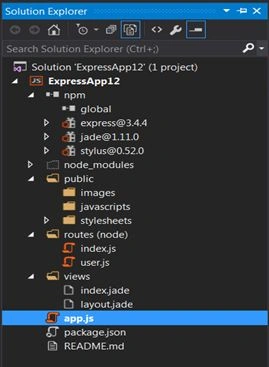
- npm: npm is a NodeJS package manager. As its name implies, you can use it to install node programs. Also, if you use it in development, it makes it easier to specify and link dependencies. If anyone needs to add new dependencies to the project then he can add those using npm.
The way to add is to right-click on npm and then do as in the following:

You can install packages using “Install new npm packages”.
To get a better understanding of npm packages please go through https://www.npmjs.com/.
- Express: As I said earlier, this is the web framework for node.js.
- Jade: jade is a template engine for node.js and the default rendering engine for the express web framework. We can say it is an alternative to HTML.
Example
extends layout.
block content.
h1= title
p Welcome to #{title}
If you need more details on Jade then please go through http://jade-lang.com/.
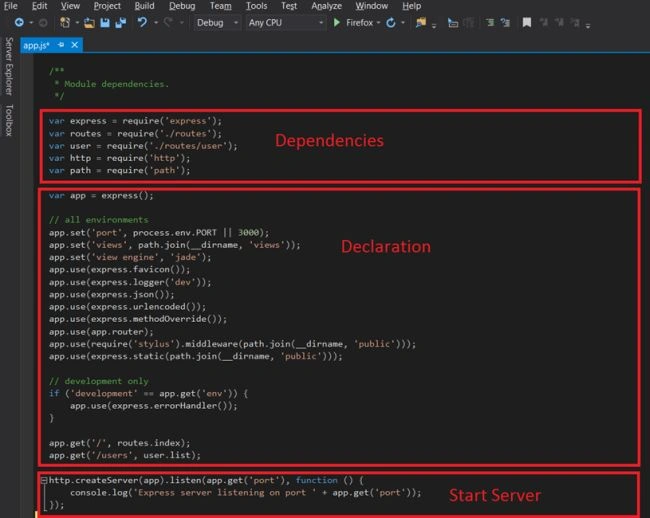
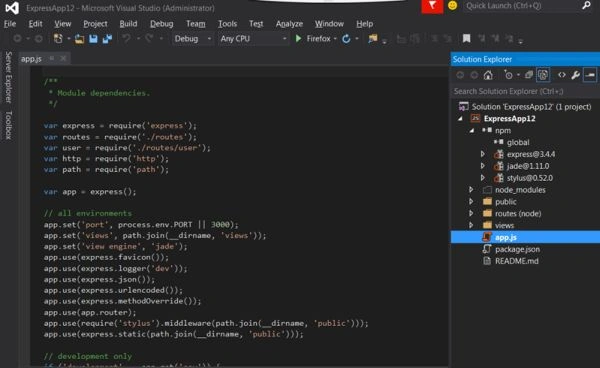
- App.js: This is the default JavaScript file.
- http.createServer(app).listen(app.get('port'), function () {
- console.log('Express server listening on port ' + app.get('port'));
- });
- package.json: The package.json file is normally located at the root directory of a Node.js project. The name field should explain itself. This is the name of your project. The version field is used by npm to ensure the right version of the package is being installed.
- Routes: Routing refers to determining how an application responds to a client request to a specific endpoint, that is a URI (or path) and a specific HTTP request method (GET, POST, and so on). Each route can have one or more handler functions, that is / are executed when the route is matched. Route definition takes the following structure app.METHOD(PATH, HANDLER), where the app is an instance of express, METHOD is an HTTP request method, PATH is a path on the server and HANDLER is the function executed when the route is matched.
Example
- exports.index = function (req, res) {
- res.render('index', { title: 'Express' });
- };
To understand more on routes please go through http://expressjs.com/guide/routing.html.
When you start the application then:
- Server starts locally:
*Server start
The following is the page as shown in a browser:



BYTES SLNSPosted Jul 15, 2019, 10:36 PM
(node:8272) [DEP0062] DeprecationWarning: `node --debug` and `node --debug-brk` are invalid. Please use `node --inspect` or `node --inspect-brk` instead.
kalu singh raoPosted Jul 7, 2016, 2:10 AM
Nice...
Vaikesh K PPosted Sep 3, 2015, 2:06 AM
Nice
Ankit BansalPosted Sep 2, 2015, 12:44 AM
good one..
Mohammed IbrahimPosted Sep 1, 2015, 4:25 PM
nice
Santhakumar MunuswamyPosted Sep 1, 2015, 3:36 PM
Thanks for nice article:)
Shridhar SharmaPosted Sep 1, 2015, 11:00 AM
nice article
Rajeesh MenothPosted Sep 1, 2015, 9:49 AM
Nice Share
Sibeesh VenuPosted Sep 1, 2015, 7:26 AM
Nice Share
Humayun Kabir MamunPosted Sep 1, 2015, 5:31 AM
Nice...
Amit PrabhuPosted Sep 1, 2015, 5:18 AM
Thanks a lot for your comments
Yashwanth MuthineniPosted Sep 1, 2015, 12:29 AM
Nice Share
Nihal AhmedPosted Aug 31, 2015, 11:54 PM
Nice one sir...
Guest UserPosted Aug 31, 2015, 11:45 PM
thanx for sharing! i'll follow steps
Karthikeyan KPosted Aug 31, 2015, 11:13 PM
Good one sir...Thanks for share
Pankaj Kumar ChoudharyPosted Aug 31, 2015, 9:12 PM
Nice Explain Sir......