

Before reading this article, I highly recommend reading the previous parts of the series.
Data Binding
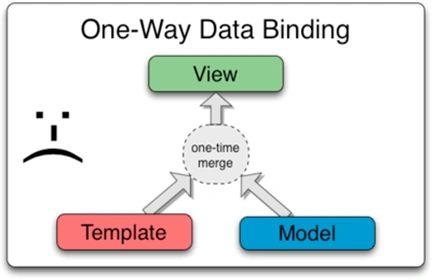
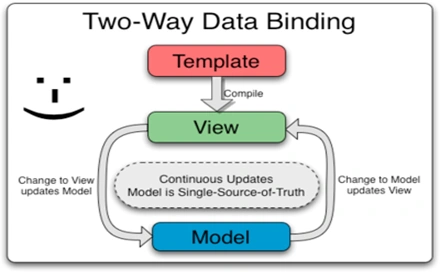
AngularJS provides one-way & two-way data binding to handle the synchronization of data between model and view.
One-way data binding
It was introduced in AngularJS 1.3 and uses a double colon (::), for binding data i.e. binding data from Model to View.
Two-way data binding
It is used to synchronize the data between the model and the view. It means any change in the model will update the view and vice versa. Ng-model directive is used for two-way data binding.
- Open an old visual studio project.
- Add a new HTML file with name data binding.
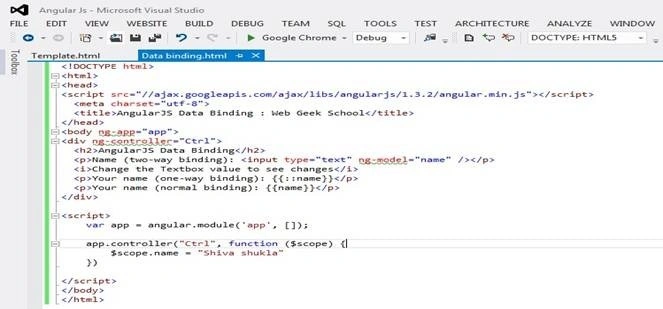
Complete code for one-way & two-way data binding here.
<!DOCTYPE html>
<html>
<head>
    <script src="//ajax.googleapis.com/ajax/libs/angularjs/1.3.2/angular.min.js"></script>
    <meta charset="utf-8">
    <title>AngularJS Data Binding : Web Geek School</title>
</head>
<body ng-app="app">
    <div ng-controller="Ctrl">
        <h2>AngularJS Data Binding</h2>
        <p>Name (two-way binding):
            <input type="text" ng-model="name" />
        </p>
        <i>Change the Textbox value to see changes</i>
        <p>Your name (one-way binding): {{::name}}</p>
        <p>Your name (normal binding): {{name}}</p>
    </div>
    <script>
        var app = angular.module('app', []);
        app.controller("Ctrl", function($scope) {
            $scope.name = "Shiva shukla"
        })
    </script>
</body>
</html>
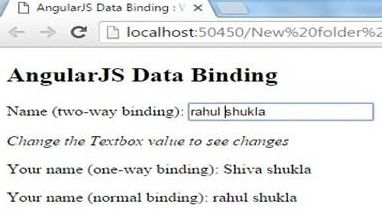
Output
Template
Templates are a combination of HTML elements, directives, filters, attributes, and expressions.
- Open an old visual studio project
- Add a new html file with the name Template.
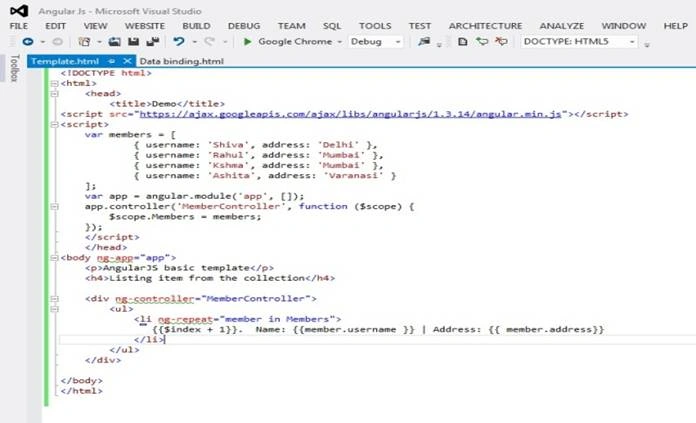
<!DOCTYPE html>
<html>
<head>
    <title>Demo</title>
    <script src="https://ajax.googleapis.com/ajax/libs/angularjs/1.3.14/angular.min.js"></script>
    <script>
        var members = [
            {
                username: 'Shiva',
                address: 'Delhi'
            },
            {
                username: 'Rahul',
                address: 'Mumbai'
            },
            {
                username: 'Kshma',
                address: 'Mumbai'
            },
            {
                username: 'Ashita',
                address: 'Varanasi'
            }
        ];
        var app = angular.module('app', []);
        app.controller('MemberController', function($scope) {
            $scope.Members = members;
        });
    </script>
</head>
<body ng-app="app">
    <p>AngularJS basic template</p>
    <h4>Listing item from the collection</h4>

    <div ng-controller="MemberController">
        <ul>
            <li ng-repeat="member in Members">
                {{$index + 1}}. Name: {{member.username }} | Address: {{ member.address}}
            </li>
        </ul>
    </div>
</body>
</html>
Output
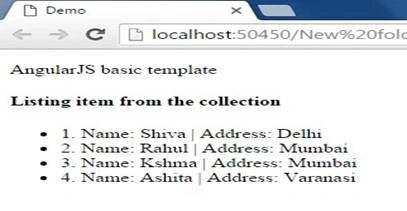
- Note: {{$index + 1}} is used for indexing & numbering.
- Ng-Reapet: To list data from the array, we shall use the ng-repeat directive.
Sonu ChaudharyPosted Mar 31, 2016, 11:55 AM
good one ...
Anil Kumar MurmuPosted Feb 10, 2016, 1:36 AM
Thank you Shiva for the quick response.
Anil Kumar MurmuPosted Feb 9, 2016, 5:45 AM
Please help me to identify if my understanding is correct: for two-way-bindings we can change the value of the object either at View or model. In One-Way-binding we can update the values only at model and the changes can be viewed at View. in One-time binding even if we make changes to JS object at model then same will not be reflected in View.
Former memberPosted Feb 1, 2016, 12:56 PM
is there any binding called one time in angularjs?
Sibeesh VenuPosted Feb 1, 2016, 1:13 AM
Nice Share
Ankit BansalPosted Feb 1, 2016, 12:40 AM
nice one..
Ranjan DailataPosted Jan 31, 2016, 9:56 AM
Please provide necessary attribution to the images that are referenced from AngularJS docs
Shiva ShuklaPosted Jan 30, 2016, 11:46 AM
Thank you Pankaj Kumar Choudhary
Pankaj Kumar ChoudharyPosted Jan 30, 2016, 11:43 AM
Nice Series Shiva Keep It Up.........