

Thank you for reading my previous articles. If you have not read them, then study from the following links. After reading them it will be easier to understand today’s topics.
- Overview Of AngularJS: Part 1
- Start With AngularJS: Part 2
- Start With AngularJS: Part 3
- Start With AngularJS Part: 4
- Start With AngularJS: Part 5
- Start With AngularJS: Part 6
- Start With AngularJS: Part 7
Validation
AngularJS allows us to make own custom validation directive where we can check email id, compare password, and bind the dropdown list.
It has some properties which have shown us errors after the form validation.
It is given below:
- $valid: $valid is a Boolean property that tells us whether what you insert in the form is valid or not. It checks if all form controls are valid then shows true; otherwise false.
- $invalid: $invalid is Boolean property that tell us what you enter in form is invalid or not. If form input is valid it disappear or invalid shows users error.
- $pristine: $pristine tell us about its input is unmodified by user or not.
- $dirty: It is Boolean property that’s just opposite of $pristine and it tells form modified by user or not.
- $error: This is an object hash which contains references to all invalid controls or forms.
Let’s start creating projects:
- Open Visual Studio 2013.
- Create new project.
- Add new html form.
- Add your cdn link of AngularJS & Bootstrap.
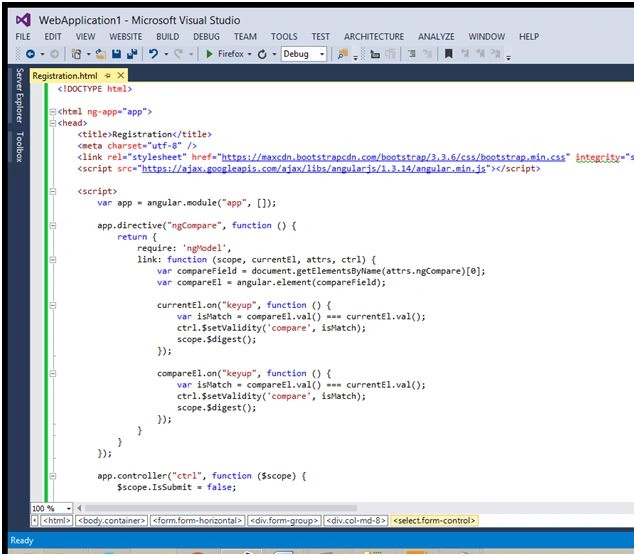
- <!DOCTYPE html>
- <html ng-app="app">
- <head>
- <title>Registration</title>
- <meta charset="utf-8" />
- <link rel="stylesheet" href="https://maxcdn.bootstrapcdn.com/bootstrap/3.3.6/css/bootstrap.min.css" integrity="sha384-1q8mTJOASx8j1Au+a5WDVnPi2lkFfwwEAa8hDDdjZlpLegxhjVME1fgjWPGmkzs7" crossorigin="anonymous">
- <script src="https://ajax.googleapis.com/ajax/libs/angularjs/1.3.14/angular.min.js">
- </script>
- <script>
- var app = angular.module("app", []);
- app.directive("ngCompare", function ()
- {
- return {
- require: 'ngModel',
- link: function (scope, currentEl, attrs, ctrl)
- {
- var compareField = document.getElementsByName(attrs.ngCompare)[0];
- var compareEl = angular.element(compareField);
- currentEl.on("keyup", function ()
- {
- var isMatch = compareEl.val() === currentEl.val();
- ctrl.$setValidity('compare', isMatch);
- scope.$digest();
- });
- compareEl.on("keyup", function ()
- {
- var isMatch = compareEl.val() === currentEl.val();
- ctrl.$setValidity('compare', isMatch);
- scope.$digest();
- });
- }
- }
- });
- app.controller("ctrl", function ($scope)
- {
- $scope.IsSubmit = false;
- $scope.CountryList = [
- {
- id: 1,
- name: "India"
- },
- {
- id: 2,
- name: "America"
- }];
- $scope.CityList = [];
- $scope.$watch("user.Country", function (newVal, oldVal)
- {
- console.log(newVal);
- if (newVal == 1)
- {
- $scope.CityList = [
- {
- id: 1,
- name: "Noida"
- },
- {
- id: 2,
- name: "Delhi"
- },
- {
- id: 3,
- name: "Allahabad"
- },
- {
- id: 4,
- name: "Varanasi"
- }];
- }
- elseif(newVal == 2)
- {
- $scope.CityList = [
- {
- id: 5,
- name: "Kaliforniya"
- },
- {
- id: 6,
- name: "newjurcy"
- },
- {
- id: 7,
- name: "washington"
- },
- {
- id: 8,
- name: "newyork"
- }];
- }
- });
- $scope.SaveData = function ()
- {
- $scope.IsSubmit = true;
- if ($scope.UserForm.$valid)
- {
- alert("Form is Valid!");
- }
- else
- {
- alert("Form is Invalid!");
- }
- }
- });
- </script>
- </head>
- <body class="container" ng-controller="ctrl">
- <h2>User SignUp</h2>
- <form name="UserForm" ng-submit="SaveData(user)" class="form-horizontal" novalidate>
- <div class="form-group">
- <label class="col-md-4">Username:
- </label>
- <div class="col-md-8">
- <input type="text" name="Username" ng-model="user.Username" ng-required="true" class="form-control" ng-minlength="3" ng-maxlength="10" />
- <p class="text-danger" ng-show="UserForm.Username.$error.required&& (IsSubmit || UserForm.Username.$dirty)">Please Enter Username:
- </p>
- <p class="text-danger" ng-show="UserForm.Username.$error.minlength&& (IsSubmit || UserForm.Username.$dirty)">*Username must has atleast three characters
- </p>
- <p class="text-danger" ng-show="UserForm.Username.$error.maxlength&& (IsSubmit || UserForm.Username.$dirty)">*Username cannot has more than 10 characters
- </p>
- </div>
- </div>
- <div class="form-group">
- <label class="col-md-4">Full Name:
- </label>
- <div class="col-md-8">
- <input type="text" name="Fullname" ng-model="user.Fullname" ng-required="true" class="form-control" />
- <p class="text-danger" ng-show="UserForm.Fullname.$error.required&& (IsSubmit || UserForm.Fullname.$dirty)">*Please Enter Fullname
- </p>
- </div>
- </div>
- <div class="form-group">
- <label class="col-md-4">Password:
- </label>
- <div class="col-md-8">
- <input type="password" name="Password" ng-model="user.Password" ng-required="true" class="form-control" />
- <p class="text-danger" ng-show="UserForm.Password.$error.required&& (IsSubmit || UserForm.Password.$dirty)">*Please Enter Password
- </p>
- </div>
- </div>
- <div class="form-group">
- <label class="col-md-4">Confirm Password:
- </label>
- <div class="col-md-8">
- <input type="password" name="ConfirmPassword" ng-model="user.ConfirmPassword" ng-required="true" class="form-control" ng-compare="Password" />
- <p class="text-danger" ng-show="UserForm.ConfirmPassword.$error.required&& (IsSubmit || UserForm.ConfirmPassword.$dirty)">*Please Enter ConfirmPassword
- </p>
- <p class="text-danger" ng-show="UserForm.ConfirmPassword.$error.compare&& (IsSubmit || UserForm.ConfirmPassword.$dirty)">**Confirm Password Doesn't match
- </p>
- </div>
- </div>
- <div class="form-group">
- <label class="col-md-4">Email
- </label>
- <div class="col-md-8">
- <input type="email" name="Email" ng-model="user.Email" ng-required="true" class="form-control" />
- <p class="text-danger" ng-show="UserForm.Email.$error.required&& (IsSubmit || UserForm.Email.$dirty)">*Please Enter Email
- </p>
- <p class="text-danger" ng-show="UserForm.Email.$error.email&& (IsSubmit || UserForm.Email.$dirty)">**Please Enter Correct Email
- </p>
- </div>
- </div>
- <div class="form-group">
- <label class="col-md-4">Mobile No:
- </label>
- <div class="col-md-8">
- <input type="number" name="Mobile" ng-model="user.Mobile" ng-required="true" class="form-control" />
- <p class="text-danger" ng-show="UserForm.Mobile.$error.required&& (IsSubmit || UserForm.Mobile.$dirty)">*Please Enter Mobile no.
- </p>
- <p class="text-danger" ng-show="UserForm.Mobile.$error.number&& (IsSubmit || UserForm.Mobile.$dirty)">**Please Enter Numbers Only
- </p>
- </div>
- </div>
- <div class="form-group">
- <label class="col-md-4">Country:
- </label>
- <div class="col-md-8">
- <select name="Country" ng-model="user.Country" ng-options="country.id as country.name for country in CountryList" ng-required="true" class="form-control">
- <option value="">Select
- </option>
- </select>
- <p class="text-danger" ng-show="UserForm.Country.$error.required&& (IsSubmit || UserForm.Country.$dirty)">*Please Select Country
- </p>
- </div>
- </div>
- <div class="form-group">
- <label class="col-md-4">City:
- </label>
- <div class="col-md-8">
- <select name="City" ng-model="user.City" ng-options="city.name for city in CityList" ng-required="true" class="form-control">
- <option value="">Select
- </option>
- </select>
- <p class="text-danger" ng-show="UserForm.City.$error.required&& (IsSubmit || UserForm.City.$dirty)">*Please Select Country
- </p>
- </div>
- </div>
- <div class="form-group">
- <label class="col-md-4">
- </label>
- <div class="col-md-8">
- <input type="submit" value="SignUp" class="btnbtn-primary" ng-disabled="UserForm.$invalid" />
- </div>
- </div>
- </form>
- </body>#ff0000</html>
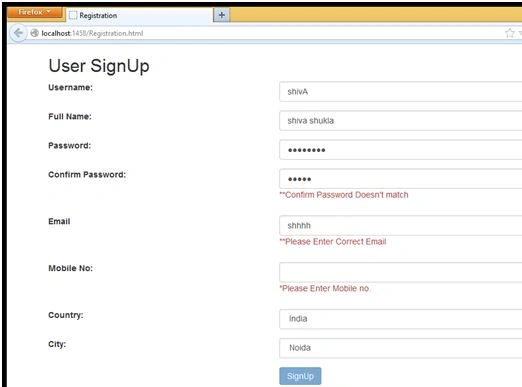
So, today we read about validation on form.
Read more articles on AngularJS:
Shiva ShuklaPosted Feb 8, 2016, 6:51 AM
thanks Vignesh Mani
Vignesh ManiPosted Feb 8, 2016, 4:40 AM
Nice one
Shiva ShuklaPosted Feb 7, 2016, 2:53 PM
thnk you Santhakumar Munuswamy
Santhakumar MunuswamyPosted Feb 7, 2016, 1:15 PM
Thanks for nice article
Shiva ShuklaPosted Feb 7, 2016, 1:02 AM
thank you Pankaj Kumar Choudhary
Pankaj Kumar ChoudharyPosted Feb 6, 2016, 7:48 PM
Nice Series Shiv Keep it up........