

As we know that HTTP is stateless protocol, it means after every request data gets lost. Browser does not know about previous data and we cannot get earlier request data. So, basically the state of the page or control lost after every page request.
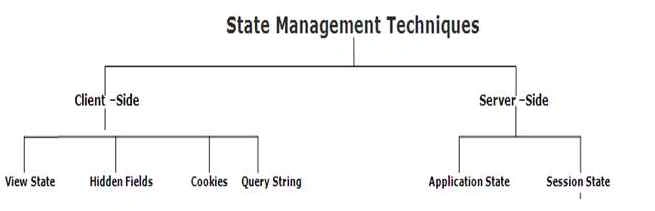
State Management techniques available in the following types:
Client Side State Management
It is used to store the state related information on the client side. So, every time to get data there is no need to hit the server. The main benefit is that you relieve the server from extra burden of storing the state related information. And you can save the server memory and utilize it in different task.
There is one drawback to use client side state management; you can store the sensitive data like your password, bank details, etc. on the client side.
The following techniques are used in client side state management:
- Hidden Field
- Cookie
- View State
- Query Strings
Server Side State Management
It works same as client side state management technique work but it stores the data on server rather than client side. Web server stores the data in web server memory. It is safe and secure for your sensitive data.
The following techniques are used in server side state management:
- Session State
- Application State
So, it is time to go in details about every technique.
Client Side- Technique
Hidden Field
It is used to store the small data on the client side. It is invisible control that contains the small data like a single variable value in it. The data of hidden filed is never shown by the browser. If you want to see the value of hidden field, you can view by page source. There is not any encryption technique applied to encrypt the hidden field data. ViewState use hidden field to store the data internally.
- //Storing in Hidden Field
- string myname = "Mukesh Kumar";
- HiddenField1.Value = myname.ToString();
- lblUserName.Text = HiddenField1.Value;
It is nothing but a small text file which stores the small pieces of data using client’s browser. The main use of the cookie is that it is only for identifying the user who is visiting the web application by their specific data that is stored into the cookie.
When cookie is persistent then it stores into the text file and when it is temporally based then it saves into the client browser. On the page request, server connects to cookie and gets the relevant information about visitors. You can take a simple example of cookie i.e login page.
We can easily create, read and delete the cookie using the code.
- Response.Cookies["UserName"].Value = "Mukesh Kumar";
- Response.Cookies["UserName"].Expires = DateTime.Now.AddDays(2);
- HttpCookie myCookie = new HttpCookie("Session");
- myCookie.Value = DateTime.Now.ToString();
- myCookie.Expires = DateTime.Now.AddDays(1);
- Response.Cookies.Add(myCookie);
In ASP.NET MVC, ViewState is used to store the state of the control or object data or any data source, etc. It contains the stored data after page is posted. So, we can say, it is a technique to retain the value or data between multiple requests for same page. We cannot access the value of ViewState on other page.
When we use the ViewState to store the page information or any control information then ViewSate hash the data into a string and saves it into the hidden field. If your data is too long or heavy then ViewState creates multiple hidden fields and save the data in chunk.
- <input type="hidden" name="__VIEWSTATE" id="__VIEWSTATE” value=" /wEPDwUKMTIxNDIyOTM0Mg9kFgICdAw9kFgICAQ8PFgIeBFRleHQFEzQvNS8yMDA24IDEd6Mzc6MTEgUE1kZGROWHn/rt75XF/pMGdnqjqHlH66cdw==" />
- protected void Page_Load(object sender, EventArgs e)
- {
- if (IsPostBack)
- {
- if (ViewState["UserName"] != null)
- {
- string userName = Convert.ToString(ViewState["UserName"]);
- }
- else
- {
- ViewState["UserName"] = "Guest";
- }
- }
- }
- protected void Submit(object sender, EventArgs e)
- {
- lblUserName.Text = ViewState["UserName"].ToString();
- }
Aishwarya DPosted Dec 7, 2015, 12:43 AM
Nice
Santhakumar MunuswamyPosted Dec 1, 2015, 1:32 AM
Nice share
Suman VermaPosted Nov 30, 2015, 5:46 AM
nice one
Upendra Pratap ShahiPosted Nov 30, 2015, 4:36 AM
nice one....
Amandeep singhPosted Nov 30, 2015, 4:16 AM
good one
Yaduveer SainiPosted Nov 30, 2015, 4:15 AM
Very nice article mukesh
Raja TPosted Nov 30, 2015, 3:14 AM
Good, Thanks for sharing